

A Look at the Percepio FreeRTOS Tracealyzer Plugin for Eclipse
Do you want to use a normal GDB-based debug probe to capture snapshot traces? You can do that with the Percepio Tracealyzer plugin for Eclipse.
Good news for everyone using Eclipse, FreeRTOS, and Percepio Tracealyzer: Percepio has released an Eclipse plugin that makes snapshot tracing very easy and convenient using a GNU gdb debugger in Eclipse, like Kinetis Design Studio:
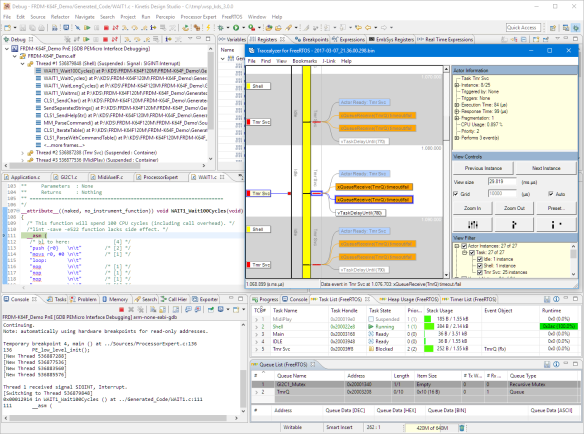
Eclipse with Percepio Tracealyzer
I’m using the Percepio Tracealyzer for FreeRTOS in many of my projects. I can trace and then inspect the system, which allows me to fix performance or runtime issues. The Tracealyzer gives me information about all kind of things, including semaphore/mutex usage, task execution time, and heap memory usage. Recently I have mostly used the RTT streaming mode with SEGGER J-Link probes (see FreeRTOS Continuous Trace Streaming). But RTT is only supported by SEGGER probes, and using other probes, like the P&E Multilinks, in snapshot mode was rather painful. Now this changes, as the Percepio Plugin simplifies snapshot tracing a lot: It is able to directly read the snapshot memory buffer from the target within Eclipse and using a connection to the GDB running. That’s really great!
This new plugin is not a full Eclipse integration, and the Tracealyzer application is still separate from Eclipse. But it makes it a lot easier to use the Percepio Tracealyzer in combination with Eclipse.
Installation
To install the plugin, point the Eclipse updater (menu Help > Install New Software) to the following update site:
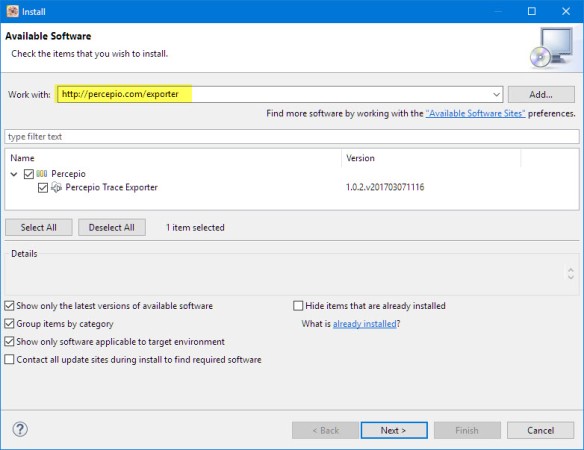
Percepio Exporter Plugin installation
The site is accessible as well with an https:// connection. But this might lead to connection problems, depending on the host Java security settings.
And install the plugin. At the end, restart the IDE.
Eclipse Menu
The plugin adds a few top-level Eclipse menus to the IDE. The plugin does not come with the Tracealyzer itself, but there is a menu item that guides me to the Percepio download page for it:

Percepio Eclipse menu
Preferences
The menu has an entry to the Eclipse workspace preferences (under Run/Debug)
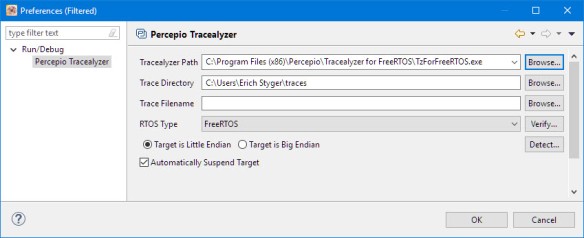
Tracealyzer preferences
There I can configure the path to the Tracealyzer application and where it shall store the trace files.
Exporter Preferences
The menu entry ‘Exporter Preferences‘ opens a view that shows various pieces of information. The ‘Context Manager’ entry shows what is responsible for the current (debug) session. In my case, it shows GDB:
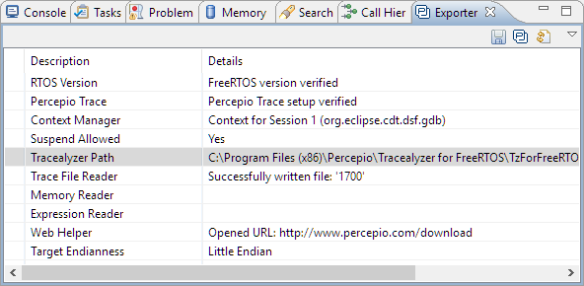
Exporter preferences
The ‘Percepio’ icon in the view allows you to launch the Tracealyzer application, too. A nice extra!
Save Snapshot Trace
The plugin can use the active gdb connection to read the snapshot trace buffer from the target memory. For this, I have to configure FreeRTOS+Trace for ‘Snapshot’ mode:
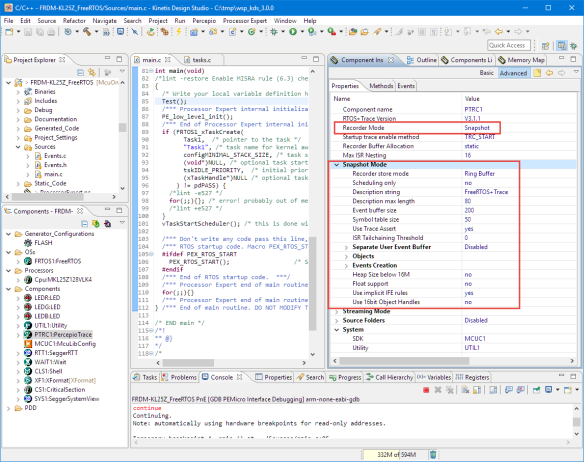
Tracealyzer Snapshot Mode
With this, I can use the ‘Save Snapshot Trace’ menu:
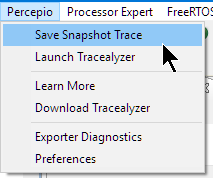
Save Snapshot Trace
This even works with a running target: It will stop the target if needed with GDB, read the trace data, export it to a file, then open the Tracealyzer application to inspect the trace: Awesome!

Tracealyzer with FreeRTOS application
Summary
The Percepio Trace Exporter plugin in Eclipse is not a full integration of the Percepio Tracealyzer into Eclipse, but it makes capturing FreeRTOS snapshot traces with Eclipse very easy and simple. That way, any normal GDB-based debug probe can be used to capture snapshot trace. And who knows, maybe there will be a way to capture streaming trace in a similar way. At least reading data with the debugger while the target is running gets more broadly available, see P&E ARM Cortex-M Debugging with FreeRTOS Thread Awareness and Real Time Expressions for GDB and Eclipse. In any case, the FreeRTOS ecosystem gets better and better.
Happy tracing!
Links
- Percepio Eclipse Plugin: https://percepio.com/docs/FreeRTOS/manual/Recorder.html#eclipse
- Percepio Trace Exporter: https://percepio.com/exporter/
Published at DZone with permission of Erich Styger. See the original article here.
Opinions expressed by DZone contributors are their own.