

Advanced Maintenance of a Multi-Database Citus Cluster With Flyway
This post has provided an in-depth guide on how to organize the maintenance of a Citus cluster with Flyway, including common practices, pitfalls, and workarounds.
Join the DZone community and get the full member experience.
Join For FreeIn the previous post, fundamental concepts of the maintenance and administration of a Citus cluster were introduced. In this post, we will discuss those concepts in greater detail, with specific examples and solutions for common problems.
Separation of Concerns
The first topic that needs to be addressed is "what exactly goes into the maintenance scripts?"
In a typical OLAP system that employs Citus, there are two essential types of data stored in a database: tables with raw data collected from various sources and views (including materialized), aggregated using the raw data. The tables with raw data are usually filled by dedicated middleware integrated with third-party APIs and other data sources, while the views are created separately, after some work deducting the necessary aggregates:
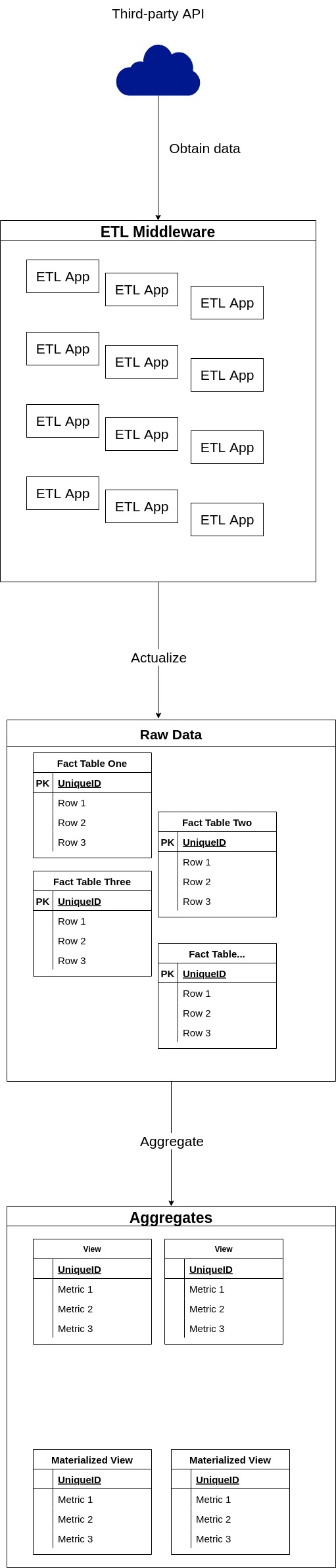
With such architecture in place, it is extremely important to define "owners" of the tables, e.g. who is allowed to change their schema and create new tables of the domain. The rule of thumb here is that schema of the raw data tables should be modified only as part of a release cycle of the ETL application that inserts data into the table. With sporadic changes of schema outside a release cycle, the ETL application will most likely fail to insert new data thus breaking the whole ETL process. And since modifications of the raw data tables are a part of the app development cycle, they are forbidden in the migration scripts, discussed in this post. While the raw data tables are out of the equation, everything else in the database should be maintained via migration scripts:
- Databases;
- Views on the raw data;
- Users, roles, and permissions on the cluster;
- Indexes and, arguably, computed columns on the raw data tables;
- Foreign servers, via dblink or postgres_fdw;
- System configuration;
- Tables outside the domain of an ETL app;
- Any other action applied to the cluster that should be logged and reproducible.
It is also should be noted that temporary changes may be applied to the cluster outside the migration scripts in order to simplify the process.
Types of Migration Scripts
With the concerns properly separated, it is necessary to decide which type of the Flyway migration script to employ for allowed actions.
Flyway has two main types of migration scripts:
- Versioned scripts have unique versions and are applied only once. If the content of the applied script is changed, flyway will return an error on the next migration.
- Repeatable scripts don't have a version number. Instead, they are reapplied to the database every time their content is changed.
It should be also noted that repeatable scripts are executed after versioning within one migration. There are other types of scripts as well, but they are circumstantial and may be discovered in the documentation.
In terms of usage, versioned scripts are more suited for iterative changes of schema. For example, the following sequence of migrations is the most suitable for versioned scripts:
-- V1
CREATE TABLE some_table
(
    id   SERIAL,
    data text
);

-- V2
ALTER TABLE some_table
    ADD COLUMN time timestamptz;

-- V3
ALTER TABLE some_table
    DROP COLUMN time;

-- V4
DROP TABLE some_table;
Each script represents an iteration of the evolution of a table schema. Now consider the creation of a view. If versioned scripts are used, the whole code of view will be mostly duplicated for each iteration:
-- V1
CREATE OR REPLACE VIEW some_view AS
SELECT column_1, column_2, sum(column_3)
FROM some_table
         JOIN some_other_table USING (some_colimn)
         JOIN
        ...
        UNION ...
        WHERE ...
        GROUP BY ...
        OREDER BY ...;

-- V2
CREATE OR REPLACE VIEW some_view AS
SELECT column_1, column_2, count(colum_3)
FROM some_table
         JOIN some_other_table USING (some_colimn)
         JOIN
        ...
        UNION ...
        WHERE ...
        GROUP BY ...
        OREDER BY ...;

-- V3
CREATE OR REPLACE VIEW some_view AS
SELECT column_1, column_2, colum_3, count(column_4)
FROM some_table
         JOIN some_other_table USING (some_colimn)
         JOIN
        ...
        UNION ...
        WHERE ...
        GROUP BY ...
        OREDER BY ...;
Since, in every migration, the view is recreated and not altered, storing its changes as a sequence of migrations doesn't make sense since only the last version will be applied. That's where repeatable scripts come into play: with the repeatable script, it is enough to modify the code of view once, and Flyway will recreate the view on the next migration.
It could be easily deducted from provided examples that almost every object with an OR REPLACE clause should be maintained via repeatable scripts: functions and procedures, to be specific. Other objects include:
- Materialized views. They can't be
REPLACEd, instead, they should be recreated viaDROP/CREATEcommands. - Indexes and computed columns (when they are treated like indexes). DDL supports
IF [NOT] EXISTSclause when the name of the index is specified. It allows to store all indexes related to the table, database, or even the whole cluster in a single file. - Privileges.
GRANTclauses are idempotent by design, but the full script may include a combination ofREVOKE.../GRANT...sequences. - Foreign servers and user mappings for them. Support
IF NOT EXISTS. - Any other idempotent and replacing type of statement.
Since all those statement types reside in repeatable scripts, version scripts may contain only:
- Databases creation statements;
- Users/Roles creation/modification statements;
- Scheduling of cron jobs via pg_cron or similar extension;
- Any other statement that requires historicity.
Following those principles will guarantee the optimal amount of boilerplate code and help an administrator to manage database objects with ease.
Script Names Convention
In order to properly organize migration scripts, it is important to provide a set of rules for naming. With Flyway two factors should be taken into account:
- Flyway script names follow clearly defined pattern but allow custom descriptions to be a part of the file name. That's where developers are free to add any more rules to the naming.
- Repeatable scripts are executed in alphabetical order within one migration run.
Since the cluster in question is expected to have multiple databases holding both cluster-wide and database-specific migrations, the preferred way for migration script names are the following:
- For versioned migration:
V<version>__[database]_<type_of_action>.sql, where:
versionmay be an integer, to simplify the flow, or use some sort of semantic versioning for better organization and the possibility for out of order migrations.databaseis an optional name of the database which is affected by the migration. If multiple databases are affected, it should be simply the_character to appear before database-specific migrations when sorted alphabetically. In practice, such cluster-wide migrations are preferable to maintain via repeatable scripts.type_of_actionhas no defined patterns and is up to the developer to fill. In general, it should be a short description likecreate_user_new_usernameorschedule_some_view_refresh.
- For repeatable migration:
R__<database>_<type_of_action>_[order]_[additional_description].sql, wheredatabaseandtype_of_actionare the same as for the versioned migrations, but theorderthe parameter differs fromversion. It allows to force order of execution of repeatable scripts within a single migration and is used when one repeatable script depends on another. For example, it is a common setup for materialized views and its indexes. The optionaladditional_descriptionmay be used to describe the action in even more detail.
Those rules applied to the scripts from the previous post will result in the following structure:
.
└── db
    └── migration
        ├── R___test_table_view.sql # Executes on new_citus_database and another_citus_database
        ├── R__new_citus_database_database_specific_view_1.sql # Specific to the new_citus_database
        ├── R__new_citus_database_database_specific_view_2_indexes.sql
        ├── R__new_citus_database_database_specific_view_3_anoter_indexes.sql
        ├── R__no_citus_database_database_specific_view.sql
        ├── V1__init.sql
        ├── V2.0__create_new_citus_database.sql
        ├── V2.0__create_new_citus_database.sql.conf # Semantic versioning
        ├── V2.1__new_citus_database_configuration.sql
        ├── V3__another_citus_database.sql # Integer versioning
        ├── V3__another_citus_database.sql.conf
        ├── V4__no_citus_database.sql
        ├── V5__new_citus_database_another_citus_database_test_table.sql
        ├── V6___common_table.sql
        └── V7__update_citus_extension.sql
Placeholders
In order to make scripts more configurable, Flyway supports the placeholders functionality. They can be passed in numerous ways and processed by the script on execution. For example, with placeholders custom environment-specific logic may be implemented, like this:
-- Assuming the environment variable FLYWAY_PLACEHOLDERS_ENVIRONMENT=release or equivalent
DO
$$
    BEGIN
        IF '${environment}' = 'release' THEN
            -- Release Statements
        ELSE
            -- Other Statements
        END IF;
    END;
$$;
Apart from custom placeholders, there are a few built-in ones. The most useful one for maintenance purposes is ${flyway:timestamp}, which can be used to run a repeatable script on every migration.
Nuances of Repeatable Scripts
Repeatable scripts are a great way for maintaining views and other replaceable objects, but there is an issue when using them for multiple databases. As was mentioned earlier, the typical multi-database script has the following form:
WITH databases AS (SELECT *
                   FROM (VALUES ('new_citus_database')
                              , ('another_citus_database')) AS t(db_name))
SELECT DBLINK_EXEC(FORMAT('dbname=%I user=postgres', db_name), $remote$
START TRANSACTION;
DROP MATERIALIZED VIEW some_view;
CREATE MATERIALIZED VIEW some_view AS SELECT...
COMMIT;
$remote$)
FROM databases;
Let's assume that we've created a new database and there is a requirement to add some_view there. A naive way would be to add the new database to the list:
WITH databases AS (SELECT *
                   FROM (VALUES ('new_citus_database')
                              , ('another_citus_database')
                              , ('newer_citus_database')) AS t(db_name))
SELECT DBLINK_EXEC(FORMAT('dbname=%I user=postgres', db_name), $remote$
START TRANSACTION;
DROP MATERIALIZED VIEW some_view;
CREATE MATERIALIZED VIEW some_view AS SELECT...
COMMIT;$remote$)
FROM databases;
It will work as expected: Flyway will detect that the content of a script was changed and reapply it. But it will be extremely inefficient since some_view will be recreated in every database. In order to isolate the execution to the new database only there are two strategies:
- Existing databases can be commented out:
WITH databases AS (SELECT *
                   FROM (VALUES
--                                 ('new_citus_database')
--                                 ,('another_citus_database')
								    ('newer_citus_database')) AS t(db_name))
SELECT DBLINK_EXEC(FORMAT('dbname=%I user=postgres', db_name), $remote$
START TRANSACTION;
DROP MATERIALIZED VIEW some_view;
CREATE MATERIALIZED VIEW some_view AS SELECT...
COMMIT;$remote$)
FROM databases;
It will do the trick, but can be very misleading for other developers because in this case comments are used as part of script logic: databases should be uncommented back next time there are changes in the view. In order for this approach to work, it should be clearly communicated that commented parts of the script are not forgotten pieces that should be removed. Instead, they are the way to control which part of a script should be executed for one specific migration.
- Custom logic based on timestamp can be implemented.
Since, essentially, we need to change the behavior of the script for a particular period of time, it can be expressed using the now() function:
DO
$$
    DECLARE
        databases TEXT[];
        db        TEXT;
    BEGIN
        IF now() AT TIME ZONE 'UTC' <= '<time_threshold_in_utc>'::timestamptz THEN
            -- Temporary clause
            databases = ARRAY ['newer_citus_database'];
        ELSE
            -- General clause
            databases = ARRAY ['new_citus_database', 'another_citus_database', 'newer_citus_database'];
        END IF;
        FOREACH db IN ARRAY databases
            LOOP
                PERFORM DBLINK_EXEC(FORMAT('dbname=%I user=postgres', db), $remote$
                START TRANSACTION;
                DROP MATERIALIZED VIEW some_view;
                CREATE MATERIALIZED VIEW some_view AS SELECT...
                COMMIT;$remote$);
            END LOOP;
    END;
$$;
Here script clearly defines which part of logic is temporary, the timestamp threshold for the temporary part, and provides an unambiguous switch to enable this logic: in this example, in order to invoke code only on newer_citus_database it is enough to set time_threshold_in_utc. But timezones should be taken with great care here: the best practice would be to set it to UTC everywhere.
Distributed Materialized Views
Sometimes it is not enough to have a materialized view stored on the coordinator only, it should be also distributed to use all the computational power of the cluster available. Unfortunately, Citus doesn't support the materialized views and proposes to use INSET INTO ... (SELECT..) queries instead. Because of that limitation, users need to emulate the materialized view behavior by combining TRUNCATE of the "distributed materialized view" with INSET INTO ... (SELECT..):
CREATE TABLE distributed_materialized_view
(
    user_id      TEXT,
    metric_one   INTEGER,
    metric_two   NUMERIC,
    metric_three TEXT
);
SELECT create_distributed_table('distributed_materialized_view', 'user_id');

-- Assuming usage of pg_cron for scheduled refresh
SELECT cron.schedule('0 0 * * *', $$
    TRUNCATE TABLE distributed_materialized_view;
    INSERT INTO distributed_materialized_view
    SELECT user_id, sum(column1), count(column_2), string_agg(column_3)
    FROM ...
    WHERE ...
    GROUP BY ...
    HAVING ...;
    $$);
This approach has two major issues:
- In order to refresh the "view" manually, it is necessary to execute the
TRUNCATE ...; INSET INTO ... (SELECT..);sequence, instead of issuing a simpleREFRESH; - This form doesn't track dependencies, so a drop of the source table will result in failure of the next refresh.
Luckily, there is a workaround to solve both problems: TRUNCATE ...; INSET INTO ... (SELECT..); should be replaced by a procedure:
CREATE PROCEDURE distributed_materialized_view_refresh()
    LANGUAGE SQL
BEGIN ATOMIC
    DELETE FROM distributed_materialized_view;
    INSERT INTO distributed_materialized_view
    SELECT user_id, sum(column1), count(column_2), string_agg(column_3)
    FROM ...
    WHERE ...
    GROUP BY ...
    HAVING ...;
END;

SELECT cron.schedule('0 0 * * *', $$ CALL distributed_materialized_view_refresh(); $$);
This solution provides a convenient way to perform manual and scheduled refresh and employ BEGIN ATOMIC syntax in order to provide the dependency tracking similar in its effect to regular materialized view. However, the TRUNCATE statement was replaced with DELETE, since at the time of writing TRUNCATE is not yet supported with the BEGIN ATOMIC syntax. In order to support TRUNCATE the procedure may be rewritten using the old syntax, but it will remove the dependency tracking:
CREATE PROCEDURE distributed_materialized_view_refresh()
    LANGUAGE SQL as
$body$
TRUNCATE TABLE distributed_materialized_view;
INSERT INTO distributed_materialized_view
SELECT user_id, sum(column1), count(column_2), string_agg(column_3)
FROM ...
WHERE ...
GROUP BY ...
HAVING ...;
$body$;
SELECT cron.schedule('0 0 * * *', $$ CALL distributed_materialized_view_refresh(); $$);
For consistency, it is recommended to name those procedures <view_name>_refresh and create them in the same schema as the view.
Dependency Tracking
Dependency tracking becomes an issue when views (especially materialized) start to depend on not only tables but other views as well. Apart from the necessity to update materialized views in a strict succession it also becomes very difficult to update them, because in order to change the view all its dependencies should be dropped in a cascading manner and then restored. This difficulty is a reason why multi-level views should be avoided at all costs.
If multi-level views are inevitable in the system, there are ways to mitigate the complexity using Flyway. In order to reflect the multi-level nature of views it is necessary to introduce another parameter to the name of repeatable script: level which goes first after the R__ prefix : R__<level>_<database>_<type_of_action>_[order]_[additional_description].sql. The level should reflect the position of a view in the dependency graph and generally can be calculated as max(level of the referenced view) + 1. For example:
.
└── db
    └── migration
        ├── R__1__another_root_view.sql
        ├── R__1__root_view.sql
        ├── R__2__another_second_level_view_depends_on_another_root_view.sql
        ├── R__2__second_level_view_depends_on_root_view_1.sql
        ├── R__2__second_level_view_depends_on_root_view_2_indexes.sql
        └── R__3__third_level_view_depends_on_root_view_and_second_level_view.sql
With this structure in place, in order to update a view of any level an admin should:
- Determine dependent views via pg_depend
- Update their repeatable scripts to reflect changes in the referenced view or simply change the content of the file by adding some comment on the top of the file (for example, with the date of forced run:
-- 2022-01-01 forced run)
Since Flyway applies scripts alphabetically, all views will be restored in the specified order.
It is also possible to automate the restoration using the pg_views, pg_mat_views, and pg_indexes views in combination with Flyway's beforeRepeatables callback.
This post has provided an in-depth guide on how to organize the maintenance of a Citus cluster with Flyway, including common practices, pitfalls, and workarounds. With the described approach the complexity of maintenance of a Citus cluster in production should be much more manageable and standardized, thus reducing the cost of maintenance in terms of man-hours and administrators' peace of mind.
Opinions expressed by DZone contributors are their own.
Comments