

Advanced SSL Certificate Troubleshooting for Windows: Chain of Trust, Debugging, and Best Practices
SSL/TLS certificates are foundational to secure communications on the internet. Windows environments present unique challenges that go beyond basics.
 CORE
·
CORE
·
Join the DZone community and get the full member experience.
Join For FreeSSL/TLS certificates are foundational to secure communications on the internet. However, Windows environments present unique challenges that go beyond basic certificate installation and troubleshooting.
If you’re already familiar with SSL fundamentals, you’ll want to know how to handle complex certificate chain issues, trust store discrepancies, and advanced debugging scenarios. This article builds on the foundational knowledge discussed in my previously published article, Troubleshooting SSL: Why Your SSL Certificate Isn’t Working on Windows, and expands on the chain of trust concepts detailed in another article, Chain of Trust: Decoding SSL Certificate Security Architecture. Here, we dive deeper into enterprise-grade troubleshooting, real-world examples, and robust best practices for Windows administrators, developers, and security professionals.
SSL Troubleshooting Issues Specific to Windows
Windows environments are known for SSL certificate headaches. The main culprits include:
- Incomplete Certificate Chains: Windows often fails to validate certificates if intermediate certificates are missing from the trust path. Unlike macOS, Windows does not always automatically fetch missing intermediates through Authority Information Access (AIA) extensions.
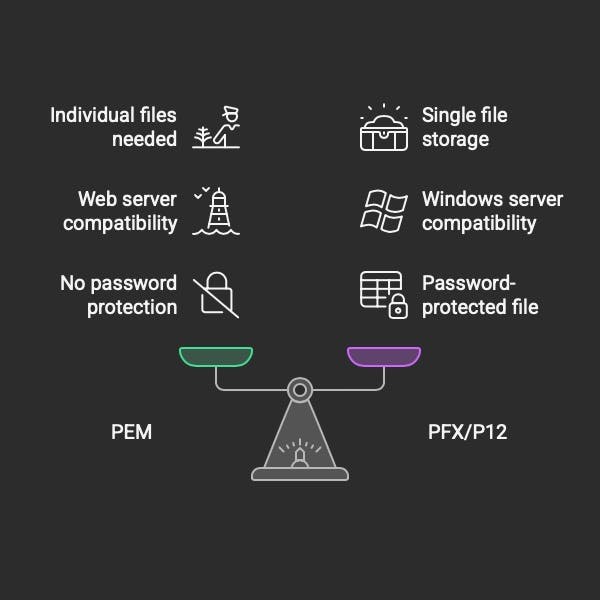
- Format Compatibility Issues: Windows typically uses PFX/P12 formats for certificates, while many providers issue PEM-formatted certificates. Mismatches here can cause authentication failures or prevent proper certificate binding.
- Trust Store Isolation: Certificates installed in the user store are not available to system services, and vice versa. Machine store certificates require administrative privileges, which can complicate deployment in large environments.
- Certificate Revocation Checking: Windows checks for revoked certificates using CRLs and OCSP. Connectivity or configuration problems with these mechanisms can cause unexpected validation failures.
- Registry-Based Certificate Store: Windows uses the Windows Registry to store certificate information, which can become corrupted or misconfigured.
For a detailed look at these common issues and their solutions, check out my previous guide:
Troubleshooting SSL: Why Your SSL Certificate Isn’t Working on Windows.
Prerequisites and Tool Installation
Before diving into advanced troubleshooting, ensure you have the necessary tools installed:
Wherever you see Shell, use the Windows Command Prompt (cmd) - Win + R and type
cmd. Run the command prompt as an Administrator.Use PowerShell as an Administrator to run the PowerShell commands.
Essential Tools Setup
OpenSSL for Windows:
# Download from https://slproweb.com/products/Win32OpenSSL.html
# Or install via Chocolatey
choco install openssl

# Or via Windows Package Manager
winget install ShiningLight.OpenSSL
Windows Subsystem for Linux (WSL) - Optional but recommended:
# Install WSL2
wsl --install

# Install Ubuntu distribution
wsl --install -d Ubuntu

# Install OpenSSL and curl in WSL
sudo apt update && sudo apt install openssl curl jq
PowerShell 7+ (recommended):
# Install via Windows Package Manager
winget install Microsoft.PowerShell

# Or via MSI from GitHub releases
# https://github.com/PowerShell/PowerShell/releases
TestSSL.sh Setup:
# In WSL or Git Bash
git clone https://github.com/drwetter/testssl.sh.git
cd testssl.sh
chmod +x testssl.sh
The Chain of Trust Model: Relevance and Diagnosis
Understanding the chain of trust is essential for diagnosing complex SSL certificate issues. The chain of trust is a hierarchical system where each certificate is signed by a higher authority, ultimately leading back to a trusted root certificate.
Key Components
- Root Certificate Authorities (Root CAs): These are the ultimate trust anchors. Root certificates are self-signed and widely distributed in the operating systems and browser trust stores.
- Intermediate CAs: These certificates are issued by root CAs and are used to sign end-entity certificates. They help insulate root CAs from direct exposure to the internet.
- End-entity Certificates: These are the certificates used by servers, clients, or devices to authenticate themselves.
Why the Chain Matters
A break in the chain — such as a missing intermediate or an untrusted root — will cause SSL validation to fail. Windows is particularly strict about this, and even a minor misconfiguration can disrupt secure communications.
Chain Validation Process
- Client receives the server certificate.
- Client checks if certificate is signed by a trusted CA.
- If not directly trusted, client looks for intermediate certificates.
- Process continues up the chain until a trusted root is found.
- Each certificate in the chain is validated for expiration, revocation, and proper signatures
For a deeper explanation of the chain of trust and its architecture, see:
Chain of Trust: Decoding SSL Certificate Security Architecture.
Real-World Examples: Misconfigured Chains, Missing Intermediates, and Trust Store Issues
Example 1: Missing Intermediate Certificate
Scenario:
A user reports that their browser displays “This connection is not trusted” even though the root certificate is installed.
Diagnosis:
The server is only presenting the end-entity certificate, not the intermediate CA certificate. Windows cannot complete the chain of trust.
Detection Commands:
# Check what certificates the server presents
openssl s_client -connect example.com:443 -servername example.com -showcerts

# Check if intermediate is missing
openssl s_client -connect example.com:443 -servername example.com | openssl x509 -text -nooutSolution:
Install the intermediate certificate in the appropriate Windows certificate store. For example, use the following command:
certutil -addstore "Intermediate Certification Authorities" intermediate.cerPowerShell Alternative:
# Import intermediate certificate
Import-Certificate -FilePath "intermediate.cer" -CertStoreLocation "Cert:\LocalMachine\CA"

# Verify the certificate chain
Get-ChildItem Cert:\LocalMachine\My | Where-Object {$_.Subject -like "*example.com*"} | Test-
Example 2: Cross-Signed Certificate Chain Issues
Scenario:
Certificate validation fails despite all certificates being present.
Diagnosis:
Multiple trust paths exist, and Windows may select a suboptimal path due to internal scoring algorithms.
Advanced Diagnosis:
Use certutil to display all possible certificate paths and check for conflicting roots:
# Display all possible certificate paths
certutil -verify -urlfetch -v certificate.cer

# Check for conflicting roots
certutil -store root | findstr "Certificate Authority"

# Show detailed chain information
certutil -verify -urlfetch certificate.cer -policy CheckChainRevocationFreshness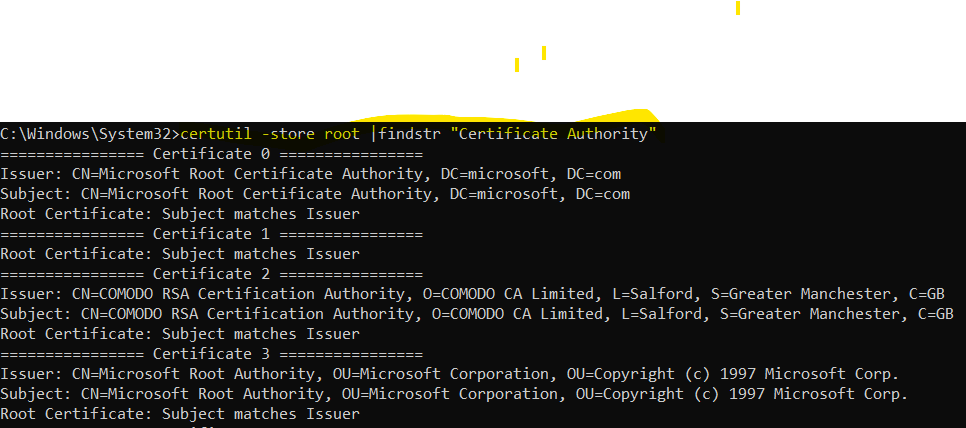
Example 3: Private Key Association Failures
Scenario:
The certificate imports successfully but is not available for IIS binding.
Diagnosis:
The private key is not properly associated with the certificate.
Recovery:
Use certutil to repair the private key association:
certutil -repairstore my "certificate_serial_number"Advanced Techniques and Tooling
OpenSSL Command-Line Analysis
OpenSSL is invaluable for diagnosing certificate chain issues. Here are some advanced commands:
# Display the complete certificate chain
openssl s_client -connect example.com:443 -showcerts

# Verify the certificate chain integrity
openssl verify -CAfile root.pem -untrusted intermediate.pem certificate.pem

# Extract and examine individual certificates
openssl s_client -connect example.com:443 -showcerts | openssl x509 -text -noout
HSM/TPM Diagnostics
# List available PKCS#11 modules
pkcs11-tool --module /usr/lib/pkcs11/opensc-pkcs11.so -L

# Generate CSR via HSM
openssl req -new -engine pkcs11 -keyform ENGINE -key "pkcs11:model=FIPS%20Token;id=01" -out server.csr

# Test HSM connectivity
pkcs11-tool --module /usr/lib/pkcs11/opensc-pkcs11.so --login --test
Windows Certificate Diagnostics
# Comprehensive certificate chain validation
$cert = Get-Item Cert:\LocalMachine\My\YOUR_THUMBPRINT
$chain = New-Object System.Security.Cryptography.X509Certificates.X509Chain
$chain.ChainPolicy.ApplicationPolicy.Add([System.Security.Cryptography.Oid]::new("1.3.6.1.5.5.7.3.1")) # Server Authentication
$chain.ChainPolicy.RevocationMode = [System.Security.Cryptography.X509Certificates.X509RevocationMode]::Online
$isValid = $chain.Build($cert)

# Display chain elements
$chain.ChainElements | ForEach-Object {
    Write-Host "Certificate: $($_.Certificate.Subject)"
    Write-Host "Issuer: $($_.Certificate.Issuer)"
    Write-Host "Valid From: $($_.Certificate.NotBefore)"
    Write-Host "Valid To: $($_.Certificate.NotAfter)"
    Write-Host "Thumbprint: $($_.Certificate.Thumbprint)"
    Write-Host "Chain Status: $($_.ChainElementStatus)"
    Write-Host "---"
}
SSL Labs API Automation
# Continuous TLS health monitoring
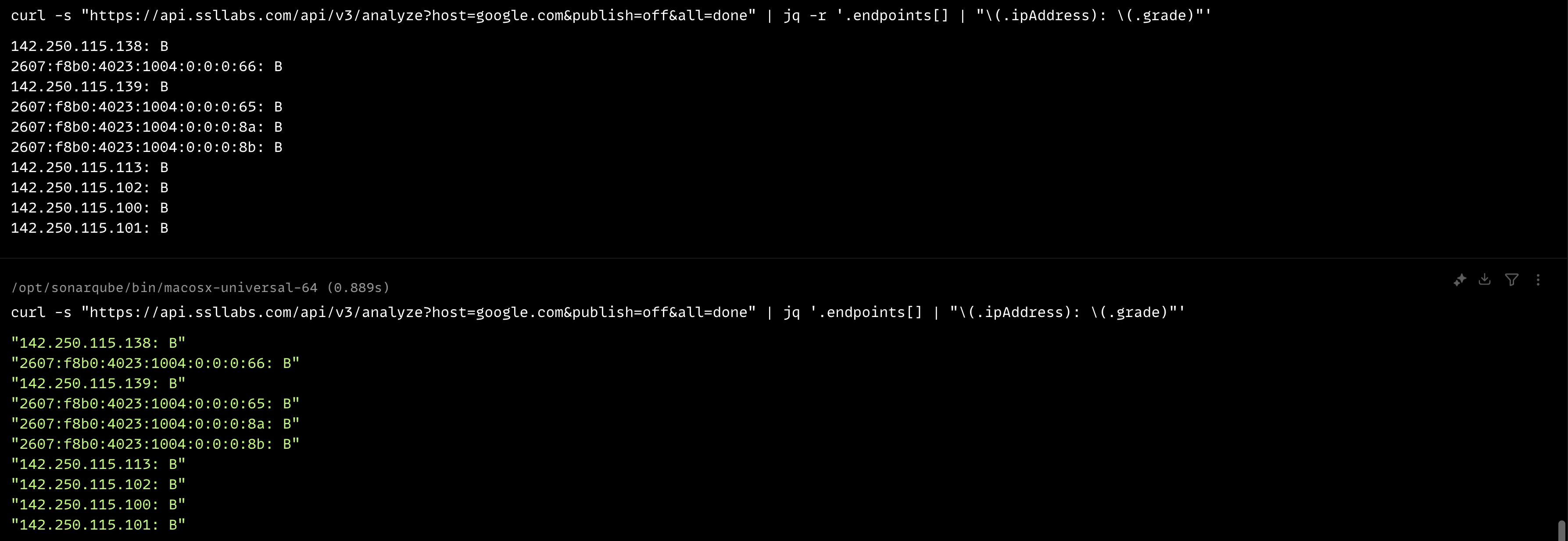
curl -s "https://api.ssllabs.com/api/v3/analyze?host=example.com&publish=off&all=done" | jq -r '.endpoints[] | "\(.ipAddress): \(.grade)"'

# Detailed endpoint analysis
curl -s "https://api.ssllabs.com/api/v3/analyze?host=example.com&publish=off&all=done" | jq '.endpoints[0].details'
SSL Labs jq Output
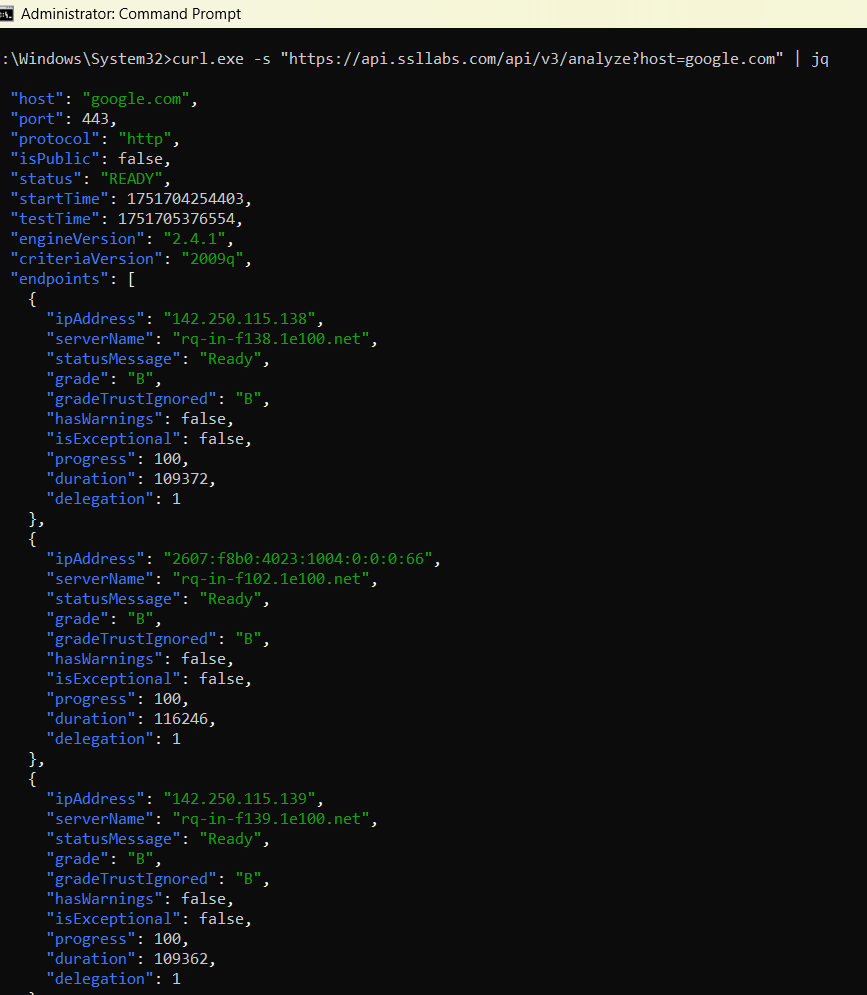
SSL Labs Raw Output Using jq
Windows Certificate Store Management
Certutil
Certutil offers powerful certificate store manipulation:
# Display detailed certificate store contents
certutil -store -v my

# Verify certificate with complete chain validation
certutil -verify -urlfetch certificate.cer

# Export certificate with complete chain
certutil -exportPFX my certificate_thumbprint output.pfx
PowerShell
PowerShell enables automation and advanced management:
# Import certificate to a specific store
Import-Certificate -FilePath "certificate.cer" -CertStoreLocation "Cert:\LocalMachine\Root"

# Generate and export self-signed certificates
$cert = New-SelfSignedCertificate -Subject "CN=TestCert" -CertStoreLocation "Cert:\CurrentUser\My"
Export-PfxCertificate -Cert $cert -FilePath "test.pfx" -Password (ConvertTo-SecureString -String "password" -Force -AsPlainText)

# Verify certificate chain programmatically
Get-ChildItem Cert:\LocalMachine\My | Where-Object {$_.Subject -like "*example.com*"} | Test-Certificate
Enterprise Certificate Store Architecture
Machine vs. User Store Deep Dive
Machine Store Locations
Cert:\LocalMachine\My- Personal certificates (server certificates)Cert:\LocalMachine\CA- Intermediate Certification AuthoritiesCert:\LocalMachine\Root- Trusted Root Certification AuthoritiesCert:\LocalMachine\TrustedPeople- Trusted PeopleCert:\LocalMachine\TrustedPublisher- Trusted Publishers
User Store Locations
Cert:\CurrentUser\My- Personal certificates (client certificates)Cert:\CurrentUser\CA- Intermediate Certification AuthoritiesCert:\CurrentUser\Root- Trusted Root Certification Authorities
Advanced Certificate Chain Validation
Programmatic Validation
PowerShell and .NET can be used for custom certificate validation:
Add-Type @"
using System;
using System.Net;
using System.Net.Security;
using System.Security.Cryptography.X509Certificates;

public class CertificateValidator {
    public static bool ValidateServerCertificate(
        object sender,
        X509Certificate certificate,
        X509Chain chain,
        SslPolicyErrors sslPolicyErrors) {

        Write-Host "Certificate Subject: " + certificate.Subject
        Write-Host "Certificate Issuer: " + certificate.Issuer
        Write-Host "SSL Policy Errors: " + sslPolicyErrors

        foreach (X509ChainStatus status in chain.ChainStatus) {
            Write-Host "Chain Status: " + status.Status
            Write-Host "Chain Status Information: " + status.StatusInformation
        }

        return sslPolicyErrors == SslPolicyErrors.None;
    }
}
"@
TestSSL.sh Integration
TestSSL.sh is a powerful tool for SSL/TLS analysis, even on Windows (with WSL or Cygwin):
./testssl.sh --jsonfile-pretty SSL_analysis.json https://example.com:443/
./testssl.sh --add-ca ~/certificates/intermediate-chain --jsonfile-pretty results.json https://example.com:443/
Certificate Revocation List (CRL) and OCSP Troubleshooting
CRL Accessibility
Certificate revocation validation can fail if CRL endpoints are unreachable:
certutil -verify -urlfetch certificate.cer
curl -I http://crl.example.com/certificate.crl
openssl crl -in certificate.crl -noout -text
OCSP Response Analysis
OCSP provides real-time certificate status verification:
openssl x509 -in certificate.pem -noout -ocsp_uri
openssl ocsp -issuer intermediate.pem -cert certificate.pem -text -url http://ocsp.example.com
Best Practices for Preventing SSL Configuration Failures
Automated Certificate Deployment
Automation reduces human error and ensures consistency:
function Deploy-Certificate {
    param(
        [string]$CertificatePath,
        [string]$StoreLocation,
        [string]$StoreName,
        [securestring]$Password
    )

    try {
        $cert = Import-PfxCertificate -FilePath $CertificatePath -CertStoreLocation "$StoreLocation\$StoreName" -Password $Password
        Write-Host "Certificate deployed successfully: $($cert.Thumbprint)"
        $chainValid = Test-Certificate -Cert $cert -AllowUntrustedRoot:$false
        if ($chainValid) { Write-Host "Certificate chain validation successful" }
        else { Write-Warning "Certificate chain validation failed" }
    }
    catch {
        Write-Error "Certificate deployment failed: $($_.Exception.Message)"
    }
}
Certificate Lifecycle Management
Monitor certificates for upcoming expiration:
Get-ChildItem Cert:\LocalMachine\My | Where-Object {
    $_.NotAfter -lt (Get-Date).AddDays(30)
} | ForEach-Object {
    Write-Warning "Certificate expiring soon: $($_.Subject) - Expires: $($_.NotAfter)"
}
Security Hardening
- Restrictive ACLs: Set strict permissions on private keys.
- Certificate Template Security: Configure templates with appropriate extensions and usage restrictions.
- Trust Store Maintenance: Regularly audit and clean certificate stores.
Troubleshooting Complex Authentication Scenarios
Client Certificate Authentication
Check client certificate availability and binding:
certutil -store -user myCross-Domain Trust Configuration
Active Directory Certificate Services Integration:
# Configure certificate auto-enrollment
function Configure-CertificateAutoEnrollment {
    param(
        [string]$TemplateName,
        [string]$CAName
    )

    # Enable auto-enrollment in Group Policy
    $registryPath = "HKLM:\SOFTWARE\Policies\Microsoft\Cryptography\AutoEnrollment"

    if (-not (Test-Path $registryPath)) {
        New-Item -Path $registryPath -Force
    }

    Set-ItemProperty -Path $registryPath -Name "AEPolicy" -Value 7 -Type DWord

    # Configure certificate template
    certutil -SetCASecurity $TemplateName "Domain Users:Allow Enroll"

    Write-Host "Auto-enrollment configured for template: $TemplateName" -ForegroundColor Green
}
Monitoring and Alerting
Event Log Analysis
Windows Event Logs provide detailed certificate-related errors:
Get-WinEvent -FilterHashtable @{LogName='System'; ID=12; StartTime=(Get-Date).AddDays(-7)} |
ForEach-Object {
    Write-Host "Certificate Error: $($_.TimeCreated) - $($_.LevelDisplayName)"
    Write-Host "Message: $($_.Message)"
}
Conclusion
Advanced SSL certificate troubleshooting in Windows requires a deep understanding of the chain of trust, trust store architecture, and sophisticated diagnostic tools. By leveraging command-line utilities like certutil and OpenSSL, PowerShell automation, and systematic troubleshooting methodologies, you can resolve even the most complex certificate issues.
Key Takeaways
- Prevention is better than cure: Implement automated certificate monitoring and lifecycle management
- Understand the full chain: Always verify the complete certificate chain, not just the end-entity certificate
- Use appropriate tools: Combine Windows-native tools with cross-platform utilities like OpenSSL
- Security first: Implement proper hardening measures and regular security audits
- Automate where possible: Use PowerShell scripts to reduce human error and ensure consistency
Additional Resources
For foundational knowledge, revisit the referenced guides:
- Troubleshooting SSL: Why Your SSL Certificate Isn’t Working on Windows
- Chain of Trust: Decoding SSL Certificate Security Architecture
Quick Reference Commands
Essential troubleshooting commands:
# Certificate store operations
certutil -store -v my
certutil -verify -urlfetch certificate.cer
certutil -addstore "CA" intermediate.cer

# Chain validation
certutil -verify -urlfetch -v certificate.cer

# Private key repair
certutil -repairstore my "thumbprint"
PowerShell essentials:
# Certificate health check
Get-ChildItem Cert:\LocalMachine\My | Test-Certificate

# Import certificate
Import-Certificate -FilePath "cert.cer" -CertStoreLocation "Cert:\LocalMachine\My"

# Export certificate
Export-Certificate -Cert $cert -FilePath "export.cer"
Stay proactive with certificate management, automate where possible, and maintain rigorous security practices to ensure long-term trust and reliability in your Windows environments. Regular monitoring, proper tooling, and comprehensive testing will help you maintain a robust SSL/TLS infrastructure that meets modern security requirements.
Published at DZone with permission of Vidyasagar (Sarath Chandra) Machupalli FBCS. See the original article here.
Opinions expressed by DZone contributors are their own.
Comments