

Your AI Agent Is a Distributed System, Not a Chatbot
Most AI agent failures are execution failures, not reasoning failures. Durable orchestration helps enterprise agents survive retries, outages, and long-running workflows.
Join the DZone community and get the full member experience.
Join For FreeMost teams are still building AI agents like chatbots. That is fine for demos. It is not fine for production.
A chatbot answers a question. An enterprise AI agent executes work. That difference sounds small, but it changes the entire architecture.
Consider a customer support agent investigating a complex technical escalation. The agent may need to analyze diagnostic logs, search product documentation, find similar historical incidents, consult multiple specialized agents, wait for a support engineer to review a recommendation, and then generate a remediation plan. That workflow may take minutes, hours, or even longer.
Now ask the uncomfortable engineering questions:
- What happens if the user closes the browser?
- What happens if the API request times out?
- What happens if one downstream system is unavailable?
- What happens if the model call is throttled?
- What happens if human approval arrives six hours later?
- What happens if the process restarts halfway through execution?
If the answer is "we will handle that in the agent code," the architecture is already in trouble.
The biggest mistake many teams make is treating the LLM as the application. In production systems, the workflow is the application. The LLM is one component inside a larger execution graph.
Enterprise AI agents are not chatbots. They are distributed systems. And distributed systems need durable runtimes.
The Chatbot Architecture Breaks Quickly
Most early AI applications start with a simple request-response model: user request → agent API → LLM → response.
This works well for Q&A, summarization, search, content generation, and basic tool calling. But enterprise workflows rarely stay that simple.
A customer support agent might instead follow a flow like this: analyze the logs, search the knowledge base, find similar historical cases, run diagnostic reasoning, check severity and escalation policy, wait for human review, and only then generate a final recommendation.
This is not a chat interaction. It is a long-running business process with AI inside it.
The moment the agent becomes responsible for completing work across systems, the architecture needs capabilities that most chatbot implementations do not provide:
- Durable state
- Retry policies
- Progress tracking
- Correlation IDs
- Human approval checkpoints
- Partial failure handling
- Event-driven resumption
- Auditability
- Workflow versioning
These are workflow orchestration concerns, not prompt engineering concerns.
The Real Problem Is Execution, Not Reasoning
The AI industry talks a lot about reasoning. But many production failures are not reasoning failures. They are execution failures.
The model may correctly identify the next step, and the system still fails because:
- The workflow state was stored only in memory.
- The frontend session disappeared.
- The backend request exceeded a timeout.
- A transient API failure caused the entire workflow to restart.
- A human approval step was handled outside the agent workflow.
- There was no way to resume from the last completed step.
- The agent retried a non-idempotent action and created duplicate work.
In other words, the model worked. The runtime failed.
None of these failure modes are new. Durable-execution runtimes solved persist-and-resume for workflows years ago, checkpointing is older than that, and idempotency keys are payments-industry bedrock. What has changed is who is building these systems: the teams shipping agents today largely did not live through the workflow-engine era, so the discipline is being relearned.
Agents also add one failure mode the classical systems never had. A workflow engine handed ambiguous state fails loudly. A language model handed ambiguous state re-reasons from scratch — it will confidently re-derive a plan, redo completed work, and re-request data it already has, and it will do so in fluent prose that looks like progress. That is a failure mode you have to design against explicitly, because it does not announce itself.
This is why enterprise agent architecture needs to borrow more from distributed systems, workflow engines, and cloud orchestration than from chatbot demos. A serious AI agent platform needs to answer:
- How is workflow state persisted?
- How are long-running tasks resumed?
- How are retries controlled?
- How are external events handled?
- How are human decisions represented?
- How is progress exposed to the user?
- How are multiple agents coordinated?
- How are failures isolated?
If those questions are not part of the architecture, the system is not production-ready.
The Better Mental Model: Workflow First, Model Second
The most useful mental model is this:
The workflow is the application. The model is one activity inside it.
That shift changes how systems are designed. Instead of building a giant agent that does everything, design a durable workflow that coordinates specialized capabilities.
For a customer support scenario, the system might use multiple specialized agents:
- Diagnostic Agent: analyzes logs, symptoms, and telemetry.
- Knowledge Search Agent: searches product documentation and known issues.
- Historical Case Agent: finds similar resolved incidents.
- Policy Agent: checks escalation, compliance, or risk rules.
- Resolution Agent: synthesizes the final recommendation.
Each agent has a focused responsibility. The orchestration layer coordinates execution, and it should own workflow progression, agent sequencing, parallel execution, state persistence, retry behavior, failure handling, human review, and final aggregation.
This keeps the AI layer focused on reasoning and the workflow layer focused on execution.
Reference Architecture: Durable Runtime for Long-Running Agents
A production-oriented architecture looks more like this.
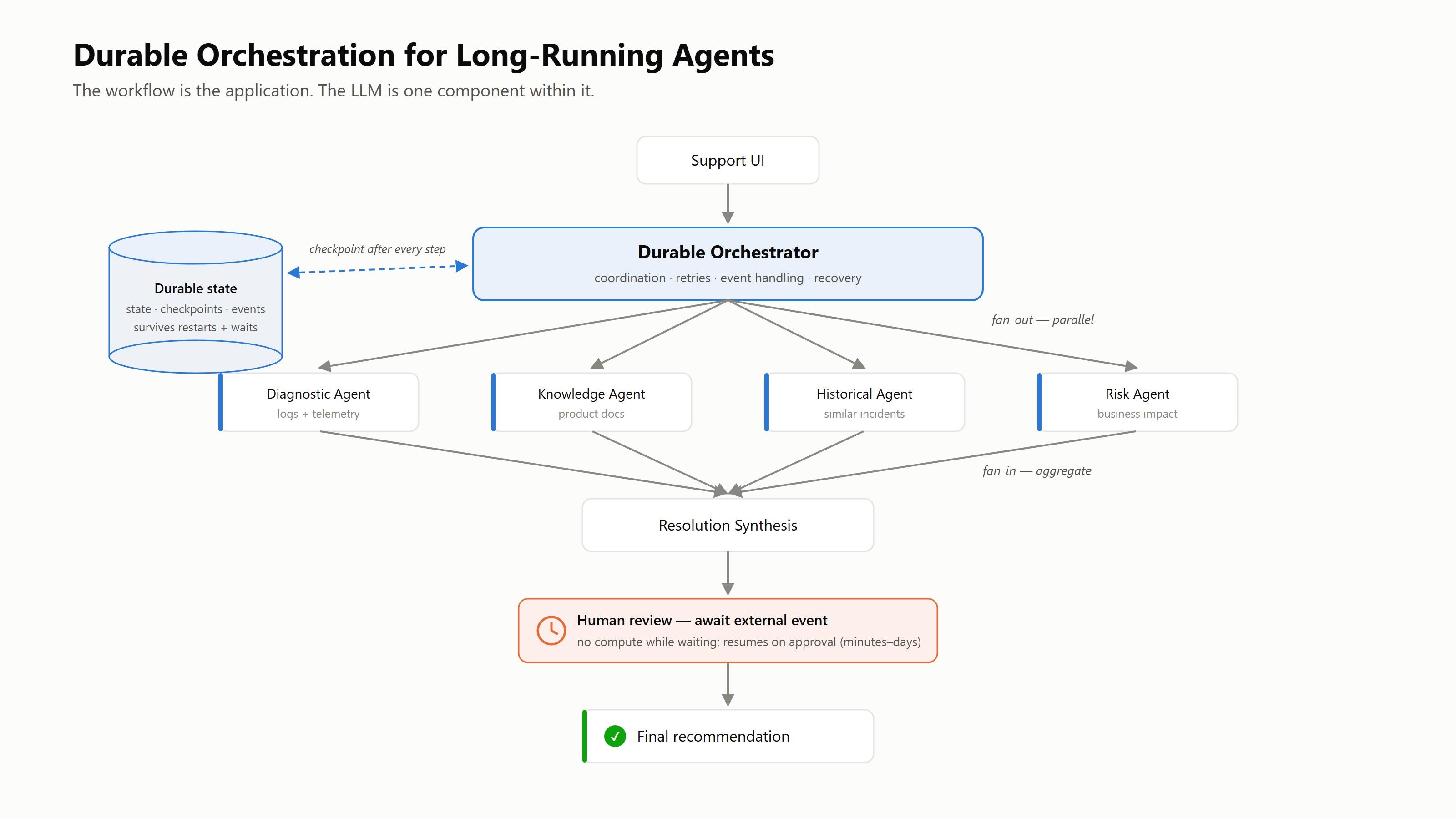
A durable orchestration layer owns state, coordination, retries, and the human-in-the-loop wait; specialized agents own only their domain. Because the orchestrator checkpoints to durable state after every step, the workflow survives restarts, deploys, and days-long approval waits.
The important part is not the specific cloud service. The important part is the architectural separation. The user interface starts the workflow. The durable orchestrator coordinates execution. Specialized agents perform bounded work. The workflow stores progress, handles retries, waits for human input, and resumes reliably.
Azure Durable Functions is one practical implementation of this pattern because it provides stateful orchestrations, activity functions, checkpointing, retry policies, and long-running workflow support on a serverless runtime.¹ The same architectural idea can be implemented with other workflow engines. The point is not "use one specific product." The point is "do not build long-running agent execution as a stateless API."
Fan-Out/Fan-In Is a Natural Pattern for Multi-Agent Systems
Many enterprise AI workflows contain independent tasks. A customer support investigation can often run its diagnostic, knowledge, historical, and policy analyses in parallel — the fan-out/fan-in shape in the architecture above.
The workflow fans out to multiple specialized agents. Each agent performs independent analysis. The workflow then fans in the results and synthesizes a recommendation. This maps directly onto the fan-out/fan-in pattern documented for durable orchestrations, which runs multiple functions in parallel and aggregates the results afterward. ²
A simplified C# orchestration can look like this. The examples use .NET Durable Functions; the same patterns exist in the Python and JavaScript bindings, and in runtimes like Temporal.
[Function(nameof(CustomerSupportAgentOrchestrator))]
public static async Task<SupportCaseResolution> RunAsync(
    [OrchestrationTrigger] TaskOrchestrationContext context)
{
    var request = context.GetInput<SupportCaseRequest>()
        ?? throw new InvalidOperationException("Support case request is required.");

    context.SetCustomStatus("Launching specialized agents");

    var diagnosticTask = context.CallActivityAsync<AgentFinding>(
        nameof(RunDiagnosticAnalysisAgent), request);

    var knowledgeTask = context.CallActivityAsync<AgentFinding>(
        nameof(RunKnowledgeSearchAgent), request);

    var historicalTask = context.CallActivityAsync<AgentFinding>(
        nameof(RunHistoricalCaseAgent), request);

    var policyTask = context.CallActivityAsync<AgentFinding>(
        nameof(RunPolicyAgent), request);

    var findings = await Task.WhenAll(
        diagnosticTask, knowledgeTask, historicalTask, policyTask);

    context.SetCustomStatus("Aggregating agent findings");

    var resolution = await context.CallActivityAsync<SupportCaseResolution>(
        nameof(GenerateDraftResolution), findings);

    return resolution;
}
This is more maintainable than building one large prompt that tries to do everything. It also gives the platform better control over which agents ran, which agents failed, which outputs were used, how long each step took, and what evidence supported the final answer.
That matters in enterprise systems.
Human-in-the-Loop Is Not an Edge Case
Many enterprise AI systems quietly assume that agents will produce immediate answers. Real workflows often require human decisions — when confidence is low, when customer impact is high, when the recommendation involves risk, when the action changes system state, when the workflow touches regulated data, or when the escalation is sensitive.
The timeline usually looks nothing like a chat exchange.
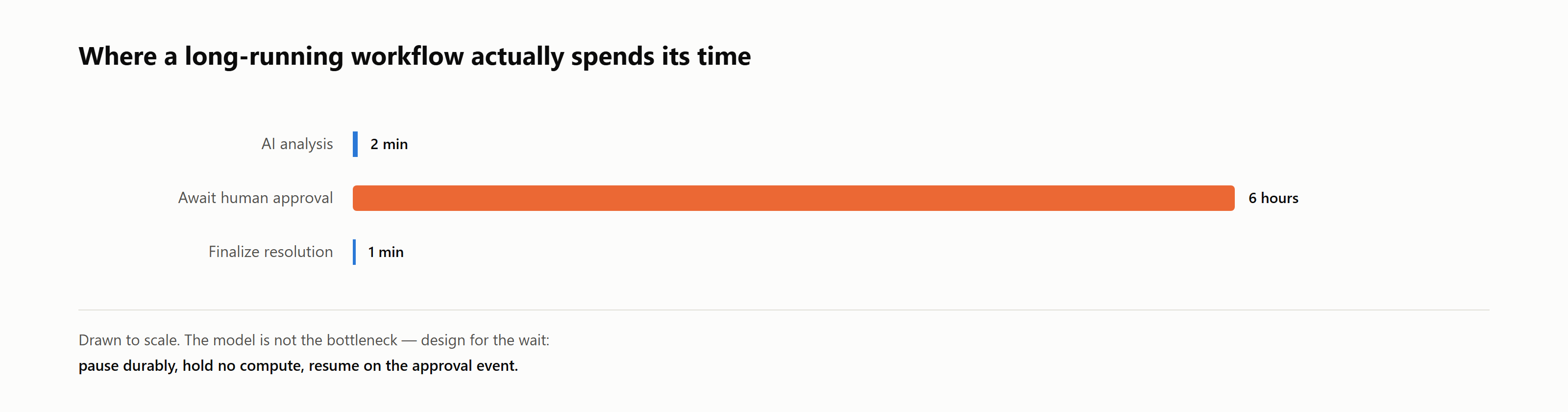
Drawn to scale: the model is not the bottleneck. A typical investigation spends two minutes on AI analysis and six hours waiting for a human to approve.
The slowest step is not always the LLM. It is often the human approval, dependency response, or operational handoff.
This is where durable orchestration becomes essential. The workflow needs to pause without losing state. It should not keep a web request open. It should not rely on memory. It should not require a custom polling database plus a manual recovery script.
Durable orchestration can model this directly:
context.SetCustomStatus("Waiting for human review");

var reviewDecision =
    await context.WaitForExternalEvent<HumanReviewDecision>(
        "HumanReviewCompleted");

var finalResolution =
    await context.CallActivityAsync<SupportCaseResolution>(
        nameof(GenerateFinalResolution),
        new FinalResolutionRequest
        {
            ReviewDecision = reviewDecision
        });

return finalResolution;
External events let a running orchestration receive signals from outside — human approvals, webhook callbacks, or other systems — without holding compute open while it waits.³
That matters because human approval should not be a side process. It should be part of the workflow.
The Crash That Costs Money
Durable runtimes give you at-least-once execution. After a crash, an activity may run again. For reads, that is free. For writes, it is the most dangerous window in the architecture, and it is worth being precise about where it opens.
A workflow issues a customer refund. The money moves. In the instant before the runtime checkpoints that the activity completed, the process dies. On recovery, the runtime replays the activity — behaving exactly as designed — and issues the refund a second time.
The orchestrator cannot prevent this, because from its point of view the activity never completed. The fix has to live in the side-effecting operation itself: every consequential write carries an idempotency key, and an operation that sees a key it has already processed returns the original result instead of acting twice.
var refund = await context.CallActivityAsync<RefundResult>(
    nameof(IssueRefund),
    new RefundCommand(
        CaseId: request.CaseId,
        Amount: approvedAmount,
        IdempotencyKey: $"{request.CaseId}:goodwill-refund"));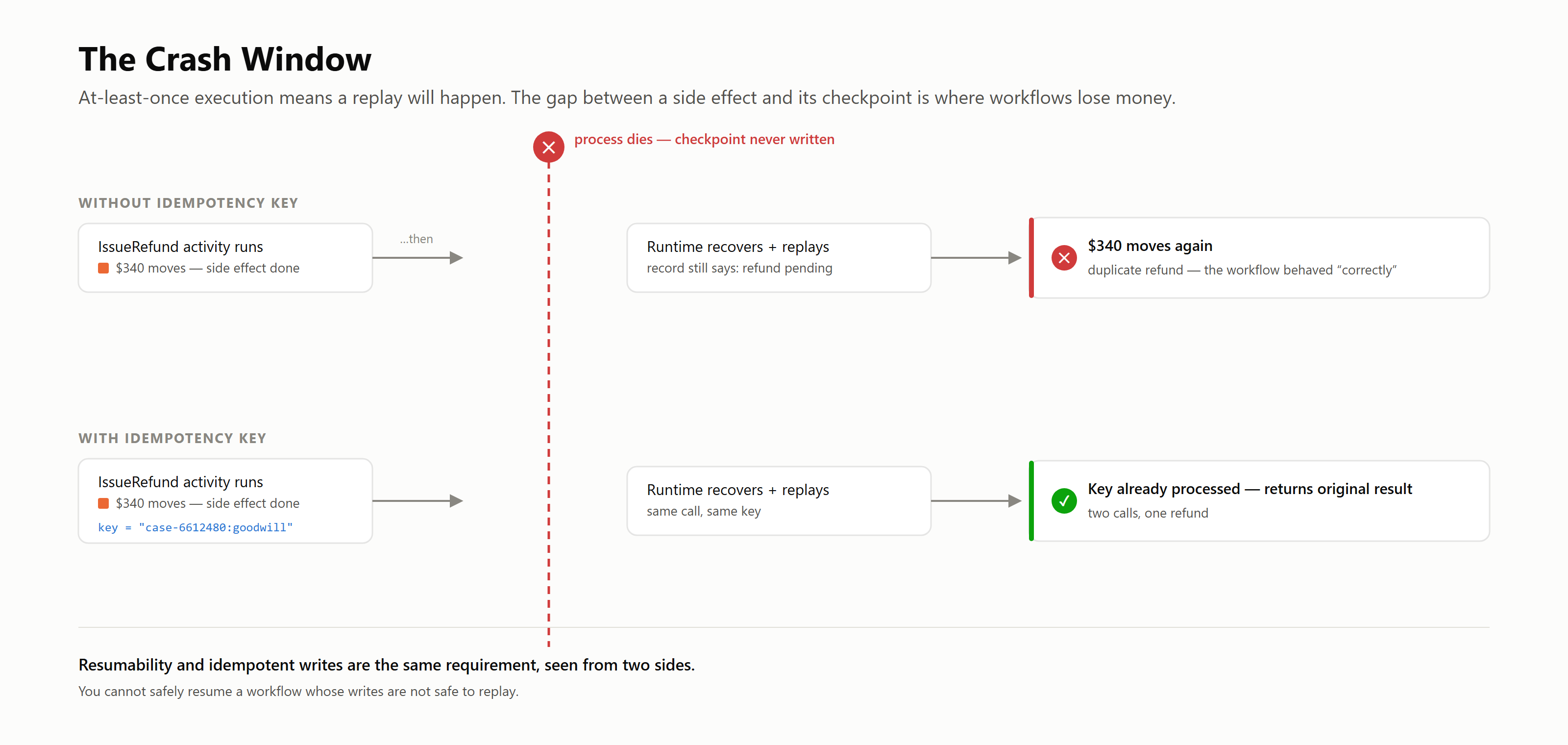
At-least-once execution guarantees a replay will eventually land in the gap between a side effect and its checkpoint. Without an idempotency key, the replay issues a second refund. With one, the operation recognizes the key and returns the original result — two calls, one refund.
Resumability and idempotent writes are the same requirement seen from two sides. You cannot safely resume a workflow whose writes are not safe to replay.
The Orchestrator Should Coordinate, Not Think
A common mistake is putting too much logic inside the agent or the orchestrator. A better separation is simple to state: the orchestrator decides what happens next — calling activities, waiting for events, tracking status, applying retry policy, coordinating results. Activities do the work — calling models, searching systems, querying databases, invoking tools, performing side effects.
For example, an activity that calls a knowledge search agent might look like this:
public sealed class RunKnowledgeSearchAgent
{
    private readonly IAgentExecutionClient _agentClient;

    public RunKnowledgeSearchAgent(IAgentExecutionClient agentClient)
    {
        _agentClient = agentClient;
    }

    [Function(nameof(RunKnowledgeSearchAgent))]
    public async Task<AgentFinding> RunAsync(
        [ActivityTrigger] SupportCaseRequest request)
    {
        var response = await _agentClient.RunAsync(new AgentExecutionRequest
        {
            AgentName = "KnowledgeSearchAgent",
            Prompt = $"""
            Search for relevant troubleshooting guidance.

            Case: {request.CaseId}
            User question: {request.UserQuestion}
            Product area: {request.ProductArea}

            Return concise findings with supporting evidence.
            """
        });

        return new AgentFinding
        {
            AgentName = "Knowledge Search Agent",
            Summary = response.Summary,
            ConfidenceScore = response.ConfidenceScore,
            Evidence = response.Citations,
            RequiresHumanReview = response.ConfidenceScore < 0.75
        };
    }
}
This keeps model calls, retrieval, tool execution, and external I/O outside the orchestration logic. That separation improves testability, recovery, and observability.
Design for Partial Success
Enterprise workflows should not be all-or-nothing by default. If four specialized agents run and one fails, should the entire investigation fail? Sometimes yes. Often no.
A better design is to treat agent results as structured outcomes:
public sealed record AgentExecutionResult
{
    public required string AgentName { get; init; }

    public bool Succeeded { get; init; }

    public AgentFinding? Finding { get; init; }

    public string? FailureReason { get; init; }
}
Now the aggregation layer can reason about partial results. If the diagnostic, knowledge, and policy agents succeed and the historical-case agent fails, the system can still produce a recommendation — with an explicit caveat that historical case comparison was unavailable.
This is how resilient systems behave. They degrade gracefully instead of collapsing completely. AI agents need the same discipline.
Observability Is a Product Feature
Users do not just want the final answer. They want to know what the system is doing. A long-running agent should expose meaningful progress — started investigation, analyzing diagnostics, searching knowledge base, finding similar cases, aggregating findings, waiting for human review, generating final recommendation, completed.
This is not cosmetic. Progress visibility builds trust.
From an operational perspective, the platform should track the workflow instance ID, correlation ID, case ID, current stage, agent execution duration, retry count, failure reason, human review latency, final outcome, and evidence references.
If a support engineer asks, "Why did the agent recommend this?" the system should have an answer. If an operator asks, "Where are workflows getting stuck?" telemetry should show it. If a governance reviewer asks, "Which model and prompt version produced this recommendation?" that should be traceable.
This is why observability belongs in the architecture, not in a dashboard added at the end.
Retry Policy Is Part of the Design
Long-running agents depend on external systems, and those systems will fail. They will throttle. They will time out. They will return transient errors. They will behave differently under load.
Retry behavior should be explicit.
var retryPolicy = new RetryPolicy(
    maxNumberOfAttempts: 3,
    firstRetryInterval: TimeSpan.FromSeconds(10))
{
    BackoffCoefficient = 2.0,
    MaxRetryInterval = TimeSpan.FromMinutes(2)
};

var taskOptions = new TaskOptions(retryPolicy);

var finding = await context.CallActivityAsync<AgentFinding>(
    nameof(RunKnowledgeSearchAgent),
    request,
    taskOptions);
Retries should be applied carefully. Retry transient failures: HTTP 429, HTTP 5xx, temporary network failures, search service timeouts, model endpoint throttling. Do not blindly retry invalid input, authorization failures, policy violations, business rule failures, or — as the previous section argued — any non-idempotent side effect.
A durable runtime gives teams a place to encode this behavior consistently. Without it, retry logic gets scattered across controllers, services, queues, and agents.
Governance Matters More When Agents Act
Governance becomes more important when agents stop answering questions and start influencing operational decisions. At minimum, production agent workflows should track the workflow version, agent version, prompt version, model deployment, input data sources, evidence references, reviewer decisions, final recommendation, and correlation ID.
This is not bureaucracy. It is operational safety.
If an agent provides a recommendation on a support case, teams need to know what information was used, which agents participated, whether a human approved the result, and how the final recommendation was generated. A durable workflow makes that lineage easier to capture, because the workflow already represents the execution path.
The Test That Tells You Whether Any of This Works
Architecture diagrams do not prove durability. The only trustworthy verification I have found is destructive.
Kill the running workflow at an arbitrary point — not at a clean boundary, at an awkward one. Discard all in-memory and in-context state. Bring the system back up and watch what the resumed execution does. A sound design picks up exactly where the work stood, and each distinct way of failing points at a specific gap:
| The resumed workflow... | You are missing |
|---|---|
| re-derives its plan from scratch | persisted state the agent layer actually reads |
| redoes completed steps | checkpointing at the right granularity |
| reloads its entire history to get oriented | a scoped working set per resume |
| re-fires a side effect | idempotency keys |
A durable runtime passes the orchestration half of this test by construction. That is what you are buying. What it does not guarantee is the agent half: whether your agents' working context, retrieved evidence, and plans are reconstructed from durable state, or were quietly living in a context window that no longer exists.
Run the test end to end, including the model-facing layers. That is where it fails in practice, and it is far better to learn that on a Tuesday afternoon than during an incident.
Five Lessons From Building Long-Running Agent Workflows
1. The workflow matters more than the prompt. Prompt quality matters, but it does not solve execution reliability. A great prompt inside a brittle runtime still produces a brittle system.
2. Human latency dominates model latency. Many workflows wait longer for people than for models. Design for hours, not seconds.
3. Multi-agent systems need coordination, not chaos. Adding agents is easy. Coordinating agents is hard. Without orchestration, multi-agent systems become difficult to reason about, debug, and govern.
4. Partial success is better than total failure. Enterprise systems should degrade gracefully. If one agent fails, the platform should decide whether the workflow can continue with caveats.
5. Observability is part of the user experience. A long-running agent without progress visibility feels broken. A long-running agent with clear status feels reliable.
Conclusion
The next phase of enterprise AI will not be won only by better prompts or larger models. It will be won by better execution architectures.
Long-running agents need to coordinate multiple systems, preserve state, recover from failures, wait for human approvals, expose progress, and produce auditable outcomes.
That is not chatbot architecture. That is distributed systems architecture.
The model is important, but it is not the whole application. In production-grade enterprise AI systems, the workflow is the application, and durable orchestration gives that workflow a runtime.
If your AI agent needs to do real work across real systems, stop building it like a chatbot. Build it like a distributed system.
References
- Microsoft Learn, "Durable Functions overview" — https://learn.microsoft.com/en-us/azure/azure-functions/durable/durable-functions-overview
- Microsoft Learn, "Fan-out/fan-in pattern scenarios in Durable Functions" — https://learn.microsoft.com/en-us/azure/durable-task/common/durable-task-fan-in-fan-out
- Microsoft Learn, "Handling external events in Durable Functions" — https://learn.microsoft.com/en-us/azure/azure-functions/durable/durable-functions-external-events
- Microsoft Learn, "Durable Functions best practices and diagnostic tools" (idempotent activities, at-least-once execution) — https://learn.microsoft.com/en-us/azure/azure-functions/durable/durable-functions-best-practice-reference
Opinions expressed by DZone contributors are their own.
Comments