

AI Copilot Using AWS Multi-Agent Orchestrator
Build a personal AI copilot that can summarize news, interact with the calendar, and provide health tips using AWS Multi-Agent Orchestrator.
Join the DZone community and get the full member experience.
Join For FreePersonal AI copilots are emerging as real game changers. They have the potential to transform how we manage our daily tasks and responsibilities. Unlike basic chatbots, these intelligent assistants are sophisticated systems that understand the nuances of our personal lives, making our day-to-day activities much smoother and more efficient.
Building such an AI copilot can be complex without proper infrastructure. AWS Multi-Agent Orchestrator is a flexible and powerful framework for managing multiple AI agents. The orchestrator's classifier selects the appropriate agent based on the user input, the agent's characteristics, and the conversation history. The orchestrator also facilitates the storage of the conversation history per agent.
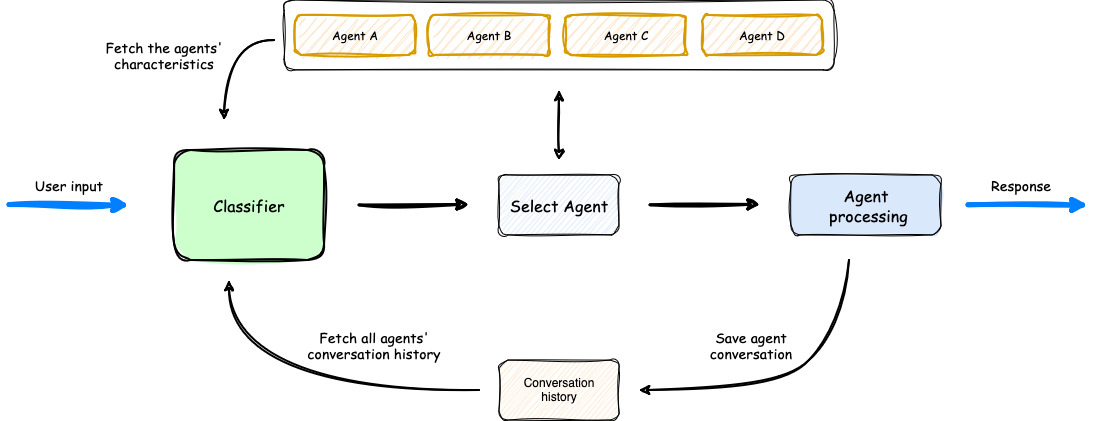
Building an AI Copilot for Various Tasks
Let us build an AI copilot that can check the calendar, suggest fitness routines, and read the news simultaneously. These are completely separate tasks that can have different contexts throughout the user's interactions with them. The full source code for this personal assistant can be found here.
Calendar Agent
This is a chain agent that internally uses ApiAgent to fetch calendar invitations using Calendly APIs. The response from the ApiAgent is streamed to BedrockLLMAgent to summarize the invitations.
agent1 = ApiAgent(ApiAgentOptions(
    endpoint = f"https://api.calendly.com/user_busy_times?user={CALENDLY_USER_URI}&start_time={start_time}&end_time={end_time}",
    method = "GET",
    name = "Calendly Schedule Agent",
    description = "Specializes in Calendar scheduling",
    streaming=False,
    headers_callback=custom_headers_callback,
  ))

agent2 = BedrockLLMAgent(BedrockLLMAgentOptions(
    name="Calendar Summarization",
    streaming=True,
    description="You are an AI agent specialized in summarizing calendar events. Given a list of events, produce a concise summary"\
        " highlighting key details such as event names, dates, times, and participants. Ensure the summary is clear, brief, and "\
            "informative for quick understanding. Do not provide duplicate information or irrelevant details.",
    model_id="anthropic.claude-3-5-sonnet-20240620-v1:0",
    callbacks=ChainlitAgentCallbacks()
))
News Reader Agent
The news reader agent also utilizes the chain agent, which internally uses ApiAgent to fetch the news using Gnews APIs. The response from the ApiAgent is streamed to BedrockLLMAgent to summarize the news.
agent1 = ApiAgent(ApiAgentOptions(
    endpoint = f"https://gnews.io/api/v4/search?q=example&apikey={GNEWS_API_KEY}",
    method = "GET",
    name = "News Reader Agent",
    description = "Specializes in reading news from various sources",
    streaming=False
  ))

agent2 = BedrockLLMAgent(BedrockLLMAgentOptions(
  name="News Summarization Agent",
  streaming=True,
  description="You are a skilled journalist tasked with creating concise, engaging news summaries."\
      "Given the following text, produce a clear and informative summary that captures the key points," \
      "main actors, and significant details. Your summary should be objective, well-structured, "\
      "and easily digestible for a general audience. Aim for clarity and brevity while maintaining the essence of the news story.",
  model_id="anthropic.claude-3-5-sonnet-20240620-v1:0",
  callbacks=ChainlitAgentCallbacks()
))
Fitness Agent
The fitness agent is a standalone agent that uses the LLM model to suggest fitness routines, diet plans, and health tips.
fitness_agent = BedrockLLMAgent(BedrockLLMAgentOptions(
  name="Fitness Agent",
  streaming=True,
  description="Specializes in fitness, health, and wellness. It can provide workout routines, diet plans, and general health tips.",
  model_id="anthropic.claude-3-5-sonnet-20240620-v1:0",
  callbacks=ChainlitAgentCallbacks()
))
Running the App
Follow these instructions for the prerequisites.
1. Clone the repository:
git clone https://github.com/ravilaudya/task-copilot.git
cd task-copilot
2. Create a virtual environment:
conda create -p venv python=3.12
conda activate ./venv
3. Install the required dependencies:
pip install -r requirements.txt4. Run the app:
chainlit run app.py --port 8888Interacting With the Copilot
Once the app is running, a browser window will open where you can interact with the AI copilot. Some example questions you can ask include:
- "What is the latest news?"
- "How is my calendar this week?"
- "How can I lose fat?"
Conclusion
The AI copilot streamlines daily tasks and enhances productivity by providing quick and relevant information tailored to individual preferences. With the right infrastructure in place, building such an AI copilot becomes a manageable and rewarding project. Having such a copilot is like having a reliable partner by your side, making life a little bit easier.
Opinions expressed by DZone contributors are their own.
Comments