

Integrating AI Into Test Automation Frameworks With the ChatGPT API
Learn how integrating AI can generate realistic data for an automation framework, detect log anomalies, and enhance the reliability of CI/CD runs.
Join the DZone community and get the full member experience.
Join For FreeWhen I first tried to implement AI in a test automation framework, I expected it to be helpful only for a few basic use cases. A few experiments later, I noticed several areas where the ChatGPT API actually saved me time and gave the test automation framework more power: producing realistic test data, analyzing logs in white-box tests, and handling flaky tests in CI/CD.
Getting Started With the ChatGPT API
ChatGPT API is a programming interface by OpenAI that operates on top of the HTTP(s) protocol. It allows sending requests and retrieving outputs from a pre-selected model as raw text, JSON, XML, or any other format you prefer to work with.
The API documentation is clear enough to get started, with examples of request/response bodies that made the first call straightforward. In my case, I just generated an API key in the OpenAI developer platform and plugged it into the framework properties to authenticate requests.
Building a Client for Integration With the API
I built the integration in both Java and Python, and the pattern is the same: Send a POST with JSON and read the response, so it can be applied in almost any programming language. Since I prefer to use Java in automation, here is an example of what a client might look like:
import java.net.http.*;
import java.net.URI;
import java.time.Duration;

public class OpenAIClient {
  private final HttpClient http = HttpClient.newBuilder()
      .connectTimeout(Duration.ofSeconds(20)).build();
  private final String apiKey;

  public OpenAIClient(String apiKey) { this.apiKey = apiKey; }

  public String chat(String userPrompt) throws Exception {
    String body = """
      {
        "model": "gpt-5-mini",
        "messages": [
          {"role":"system","content":"You are a helpful assistant for test automation..."},
          {"role":"user","content": %s}
        ]
      }
      """.formatted(json(userPrompt));
    HttpRequest req = HttpRequest.newBuilder()
        .uri(URI.create("https://api.openai.com/v1/chat/completions"))
        .timeout(Duration.ofSeconds(60))
        .header("Authorization", "Bearer " + apiKey)
        .header("Content-Type", "application/json")
        .POST(HttpRequest.BodyPublishers.ofString(body))
        .build();

    HttpResponse<String> res = http.send(req, HttpResponse.BodyHandlers.ofString());
    if (res.statusCode() >= 300) throw new RuntimeException(res.body());
    return res.body();
  }
}
As you probably have already noticed, one of the query parameters in the request body is the GPT model. Models differ in speed, cost, and capabilities: some are faster, while others are slower; some are expensive, while others are cheap, and some support multimodality, while others do not. Therefore, before integrating with the ChatGPT API, I recommend that you determine which model is best suited for performing tasks and set limits for it. On the OpenAI website, you can find a page where you can select several models and compare them to make a better choice.
It will also probably be good to know that custom client implementation can also be extended to support server-sent streaming events to show results as they’re generated, and the Realtime API for multimodal purposes. This is what you can use for processing logs and errors in real time and identifying anomalies on the fly.
Integration Architecture
In my experience, integration with the ChatGPT API only makes sense in testing when applied to the correct problems. In my practice, I found three real-world scenarios I mentioned earlier, and now let’s take a closer look at them.
Use Case 1: Test Data Generation
The first use case I tried was a test data generation for automation tests. Instead of relying on hardcoded values, ChatGPT can provide strong and realistic data sets, ranging from user profiles with household information to unique data used in exact sciences. In my experience, this variety of data helped uncover issues that fixed or hardcoded data would never catch, especially around boundary values and rare edge cases.
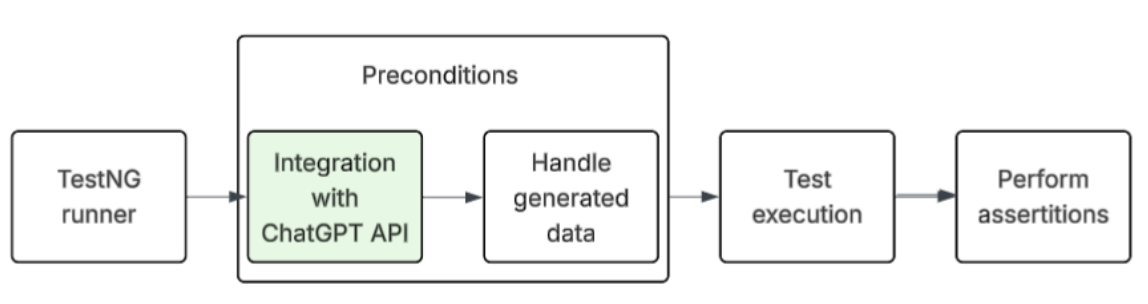
The diagram below illustrates how this integration with the ChatGPT API for generating test data works. At the initial stage, the TestNG Runner launches the suite, and before running the test, it goes to the ChatGPT API and requests test data for the automation tests. This test data will later be processed at the data provider level, and automated tests will be run against it with newly generated data and expected assertions.
class TestUser { public String firstName, lastName, email, phone; public Address address; }
class Address { public String street, city, state, zip; }

public List<TestUser> generateUsers(OpenAIClient client, int count) throws Exception {
  String prompt = """
    You generate test users as STRICT JSON only.
    Schema: {"users":[{"firstName":"","lastName":"","email":"","phone":"",
    "address":{"street":"","city":"","state":"","zip":""}}]}
    Count = %d. Output JSON only, no prose.
  """.formatted(count);

  String content = client.chat(prompt);
  JsonNode root = new ObjectMapper().readTree(content);
  ArrayNode arr = (ArrayNode) root.path("users");
  List<TestUser> out = new ArrayList<>();
  ObjectMapper m = new ObjectMapper();
  arr.forEach(n -> out.add(m.convertValue(n, TestUser.class)));
  return out;
}
This solved the problem of repetitive test data and helped to detect errors and anomalies earlier. The main challenge was prompt reliability, and if the prompt wasn’t strict enough, the model would add extra text that broke the JSON parser. In my case, the versioning of prompts was the best way to keep improvements under control.
Use Case 2: Log Analysis
In some recent open-source projects I came across, automated tests also validated system behavior by analyzing logs. In most of these tests, there is an expectation that a specific message should appear in the application console or in DataDog or Loggly, for example, after calling one of the REST endpoints. Such tests are needed when the team conducts white-box testing.
But what if we take it a step further and try to send logs to ChatGPT, asking it to check the sequence of messages and identify potential anomalies that may be critical for the service?
Such an integration might look like this:
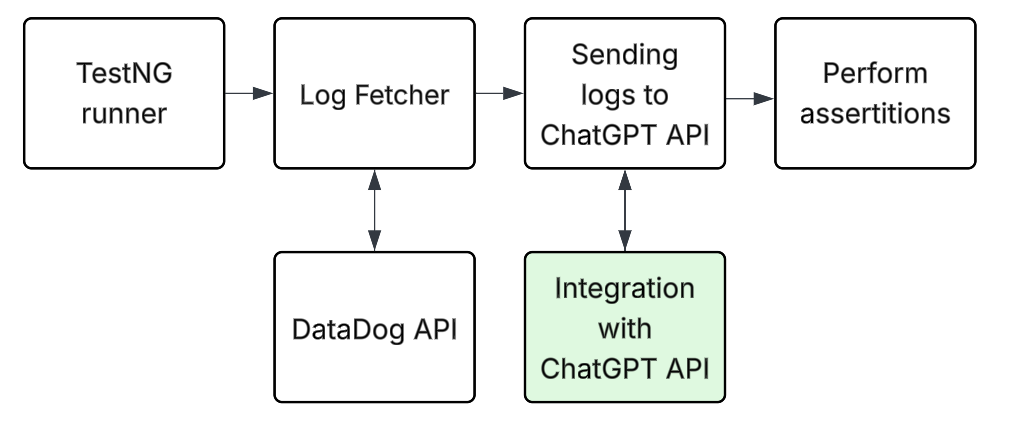
When an automated test pulls service logs (e.g., via the Datadog API), it groups them and sends a sanitized slice to the ChatGPT API for analysis. The ChatGPT API has to return a structured verdict with a confidence score. In case anomalies are flagged, the test fails and displays the reasons from the response; otherwise, it passes. This should keep assertions focused while catching unexpected patterns you didn’t explicitly code for.
The Java code for this use case might look like this:
//Redaction middleware (keep it simple and fast)
public final class LogSanitizer {
  private LogSanitizer() {}
  public static String sanitize(String log) {
    if (log == null) return "";
    log = log.replaceAll("(?i)(api[_-]?key\\s*[:=]\\s*)([a-z0-9-_]{8,})", "$1[REDACTED]");
    log = log.replaceAll("([A-Za-z0-9-_]{20,}\\.[A-Za-z0-9-_]+\\.[A-Za-z0-9-_]+)", "[REDACTED_JWT]");
    log = log.replaceAll("[a-zA-Z0-9._%+-]+@[a-zA-Z0-9.-]+", "[REDACTED_EMAIL]");
    return log;
  }
}

//Ask for a structured verdict
record Verdict(String verdict, double confidence, List<String> reasons) {}

public Verdict analyzeLogs(OpenAIClient client, String rawLogs) throws Exception {
  String safeLogs = LogSanitizer.sanitize(rawLogs);

  String prompt = """
    You are a log-analysis assistant.
    Given logs, detect anomalies (errors, timeouts, stack traces, inconsistent sequences).
    Respond ONLY as JSON with this exact schema:
    {"verdict":"PASS|FAIL","confidence":0.0-1.0,"reasons":["...","..."]}
    Logs (UTC):
    ----------------
    %s
    ----------------
  """.formatted(safeLogs);

  // Chat with the model and parse the JSON content field
  String content = client.chat(prompt);
  ObjectMapper mapper = new ObjectMapper();
  JsonNode jNode = mapper.readTree(content);

  String verdict = jNode.path("verdict").asText("PASS");
  double confidence = jNode.path("confidence").asDouble(0.0);

  List<String> reasons = mapper.convertValue(
      jNode.path("reasons").isMissingNode() ? List.of() : jNode.path("reasons"),
      new com.fasterxml.jackson.core.type.TypeReference<List<String>>() {}
  );

  return new Verdict(verdict, confidence, reasons);
}
Before implementing such an integration, it is important to remember that logs often contain sensitive information, which may include API keys, JWT tokens, or user email addresses. Therefore, sending raw logs to the cloud API is a security risk, and in this case, the data sanitization must be performed. That is why, in my example, I added a simple LogSanitizer middleware to sanitize sensitive data before sending these logs to the ChatGPT API.
It is also important to understand that this approach does not replace traditional assertions, but complements them. You can use them instead of dozens of complex checks, allowing the model to detect abnormal behavior. The most important thing is to treat the ChatGPT API verdict as a recommendation and leave the final decision to the automated framework itself based on the specified threshold values. For example, consider a test a failure only if the confidence is higher than 0.8.
Use Case 3: Test Stabilization
One of the most common problems in test automation is the occurrence of flaky tests. Tests can fail for various reasons, including changes to the API contract or interface. However, the worst scenario is when tests fail due to an unstable testing environment. Typically, for such unstable tests, the teams usually enable retries, and the test is run multiple times until it passes or, conversely, fails after three unsuccessful attempts in a row. But what if we give artificial intelligence the opportunity to decide whether a test needs to be restarted or whether it can be immediately marked as failed or vice versa?
Here’s how this idea can be applied in a testing framework:

When a test fails, the first step is to gather as much context as possible, including the stack trace, service logs, environment configuration, and, if applicable, a code diff. All this data should be sent to the ChatGPT API for analysis to obtain a verdict, which is then passed to the AiPolicy.
It is essential not to let ChatGPT make decisions independently. If the confidence level is high enough, AiPolicy can quarantine the test to prevent the pipeline from being blocked, and when the confidence level is below a specific value, the test can be re-tried or immediately marked as failed. I believe it is always necessary to leave the decision logic to the automation framework to maintain control over the test results, while still using AI-based integration.
The main goal for this idea is to save time on analyzing unstable tests and reduce their number. Reports after processing data by ChatGPT become more informative and provide clearer insights into the root causes of failures.
Conclusion
I believe that integrating the ChatGPT API into a test automation framework can be an effective way to extend its capabilities, but there are compromises to this integration that need to be carefully weighed. One of the most important factors is cost. For example, in a set of 1,000 automated tests, of which about 20 fail per run, sending logs, stack traces, and environment metadata to the API can consume over half a million input tokens per run. Adding test data generation to this quickly increases token consumption. In my opinion, the key point is that the cost is directly proportional to the amount of data: the more you send, the more you pay.
Another major issue I noticed is the security and privacy concerns. Logs and test data often contain sensitive information such as API keys, JWT tokens, or users' data, and sending raw data to the cloud is rarely acceptable in production. In practice, this means either using open-source LLMs like LLaMA deployed locally or providing a redaction/anonymization layer between your framework and the API so that sensitive fields are removed or replaced before anything leaves your testing environment.
Model selection also plays a role. I've found that in many cases the best strategy is to combine them: using smaller models for routine tasks, and larger ones only where higher accuracy really matters.
With these considerations in mind, the ChatGPT API can bring real value to testing. It helps generate realistic test data, analyze logs more intelligently, and makes it easier to manage flaky tests. The integration also makes reporting more informative, adding context and analytics that testers would otherwise have to research manually. As I have observed in practice, utilizing AI effectively requires controlling costs, protecting sensitive data, and maintaining decision-making logic within an automation framework to enable effective regulation of AI decisions. It reminds me of the early days of automation, when teams were beginning to weigh the benefits against the limitations to determine where the real value lay.
Opinions expressed by DZone contributors are their own.
Comments