

Analyzing Relationships in Game of Thrones With NetworkX, Gephi, and Nebula Graph (Part Two)
In this post, we will show you how to access data in Nebula Graph by using NetworkX.
Join the DZone community and get the full member experience.
Join For FreeIn the last post, we showed the character relationship for the Game of Thrones by using NetworkX and Gephi. In this post, we will show you how to access data in Nebula Graph by using NetworkX.
NetworkX
NetworkX is a modeling tool for the graph theory and complex networks written by Python. With its rich, easy-to-use built-in graphs and analysis algorithms, it’s easy to perform complex network analysis and simulation modeling.
In NetworkX, a graph (network) is a collection of nodes together with a collection of edges. Attributes are often associated with nodes and/or edges and are optional. Nodes represent data. Edges are uniquely determined by two nodes, representing the relationship between the two nodes. Nodes and edges can also have many attributes so that more information can be stored.
The following four basic graph types are provided in NetworkX:
- Graph: undirected graph.
- DiGraph: directed graph.
- MultiGraph: A flexible graph class that allows multiple undirected edges between pairs of nodes.
- MultiDiGraph: A directed version of a MultiGraph.
Create an undirected graph in NetworkX:
xxxxxxxxxx
import networkx as nx
G = nx.Graph()
Add nodes:
xxxxxxxxxx
G.add_node(1)
G.add_nodes_from([2,3,4])
G.add_node(2,name='Tom',age=23)
Add edges:
xxxxxxxxxx
G.add_edge(2,3)
G.add_edges_from([(1,2),(1,3)])
g.add_edge(1, 2, start_year=1996, end_year=2019)
In the last post (part one of this series), we have displayed the community detection algorithm Girvan-Newman provided by NetworkX.
Graph Database Nebula Graph
NetworkX usually uses local files as the data source, which is totally okay for static network researches. But when the graph network changes a lot, for example, some central nodes are deleted or important network topology changes are introduced, it is a little troublesome to generate, load, and analyze the new static files. At this time, we’d better persist the entire change process in a database, and load subgraphs or whole graphs directly from the database for real-time analysis. This post uses Nebula Graph as the graph database for storing the graph data.
Nebula Graph provides two methods to get graph structures:
- Query to return a subgraph.
- Scan the underlying storage to get the whole graph.
The first method is suitable for obtaining certain nodes and edges that meet the requirements through fine filtering and pruning in a large-scale graph network. Whereas the second method is more suitable for the whole graph analysis. It is usually used in the early stage of the project when conducting heuristic exploration. When you further understand the graph, you can use the first method for fine pruning analysis.
By reading the code of the python client for Nebula Graph, we know that the nebula-python/nebula/ngStorage/StorageClient.py and the nebula-python/nebula/ngMeta/MetaClient.py file are the APIs that interact with the underlying storage. These files contain a series of interfaces to scan nodes, scan edges, read columns, and so on. The following two interfaces can be used to scan all nodes and edges:
def scanVertex(self, space, returnCols, allCols, limit, startTime, endTime)
def scanEdge(self, space, returnCols, allCols, limit, startTime, endTime)
1. Initialize a client and a ScanEdgeProcessor. The ScanEdgeProcessor decodes the edge data read from Nebula Graph:
xxxxxxxxxx
metaClient = MetaClient([('192.168.8.16', 45500)])
metaClient.connect()
storageClient = StorageClient(metaClient)
scanEdgeProcessor = ScanEdgeProcessor(metaClient)
2. Initialize the parameters for the scanEdge interface:
xxxxxxxxxx
spaceName = 'nba' # The name of the graph space to be read.
returnCols = {} # The edges (or nodes) and their property columns to be returned.
returnCols['serve'] = ['start_year', 'end_year']
returnCols['follow'] = ['degree']
allCols = False # Return all the property columns or not. When set to False, only the specified property columns in the returnCols are returned. When set to True, all property columns are returned.
limit = 100 # Maximum data entry number returned.
startTime = 0
endTime = sys.maxsize
3. Call the scanPartEdge interface to return the iterator for the canEdgeResponse object:
xxxxxxxxxx
scanEdgeResponseIterator = storageClient.scanEdge(spaceName, returnCols, allCols, limit, startTime, endTime)
4. Keep reading the data in the ScanEdgeResponse object which the iterator points to till all the data are read:
xxxxxxxxxx
while scanEdgeResponseIterator.hasNext():
scanEdgeResponse = scanEdgeResponseIterator.next()
if scanEdgeResponse is None:
print("Error occurs while scaning edge")
break
processEdge(space, scanEdgeResponse)
In the preceding snippet, the process_edge is a custom function for processing the scanned edge data. This function first uses the scan_edge_processor to decode the data in the scan_edge_response. The decoded data can either be directly printed out or processed for other purposes such as importing these data into the calculation framework NetworkX.
5. Process data. Here we import all the scanned data into Graph G in the NetworkX:
xxxxxxxxxx
def processEdge(space, scanEdgeResponse):
result = scanEdgeProcessor.process(space, scanEdgeResponse)
# Get the corresponding rows by edge_name
for edgeName, edgeRows in result.rows.items():
for row in edgeRows:
srcId = row.defaultProperties[0].getValue()
dstId = row.defaultProperties[2].getValue()
print('%d -> %d' % (srcId, dstId))
props = {}
for prop in row.properties:
propName = prop.getName()
propValue = prop.getValue()
props[propName] = propValue
G.add_edges_from([(srcId, dstId, props)]) # Add edges to Graph G in the NetworkX
Nodes scanning is similar to the preceding process.
In addition, for some of the distributed graph calculation frameworks, Nebula Graph provides batch reading and storing based on the partitions. We will show you in the later post.
Applying Graph Analysis in NetworkX
When importing all the nodes and edges into the NetworkX according to the preceding process, we can do some basic graph analysis and calculations:
1. Draw a plot:
xxxxxxxxxx
nx.draw(G, with_labels=True, font_weight='bold')
import matplotlib.pyplot as plt
plt.show()
plt.savefig('./test.png')
The plot you just drew looks like following:
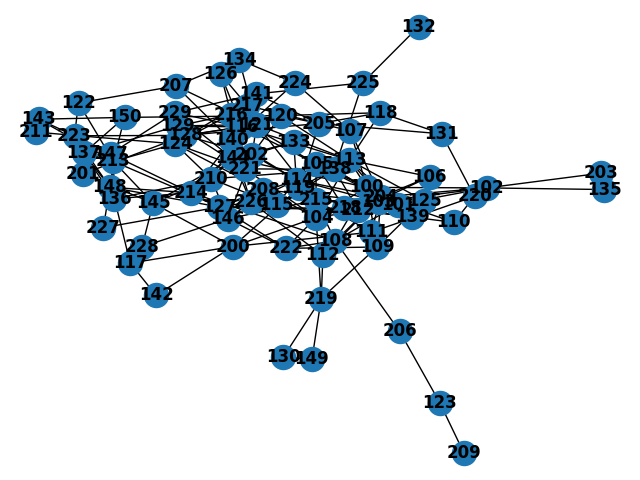
2. Print out all the nodes and edges in the plot:
xxxxxxxxxx
print('nodes: ', list(G.nodes))
print('edges: ', list(G.edges))
Results printed:
xxxxxxxxxx
nodes: [109, 119, 129, 139, 149, 209, 219, 229, 108, 118, 128, 138, 148, 208, 218, 228, 107, 117, 127, 137, 147, 207, 217, 227, 106, 116, 126, 136, 146, 206, 216, 226, 101, 111, 121, 131, 141, 201, 211, 221, 100, 110, 120, 130, 140, 150, 200, 210, 220, 102, 112, 122, 132, 142, 202, 212, 222, 103, 113, 123, 133, 143, 203, 213, 223, 104, 114, 124, 134, 144, 204, 214, 224, 105, 115, 125, 135, 145, 205, 215, 225]
edges: [(109, 100), (109, 125), (109, 204), (109, 219), (109, 222), (119, 200), (119, 205), (119, 113), (129, 116), (129, 121), (129, 128), (129, 216), (129, 221), (129, 229), (129, 137), (139, 138), (139, 212), (139, 218), (149, 130), (149, 219), (209, 123), (219, 130), (219, 112), (219, 104), (229, 147), (229, 116), (229, 141), (229, 144), (108, 100), (108, 101), (108, 204), (108, 206), (108, 214), (108, 215), (108, 222), (118, 120), (118, 131), (118, 205), (118, 113), (128, 116), (128, 121), (128, 201), (128, 202), (128, 205), (128, 223), (138, 115), (138, 204), (138, 210), (138, 212), (138, 221), (138, 225), (148, 127), (148, 136), (148, 137), (148, 214), (148, 223), (148, 227), (148, 213), (208, 127), (208, 103), (208, 104), (208, 124), (218, 127), (218, 110), (218, 103), (218, 104), (218, 114), (218, 105), (228, 146), (228, 145), (107, 100), (107, 204), (107, 217), (107, 224), (117, 200), (117, 136), (117, 142), (127, 114), (127, 212), (127, 213), (127, 214), (127, 222), (127, 226), (127, 227), (137, 136), (137, 213), (137, 150), (147, 136), (147, 214), (147, 223), (207, 121), (207, 140), (207, 122), (207, 134), (217, 126), (217, 141), (217, 124), (217, 144), (106, 204), (106, 212), (106, 113), (116, 141), (116, 126), (116, 210), (116, 216), (116, 121), (116, 113), (116, 105), (126, 216), (136, 210), (136, 213), (136, 214), (146, 202), (146, 210), (146, 215), (146, 222), (146, 226), (206, 123), (216, 144), (216, 105), (226, 140), (226, 112), (226, 114), (226, 144), (101, 100), (101, 102), (101, 125), (101, 204), (101, 215), (101, 113), (101, 104), (111, 200), (111, 204), (111, 215), (111, 220), (121, 202), (121, 215), (121, 113), (121, 134), (131, 205), (131, 220), (141, 124), (141, 205), (141, 225), (201, 145), (211, 124), (221, 104), (221, 124), (100, 125), (100, 204), (100, 102), (100, 113), (100, 104), (100, 144), (100, 105), (110, 204), (110, 220), (120, 150), (120, 202), (120, 205), (120, 113), (140, 114), (140, 214), (140, 224), (150, 143), (150, 213), (200, 142), (200, 104), (200, 145), (210, 124), (210, 144), (210, 115), (210, 145), (102, 203), (102, 204), (102, 103), (102, 135), (112, 204), (122, 213), (122, 223), (132, 225), (202, 133), (202, 114), (212, 103), (222, 104), (103, 204), (103, 114), (113, 104), (113, 105), (113, 125), (113, 204), (133, 114), (133, 144), (143, 213), (143, 223), (203, 135), (213, 124), (213, 145), (104, 105), (104, 204), (104, 215), (114, 115), (114, 204), (134, 224), (144, 145), (144, 214), (204, 105), (204, 125)]
3. One of the common application is to calculate the shortest path between two nodes:
xxxxxxxxxx
p1 = nx.shortest_path(G, source=114, target=211)
print('The shortest path between Node 114 and Node 211: ', p1)
Results printed:
xxxxxxxxxx
The shortest path between Node 114 and Node 211: [114, 127, 208, 124, 211]
4. Calculate the pagerank value for each node in the graph to see their influences:
xxxxxxxxxx
print(nx.pagerank(G))
Results printed:
xxxxxxxxxx
{109: 0.011507076520104863, 119: 0.007835838669313514, 129: 0.015304593799331218, 139: 0.007772926737873626, 149: 0.0073896601012629825, 209: 0.0065558926178649985, 219: 0.014100908598251508, 229: 0.011454115940170253, 108: 0.01645334474680034, 118: 0.01010598371500564, 128: 0.01594717876199238, 138: 0.01671097227127263, 148: 0.015898676579503977, 208: 0.009437234075904938, 218: 0.0153795416919104, 228: 0.005900393773635255, 107: 0.009745182763645681, 117: 0.008716335675518244, 127: 0.021565565312365507, 137: 0.011642680498867146, 147: 0.009721031073465738, 207: 0.01040504770909835, 217: 0.012054472529765329, 227: 0.005615576255373405, 106: 0.007371191843767635, 116: 0.020955704443679106, 126: 0.007589432032220849, 136: 0.015987209357117116, 146: 0.013922108926721374, 206: 0.008554794629575304, 216: 0.011219193251536395, 226: 0.013613173390725904, 101: 0.016680863106330837, 111: 0.010121524312495604, 121: 0.017545503989576015, 131: 0.008531567756846938, 141: 0.014598319866130227, 201: 0.0058643663430632525, 211: 0.003936285336338021, 221: 0.009587911774927793, 100: 0.02243017302167168, 110: 0.007928429795381916, 120: 0.011875669801396205, 130: 0.0073896601012629825, 140: 0.01205992633948699, 150: 0.010045605782606326, 200: 0.015289870550944322, 210: 0.017716629501785937, 220: 0.008666577509181518, 102: 0.014865431161046641, 112: 0.007931095811770324, 122: 0.008087439927630492, 132: 0.004659566123187912, 142: 0.006487446038191551, 202: 0.013579313206377282, 212: 0.01190888044566142, 222: 0.011376739416933006, 103: 0.013438110749144392, 113: 0.02458154500563397, 123: 0.01104978432213578, 133: 0.00743370900670294, 143: 0.008011123394996112, 203: 0.006883198710237787, 213: 0.020392557117890422, 223: 0.012345866520333572, 104: 0.024902235588979776, 114: 0.019369722463816744, 124: 0.017165705442951484, 134: 0.008284361176173354, 144: 0.019363506469972095, 204: 0.03507634139024834, 214: 0.015500649025348538, 224: 0.008320315540621754, 105: 0.01439975542831122, 115: 0.007592722237637133, 125: 0.010808523955754608, 135: 0.006883198710237788, 145: 0.014654713389044883, 205: 0.014660118545887803, 215: 0.01337467974572934, 225: 0.009909720748343093}
In addition, similar to the first post in the series, you can access to Gephi to make the visualization look better.
The code used in this post can be accessed here.
Published at DZone with permission of Jamie Liu. See the original article here.
Opinions expressed by DZone contributors are their own.
Comments