

Anypoint Runtime Fabric Basic vs. Crucial Points for Planning Resources
This article provides a tutorial on how to define a strategy to utilize the benefits of the MuleSoft Runtime fabric setup.
Join the DZone community and get the full member experience.
Join For FreeMuleSoft Runtime fabric setup is one of the optimized resource platforms. However, we need to define a strategy to utilize its benefits for application deployment.
There are a few points we need to remember:
1: The number of applications required or forecast to deploy.
- Before moving to MuleSoft RTF, prepare statistics about several applications that are targeting to deploy from lowest environment to production environment.
- Define the application and platform monitoring strategy for a platform with the currently available resources in an organization.
- The MuleSoft RTF platform provides maximum capabilities to support platform monitoring with external tools.
- The current level of support and configuration needs to be identified before application deployment.
2: The application integration strategy.
- The amount of CPU and memory can be defined based on application-level integrations.
- For instance, an experienced API and process API might need approx. the same resource or a slight difference to execute a required task.
- As the Anypoint monitoring consumes additional resources from assigned to an individual pod (log forwarder enabled), 30% of resources will be consumed in the pod's monitoring and maintenance services.
- Based on the externalizing configuration or the external system performance, define the resource allocation. For instance, there is a probability to retry/wait in the scheduling operation in the system API integration. Hence, securing additional resources for individual applications.
3: The future performance of the platform.
- The number of instances needs to be defined based on the expected process during peak or non-peak application performance.
- All instances will not consume assigned resources. Hence, the matrix needs to be prepared and to allocate CPU/memory.
- Adding any container/service on the controller node will not have any adverse impact on the cluster performance, hence defining metadata forwarding strategy on cluster node despite individual node.
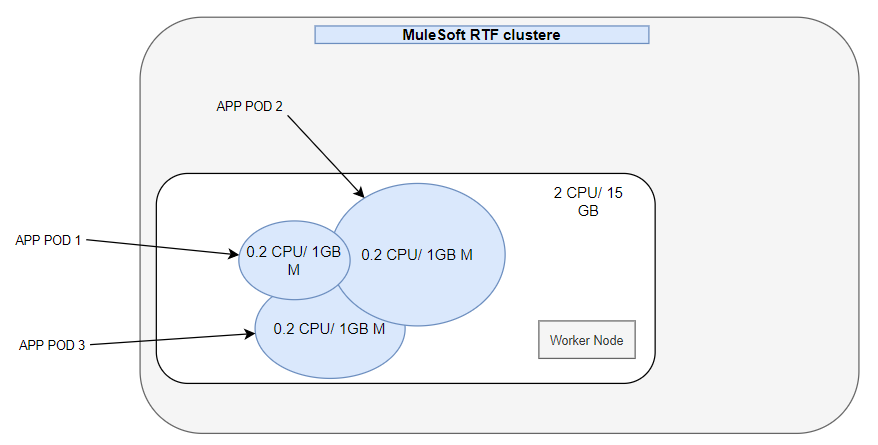
4. While defining the application deployment strategies, the resources sharing the concept need to be considered.
- As pods are created, they can share assigned resources to other pods within the worker. It is decided based on the probability of resources expected for individual pods. In the below picture, it is indicated that the assigned resources can be shared among pods.
Note: While defining or preparing strategy, it needs to be comprehensively evaluated. It is an extraordinary feature of Runtime Fabric, but any wrong calculation would harm application performance. Furthermore, it needs to be calculated/assessed with every point of requirement.
Sizing Reference
Application type |
Starting resource allocated |
Performance reference |
Proxy – security policies applied |
Reserved CPU: 0.1 core Limit CPU: 0.3 core Memory: 700mb-1 GB (translate to 350MB to 0.5GB Java Heap Size) |
Estimated start-up time: <5 mins Estimated max performance: <500 concurrent user or < 6000 tps with 1kb payload |
Experience API – normal data transformation (one-to-one) |
Reserved CPU: 0.3 core Limit CPU: 0.5 core Memory: 1 GB (translate to 0.5GB Java Heap Size) |
Estimated start-up time: <3 mins Estimated max performance: <15 concurrent user or < 800 tps |
Experience API – heavy data transformation (complex) |
Reserved CPU: 0.5 core Limit CPU: 0.7 core Memory: 1.5 GB (translate to 0.75 GB Java Heap Size) |
Estimated start-up time: <2 mins Estimated max performance: <25 concurrent user or < 800 tps |
Process/System API – normal data/protocol translation (< 10 fields data translation) |
Reserved CPU: 0.3 core Limit CPU: 0.5 core Memory: 1.5 GB (translate to 0.75GB Java Heap Size) |
Estimated start-up time: <3 mins Estimated max performance: <15 concurrent user or < 800 tps |
Process/System API – heavy data/protocol translation (< 50 fields data translation) |
Reserved CPU: 0.5 core Limit CPU: 0.7 core Memory: 2 GB (translate to 1 GB Java Heap Size) |
Estimated start-up time: <2 mins Estimated max performance: <25 concurrent user or < 800 tps |
Process/System API – Asynchronous (JMS style) |
Reserved CPU: 0.3 core Limit CPU: 0.5 core Memory: 1.5 GB (translate to 0.75GB Java Heap Size) |
Estimated start-up time: <3 mins Estimated max performance: <1000 ingress rate MPS(/source queue) or < 3000 MPS (successful transfer to destination queue)
|
Process/System API - Batch |
Reserved CPU: 0.3 core Limit CPU: 0.5 core Memory: 2 GB (translate to 1 GB Java Heap Size) |
Estimated start-up time: <3 mins Estimated max performance: <5mb file size (source file of batch loading) or <800 tps |
Opinions expressed by DZone contributors are their own.
Comments