

API Security — 3rd-Party Key Manager Support In WSO2 API Manager 3.2.0
API security is one of the most discussed topics in the industry today. Let's explore how we can integrate external Key Managers with WSO2 API Manager.
Join the DZone community and get the full member experience.
Join For FreeAPI Security is one of the most discussed topics in the industry today, and it is one of the top/ critical items in the API design guidelines checklist. APIs allow other users/ applications to access your internal application/ data, and if we don’t have proper security in place, we will be inviting a lot of unwanted risks/ threats into your perimeter.
It’s sometimes very difficult and not practical to completely offload the security to the backend APIs and this where an API Management platform comes in handy. Almost all the API Management platforms provide first-class API Security capabilities and WSO2 API Manager provides API Secuuroty using an inbuilt Key Manager component which is a trimmed-down version of WSO2 Identity Server.
WSO2 API Manager’s inbuilt Key Manager component is responsible for providing required API Security features including authentication, authorization, etc. and as you can see in the below diagram, it works closely with the Gateway component.
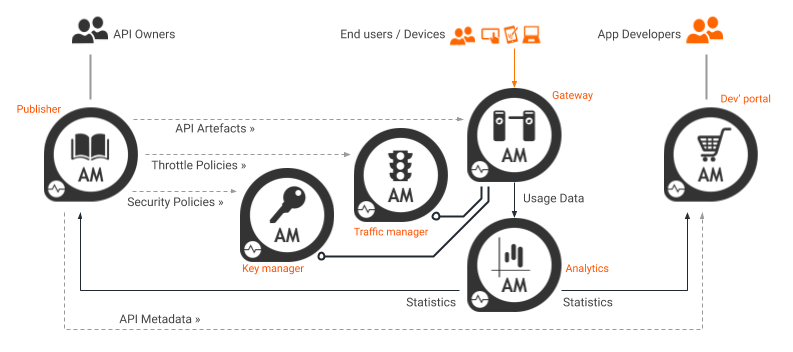
While you can leverage WSO2 API Manager’s inbuilt Key Manager component to provide API Security, sometimes it is required to integrate with other authorization servers such as Ping, Auth0, Okta, Keycloak, etc. depending on the customer’s choice. While some customers prefer to use the inbuilt Key Manager, others may prefer to use one of their existing authorization servers since they are already confident with it. In other words, while they leverage Publisher, Dev Portal, Gateway, Traffic Manager, and Analytics components from the WSO2 API Manager platform, for Key Manager, they may want to leverage something else. This is where we need to make the API Manager is extensible and it’s pluggable architecture allows us to integrate 3rd-party Key Managers to provide authentication and authorization to your APIs.
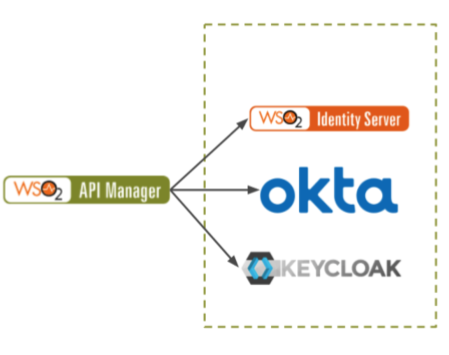
As you can see in the above diagram, the WSO2 API Manager provides an admin functionality for admins/ tenant admins to configure different authorization servers as Key Managers. This brings the capability of supporting multiple Key Managers for a given API.
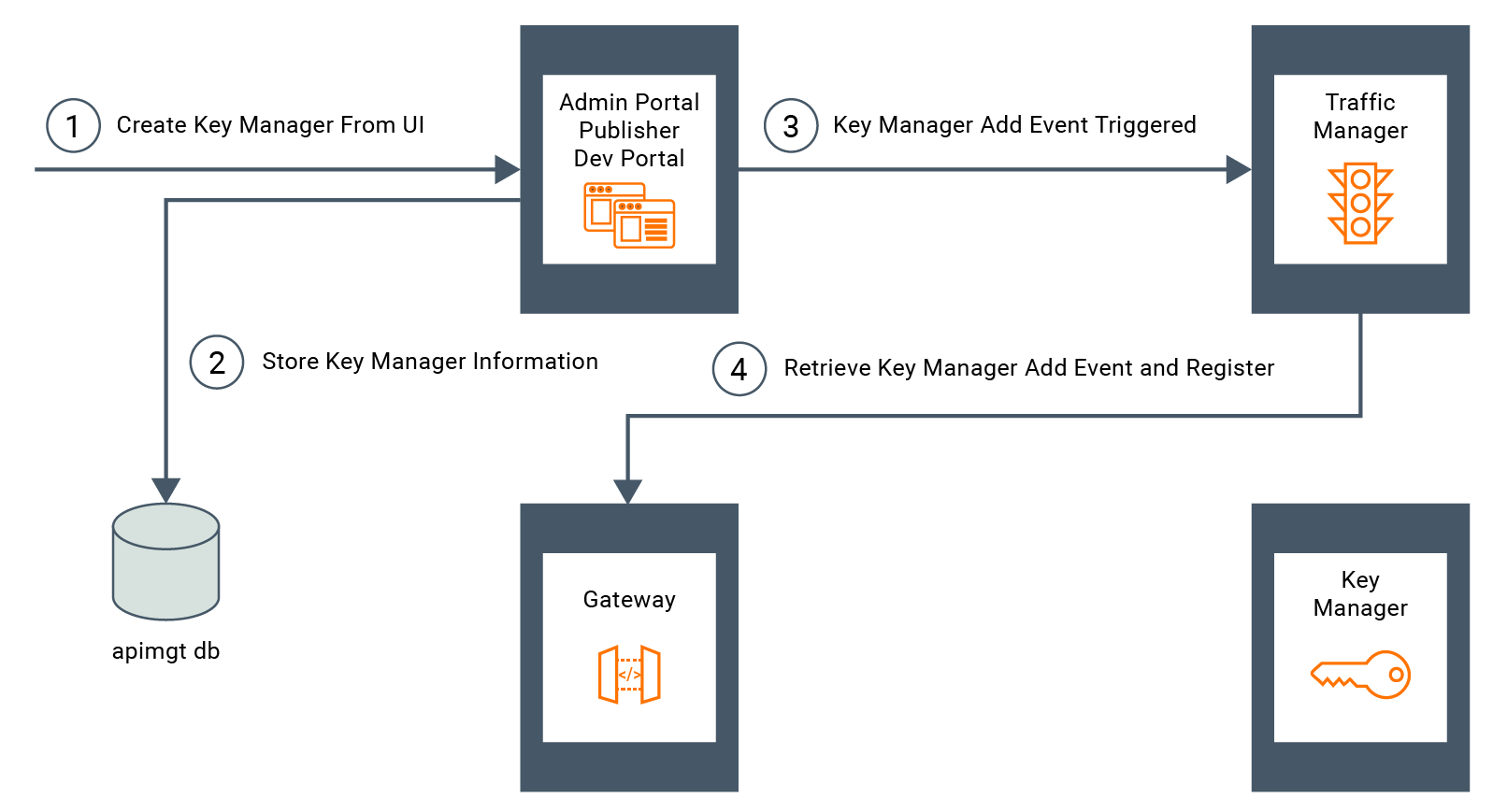
When a 3rd-party Key Manager is added via the Admin Portal, it is persisted in the API Manager Database. At the same time, an event is triggered by the Traffic Manager. As a result, the Gateway will receive the event and register the new Key Manager in the Gateway. Therefore, the Key Manager will be registered as another Key Manager and moving forward, it will be available for the APIs that are created within the tenant.
Also, when generating keys for a selected Key Manager, it checks if the Key Manager configurations have the consumer application creation enabled. If it is enabled, it generates the consumer Application upon validation of the required parameters.
WSO2 API Manager 3.2.0 supports enabling 3rd-party Key Managers very easily using the Admin Portal and we no longer have to modify any configuration files manually. By default it supports the below authorization server out-of-the-box:
- Okta
- Keycloak
- Auth0
- PingFederate
More authorizations servers will be added to the platform with future product updates.
Below is a short screencast I have created to demonstrate how to configure Okta as a 3rd-party Key Manager and how to use it to authenticate API calls.
For more details on 3rd-party Key Manager support in WSO2 API Manager 3.2.0 release, please check:
Published at DZone with permission of Joy Rathnayake. See the original article here.
Opinions expressed by DZone contributors are their own.
Comments