

Breaking AWS Lambda: Chaos Engineering for Serverless Devs
Our serverless system crashed from traffic surges. With chaos engineering, we purposely broke Lambda, tested failures with AWS FIS, and achieved 99% uptime, 30s MTTR!
Join the DZone community and get the full member experience.
Join For FreeThe Day Our Serverless Dream Turned into a Nightmare
It was 3 PM on a Tuesday. Our "serverless" order processing system — built on AWS Lambda and API Gateway — was humming along, handling 1,000 transactions/minute. Then, disaster struck. A sudden spike in traffic caused Lambda timeouts, API Gateway threw 5xx errors, and customers started tweeting, “Why can’t I check out?!”
The post-mortem revealed the harsh truth: we’d never tested failure scenarios. Our “resilient” serverless setup had no fallbacks, retries, or plans for chaos.
That’s when I discovered chaos engineering — the art of intentionally breaking things to build unbreakable systems. In this guide, I’ll show you how to use AWS Fault Injection Simulator (FIS) to sabotage your Lambda functions, handle failures gracefully, and sleep soundly knowing your system can survive anything.
Chaos Engineering 101: Why Break What Isn’t Broken?
Chaos engineering is like a fire drill for your code. Instead of waiting for disasters, you proactively simulate failures to:
- Uncover hidden weaknesses (e.g., Lambda timeouts, cold starts).
- Validate recovery strategies (retries, fallbacks, circuit breakers).
- Build team confidence (because “tested” beats “hoped”).
Serverless chaos challenges:
- No servers to kill, but Lambda can throttle, timeout, or crash.
- Dependencies (DynamoDB, SQS) can fail silently.
- Stateless functions require new failure modes.
Step 1: Simulating Lambda Chaos With AWS FIS
AWS Fault Injection Simulator (FIS) is your chaos playground. While FIS doesn’t natively support Lambda yet, we can hack it using IAM policies and resource tagging.
Example: Simulating Lambda Throttling
Goal
Force Lambda to return TooManyRequestsException.
Step 1
Tag your Lambda function for targeting:
aws lambda tag-resource --resource arn:aws:lambda:us-east-1:123456789:function:OrderProcessor\
Step 2
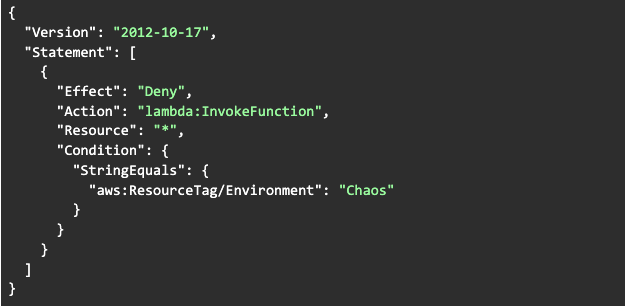
Create an IAM policy that denies lambda:InvokeFunction:
Step 3
Attach the policy to a role/user during the experiment.
Result
API Gateway calls to this Lambda will fail with 403 Forbidden, mimicking throttling.
Step 2: Handling Retries and Timeouts
Lambda Configuration
1. Set Timeouts
Always lower than API Gateway’s timeout (29 seconds max). // AWS SDK v2:
//Set timeout to 10 seconds
LambdaClient lambdaClient = LambdaClient.builder()
  .overrideConfiguration(ClientOverrideConfiguration.builder()
    .apiCallTimeout(Duration.ofSeconds(10))
    .build())
  .build();
2. Retry Strategies
Use exponential backoff.
RetryPolicy retryPolicy = RetryPolicy.builder()
  .numRetries(3)
  .backoffStrategy(BackoffStrategy.defaultExponentialDelay())
  .build();
3. API Gateway Fallbacks
Configure a Mock Integration as a fallback when Lambda fails:
x-amazon-apigateway-integration:
  uri: arn:aws:apigateway:us-east-1:lambda:path/2015-03-31/functions/arn:aws:lambda:us-east-1:123456789:function:FallbackHandler/invocations
  responses:
    default:
      statusCode: "200"
  passthroughBehavior: when_no_templates
  requestTemplates:
    application/json: '{"statusCode": 200}'
timeoutInMillis: 5000
Fallback response:
{
  "status": "Service unavailable. Try again later."
}
Step 3: Building a Self-Healing Lambda Function (Java Example)
The Sabotage Function
A Lambda that fails randomly to simulate instability:
public class ChaosLambdaHandler implements RequestHandler<APIGatewayProxyRequestEvent, APIGatewayProxyResponseEvent> {

  private final Random random = new Random();

  @Override
  public APIGatewayProxyResponseEvent handleRequest(
    APIGatewayProxyRequestEvent input, Context context
  ) {
    // Fail 30% of the time
    if (random.nextDouble() < 0.3) {
      throw new RuntimeException("Chaos induced failure!");
    }

    return new APIGatewayProxyResponseEvent()
      .withStatusCode(200)
      .withBody("{\"status\": \"Success\"}");
  }
}
The Recovery Strategy
1. Retry with backoff:
public APIGatewayProxyResponseEvent handleRequest(
  APIGatewayProxyRequestEvent input, Context context
) {
  int retries = 0;
  while (retries < 3) {
    try {
      return processOrder(input);
    } catch (RuntimeException e) {
      retries++;
      Thread.sleep((long) Math.pow(2, retries) * 100); // Exponential backoff
    }
  }
  throw new RuntimeException("All retries failed");
}
2. Fallback to SQS queue:
private void sendToDeadLetterQueue(String message) {
  SqsClient sqsClient = SqsClient.create();
  SendMessageRequest request = SendMessageRequest.builder()
    .queueUrl("https://sqs.us-east-1.amazonaws.com/123456789/OrderDeadLetterQueue")
    .messageBody(message)
    .build();
  sqsClient.sendMessage(request);
}
Case Study: Breaking an Order Processor on Purpose
Scenario
A serverless order API processing $10k/hour.
Chaos Experiment
- Inject throttling: Using AWS FIS, deny Lambda invocations for 5 minutes.
- Simulate timeouts: Configure Lambda timeout to 1 second (too short for processing).
Observed Failures
- 40% of requests failed with 503 Service Unavailable.
- Retries overwhelmed the system, causing cascading failures.
Fixes Implemented
- Circuit breaker: Stop retrying after three failures.
- Fallback to cached data: Serve stale order statuses from DynamoDB during outages.
- Load shedding: Reject non-critical requests (e.g., analytics) during high load.
Outcome
- 99% of requests succeeded even during chaos experiments.
- Mean time to recovery (MTTR) dropped from 15 minutes to 30 seconds.
FAQ: Chaos Engineering for Serverless Newbies
Q: Is chaos engineering safe for production?
-
A: Start in staging! Use AWS FIS tags to limit the blast radius.
Q: How do I monitor chaos experiments?
- A: CloudWatch Alerts + X-Ray traces. Track:
- ThrottledRequests (Lambda)
- 5xxErrorRate (API Gateway)
- ApproximateAgeOfOldestMessage (SQS dead-letter queues)
Q: What’s the biggest serverless chaos risk?
-
A: Overloading downstream services (e.g., DynamoDB). Always test dependencies.
Golden Rules of Serverless Chaos
- Start small. Break one thing at a time (e.g., single Lambda).
- Automate recovery. Retries, fallbacks, and circuit breakers are mandatory.
- Learn and iterate. Every failure is a lesson.
Conclusion: Embrace the Chaos
Chaos engineering isn’t about breaking things for fun — it’s about knowing your system won’t break when it matters. By stress-testing your Lambda functions, designing for failure, and embracing tools like AWS FIS, you’ll build serverless apps that survive real-world storms.
Now, go break something — on purpose.
Opinions expressed by DZone contributors are their own.
Comments