

Backing Up Azure Infrastructure with Python and Aztfexport
We treat code as a first-class citizen, but our actual cloud state often drifts. Here’s how to build a Python-based “Time Machine” for Azure.
In an ideal DevOps world, every cloud resource is spawned from Terraform or Bicep. In the real world, we deal with “ClickOps.” An engineer manually tweaks a Network Security Group (NSG) to fix a production outage, or a legacy resource group exists with no code definition at all.
When a disaster strikes — such as the accidental deletion of a resource group — you can’t just “re-run the pipeline” if the pipeline doesn’t match reality.
To solve this, we need a Configuration Backup Engine. While Azure creates backups for data, it does not natively back up infrastructure state.
This article outlines a solution using Python to orchestrate aztfexport (Microsoft’s Azure Export for Terraform). By wrapping this tool in a Python script, we can dynamically discover resources, reverse-engineer them into Terraform code, and ship them to immutable storage.
The Problem: The “State Gap”
Infrastructure as Code (IaC) is usually uni-directional:
Code → Cloud
The problem arises when the cloud changes independently of the code.
- Drift: The live environment diverges from the repository
- Legacy: Resources created years ago have no IaC definition
- Audit: You need a snapshot of exactly how the firewall looked last Tuesday
What we need is a workflow that goes:
Cloud → Code → Backup
The Solution: A Python Automation Controller
Instead of relying on rigid CI/CD YAML files, we use Python. This allows us to dynamically loop through subscriptions, handle authentication errors gracefully, and interface directly with Azure Blob Storage for archiving.
The Architecture
The workflow runs as a scheduled task (a CRON job or CI stage).
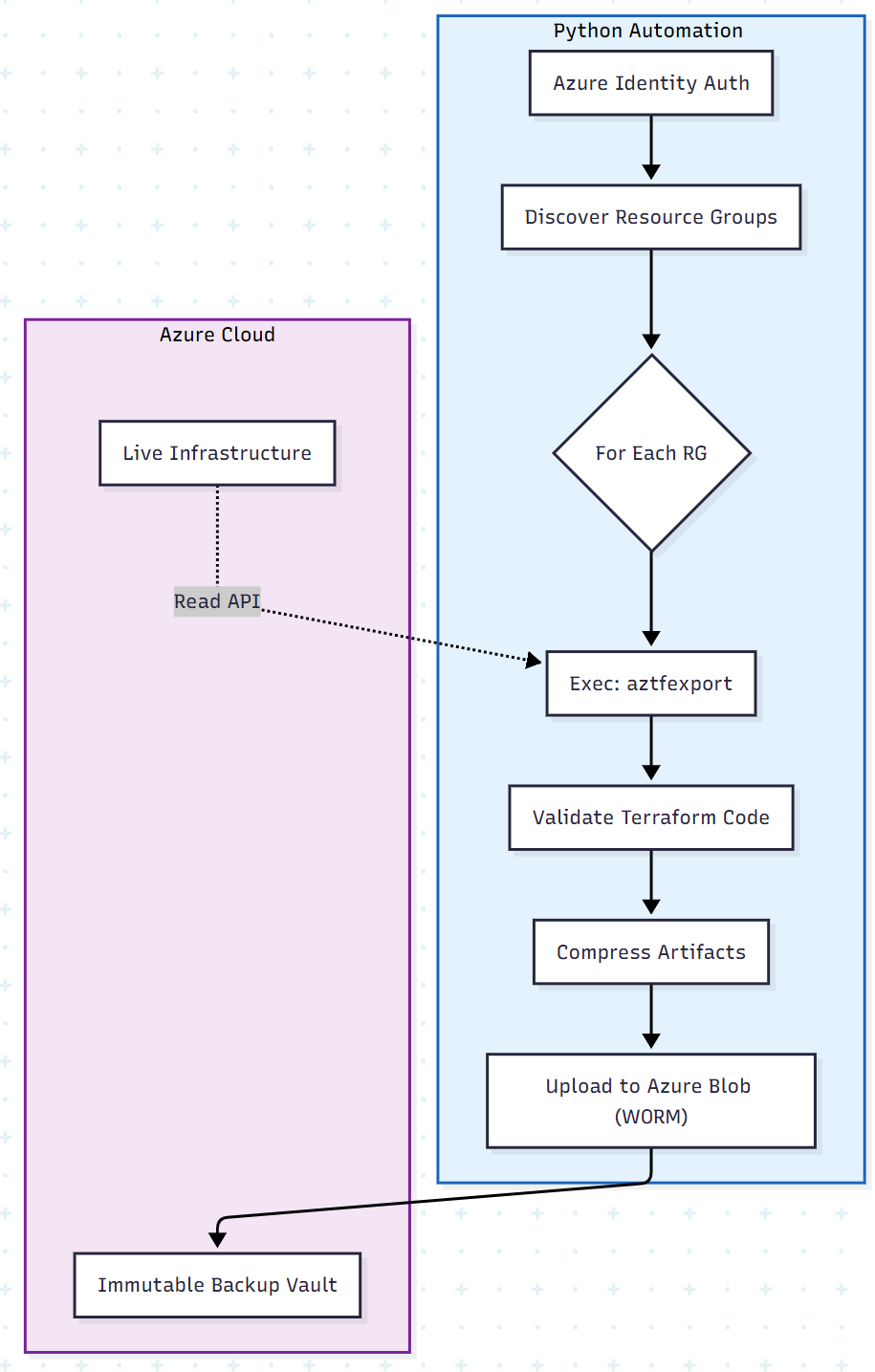
The Implementation: From Cloud to ZIP
We use the subprocess module to control the aztfexport CLI tool and the Azure SDK for Python to handle storage.
Prerequisites
aztfexportinstalled on the runnerazure-identityandazure-storage-bloblibraries
backup_infra.py
import os
import subprocess
import shutil
import datetime
from azure.identity import DefaultAzureCredential
from azure.storage.blob import BlobServiceClient

# Configuration
SUBSCRIPTION_ID = os.getenv("AZURE_SUBSCRIPTION_ID")
TARGET_RG = "mission-critical-rg"
BACKUP_CONTAINER = "infra-backups"
STORAGE_ACCOUNT_URL = "https://mybackupvault.blob.core.windows.net"

def run_export(resource_group):
    """
    Runs aztfexport to reverse-engineer the Azure Resource Group
    into Terraform configuration files.
    """
    timestamp = datetime.datetime.now().strftime("%Y%m%d-%H%M%S")
    output_dir = f"./exports/{resource_group}/{timestamp}"

    print(f" Starting export for {resource_group}...")

    # Construct the command
    # --non-interactive: Auto-accepts defaults
    # --hcl-only: Generates .tf files (you can omit this to get state file as well)
    cmd = [
        "aztfexport",
        "resource-group",
        resource_group,
        "--non-interactive",
        "--output-dir", output_dir
    ]

    try:
        # Run the export tool
        result = subprocess.run(
            cmd,
            check=True,
            capture_output=True,
            text=True
        )
        print(f" Export successful for {resource_group}")
        return output_dir
    except subprocess.CalledProcessError as e:
        print(f" Export failed: {e.stderr}")
        return None

def archive_and_upload(source_dir, resource_group):
    """
    Compresses the Terraform files and uploads to Azure Blob Storage
    """
    # 1. Create Zip Archive
    zip_name = f"{resource_group}-backup"
    shutil.make_archive(zip_name, 'zip', source_dir)
    full_zip_path = f"{zip_name}.zip"

    # 2. Upload to Blob Storage
    print(f" Uploading {full_zip_path} to immutable storage...")

    credential = DefaultAzureCredential()
    blob_service_client = BlobServiceClient(account_url=STORAGE_ACCOUNT_URL, credential=credential)
    container_client = blob_service_client.get_container_client(container=BACKUP_CONTAINER)

    with open(full_zip_path, "rb") as data:
        container_client.upload_blob(name=full_zip_path, data=data, overwrite=True)

    print(f" Backup secured: {full_zip_path}")

    # Cleanup local files
    os.remove(full_zip_path)
    shutil.rmtree(source_dir)

if __name__ == "__main__":
    # Orchestration Logic
    export_path = run_export(TARGET_RG)
    if export_path:
        archive_and_upload(export_path, TARGET_RG)
Why Python Over Bash or YAML?
- Error handling: If
aztfexportfails partially (for example, a locked resource), Python can catch the specific error code, log it, and decide whether to retry or skip, rather than crashing the whole pipeline. - Dynamic discovery: You can easily add a function to query Azure Resource Graph (az graph query) to list all resource groups tagged
Backup=True) and iterate through them. YAML pipelines struggle with this level of dynamic looping. - SDK integration: Direct integration with Azure Key Vault and Blob Storage is more secure and robust via the Python SDK than using CLI commands in a script.
The Restore Strategy: The “Review and Apply” Gate
Automating backups is useless if you can’t restore them. Because the output is standard Terraform code, restoration follows familiar IaC practices.
When a disaster occurs (for example, a subnet is deleted):
- Fetch: Download the latest ZIP from Blob Storage
- Review: Inspect the
.tffiles —aztfexportgenerates a mapping file that connects the code to the resource IDs - Apply: Run
terraform apply. Terraform will detect that the resource ID is missing in the cloud and recreate it according to the configuration defined in the backup
Conclusion
Infrastructure should be treated with the same data-protection rigor as databases. By implementing a Reverse-IaC pattern using Python and aztfexport, you create a self-documenting, self-backing-up environment.
This approach transforms the “black box” of legacy Azure resources into transparent, versioned code — providing both a safety net for disaster recovery and a foundation for future modernization.
Opinions expressed by DZone contributors are their own.