

Blueprint for Agentic AI: Azure AI Foundry, AutoGen, and Beyond
Azure AI Foundry and AutoGen enable scalable, collaborative AI agents that automate complex tasks with minimal human effort.
Join the DZone community and get the full member experience.
Join For FreeIn 2025, AI isn’t just about individual models doing one thing at a time, but it’s about intelligent agents working together like a well-coordinated team. Picture this: a group of AI systems, each with its own specialty, teaming up to solve complex problems in real time. Sounds futuristic? It’s already happening — thanks to multi-agent systems.
Two tools that are making this possible in a big way are Azure AI Foundry and AutoGen.
In this post, we’ll dive into how you can bring these two powerful platforms together — using Azure’s scalable infrastructure and AutoGen’s agent collaboration capabilities — to create smarter, more connected, and more efficient AI workflows.
The Challenge: From Isolated Models to Intelligent Teams
Traditional AI development often involves training and deploying individual models for specific tasks. While effective, this approach can lead to:
- Siloed intelligence: Models operate independently and do not share knowledge.
- Manual orchestration: Developers must connect models manually, consuming time and increasing complexity.
- Limited autonomy: Systems struggle to adapt to new, unforeseen situations.
Multi-agent systems introduce a powerful new paradigm where distinct AI agents, which have specialized roles, communicate and collaborate toward a shared goal. This shift unlocks new levels of autonomy, adaptability, and problem-solving potential.
Meet the Architects: Azure AI Foundry and AutoGen
Before we dive into the "how," let's understand our key players:
1. Azure AI Foundry: Your Enterprise AI Blueprint
Azure AI Foundry is Microsoft's new platform designed to help organizations build, deploy, and manage custom AI models at scale. Think of it as your enterprise-grade foundation for AI. It provides:
- Scalable infrastructure: Compute, storage, and networking tailored for AI workloads.
- Robust MLOps: Tools for model training, versioning, deployment, and monitoring.
- Security and compliance: Enterprise-level features to meet stringent requirements.
- Model catalog: A centralized repository for managing and discovering models, including foundation models.
Azure AI Foundry offers the stable, secure, and performant environment needed to host sophisticated AI solutions.
2. AutoGen: Empowering Conversational AI Agents
AutoGen, developed by Microsoft Research, is a framework that simplifies the orchestration, optimization, and automation of LLM-powered multi-agent conversations. It allows you to:
- Define agents: Create agents with specific roles (e.g., "Software Engineer," "Data Analyst," "Product Manager").
- Enable communication: Agents can send messages, execute code, and perform actions in a conversational flow.
- Automate workflows: Design complex tasks that agents can collectively solve, reducing human intervention.
- Integrate tools: Agents can leverage external tools and APIs, expanding their capabilities.
AutoGen brings collaborative intelligence to your AI solutions.
The Synergy: Azure AI Foundry + AutoGen for Smarter Workflows
By combining Azure AI Foundry and AutoGen, you get the best of both worlds:
- Scalable and secure agent deployment: Deploy your AutoGen-powered multi-agent systems on Azure AI Foundry's robust infrastructure, ensuring high availability and enterprise-grade security.
- Centralized model management: Leverage Azure AI Foundry's model catalog to manage the LLMs that power your AutoGen agents.
- Streamlined MLOps for agents: Apply MLOps practices to your agent development, from versioning agent configurations to monitoring their performance in production.
- Accelerated development: Focus on designing intelligent agent interactions, knowing that the underlying infrastructure is handled by Azure AI Foundry.
Building Your First Collaborative AI Workflow: A Simple Example
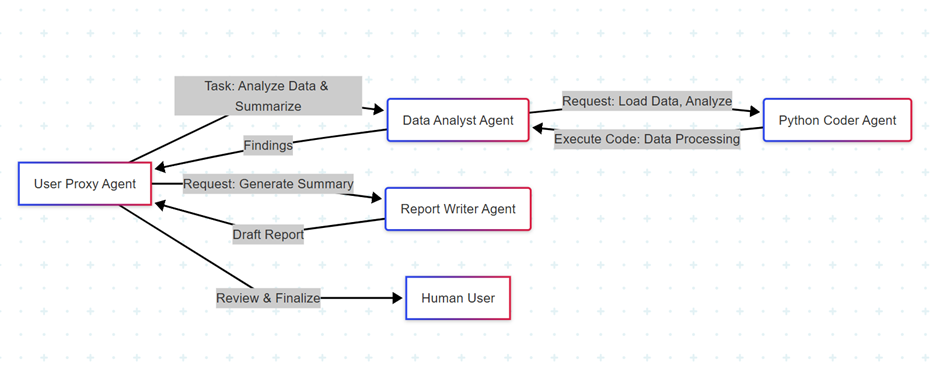
Let's walk through a conceptual example: an AI team designed to analyze a dataset and generate a summary report.
Scenario: We want an AI workflow that can:
- Read a CSV file.
- Perform basic data analysis (e.g., descriptive statistics, identify trends).
- Generate a concise, insightful summary.
This is a perfect task for collaborative agents!
Workflow Overview
Code Snippet (Conceptual)
First, ensure you have the necessary libraries installed: pip install autogen openai azure-ai-ml.
(Note: Replace your-api-key and your-endpoint with your actual Azure OpenAI Service credentials for the LLMs that power your agents.)
# Assuming you've configured Azure AI Foundry with Azure OpenAI Service

# for your LLM endpoints.

# This setup would typically be handled via environment variables or a configuration file.

 import autogen

from autogen import UserProxyAgent, AssistantAgent

import os

 # --- Configuration for AutoGen with Azure OpenAI Service ---

# These values would come from your Azure AI Foundry deployment or environment variables

config_list = [

    {

         "model": "your-gpt4-deployment-name", # e.g., "gpt-4" or "gpt-4-32k"

         "api_key": os.environ.get("AZURE_OPENAI_API_KEY"),

         "base_url": os.environ.get("AZURE_OPENAI_ENDPOINT"),

         "api_type": "azure",

         "api_version": "2024-02-15-preview", # Check latest supported version

    },

    # You can add more models/endpoints here for different agents if needed

]

 # --- 1. Define the Agents ---

 # User Proxy Agent: Acts as the human user, can execute code (if enabled)

# and receives messages from other agents.

user_proxy = UserProxyAgent(

     name="Admin",

     system_message="A human administrator who initiates tasks and reviews reports. Can execute Python code.",

     llm_config={"config_list": config_list}, # This agent can also use LLM for conversation

     code_execution_config={

         "work_dir": "coding", # Directory for code execution

         "use_docker": False # Set to True for sandboxed execution (recommended for production)

    },

     human_input_mode="ALWAYS", # Always ask for human input for critical steps

     is_termination_msg=lambda x: "TERMINATE" in x.get("content", "").upper(),

)

 # Data Analyst Agent: Specializes in data interpretation and analysis.

data_analyst = AssistantAgent(

     name="Data_Analyst",

    system_message="You are a meticulous data analyst. Your task is to analyze datasets, extract key insights, and present findings clearly. You can ask the Coder for help with programming tasks.",

     llm_config={"config_list": config_list},

)


# Python Coder Agent: Specializes in writing and executing Python code.

python_coder = AssistantAgent(

     name="Python_Coder",

     system_message="You are a skilled Python programmer. You write, execute, and debug Python code to assist with data manipulation and analysis tasks. Provide clean and executable code.",

     llm_config={"config_list": config_list},

)


# Report Writer Agent: Specializes in summarizing information and generating reports.

report_writer = AssistantAgent(

     name="Report_Writer",

     system_message="You are a concise and professional report writer. Your goal is to synthesize information from the data analyst into a clear, summary report for the Admin.",

     llm_config={"config_list": config_list},

)

 # --- 2. Initiate the Multi-Agent Conversation ---


# Example task: Analyze a simulated sales data CSV

# In a real scenario, this CSV would be pre-loaded or retrieved from a data source.

initial_task = """

Analyze the following hypothetical sales data CSV (assume it's available as 'sales_data.csv'):

 'date,product,region,sales\n2023-01-01,A,East,100\n2023-01-02,B,West,150\n2023-01-03,A,East,120\n2023-01-04,C,North,200\n2023-01-05,B,West,130\n2023-01-06,A,South,90'


Perform the following:

1. Load the data into a pandas DataFrame.

2. Calculate total sales per product and per region.

3. Identify the best-selling product and region.

4. Summarize your findings in a clear, concise report, suitable for a business stakeholder.

"""

 # Create a dummy CSV for the coder agent to work with

with open("coding/sales_data.csv", "w") as f:

     f.write("date,product,region,sales\n2023-01-01,A,East,100\n2023-01-02,B,West,150\n2023-01-03,A,East,120\n2023-01-04,C,North,200\n2023-01-05,B,West,130\n2023-01-06,A,South,90")


# --- 3. Orchestrate the Group Chat ---

groupchat = autogen.GroupChat(

     agents=[user_proxy, data_analyst, python_coder, report_writer],

    messages=[],

     max_round=15, # Limit rounds to prevent infinite loops

     speaker_selection_method="auto" # AutoGen decides who speaks next

)


manager = autogen.GroupChatManager(groupchat=groupchat, llm_config={"config_list": config_list})


print("Starting agent conversation...")

user_proxy.initiate_chat(

    manager,

     message=initial_task,

)

print("\nAgent conversation finished.")


# The final report will be in the conversation history of the user_proxy agent.

# You would then extract it from `user_proxy.chat_messages`

# for further processing or storage in Azure AI Foundry.
Deployment on Azure AI Foundry (Conceptual Flow)
Once your AutoGen workflow is refined, you'd typically:
- Containerize your agents: Package your AutoGen agents and their dependencies into a Docker image.
- Define a model in Azure AI Foundry: Register your LLM endpoint (Azure OpenAI Service) as a model in Azure AI Foundry's model catalog.
- Create an endpoint/deployment: Deploy your containerized AutoGen application as an online endpoint (e.g., Azure Kubernetes Service or Azure Container Instances) within Azure AI Foundry. This exposes an API that you can call to trigger your multi-agent workflow.
- Monitor and manage: Use Azure AI Foundry's MLOps capabilities to monitor the performance of your deployed agents, track costs, and update agent configurations or underlying LLMs as needed.
Here is the workflow:

Benefits of this Integrated Approach
- Accelerated problem-solving: Agents quickly collaborate to solve complex tasks.
- Reduced human effort: Automate multi-step processes that previously required manual orchestration.
- Enhanced adaptability: Agents can be designed to learn and adjust their strategies based on outcomes.
- Scalability and reliability: Leverage Azure's enterprise-grade infrastructure for your AI solutions.
- Improved governance: Centralized management of models and deployments within Azure AI Foundry.
Conclusion
The future of AI is collaborative. Bringing together the MLOps capabilities of Azure AI Foundry with the intelligent multi-agent orchestration of AutoGen can let you unlock powerful, autonomous AI workflows that drive efficiency and innovation.
Opinions expressed by DZone contributors are their own.
Comments