

Building Cost-Effective Internet Scale Applications
How cloud developers can build highly scalable applications with zero initial cost of running the infrastructure and scale them to millions of user requests.
Join the DZone community and get the full member experience.
Join For FreeAs developers, it is important that when we build an application, we design keeping both its targeted scale and the cost of running it in mind. If we are building an internet-scale application that could start from zero traffic on day one and gradually achieve a scale of millions of daily users, we have to choose a design and set of tools that can scale in a similar fashion. This is easier said than done. Developers usually over-provision in anticipation of higher traffic and end up paying larger costs than they could have managed without. Following an appropriate design and the right choice of technologies can make a huge difference.
In this article we will take a look at various serverless technologies offered by cloud providers and focus on AWS as a reference to discuss how we can build a fairly common kind of application which involve front end, backend and a database that could be blazingly fast, while if designed well could cost you zero in your monthly bill to start with and eventually scale as your user base scales.
In this article, we will use a customer rating and review system for an e-commerce application as an example, which is easy to relate to. We will break this application down to its individual components and then start its design, which is simple but scalable to millions of daily users. When users increase, the demands and features of applications also increase. We will explore how we could keep our application flexible enough to be extended with more features and capabilities while not increasing its running cost, when the user base is low to negligible. The blueprint we discuss in the article should be easily adoptable to other use cases that readers might have in mind.
Designing the Application
Let's identify individual components and later discuss their tradeoffs. In the case of our ratings and review system, we can break the application into a front end, which would display to users the rating of an item in a 1 to 5 star rating, along with the text, if present, of the customer’s review of an item. There could be hundreds of such reviews per item. There could also be an aggregated star rating based on all other star ratings for the item.. We also have to give users the ability to add reviews and rate items they have bought.
Breaking this down further, when reviews are displayed, you want multiple reviews to show up quickly when customers are browsing items on the e-commerce website. This means we need very fast retrieval of multiple reviews and ratings of an item. Writing of the reviews may not be that critical in terms of its latency requirements. So, now we know that we have to optimize for reads rather than writes for both frontend and backend.
On the backend, we will need to expose the following API:
- API to allow users to add customer reviews and ratings to an item
- API to retrieve a single review given by a user
- API to retrieve all reviews of an item
- API to retrieve all reviews by a user
- API to retrieve a calculated rating for a signal item based on all its ratings
Of all these APIs, the most called APIs will be those needed when users browse items, which will be the aggregated review rating. The second most-called API will be to retrieve all reviews of an item, which will be called when users click on an item and try to find details.
Moving to the storage needs of this service, we quickly realize that this system does not have many complex relationships, and its access patterns are quite straightforward and known. A NoSQL document-oriented database will work well for such an application.
Now that we have a good understanding of the application, let’s explore the design of the service.
We could use a cloud delivery network (AWS Cloudfront) to be able to display the UI for the customer review and cache data from the two most frequently used APIs that we identified above. This will help alleviate a large load on the backend system when the user base increases, while also providing fast access to the front end to users, even though they may be geographically separated from where the service is deployed. Since AWS CloudFront is billed based on traffic, this works well for us.
On the backend compute layer, we could leverage AWS Lambda. Lambda allows you 1 million free requests per month and can scale to millions of daily users if needed, with minimal effort.
On the storage side, we can leverage AWS DynamoDB, which is a NoSQL database with millisecond retrieval latency.
Now, let’s look at the overall architecture and dive deeper into the individual components of this system.
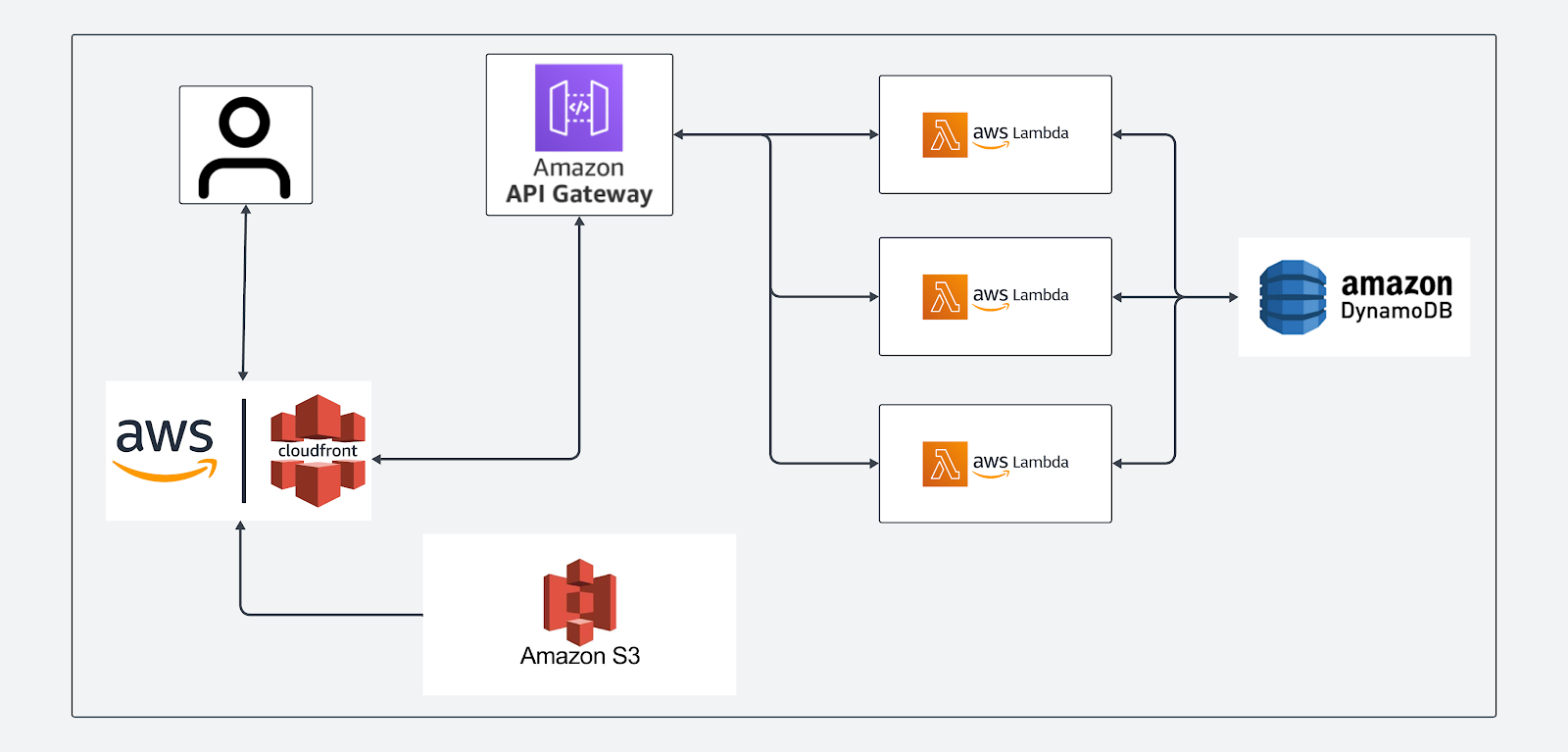
Now, let's look at each of these components in more detail. We will dig deeper into some of the components that we haven't discussed yet, like the API Gateway, and why having it will help us increase the performance even though it adds another layer or hop to reach Lambda compute.
Looking Into Individual Components
Now let's break down each service and understand the critical role it plays.
Amazon S3
This is where we keep the static content for the front-end user interface example — the HTML, CSS, and JavaScript files. This will not cost you any money as the amount of content is not enough, and the files are not accessed too often. This is because the S3 location is the permanent store for the files, but users access this content via another service, which is Cloudfront, the CDN from AWS. Let’s look at that next.
Amazon CloudFront
This is one of the most crucial and often misunderstood components for creating a low-latency and highly performant application. CloudFront is a Content Delivery Network (CDN) that serves as the unified entry point for all your application's traffic — both static content from S3 and dynamic API calls that interact with AWS’s API Gateway.
Here’s how this helps our application:
For Static Content
Suppose your application is deployed in the AWS us-east-1 region. A user who is geographically far from this location, for example, in India or the UK, will have a huge latency and thus not get a great user experience. This is where a CDN like CloudFront becomes helpful. CloudFront caches the S3 files at hundreds of "edge locations" worldwide. So if a user in London requests your site, they get the files from the London edge location, not from the main AWS region us-east-1. The result is a significant reduction in latency and a fast initial page load.
For Dynamic API Requests
Normally, a user in the UK making an API call would have their request traverse the public internet all the way to the API Gateway in us-east-1. The public internet is not optimized for reducing hops. When routing dynamic traffic via Cloudfront, we see a significant advantage, which is because of the following reasons:
- The user’s API request travels a short distance to the nearest edge location. In this case, a user in London in the UK will be serviced by an edge server located in the same city.
- Once the request reaches the edge server, the request hops onto Amazon's global backbone network, which is a highly optimized, low-latency network path across continents to its journey to us-east-1.
Amazon API Gateway
An API gateway helps us centralize many of the common cross-cutting concerns of any complex and distributed application. Most of the services offered by the API gateway can be replicated by your own servers and compute environments, but then your services add that extra complexity, bringing additional overhead to maintain them. Maintaining an internet-scale application with demanding users requires your engineering team's dedicated focus on user experience rather than on horizontal technical issues that have already been solved with in-built services across cloud providers. API Gateway is one such service. It manages all incoming API requests and directs them to the correct service. Here are some of the features they provide:
- Handling authentication and authorization: Secure API endpoints with API keys or user identities using services that leverage OAuth2 services like Congito, SSO, and SAML.
- Throttle requests: Protect your backend from abuse by setting rate limits.
- Validate and transform: Reject malformed requests before they hit your business logic.
AWS Lambda
AWS Lambda is a serverless compute service. Once code is uploaded, Lambda can invoke it on demand. There are no servers to patch, manage, or scale. Lambda lets developers invoke the service one million times for free every month.
For the customer review and rating service, we previously identified five essential APIs that would suffice the basic requirements of the service.
For our feedback system, we have three distinct functions: SubmitStarRatingLambda, SubmitReviewCommentLambda, and GetFeedbackLambda.
Here’s a conceptual snippet of what the SubmitStarRatingLambda might look like in Python:
import json

import boto3

dynamodb = boto3.resource('dynamodb')

table = dynamodb.Table('Feedback')

def lambda_handler(event, context):

   body = json.loads(event['body'])

   product_id = body.get('productId')

   rating = body.get('rating')

   if not all([product_id, rating]) or not 1 <= rating <= 5:

       return {'statusCode': 400, 'body': 'Invalid input'}

   table.put_item(

       Item={

           'productId': product_id,

           'submissionId': f'rating-{context.aws_request_id}',

           'rating': rating

       }

   )

   return {'statusCode': 200, 'body': 'Rating submitted successfully!'}
Amazon DynamoDB
DynamoDB is a fully managed NoSQL document-oriented database built for speed and scale. In our context, we can scale this fully managed database based on our read and write requirements. When the user base is low, we can keep On-Demand provisioning switched on. This would help the service scale based on the incoming traffic. Once the service has more users, the provisioning can be changed to provisioned capacity of read and write capacity units. This gives us the flexibility to leverage this service without having to pay when traffic is low and negligible.
DynamoDB excels at key-value lookups; it can deliver single-digit millisecond performance irrespective of the number of documents the service stores.
Cost Projection
Here are the estimated monthly costs at three stages of an application's life, assuming a mix of read and write requests.
|
AWS Service |
Stage 1: Initial Period (50K requests/mo) |
Stage 2: Growing App (500K requests/mo) |
Stage 3: Million-User Scale (5 million requests/mo) |
|---|---|---|---|
|
AWS Lambda |
$0.00 (within 1M free requests) |
$0.00 (within 1M free requests) |
$0.80 ((5M - 1M free) * $0.20/M) |
|
API Gateway |
$0.00 (within 1M free requests) |
$0.00 (within 1M free requests) |
$14.00 ((5M - 1M free) * $3.50/M) |
|
DynamoDB |
$0.00 (within free tier) |
$0.00 (within free tier) |
~$6.00 (for 2.5M writes & 2.5M reads) |
|
CloudFront |
$0.00 (within 1TB free data transfer) |
$0.00 (within 1TB free data transfer) |
$0.00 (likely still within free tier) |
|
S3 Storage |
$0.00 (within 5GB free tier) |
$0.00 (within 5GB free tier) |
$0.00 (likely still within free tier) |
|
Total Est. Monthly Cost |
$0.00 |
$0.00 |
~$20.80 |
Note: This is an estimate. Actual costs depend on your specific usage patterns, Lambda memory/duration, and data sizes.
As we observe from the table above, with the right design and planning, it is possible to run a service with negligible cost till they have matured to a high traffic application. The cost advantage is significantly higher when you keep in mind that with serverless cloud offerings, we also reduce the development effort for cross-cutting concerns that are available out of the box. We have not factored the gains in that domain at all here, and it may be a topic for another article in the future.
Exploring Offerings From Other Cloud Providers
Let’s try to explore similar cloud offerings by Google Cloud Platform (GCP) and Microsoft’s Azure cloud service for developers who may want to leverage similar gains from other cloud providers.
|
AWS |
Microsoft Azure |
Google Cloud Platform (GCP) |
Description |
|---|---|---|---|
|
Lambda |
Functions |
Functions |
Serverless, event-driven compute service |
|
CloudFront |
CDN |
CDN |
Content Delivery Network (CDN) for fast content delivery |
|
DynamoDB |
Cosmos DB |
Firestore |
Fully managed NoSQL database service |
|
Simple Storage Service (S3) |
Blob Storage |
Cloud Storage |
Scalable object storage in the cloud |
|
API Gateway |
API Management |
Apigee / Cloud Endpoints |
Service for creating, publishing, and managing APIs |
Conclusion
It is possible to build internet-scale applications while keeping your costs to a minimum or even zero, while you scale your user traffic gracefully. We looked at how this can also be done without any change in your application code or even the infrastructure. We looked at a simple review and rating service to demonstrate how it is important to identify key APIs and how they will be used by users. We then used this information to design our application based on the demands of the individual APIs.
In conclusion, if one is intentional about their design right from the drawing board, it is possible to build an application keeping scale and performance in mind without breaking the bank.
Opinions expressed by DZone contributors are their own.
Comments