

Low Code, High Impact: A Solution Architect’s Guide to Building Scalable Community Platforms With AI and Low-Code Tools
How to build a modular, low-code community platform using Webflow, Supabase, AI-powered media generation, and Google Cloud Run.
Join the DZone community and get the full member experience.
Join For FreeAs a solution architect, I’ve spent most of my career building massive enterprise systems — cloud-native platforms, scalable APIs, and robust infrastructure. So when I took it upon myself to build a digital hub for our Chhath Puja community in Southern California, it was a refreshing shift from the corporate grind.
This time, there was no project team, no IT budget, and no stakeholder meetings. Just me — and the need to launch something meaningful, quickly.
What began as a simple website turned into a feature-rich community platform, supporting events, donations, email broadcasts, admin automation, and even AI-enhanced media workflows. And I built it solo using the best of low-code tools.
I didn’t approach this as a weekend hobby. I applied every lesson I’ve learned in system design — from separation of concerns to lifecycle planning — because I knew that even a small platform deserves real architecture.
Even low-code solutions need sound architecture to be scalable, sustainable, and secure.
Choosing the Stack: Balancing Simplicity and Scalability
Rather than reaching for a custom build, I evaluated various low-code tools that aligned with the key pillars of modern architecture: modularity, extensibility, and automation readiness. I chose each component of the stack not only for its ease of use but also for its ability to integrate cleanly with the others.
Here’s how I assembled the platform:
- Webflow – for intuitive and responsive UI design, allowing me to focus on structure and content without getting bogged down by CSS
- Wized – as the glue layer between UI and data, enabling logic flows, user input handling, and API orchestration
- Supabase – powering authentication, database operations, file storage, and custom edge functions
- Google Cloud Run – to host and run stateless, containerized microservices, particularly the AI automation workflows for banners and teaser videos
- MailerSend and Resend – decoupling community-facing emails from transactional ones
- Google Sheets and Google Drive – acting as my admin console and content backend, providing no-code capabilities for scheduling, uploads, and lightweight dashboards
From a solution architecture perspective, this stack was modular, cost-effective, and aligned with the principle of layering — keeping responsibilities isolated but orchestrated.
System Architecture Overview: Modular, API-First, and Low-Code Ready
To tie it all together, here's a visual architecture diagram showing how each tool interacts across layers of the platform: 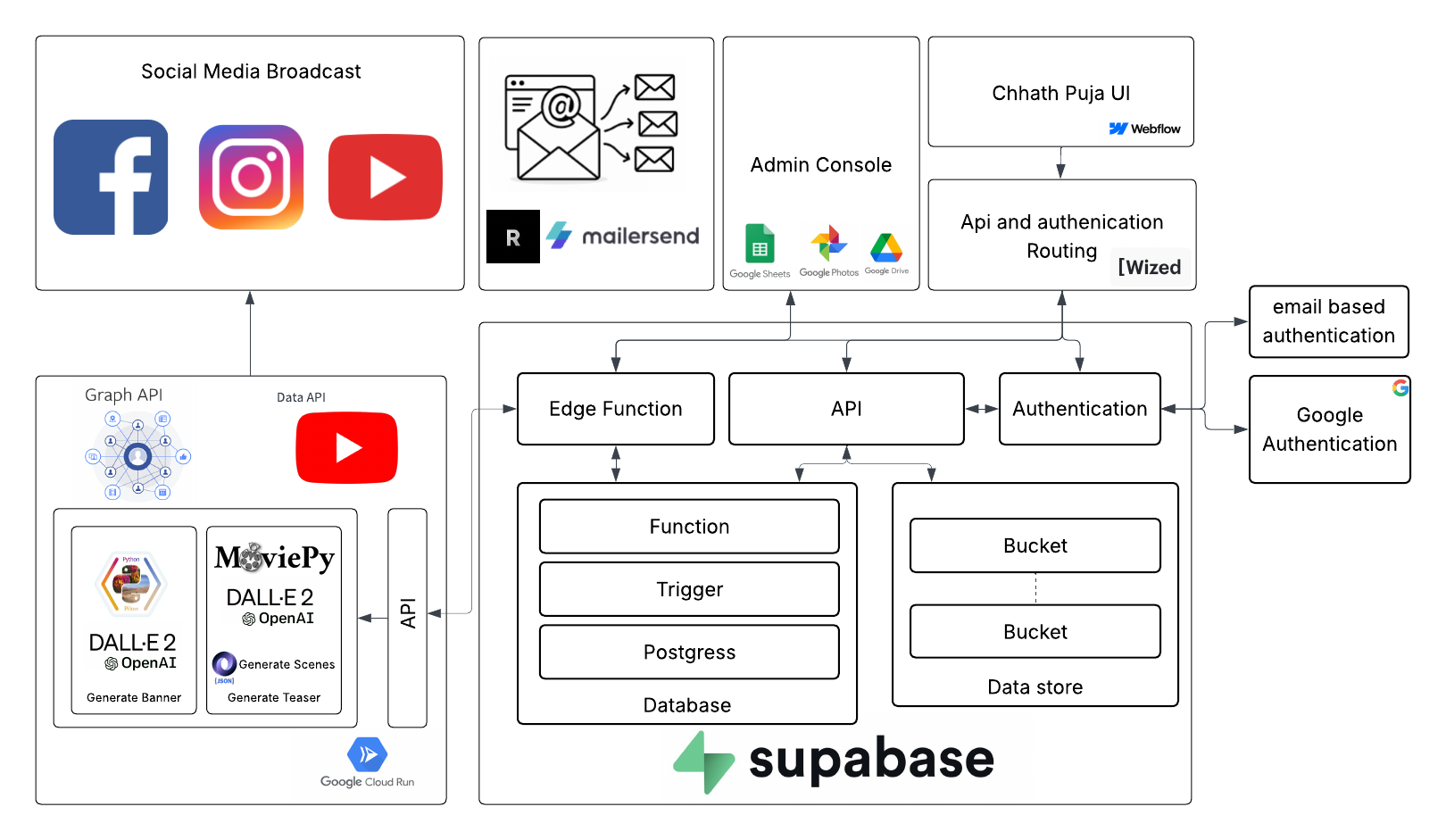
This diagram illustrates how event management, automation, authentication, AI-generated assets, and social distribution are orchestrated using a cost-effective, API-first, and modular architecture.
This setup reflects:
- Clear responsibility layers (UI, logic, storage, AI)
- Serverless-first principles using Supabase Edge Functions
- Scalable AI pipelines hosted via Google Cloud Run
- Minimal vendor lock-in
- Zero-cost or low-cost hosting and automation components
First Features: Translating Community Needs into Functionality
The initial feature set was simple, but each had real value for the community:
- User sign-up/login: Supabase Auth with Google and email/password options.
- Event management: Admins can create and publish events with dates, locations, and images.
- RSVP system: Members can register for events, either as volunteers or attendees.
- Dynamic event listings: Pulled from Supabase and rendered in Webflow via Wized.
- Photo uploads: Admins and volunteers can upload post-event pictures to a shared gallery.
Low code didn't mean “click and done” — I still had to handle things like JWT-based session handling, conditional rendering, and responsive layout fixes. But compared to custom development, I was up and running in a matter of days, not weeks.
Extending the Platform: Cost-Effective Engagement and Admin Automation
As the platform matured, I focused on two principles that every architect cares about:
- Cost optimization
- Operational maintainability
1. Email Broadcast and Authentication: Scalable and Purpose-Specific
This section was designed with both scale and specialization in mind. I strategically selected Resend and MailerSend to handle different types of email flows — each chosen for a specific role in the architecture.
Reasons to use Resend:
- Lightweight, developer-friendly API
- Perfect for authentication emails like signup confirmations, login verifications, and password resets
- Quick to set up and cost-effective for low to moderate volume
Reasons to use MailerSend:
- Designed for bulk and personalized messaging, like event reminders, RSVP confirmations, and community newsletters
- Built-in analytics and unsubscribe support
- Strong templating support for consistent branding
Both tools integrate seamlessly with Supabase Edge Functions, giving me flexibility and control over email flows without managing external servers.
Resend code snippet:
import { Resend } from 'resend';

const resend = new Resend(Deno.env.get("RESEND_API_KEY"));

await resend.emails.send({
  from: 'communitysite  <[email protected]>',
  to: email,
  subject: 'Welcome to <community site>!',
  html: `<p>Thanks for signing up!</p>`
});
MailerSend code snippet:
// File: supabase/functions/send_rsvp_email/index.ts
import { serve } from "https://deno.land/std/http/server.ts";
import { createClient } from "https://esm.sh/@supabase/supabase-js";

serve(async (req) => {
  const { email, event_name, event_date } = await req.json();

  const API_KEY = Deno.env.get("MAILERSEND_API_TOKEN");
  const DOMAIN = "communitysite.org";

  const payload = {
    from: { email: `noreply@${DOMAIN}`, name: "Community Site Name" },
    to: [{ email }],
    subject: `You're RSVP'd for ${event_name}`,
    html: `
      <p>Thank you for RSVPing to <strong>${event_name}</strong> on <strong>${event_date}</strong>.</p>
      <p>We're excited to see you there!</p>
      <br/>
      <a href="https://${DOMAIN}/unsubscribe?email=${encodeURIComponent(email)}">Unsubscribe</a>
    `
  };

  const res = await fetch("https://api.mailersend.com/v1/email", {
    method: "POST",
    headers: {
      "Authorization": `Bearer ${API_KEY}`,
      "Content-Type": "application/json",
    },
    body: JSON.stringify(payload),
  });

  return new Response(JSON.stringify({ status: res.status }), {
    headers: { "Content-Type": "application/json" },
  });
});
Choosing two specialized email tools gave me clarity, flexibility, and traceability — all while keeping the email logic modular and maintainable.
2. AI-Enhanced Media Automation: Event Banners and Teaser Videos
To promote events effectively across platforms, I built an AI-driven pipeline for both image and video content, automating visuals from metadata. This entire automation workflow — including image generation, scene scripting, and video rendering — is executed on Google Cloud Run.
Supabase Edge Functions initiate the process by calling the Cloud Run endpoint. From there, the pipeline dynamically executes the steps of banner creation and teaser video generation in a serverless, scalable manner.
AI-Powered Banners With DALL·E + Python Overlay
- I use the OpenAI DALL·E API to generate culturally themed event backgrounds.
- A Python Pillow script overlays the event title, date, and location.
- The output is stored in Supabase Storage or Google Drive and scheduled for posting.
This eliminated Canva dependency while offering consistent, branded visuals.
AI-Generated Teaser Videos With Scene Logic and Automation
To create short teaser videos for upcoming events, I designed a multi-step automated workflow combining AI-generated storyboarding with visual rendering logic.
First, I use GPT to analyze event metadata like title, date, and location. From this, the model generates a scene-by-scene JSON structure that acts as a storyboard. Each scene description includes attributes like duration, text content, position, font styling, transitions, and even suggestions for background visuals or music.
For example:
{
  "duration": 4,
  "background_path": "/tmp/scene1.jpg",
  "text": "Chhath Puja 2025",
  "text_position": "center",
  "font_size": 80,
  "transition": "fadein"
}
Each background is generated using DALL·E, saved to the asset library, and the JSON is updated accordingly.
The rendering pipeline (using MoviePy) reads the updated JSON and builds the video frame by frame. The final MP4 is saved to Supabase Storage and published automatically:
- To Facebook and Instagram using the Meta Graph API
- To YouTube using the YouTube Data API
This pipeline eliminated hours of video editing and brought scalable storytelling to our community platform.
Teasers are auto-triggered X days before each event and optionally overridden via a Google Sheet trigger.
Result: Broader engagement across visual platforms, consistent branding, and automated last-mile outreach.
3. Admin Console via Google Sheets and Drive: No-Code Ops
While the front-end looked sleek, I needed a simple, familiar interface for admins.
- Google Sheets became the admin console for events, teams, and RSVP viewing.
- Google Drive served as the event photo hub, auto-organized by event ID.
- Edge Functions kept data in sync between Google Workspace and Supabase.
Maintenance win: Non-technical users can manage everything — no Webflow, Wized, or Supabase access required.
4. Privacy and Governance: Data Masking and Google Verification
As the platform began handling real user data (email addresses, RSVPs, phone numbers), I introduced data masking within Google Sheets, particularly for any data exposed to admins, volunteers, or event coordinators.
Reasons to mask user data in Google Sheets:
- Privacy by design: Not all admins need full access to sensitive user data
- Reduce human error: Masking helps avoid accidental exposure or copy-paste mishaps
- Trust building: Communicates to users that their data is handled responsibly
How it’s done:
- Emails are masked like:
ra***@gmail.com - Phone numbers show only the last 2 digits:
XXX-XXX-66
function maskEmail(email) {
  const [user, domain] = email.split("@");
  return user.slice(0, 2) + "***@" + domain;
}
You can also use Supabase Postgres views to return masked values instead of raw data.
Google Verification for OAuth and Sheets API
To securely connect the website and Supabase Edge Functions with Google Sheets and Drive, I had to undergo Google Cloud project verification.
Steps I Took:
- Created a Google Cloud Project
- Enabled Sheets API and Drive API
- Set up OAuth consent screen with app description, privacy policy, and domain verification
- Limited testing to internal users
- Submitted for OAuth verification for production access
Note: Google may require a demo video or app access credentials to verify use of sensitive scopes.
5. Community Donations and Reconciliation: A No-Integration Approach
As a community-driven platform, enabling donations was essential, and Zelle was chosen for its ubiquity and ease of use. However, since Zelle lacks a public API, I architected a lightweight hybrid solution that accepts contributions and supports semi-automated reconciliation.
How donations work:
- Donors are prompted to send money via Zelle to
[email protected]. - After donating, users upload their confirmation screenshot and enter basic details (name, amount, purpose) through a Webflow form.
- A Supabase Edge Function stores the data and:
- Sends a confirmation email via MailerSend
- Generates a personalized PDF donation receipt using the Google Docs API
- Archives the receipt in Google Drive
Donation Reconciliation: Matching Against Zelle Bank Statements
Admins periodically upload bank statements (CSV/XLSX) to Google Drive. An Edge Function parses the file, matches transactions with pending submissions, and:
- Marks matches as confirmed
- Sends receipts via email
- Flags unmatched donations for manual review
This approach ensured compliance, trust, and zero ongoing fees — while maintaining an admin-friendly, auditable workflow.
Lessons Learned as a Solution Architect in Low-Code Land
- Low code ≠ no architecture — think in terms of API orchestration, modular services, and data security
- Design the data model early — especially in Supabase; future queries depend on normalized schemas
- Use Sheets/Drive as a UI layer — it brings maintainability and empowers non-dev contributors
- Don’t overbuild — launch fast with core features, then layer in automation gradually
Closing Thought
This wasn’t just a project — it became a platform that brought people together, simplified coordination, and empowered volunteers — all with tools that prioritized usability over complexity.
The Chhath Puja SoCal website started as a simple site for event details and RSVP. It grew into an end-to-end system for managing logistics, communicating in real-time, reconciling donations, and engaging across social channels — built entirely by one person, with a low-code stack.
What I learned:
You don’t need a massive tech team or heavy infrastructure to deliver something meaningful. But you do need discipline in how you design it.
Even low-code tools benefit from real architectural thinking:
- Use a layered design to separate UI, logic, and data
- Keep your services modular and testable
- Automate repetitive flows — but leave room for oversight
For solution architects stepping into low code:
- Treat low code like code — plan, modularize, optimize
- Don’t sacrifice lifecycle planning or separation of concerns
- The elegance of your platform comes not from the tools, but from how you apply them
Architecture is mindset — not just method.
The most scalable platforms are often the most intentional ones. Building this community site reminded me: thoughtful design scales, even when the tools are simple.
Building the Chhath Puja website also taught me that impactful platforms don’t always need massive infrastructure — just thoughtful architecture and the right tools.
Low-code platforms, when used strategically, can deliver:
- Rapid development
- Scalable backend
- Cost efficiency
- Admin-friendly operations
For solution architects stepping into the world of low code, the lesson is simple: Your mindset — not just your toolset — defines the architecture.
Need Help or Mentorship?
If you're building a community platform, experimenting with low-code tools, or navigating the blend of architecture and automation, I'm happy to help. I mentor developers and solution architects on ADPList. Feel free to reach out — whether it's for feedback, guidance, or just to brainstorm your next big idea.
Leave a comment or connect directly — I'll try to respond as soon as I can.
Opinions expressed by DZone contributors are their own.
Comments