

Building Self-Contained Decision Models With DMN and Drools
The usage of DMN as a standard for building business decision models is on the rise. In this article, take a look at running DMN models in a self-contained (uber-jar) Drools application.
 ·
·
Join the DZone community and get the full member experience.
Join For FreeWith the evolution of DMN specification, building complex decision models have become more elegant. Most widely used open source rules engines like Drools have supported the execution of DMN models for quite sometime now, and the usage and adoption of DMN as a standard for building business decision models is on the rise. In this article, we will take a quick look at running DMN models in a self-contained (uber-jar) Drools application.
Getting Started:
To start with, let's create a very simple DMN model that determines the age group/category to which a given person's age belongs. The DMN model can be created very easily by using the Red Hat provided DMN Editor extension. Just add this extension to your VSCode/VSCodium setup and you are done.
Then, create a DMN project (using the kie-drools-archetype) by executing the Maven command at a suitable file system location:
mvn archetype:generate -B -DarchetypeGroupId=org.kie -DarchetypeArtifactId=kie-drools-archetype -DarchetypeVersion=7.48.0.Final -DgroupId=com.lab -DartifactId=dmn-project -Dversion=1.0-SNAPSHOT -Dpackage=com.labThe kie-drools-archetype will generate drools specific project artifacts and a typical maven project structure as given below:
dmn-project/
├── pom.xml
└── src
    ├── main
    │   ├── java
    │   │   └── com
    │   │       └── lab
    │   │           └── Measurement.java
    │   └── resources
    │       ├── META-INF
    │       │   └── kmodule.xml
    │       └── org
    │           └── example
    │               └── rules.drl
    └── test
        ├── java
        │   └── com
        │       └── lab
        │           └── RuleTest.java
        └── resources
            └── log4j.properties
Now, open the generated project in VSCode/VSCodium and delete the unnecessary artifacts that were generated by the archetype namely - src/main/test/com/lab/RuleTest.java, src/main/java/com/lab/Measurement.java and the folder src/main/resources/org.
Create a new folder under src/main/resources (for example: dmn-models) in which the DMN models would be created. Then, create a file named age-classifier.dmn and open it. Since, the DMN editor is already installed, the .dmn file will open up in the DMN editor.
In the DMN editor canvas that opens up, drag and drop the DMN Input Data and name it as "age". Then, from the palette, select DMN decision and name it as "age-classification". Then connect "age" to "age-classification" by clicking on "age" and choosing Create DMN Information Requirement. Your DMN model should look like this now:

Save the DMN model. Then, click on "age-classification" and choose "Edit". In the editor that opens up, click on "Select expression" and choose "Decision Table" and start creating a decision table and save it. Here's a short video for a quick reference on how to do this.
Running the DMN application:
With a simple DMN model ready, the next step would be to invoke the DMN models from the application and check if it works as intended. For that, the pom.xml has to be updated with the relevant dependencies given below.
  <dependencies>
    <dependency>
      <groupId>org.kie</groupId>
      <artifactId>kie-dmn-core</artifactId>
      <version>${drools-version}</version>
    </dependency>
    <dependency>
      <groupId>org.kie</groupId>
      <artifactId>kie-ci</artifactId>
      <version>${drools-version}</version>
    </dependency>
    <dependency>
      <groupId>org.drools</groupId>
      <artifactId>drools-compiler</artifactId>
      <version>${drools-version}</version>
    </dependency>
  </dependencies>
Then, create a class under src/main/java/com/lab (for example App.java) and add the sample code given below. This code uses the drools DMN APIs to pass on a list of sample age values (1,12,13,64,65,66) and evaluate the DMN model for each of the input and print the result.
package com.lab;

import java.util.Arrays;

import org.kie.api.KieServices;
import org.kie.api.runtime.KieContainer;
import org.kie.api.runtime.KieRuntimeFactory;
import org.kie.dmn.api.core.DMNContext;
import org.kie.dmn.api.core.DMNDecisionResult;
import org.kie.dmn.api.core.DMNModel;
import org.kie.dmn.api.core.DMNResult;
import org.kie.dmn.api.core.DMNRuntime;

public class App {

   public static void main( String[] args )
   {
       KieServices ks = KieServices.Factory.get();
       KieContainer kContainer = ks.getKieClasspathContainer();

       DMNRuntime dmnRuntime = KieRuntimeFactory.of(kContainer.getKieBase()).get(DMNRuntime.class);
       String namespace = "https://kiegroup.org/dmn/<<UUID>>";
       // replace the value of namespace; copy it form your DMN model
       String modelName = "age-classifier";

       DMNModel dmnModel = dmnRuntime.getModel(namespace, modelName);
       DMNContext dmnContext = dmnRuntime.newContext();

       for (Integer age : Arrays.asList(1,12,13,64,65,66)) {
           dmnContext.set("age", age);
           DMNResult dmnResult =
               dmnRuntime.evaluateAll(dmnModel, dmnContext);

           for (DMNDecisionResult dr : dmnResult.getDecisionResults()) {
               System.out.println("Age: " + age + ", " +
                       "Decision: '" + dr.getDecisionName() + "', " +
                       "Result: " + dr.getResult());
           }
       }
   }
}
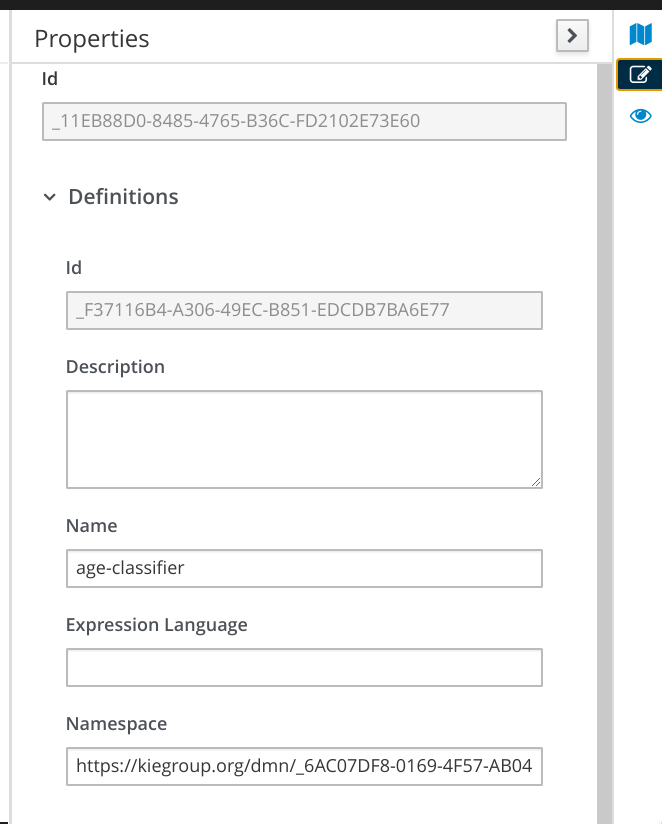
Note: Copy the value of namespace from the DMN model (Open the DMN model and in the top right corner of the DMN editor, choose "Properties" and look for the field "Namespace" - refer image below) and set that value in the line 22 of the sample code given above.
Now, run the code in VSCode and you'll see that the DMN model would produce the expected results for each of the given sample inputs.
SLF4J: Failed to load class "org.slf4j.impl.StaticLoggerBinder".
SLF4J: Defaulting to no-operation (NOP) logger implementation
SLF4J: See http://www.slf4j.org/codes.html#StaticLoggerBinder for further details.
Age: 1, Decision: 'age-classification', Result: child
Age: 12, Decision: 'age-classification', Result: child
Age: 13, Decision: 'age-classification', Result: adult
Age: 64, Decision: 'age-classification', Result: adult
Age: 65, Decision: 'age-classification', Result: elderly
Age: 66, Decision: 'age-classification', Result: elderly
Making It a Self-Contained App:
Now that the application works, the next step would be to package the application as an uber-jar and run it. For that, we'll rely on the maven-shade-plugin. Adding this plugin reference to the pom.xml (as shown below) will make the uber-jar creation very simple.
<plugin>
        <groupId>org.apache.maven.plugins</groupId>
        <artifactId>maven-shade-plugin</artifactId>
        <version>3.1.0</version>
        <executions>
          <execution>
            <phase>package</phase>
            <goals>
              <goal>shade</goal>
            </goals>
            <configuration>
              <transformers>
                <transformer implementation="org.apache.maven.plugins.shade.resource.AppendingTransformer">
                  <resource>META-INF/kie.conf</resource>
                </transformer>
              </transformers>
              <artifactSet>
              </artifactSet>
              <outputFile>${project.build.directory}/${project.artifactId}-${project.version}-uber.jar</outputFile>
            </configuration>
          </execution>
        </executions>
      </plugin>
Then, update the kmodule.xml located under src/main/resources/META-INF with a new kbase having the properties "default=true" and "packages=dmn-models" (the folder that holds the age-classifier.dmn).
<?xml version="1.0" encoding="UTF-8"?>
<kmodule xmlns="http://www.drools.org/xsd/kmodule">
  <kbase name="dmn" packages="dmn-models" default="true">
  </kbase>
</kmodule>
Once added, running mvn clean install will produce the under-jar (under the target folder of the project) and the application can now be run directly as a self-contained Java application as shown below.
[CLI]>>>>$ java -cp ./target/dmn-project-1.0-SNAPSHOT-uber.jar com.lab.App

SLF4J: Failed to load class "org.slf4j.impl.StaticLoggerBinder".
SLF4J: Defaulting to no-operation (NOP) logger implementation
SLF4J: See http://www.slf4j.org/codes.html#StaticLoggerBinder for further details.
Age: 1, Decision: 'age-classification', Result: child
Age: 12, Decision: 'age-classification', Result: child
Age: 13, Decision: 'age-classification', Result: adult
Age: 64, Decision: 'age-classification', Result: adult
Age: 65, Decision: 'age-classification', Result: elderly
Age: 66, Decision: 'age-classification', Result: elderlyPublished at DZone with permission of Bala Krishnan. See the original article here.
Opinions expressed by DZone contributors are their own.
Comments