

Cost Governance of Cloud-Native Workloads Using Kubecost and Kyverno
Keeping an eye on costs.
 ·
·
Join the DZone community and get the full member experience.
Join For FreeBackground
Nowadays, most applications use cloud infrastructure to host their applications. The cloud infrastructure could be resources available from public clouds, e.g., AWS/GCP/Azure, or compute resources like servers in data centers running cloud workloads in the form of VMs and containers.
While the cloud has allowed our business to grow and services to become more and more agile, it comes at an expense. All provisioned cloud resources, whether they are over-utilized or under-utilized have a running cost associated with them. Organizations often face challenges regulating such costs and take necessary actions proactively.
One way to address cost-related challenges is to either have a fixed resource quota in place that limits the usage of the resources. Another option is to have a tool in place (cloud or on-prem) that regularly reports the identified running “total cost” of the resources used.
The resource quotas may be a straightforward solution but this one size fits all approach may not be optimal for all scenarios. Even the cost identification via a tool works really well to get the cost information related to a resource, but cannot be extended to different scenarios where you might want to take a proactive approach i.e define a condition if the defined condition is met; take action to either report it or remediate it. Like low-code, closed-loop automation.
The Nirmata DevSecOps Platform is designed to address these challenges comprehensively. It’s an open and easy-to-adopt platform to deploy, operate, and optimize Kubernetes workloads on any infrastructure, enabling self-service, segregation of responsibilities, and security and governance controls. In this post, we will use Kyverno as a policy engine that takes an action i.e alerting, whenever the cost of a certain Kubernetes workload as reported by kubecost, is higher than the allocated value.
Kubecost
Kubecost provides real-time cost visibility and insights for teams using Kubernetes, helping you continuously reduce your cloud costs. Kubecost addresses the following challenges
- Cost Allocation – Breakdown costs by many Kubernetes resources, including deployment, service, namespace label, and more. View costs across multiple clusters in a single view or via a single API endpoint.
- Unified Cost Monitoring – Kubernetes costs with any external cloud services or infrastructure spend to have a complete picture. External costs can be shared and then attributed to any Kubernetes concept for a comprehensive view of spend
- Optimization Insights – Insights into which resources are contributing to the cost and potential ways in which they can be optimized. Receive dynamic recommendations for reducing spend without sacrificing performance. Prioritize key infrastructure or application changes for improving resource efficiency and reliability.
- Alerts & Governance – Quickly catch cost overruns and infrastructure outage risks before they become a problem with real-time notifications. Preserve engineering workflows by integrating with tools like PagerDuty and Slack.
Kyverno Policy Engine
Kyverno is an open-source Kubernetes-native policy engine that runs as an admission controller and can validate, mutate, and generate any configuration data based on customizable policies.
Although other general-purpose policy solutions were retrofitted to Kubernetes, Kyverno was designed ground-up for Kubernetes. Like Kubernetes, Kyverno adopts a declarative management paradigm. Kyverno policies are simply Kubernetes resources and don’t require learning a new language. Kyverno helps secure the Kubernetes configuration by preventing misconfigurations and enhancing security.
Nirmata DevSecOps Platform
Nirmata DevSecOps Platform (NDP) integrates the required tools and processes, enabling enterprises to standardize on Kubernetes as their cloud-native operating system, cleanly decoupling workflows for operators, developers, and security teams.
The platform helps enterprise operations teams deliver self-service secure environments for developers unlocking DevOps agility. Nirmata Kubernetes Platform supports Kubecost as a certified Add-on.
Nirmata developed the CNCF open-source project, Kyverno, and natively supports it in its DevSecOps platform. Kyverno policy engine is a powerful tool to ensure compliance with security and operational best practices. NDP will be utilized to deploy the kubecost add-on.
Putting it All Together
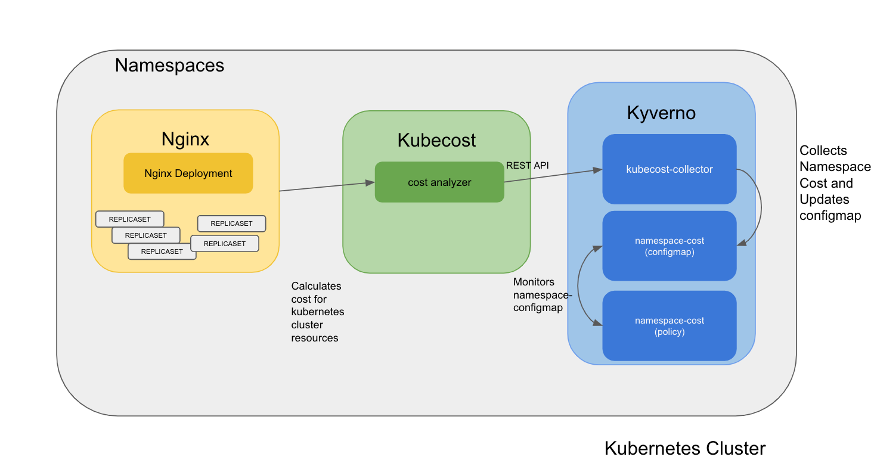
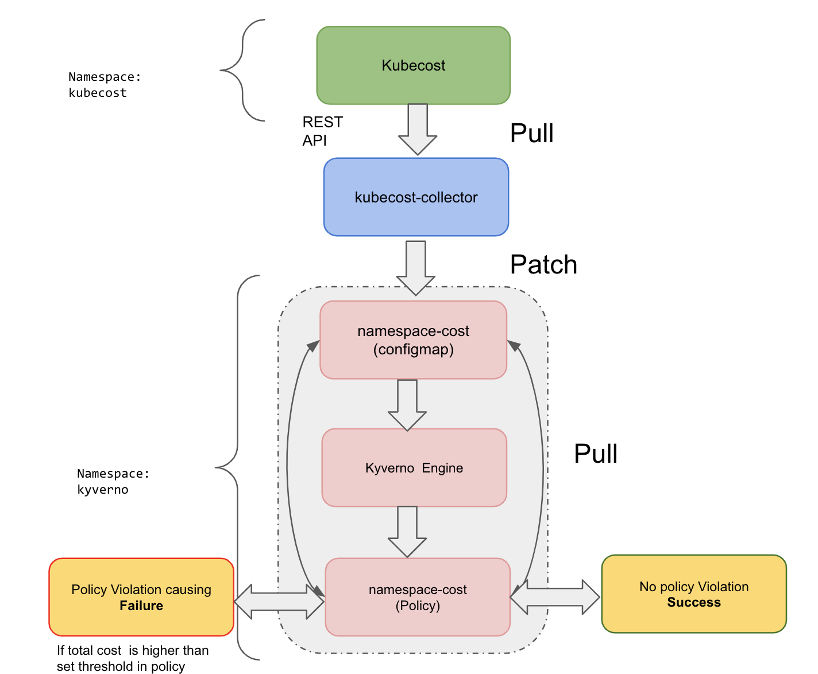
Next, we’ll cover how a cluster policy monitors the total running cost of a Kubernetes namespace, taking advantage of Kyverno. Kyverno creates a violation/failure when the total cost is higher than the threshold. The total cost information is stored in a config map using the kubecost REST API. We will cover the components in detail below.
To start with, deploy kubecost and Kyverno in their respective namespaces.
Kubecost can be installed from here and Kyverno installation instructions are available here.
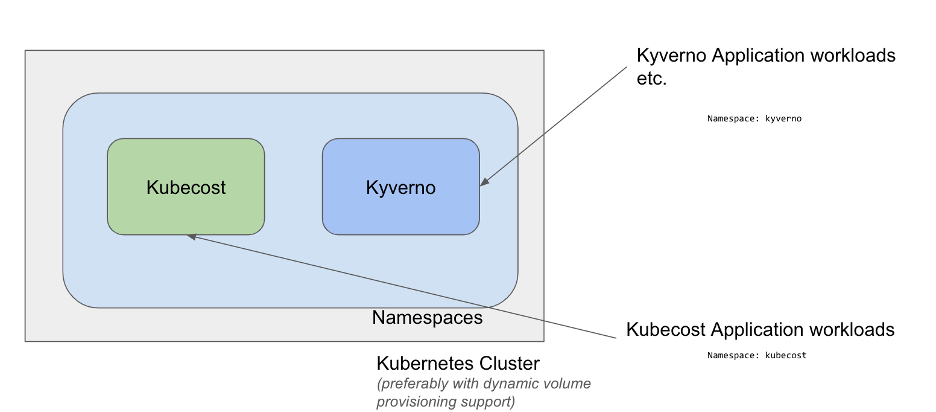
For the purpose of the demo, we will have a demo namespace called Nginx running replicas of Nginx web server.
kubecost can also be deployed as an Add-on using the Nirmata DevSecOps Platform (In this case, kubecost uses OpenEBS-hostpath storage class for dynamic volume creation). The link is covered in the references section.
Demo Components
All the relevant files are stored in the Nirmata git repo.
- Collection script – kubecost-collector.py
- Python script that runs in the background as a Kubernetes cron job gathers cost information from kubecost REST API Endpoint for Nginx namespace. http://<KUBECOST_COST_ANALYZER_SVC_URL>>/model/allocation
- Periodically updates the cost information present in configmap namespace-cost configmap
- ConfigMap
- configmap in Kyverno namespace that holds the cost information for Nginx namespace
- Kyverno Policy
- Kyverno policy monitoring the data stored in namespace-configmap for change in cost value
- Creates a failure report in case the total cost for the Nginx namespace is higher than the threshold.
The above components can be downloaded from the Github page in the references section.
Demo workflow
1. Create an nginx namespace and deploy Nginx replicas.
kubectl create namespace nginx
Kubectl create deploy nginx -—image=nginx -—replicas=10
We assume that Kyverno is running in the Kyverno namespace and the kubecost application is up and running to provide us the cost information.
2. Create the configmap namespace-cost in namespace kyverno using cm.yaml
kubectl create -f cm.yaml -n kyverno3. Create RBAC resources (ServiceAccount, ClusterRole, ClusterRoleBindings) required to update the configmap in namespace-cost
kubectl create -f rbac.yaml4. Copy the collection script kubecost-collector.py to the Kubernetes cluster.
A. Build the docker image for kubecost-collector using Dockerfile after placing them in a folder. Make sure to update the script with kubecost cost-analyzer REST API Endpoint.
mkdir <FOLDER_NAME>
cp Dockerfile <FOLDER_NAME>
cp kubecost-collector.py <FOLDER_NAME>
docker build -t kubecost-collector .
Once the above command has finished verifying the kubecost-collector image exists.
docker images kubecost-collector
REPOSITORY           TAG       IMAGE ID       CREATED          SIZE
kubecost-collector   latest    47a05cdc11bf   16 minutes ago   205MB
B. Run the kubecost-collector as Kubernetes cron job
kubectl create -f cron.yaml Verify the cost of cm created in step 2 is now updated to a non-zero value because the kubecost-collector is getting the real-time values from the kubecost REST API Endpoint.
Data
====
nginx:
----
0.481581

BinaryData
====
5. Create the Kyverno Cluster Policy namespace-cost
kubectl apply -f policy.yaml Set an appropriate cost threshold in the policy before applying. As the workload is very recent it may have a very low cost associated initially.
6. Verify the policy namespace-cost is in READY state.
kubectl get cpol
NAME             BACKGROUND   ACTION   READY
namespace-cost   true         audit    true
The policy should pass right now as the running cost of the newly created nginx namespace will be lower than the allocated threshold.
kubectl get cpolr
NAME                  PASS   FAIL   WARN   ERROR   SKIP   AGE
clusterpolicyreport   1      0      0      0       20     3m8s
7. Scale up the nginx replicas to a higher value so the total cost value goes higher than the allocated threshold in policy.yaml
Alternatively, you can also run a CPU/Memory intensive workload in nginx namespace instead of nginx web server replicas.
8. As the cost of the namespace nginx goes high the policy will fail. Check the policy reports using kubectl to get polr. The same can be verified using the Nirmata Policy Reports UI.
kubectl get cpolr
NAME                  PASS   FAIL   WARN   ERROR   SKIP   AGE
clusterpolicyreport   0      1      0      0       20     5m8s
The above failure can be described to see the details
kubectl describe cpolr clusterpolicyreport | grep "Result: \+fail" -B10
Timestamp:
    Nanos:    0
    Seconds:  1644935662
  Message:    The namespace running cost not within defined threshold
  Policy:     namespace-cost
  Resources:
    API Version:  v1
    Kind:         Namespace
    Name:         nginx
    UID:          f1d06aa0-6fdf-44ab-a935-c5b8cf903e2e
  Result:         fail
Summary
Users can alert individual teams and can take event-based action for the namespace when it exceeds the cost threshold. Kyverno offers different rules (Mutate, Validate, Generate) to take actions on user-defined existing & new workloads, even create new resources based on conditions defined in the policy (Generate ).
Get involved
With over 2000 GitHub stars and 150M downloads, Kyverno is a CNCF project and the policy engine designed for Kubernetes. With Kyverno, policies are managed as Kubernetes resources, and no new language is required. This allows using familiar tools such as kubectl, git, and kustomize to manage policies. Kyverno policies can validate, mutate, and generate Kubernetes resources plus ensure OCI image supply chain security with integrations for Sigstore Cosign and in-toto attestations. If you would like to learn more about Kyverno, you can join our slack channel and follow our GitHub repository to stay updated.
Opinions expressed by DZone contributors are their own.
Comments