

Debugging Gson, Moshi, and Jackson JSON Frameworks in Production
Parsing is a major source of production failures. Some are easy to track but some are insidious. Here's how you can debug them on the fly!
 CORE
·
CORE
·
Join the DZone community and get the full member experience.
Join For FreeParsing bugs are the gift that keeps giving in the age of APIs. We use a service; it works perfectly in debugging, QA, and so on. Then some user input that made its way to the web request, returns a result we just can’t parse. Unfortunately, there isn’t much we can do at this stage. We need to understand why the failure occurred and how we can workaround it and fix it.
In production, that isn’t trivial. We could log all the calls we made and all the objects passed. But this will destroy our performance and send our log storage bill through the roof. It might also put us in violation of privacy laws, since the JSON data might include private user information. This is a common problem in production since a webservice might change and trigger a serialization failure at runtime. This is especially true in polyglot environments where a Java class mapped using an API like Jackson might fail on the deserialization of a NodeJS object.
For JSON processing, Java has three common libraries:
- Jackson – oldest and most stable parser API of the three
- Gson – a more lightweight API from Google
- Moshi – not as well known in the server (more popular on Android); written by the author of Gson and should be considered its successor since Gson is no longer actively maintained
Basics of JSON Parsing in Java
These libraries are pretty similar in concept. They support serialization of generic types and mapping them to objects. We can convert to/from an arbitrary Java object or a list of objects. For simplicity, I’ll focus on Strings since this is a tutorial about debugging.
In the code snippet below, we use standard Java POJO (Plain Old Java Object) for the User and DBObject values. These are trivial objects containing relatively simple fields such as Strings, primitives, byte arrays, and so on. In the demo code, I created them with Lombok for convenience, but they would work just fine with getter/setters. This can also work for complex objects with deep nesting, collection types, etc.
With Jackson you can generate a JSON String using code such as this:
String json = mapper.writeValueAsString(user);
You can perform object serialization using Jackson:
DBObject object = mapper.readValue(json, DBObject.class);
For Gson, we can accomplish the same using:
String json = gson.toJson(user);
And this is how Gson converts to an object:
DBObject object = gson.fromJson(json, DBObject.class);
Moshi is a bit more verbose but supports more customization features and type safety:
String json = moshi.adapter(User.class).toJson(user);
And this is the code to get an object in Moshi:
DBObject object = moshi.adapter(DBObject.class).fromJson(json);
Notice that Moshi uses type adapters out of the box. The “type adapters” concept isn’t unique to Moshi and exists in all of these tools. It lets us perform custom deserialization, specifically “low-level” object/JSON mapping. In this case, Moshi puts this API in the forefront.
Demo
To demonstrate debugging, I created a simple JSON database application that lets us save elements as JSON files. You can find the full source code here. This demo covers all three JSON parsers and most of their basic features, like type adapters.
We can pick the API to use in the request by submitting an HTTP header and a factory method in the DatabaseWS class picks the right implementation instance. This way, we can process any request as Gson, Jackson or Moshi. The default is Moshi.
This is a standard Spring Boot project you can open in IntelliJ/IDEA. The rest of this post assumes that you have Lightrun installed and running. If not, please install it for free here. You can read about it here.
Creating a Database User
Before we start, we need to create a new database user. We can do that with the following command:
curl -X PUT -H "Content-Type: application/json" -H "Authorization: 45971c45-4049-48f8-970f-04d47be2defc" -d '{"login":"user", "password":"123456", "givenName":"Shai", "surname":"Almog"}' "http://localhost:8080/addUser"
Once executed, you should see a file called “~/myDB/user.user”. Notice that ~ represents the home directory of the current user. The file should contain something similar to the following JSON:
{
  "login": "user",
  "givenName": "Shai",
  "surname": "Almog",
  "email": null,
  "hashedPassword": "$2a$10$DeBGvevs8RiHCIdRqa9fo.ED.6K2UYXXgXYF1.6uLxU1yxmq9c8ZK",
  "token": "7e5a50db-f44a-4177-af48-6fa39c127810",
  "password": null
}
The file was generated by Moshi. If we wish to use another option for the parser/generator we can add the argument:
-H "type: jackson" or -H "type: gson" respectively.
Authentication
Once we created a user, we can use the authentication API to login to the database using a curl command similar to this:
curl -H "Content-Type: application/json" -H "Authorization: 45971c45-4049-48f8-970f-04d47be2defc" -H "type: jackson" -d '{"login":"shai","password":"123456"}' "http://localhost:8080/auth"
In this case, I chose to log in using the Jackson parser instead of the Moshi default. This command returns a token in the response which we can then use to perform operations.
Adding an Entry
We can add a record to the “database” using a command, such as:
curl -H "Content-Type: application/json" -H "Authorization: 45971c45-4049-48f8-970f-04d47be2defc" -H "type: jackson" -d '{"coreData":"FBYWFiEs"}' "http://localhost:8080/create"
Notice that the response from the authentication call we sent above is used in the authorization header.
There are several other features in the database but I’ll skip them for now…
Reading an Entry
Reading elements from the database using deserialization is even easier. It’s a simple REST GET method:
curl -H "Content-Type: application/json" -H "Authorization: 45971c45-4049-48f8-970f-04d47be2defc" -H "type: jackson" "http://localhost:8080/read?id=0ca3edb8-37db-4d97-bbc4-e5222e94db17"
In this case, I used Jackson again, but it should work for Moshi/Gson just the same. Notice the argument to the read invocation is the ID of the object. We receive the ID as a response from the create invocation.
Inspecting and Debugging
Debugging APIs such as Gson, Jackson or Moshi is pretty challenging. Unlike typical Java APIs that will throw a checked exception when they fail, these tools typically log parsing errors. Furthermore, many serialization errors or problems can appear as a missing option rather than a visible bug.
A class might have different field names or might be missing an extra field and as a result object fields might include partial information following the deserialization process. Unfortunately, by the time we have the type object, it’s a bit too late. The JSON is gone and we can’t compare it to the result. We want to inspect the object during serialization.
Before we proceed, you need to make sure you installed Lightrun and have a basic sense of its usage. There’s a free version you can install from here.
Once we have that, we can start debugging…
Debugging Serialization in Action
The code that generates a JSON file is usually much simpler to debug and has fewer issues. It’s a simple place to start. We can place a snapshot right in the location where we write the object. E.g., in this case, I used the JSONDatabaseService class and placed a snapshot on the writeString method call.
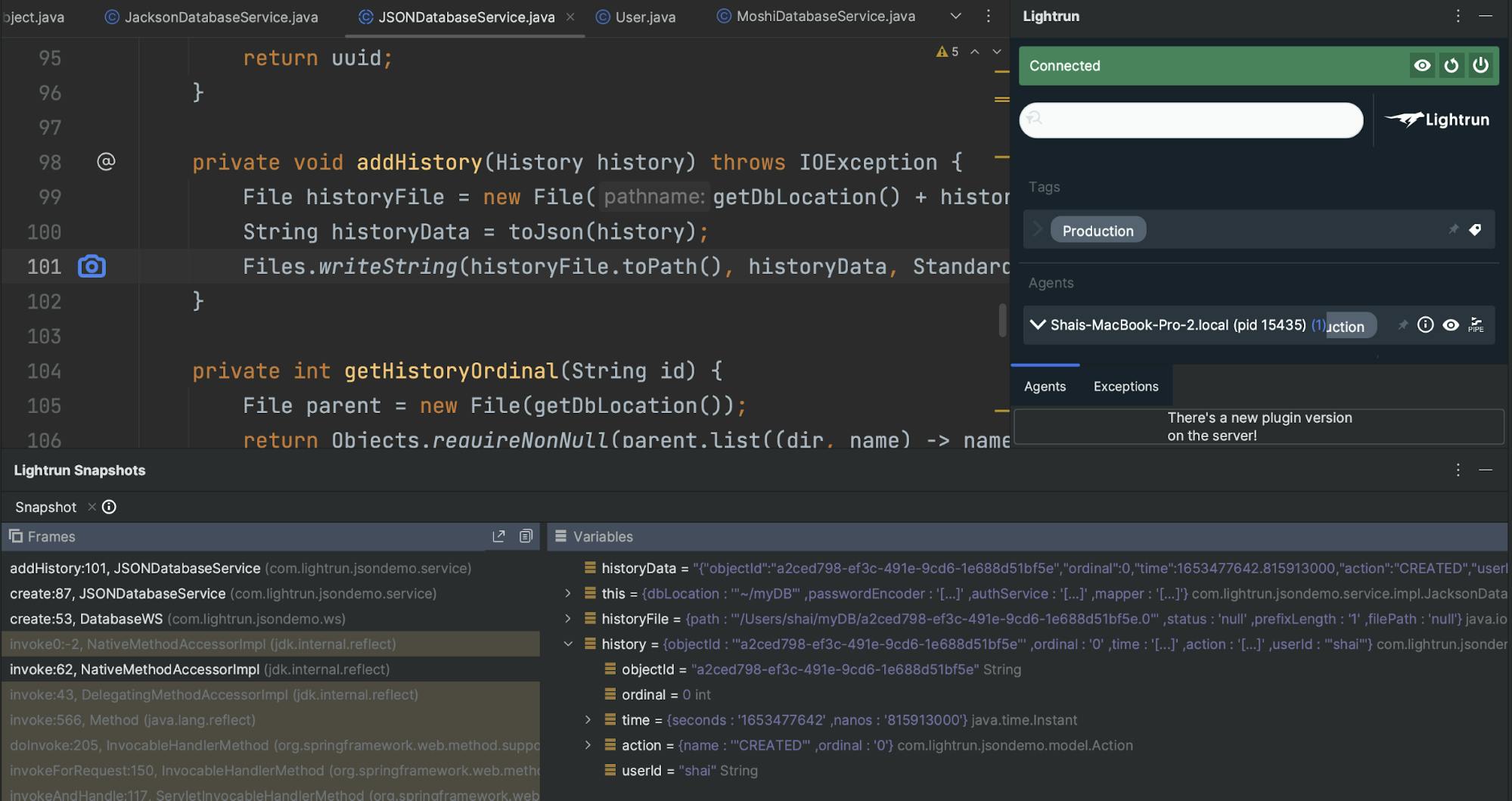
In the stack I can see the JSON data and the original object. That way, we can inspect any discrepancies between the two. Oftentimes, this can relate to default behaviors of an implementation like Jackson or Gson in relation to null objects, date, time, and so on. Those are nuances that differ significantly between the various implementations.
Deserialization
Reading a JSON string or file into a class is the place where most of us fail. Names that are missing are just skipped and a small typo can become an immense problem down the road.
Here is the true value of the ability to inspect the JSON before we convert a string to an object. We can easily do that in this sample by placing a snapshot in the JacksonDatabaseService class. Notice that this is Jackson specific. We can do the same for Gson and moshi by placing the snapshot in their respective abstraction classes.
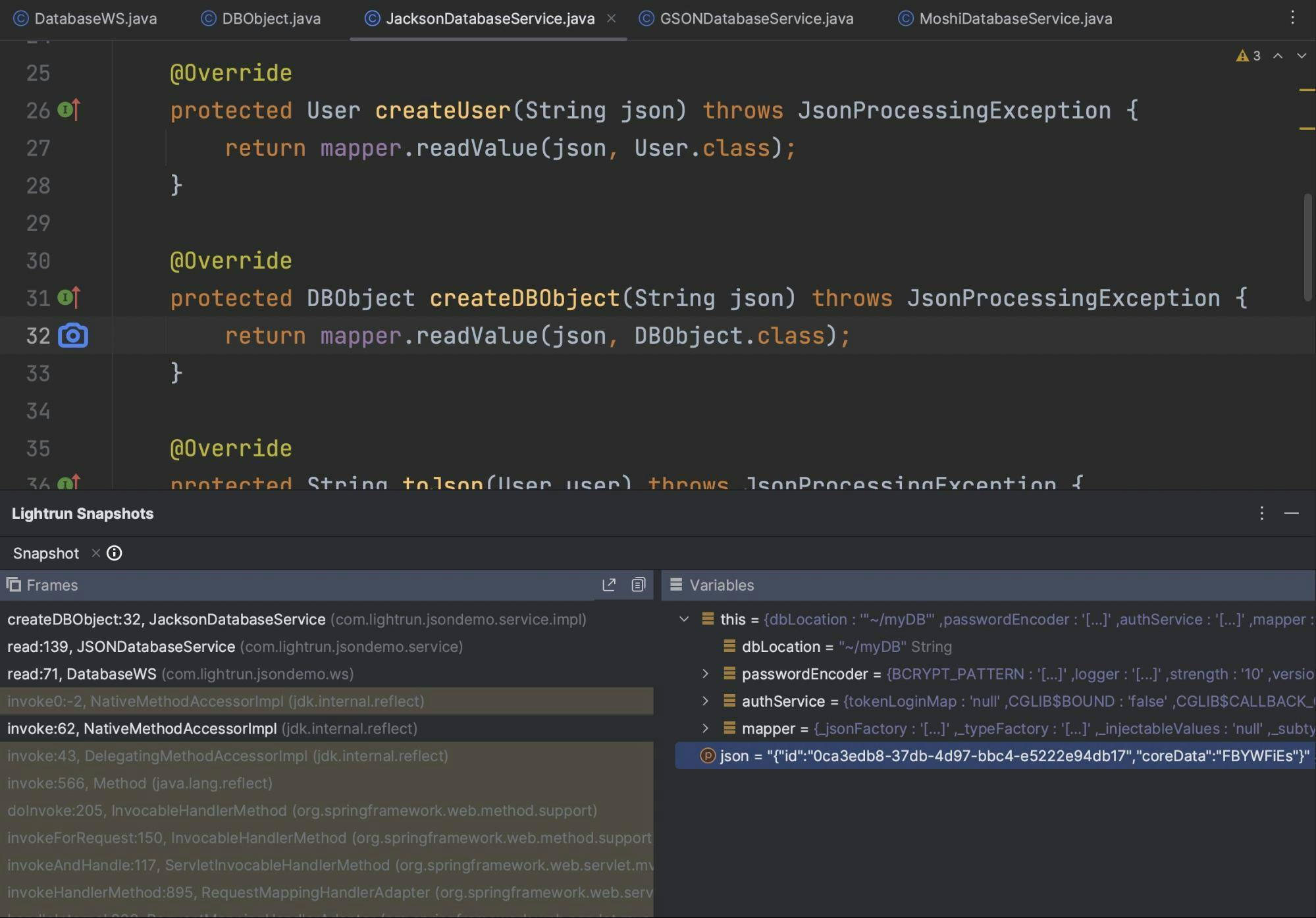
Once this is placed, we can try reading an object and we’ll see the JSON that’s received. In this particular case, grabbing the JSON is trivial from the method parameter. However, this isn’t the exception and grabbing this data is possible in most cases.
This is the place to review the field names and various type adapters to understand the resulting object fields.
Final Word
JSON processing in Java is always a challenge whether you use Jackson, Gson, or Moshi. They all fail in roughly the same ways and oftentimes in production data. Since logging data might expose us to liability and increasing costs, our only option to debug these APIs is via developer observability tools, such as Lightrun.
For most debugging cases, we can just place a snapshot on API access and inspect the resulting node, list, and so on. This is usually generic code that helps us convert a type representation such as an object of type foo. to a JSON file that we can send/store, etc.
Published at DZone with permission of Shai Almog. See the original article here.
Opinions expressed by DZone contributors are their own.
Comments