

Deep Linking in Enterprise Android Apps: A Real-World, Scalable Approach
Enterprise apps demand reliable navigation. Learn to implement deep linking using Hilt, ViewModel, and UseCases, with real-world flows and built-in security.
Join the DZone community and get the full member experience.
Join For FreeIn modern enterprise Android development, navigating users through massive apps with multiple modules, features, and roles can quickly become complex. This is where deep linking steps in as a game-changer. It enables direct routing to specific parts of your app — skipping redundant screens and delivering a seamless, contextual experience.
In this article, we’ll walk through a real-world example and a modern architecture that makes deep linking not only functional but also secure, maintainable, and testable. We’ll use Jetpack components like ViewModel, dependency injection with Hilt, clean business logic through UseCases, and URI validation to keep things safe and predictable.
Real-World Example: Instant Checkout from a Promo Email
Imagine one of your users receives a promotional email from you. The subject line reads: “Limited Time Offer: Get 20% OFF Headphones Today!” Inside, there’s a shiny “Order Now” link. When tapped, instead of dropping the user into the home screen or product listing, it launches the app and opens directly to an order details screen for those headphones. The 20% discount is already applied, and there’s a single call to action: “Place Order.”
That’s the kind of flow that deep linking unlocks — minimal friction, high intent, and maximum conversion.
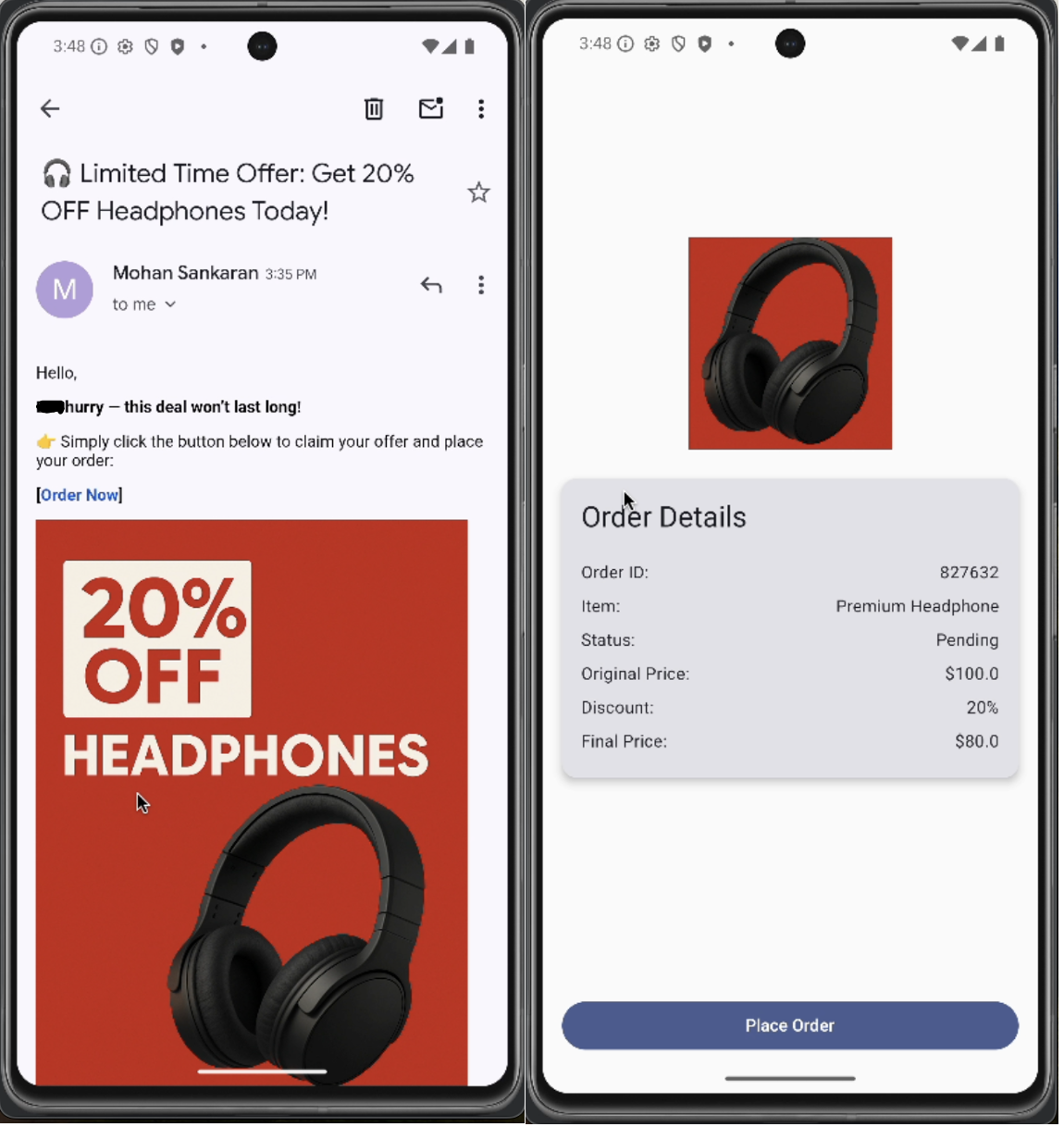
Now, let’s see how to build that flow.
1. Define the Deep Link in the Manifest
<activity
    android:name=".OrderDetailsActivity"
    android:exported="true">
    <intent-filter android:autoVerify="true">
        <action android:name="android.intent.action.VIEW" />
        <category android:name="android.intent.category.DEFAULT" />
        <category android:name="android.intent.category.BROWSABLE" />
        <data
            android:scheme="myapp"
            android:host="order"
            android:path="/details" />
    </intent-filter>
</activity>
This config tells Android to launch OrderDetailsActivity when the user clicks on a link like:
myapp://order/details?orderId=827632&promo=SUMMER20The autoVerify attribute ensures verified app links behave securely and predictably.
2. Validate the Deep Link Securely
sealed class ValidationResult {
    object Valid : ValidationResult()
    data class Invalid(val reason: String) : ValidationResult()
}

@Singleton
class DeepLinkValidator @Inject constructor() {
    fun validate(uri: Uri): ValidationResult {
        return when {
            uri.scheme != "myapp" -> ValidationResult.Invalid("Invalid scheme")
            uri.host != "order" -> ValidationResult.Invalid("Invalid host")
            !hasValidSignature(uri) -> ValidationResult.Invalid("Missing or invalid parameters")
            else -> ValidationResult.Valid
        }
    }

    private fun hasValidSignature(uri: Uri): Boolean {
        return uri.getQueryParameter("orderId") != null
    }
}
Before we do anything with a deep link, we want to make sure it’s valid. That means checking the scheme, host, and key parameters (like orderId) so we don’t accidentally process malformed or malicious URIs.
3. Activity Entry Point
@AndroidEntryPoint
class OrderDetailsActivity : AppCompatActivity() {
    private val viewModel: OrderDetailsViewModel by viewModels()

    @Inject
    lateinit var deepLinkValidator: DeepLinkValidator

    override fun onCreate(savedInstanceState: Bundle?) {
        super.onCreate(savedInstanceState)
        setContentView(R.layout.activity_order_details)

        intent.data?.let { uri ->
            when (val result = deepLinkValidator.validate(uri)) {
                is ValidationResult.Valid -> viewModel.processDeepLink(uri)
                is ValidationResult.Invalid -> {
                    Toast.makeText(this, "Invalid link: ${result.reason}", Toast.LENGTH_LONG).show()
                    finish()
                }
            }
        }

        observeViewModel()
    }

    private fun observeViewModel() {
        lifecycleScope.launchWhenStarted {
            viewModel.uiState.collect { state ->
                when (state) {
                    is OrderDetailsState.Success -> showOrder(state.order)
                    is OrderDetailsState.Error -> showError(state.error)
                    is OrderDetailsState.Loading -> showLoading()
                }
            }
        }
    }

    private fun showOrder(order: Order) { /* render UI */ }
    private fun showError(error: Throwable) { /* show error */ }
    private fun showLoading() { /* show loading spinner */ }
}
Once the URI is validated, we send it to the ViewModel, which handles the rest.
4. ViewModel + UseCase = Clean Business Logic
@HiltViewModel
class OrderDetailsViewModel @Inject constructor(
    private val getOrderUseCase: GetOrderUseCase
) : ViewModel() {

    private val _uiState = MutableStateFlow<OrderDetailsState>(OrderDetailsState.Loading)
    val uiState: StateFlow<OrderDetailsState> = _uiState

    fun processDeepLink(uri: Uri) {
        viewModelScope.launch {
            try {
                val orderId = uri.getQueryParameter("orderId")
                    ?: throw IllegalArgumentException("Missing order ID")
                val promoCode = uri.getQueryParameter("promo")
                val order = getOrderUseCase(orderId, promoCode)
                _uiState.value = OrderDetailsState.Success(order)
            } catch (e: Exception) {
                _uiState.value = OrderDetailsState.Error(e)
            }
        }
    }
}
The ViewModel parses the URI and invokes a use case to get the business data. If something goes wrong, it bubbles up the error gracefully.
5. Domain Logic and Models
class GetOrderUseCase @Inject constructor(
    private val orderRepository: OrderRepository
) {
    suspend operator fun invoke(orderId: String, promoCode: String?): Order {
        require(orderId.isNotBlank()) { "Order ID is required" }
        val order = orderRepository.getOrder(orderId)
            ?: throw IllegalArgumentException("Order not found")
        return order.apply {
            if (promoCode == "SUMMER20") {
                discount = "20%"
            }
        }
    }
}

sealed class OrderDetailsState {
    object Loading : OrderDetailsState()
    data class Success(val order: Order) : OrderDetailsState()
    data class Error(val error: Throwable) : OrderDetailsState()
}

data class Order(val id: String, val itemName: String, var discount: String? = null)
This use case handles validation, applies promotions, and returns structured domain models to the UI layer.
Test Your Deep Links
To quickly test your deep link behavior during development, you can use ADB to simulate clicking a link:
adb shell am start -a android.intent.action.VIEW \
    -c android.intent.category.BROWSABLE \
    -d "myapp://order/details?orderId=827632&promo=SUMMER20" \
    your.package.name
This command triggers the same flow your app would go through when a user taps a link in an email or browser.
You can also write a unit test to verify promo handling logic:
@Test
fun `test promo code is applied correctly`() = runTest {
    val uri = Uri.parse("myapp://order/details?orderId=987&promo=SUMMER20")
    viewModel.processDeepLink(uri)
    val state = viewModel.uiState.first()
    assertTrue(state is OrderDetailsState.Success)
    assertEquals("20%", (state as OrderDetailsState.Success).order.discount)
}
Unit tests make sure your business logic works and won’t break due to refactors or unexpected changes.
Wrapping Up
Deep linking isn’t just a convenience — it’s a competitive advantage, especially in enterprise apps where speed, personalization, and flow efficiency matter. Using URI validation, lifecycle-aware ViewModels, dependency injection with Hilt, and a clean separation of concerns, you can build deep linking flows that are secure, scalable, and a delight to use.
Opinions expressed by DZone contributors are their own.
Comments