

Detecting Bugs and Vulnerabilities in Java With SonarQube
SonarQube automatically detects bugs and security in Java applications through static code analysis to improve code quality and enforce secure coding practices.
 ·
·
Join the DZone community and get the full member experience.
Join For FreeThe security audit report landed unexpectedly. It highlighted a critical vulnerability in our payment processing module. We had passed all unit tests. We had passed all integration tests. The code review looked clean. Yet the auditors found a hardcoded API key hidden in a utility class. This key allowed access to our third-party payment gateway. Anyone with access to the repository could see it. We were lucky the auditors found it before a malicious actor did. This incident was a wake-up call. We realized manual code reviews were not enough. We needed automated static analysis. We needed SonarQube.
In this article, I will share how we integrated SonarQube into our Java development workflow. I will explain the specific rules that exposed our vulnerabilities. I will detail how we configured quality gates to prevent future regressions. This is not a generic installation guide. It is a record of how we shifted security left in our pipeline. Static analysis is not just about finding bugs. It is about building a culture of quality.
The Blind Spot in Our Testing
Our testing strategy relied heavily on functional correctness. We wrote tests to ensure features worked as expected. We did not write tests to ensure secrets were absent. We did not write tests to check for SQL injection patterns. These security concerns fell outside the scope of standard unit testing. Developers focused on delivering features quickly. Security was an afterthought. This mindset created technical debt. It also created risk.
The hardcoded key incident showed us the gap. The developer who wrote the code intended to replace the key later. They forgot. The code merged to the main branch. It reached production. We rotated the key immediately, but the exposure window was dangerous. We needed a safety net. We needed a tool that could scan every commit for these patterns. SonarQube offered this capability.
Integrating SonarQube into CI/CD
We chose to integrate SonarQube into our Jenkins pipeline. This ensured every build was analyzed. We did not want developers to run the scan manually. Manual steps get skipped. Automation enforces consistency. We added a stage to our Jenkinsfile specifically for static analysis.
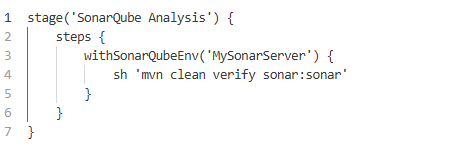
This configuration triggered the Maven Sonar plugin. It sent code metrics to the SonarQube server. The server analyzed the code against a set of rules. These rules covered bugs and vulnerabilities, and code smells. The analysis happened in parallel with our tests. It added minimal time to the build. The results were available immediately after deployment.
The Rule That Caught Us
SonarQube has thousands of rules. We did not enable all of them initially. We started with the Sonar Way profile. This profile includes a curated set of essential rules. One specific rule flagged our hardcoded credential issue. The rule key is java:S2068. It searches for strings that look like passwords or keys.
Here is the code that triggered the alert.
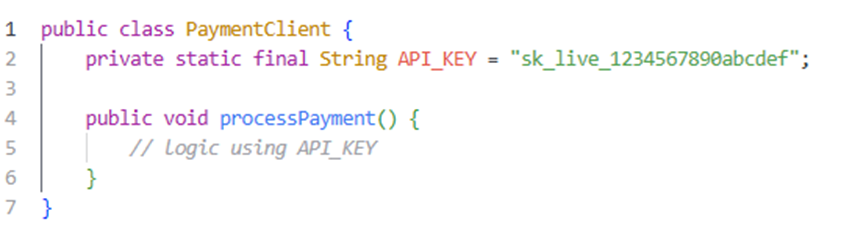
SonarQube marked this line as a critical vulnerability. It recognized the pattern of a secret key. It suggested moving the value to an environment variable. This feedback was immediate. The developer saw the issue in the pull request dashboard. They fixed it before merging. This prevented the vulnerability from reaching production.
Configuring Quality Gates
Finding issues is only half the battle. You must prevent bad code from merging. We configured quality gates in SonarQube. A quality gate defines the conditions for a build to pass. We set strict thresholds for our main branch.
- New bugs: Must be zero.
- New vulnerabilities: Must be zero.
- New security hotspots: Must be reviewed.
- Code coverage: Must be above 80 percent.
If a pull request failed these conditions, the pipeline failed. This gave us leverage. We could tell developers they could not merge until the issues were resolved. It enforced accountability. It also prevented technical debt from accumulating. We treated security violations like compilation errors. They blocked progress until fixed.
Handling False Positives
No tool is perfect. SonarQube sometimes flags safe code as risky. We encountered this with utility methods that handled strings resembling passwords. The tool raised alarms unnecessarily. This creates noise. Noise leads to alert fatigue. Developers start ignoring the warnings.
We learned to tune the rules. We marked specific issues as false positives in the dashboard. We added comments to the code to explain why the pattern was safe.

This annotation told SonarQube to ignore the rule for this line. We used this sparingly. We required a justification for every suppression. This ensured we did not hide real vulnerabilities. We reviewed suppressions during code review. This kept the process honest.
Security Hotspots vs. Vulnerabilities
SonarQube distinguishes between vulnerabilities and security hotspots. Vulnerabilities are confirmed issues. Hotspots are code that needs manual review. This distinction is important. Not every risky pattern is a bug. Some patterns require context to evaluate.
We established a process for reviewing hotspots. A senior engineer reviewed each hotspot. They determined if it was a real risk. If it were, they converted it to a vulnerability. If not, they marked it as Safe. This human-in-the-loop approach reduced false positives. It also educated developers on security patterns. They learned why certain code was risky. This improved overall code quality over time.
Lessons Learned and Best Practices
Our journey with SonarQube taught us several lessons. We incorporated these into our development standards.
- Fail fast: Run analysis on every commit. Do not wait for nightly builds. Immediate feedback helps developers fix issues while context is fresh.
- Start small: Do not enable all rules at once. Start with the critical security rules. Add more rules gradually. This prevents overwhelming the team.
- Fix the root cause: Do not just suppress warnings. Understand why the rule exists. Fix the underlying code pattern. This prevents similar issues elsewhere.
- Track trends: Monitor the technical debt ratio over time. It should decrease. If it increases, investigate why. Are we rushing features? Are we skipping reviews?
- Educate the team: Tools do not replace knowledge. Hold sessions on secure coding practices. Explain the SonarQube rules. Help developers understand the why behind the rules.
- Integrate with IDE: Install the SonarLint plugin in IntelliJ or Eclipse. This brings analysis to the developer workstation. They see issues before committing code. This is the fastest feedback loop.
- Secure the server: SonarQube itself holds sensitive data. Secure the server with authentication. Restrict access to project settings. Rotate admin passwords regularly. Do not expose the dashboard to the public internet.
Conclusion
Integrating SonarQube transformed our approach to Java development. We moved from reactive security to proactive quality assurance. The hardcoded key incident never happened again. The tool caught similar patterns early in the cycle. Developers became more aware of security implications. They wrote cleaner code. They respected the quality gates.
Static analysis is not a silver bullet. It does not catch logic errors or business rule violations. It does not replace penetration testing. However, it is a powerful layer in a defense-in-depth strategy. It catches the low-hanging fruit automatically. This frees up security engineers to focus on complex threats.
We continue to refine our rules and thresholds. We add custom rules for our specific domain logic. We treat the SonarQube dashboard as a health monitor for our codebase. It tells us when our code is getting sick. We treat it before the patient crashes. Java provides a robust ecosystem for building secure applications. SonarQube helps us uphold that standard. Happy coding and keep your code clean.
Opinions expressed by DZone contributors are their own.
Comments