

Develop a Scraper With Node.js, Socket.IO, and Vue.js/Nuxt.js
Web scraper development with node.js and vue.js in the front-end with socket.io to get real-time data.
The incredible amount of data available publicly on the internet for any industry can be useful for market research. You can use this data in machine learning/big data to train your model with tens of thousands of entries.
Here, in this article, I’m going to discuss the development of a web scraper with Node.js, Cheerio.js, and send back-end data to Vue.js in the front-end. Along with that, I’m going to use a simple crawler Node.js package.
Simplecrawler: Used to get all the pages of a domain.
Crawler: Get internal links, meta title, description, and content.
Vue.js: Used in the front-end to show data to the users.
Socket.io: Send data from the back-end to the front-end in real-time.
Node.js: Used to run the backend server.
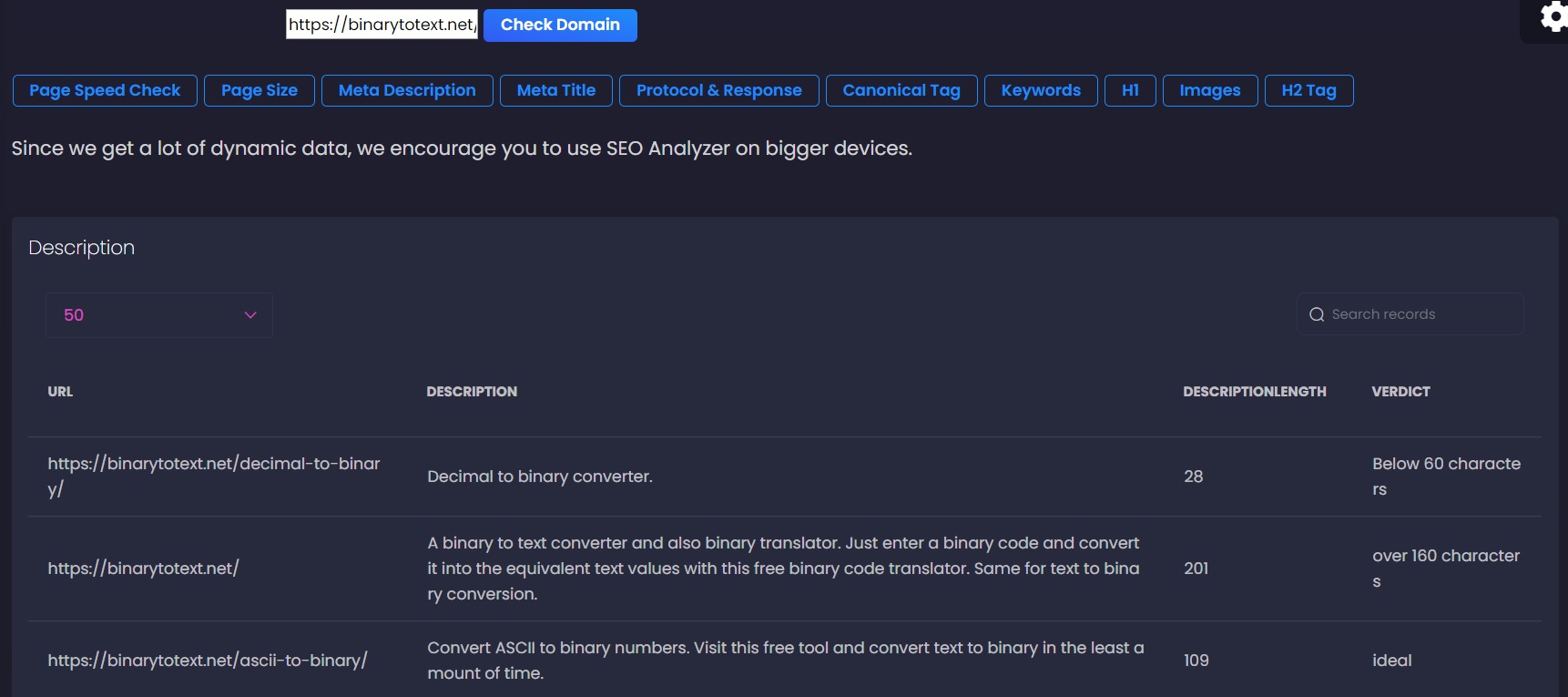
(source)
Where Can Web Scrapper Be Used?
Web scrapper can be used to extract content from the website and you can use it for your marketing campaign and data analysis. Many SEO companies use web scraper to extract data that is publicly available on the internet.
Along with that, many companies that provide data science and machine learning services need a huge amount of data to train their model. They can also use this web scraper to extract data from the internet.
If you are developing a travel portal then you can use this scraper to get data from multiple websites, compare the data, and returns the most affordable package. To save data from getting scrapped, you can take the help of different numbering systems and save data in the database. Popular numbers systems are binary, decimal, hexadecimal, and octal. For your reference, consider this decimal to hexadecimal tool and convert your sensitive data.
First, you need to install all the required npm packages:
npm install –save vue-socket.io socket.io-client socket.io simplecrawler nuxt-socket-io crawler
Code for Developing a Web Scraper With Node.Js/Vue.Js:
First, add the following vue.js code with the v-model:
xxxxxxxxxx
<input type="text" placeholder="Enter a Domain" v-model="domain" value="" @keyup.enter="senddomain">
<button type="button" class="btn btn-sm btn-info" name="button" @click="senddomain">Check Domain</button></div><br>
In the script tag, add the following inside data return:
xxxxxxxxxx
data() {
return {
domain: ''
}
}
Inside the methods tags, copy and paste the following code:
xxxxxxxxxx
senddomain(){
if(this.domain === ''){
alert("please enter a domain")
}
else if(!this.domain.includes("http")){
alert("please enter URL with http")
}
else{
const message = this.domain;
//this.messages.push(message)
// socket.emit('brokenlinks', message)
socket.emit('brokenlinks1', message)
}
}
Now, create a folder called IO at the root directory, inside of this IO folder, create a file called index.js. Copy and paste the following code inside of the index.js file.
xxxxxxxxxx
import socketIO from 'socket.io'
var Crawler1 = require("simplecrawler");
var Crawler = require("crawler");
socket.on('brokenlinks1', function (message) {
console.log("for broken link:" + message);
var crawler1 = Crawler1(message)
let xxxz = [];
let xxx2 = [];
let domains = [];
let acc = [];
var element = {
title: '',
url: ''
};
crawler1.on("fetchcomplete", function(queueItem, responseBuffer, response) {
if(queueItem.stateData.contentType === "text/html; charset=UTF-8" || queueItem.stateData.contentType === "text/html; charset=utf-8"){
acc.push(queueItem);
var last_element = acc[acc.length - 1];
domains = last_element.url;
//xxx2.push(domains)
// socket.emit('new-domain', domains)
var c = new Crawler({
maxConnections: 10,
// This will be called for each crawled page
callback : function(error, response, done) {
if(error){
console.log(error);
}else{
let $ = response.$;
let url = response.options.uri;
let urls = '';
urls = $("a");
//console.log(images);
Object.keys(urls).forEach((item) => {
//console.log(urls[item].attribs.href);
if (urls[item].type === 'tag') {
let href = '';
href = urls[item].attribs.href;
// console.log(href);
if(href !== undefined && href.startsWith('https'))
{
https.get(href, function(res) {
var status = res.statusCode;
//socket.emit('new-message', { href, url, status })
socket.emit('brokenlinks', { status, href, url })
})
}
if(href !== undefined && href.startsWith('http:')){
http.get(href, function(res) {
var status = res.statusCode;
//socket.emit('new-message', { href, url, status })
socket.emit('brokenlinks', { status, href, url })
})
}
//
console.log("href:" + ":" + href);
// console.log("alt tag:" + ":" + alt);
}
});
//console.log(response.options.uri);
//socket.emit('queueItem', { keywordsverdict, h1verict, canonicalverdict, descriptionverdict, descriptionlength, title, titlelengthverdict, titlelength, urlfinal, description, h1, h2, canonical, keywords })
}
done();
}
});
c.queue(domains);
}
// console.log(acc);
// socket.emit('new-domain', domains)
});
crawler1.start();
messages.push(acc)
})
Create a plugins folder at the root of your app. Inside of that plugins folder, create a file named socket.io.js and add the following code in that file:
xxxxxxxxxx
import io from 'socket.io-client'
const socket = io(process.env.WS_URL)
export default socket
Code Explanation
In most cases, developers use Axios to send data to the server and receive a response and show that to the users. Axios is great but it only returns the response once. When I used Axios for the scraper, this crawler returned just the first result and I did not receive the rest of the data. So that I decided to use the socket.io plug-in to get the real-time data from that crawler. And guess what, it works just awesome, socket.io is working beyond my expectations.
You can implement this code on your app and if you face any error then do not hesitate to share your experience, I will be happy to help solve your errors!
Opinions expressed by DZone contributors are their own.