

Diving into JNI: My Messy Adventures With C++ in Android
JNI is powerful but tricky. Automate boilerplate with generators, carefully manage references, test with CheckJNI, and embrace the chaos; it gets satisfying.
So, I've been deep in the trenches with JNI lately (yeah, that Java Native Interface stuff) while working on a project where we had to plug a C++ AI assistant into our Android app. At first, it felt like stepping into a weird twilight zone — half Java, half C++, and all these random edge cases you never think about until you hit them. I remember staring at the stack trace for what felt like hours, realizing that one tiny missed DeleteLocalRef was enough to crash the whole app. Thought I'd share what actually tripped me up, what worked, and some ways to make life a little less miserable if you ever have to do this.
What the Hell Is JNI Anyway?
JNI is basically the bridge that lets Java (or Kotlin) talk to C/C++ code and vice versa. On Android, it’s the only real way to get heavy lifting done efficiently or access low-level APIs that Java/Kotlin just can't reach. Honestly, the first time I tried to wrap my head around it, I felt like I was learning a new language on top of Java and C++ at the same time.
Some key points I painfully learned:
- You can call C++ from Java, and Java from C++. Sounds simple, but the devil is in the details — especially when managing references and lifetimes.
- Despite newer stuff like Project Panama or JNA, Android devs still live and die by JNI. Trying to convince anyone on my team to switch to newer abstractions was a losing battle.
The classic workflow:
- Declare a
native(Java) orexternal(Kotlin) method - Generate a
.hheader file withjavac -h - Implement your C++ function using
JNIEnv - Build with CMake / ndk-build and load the
.soin Gradle
Example in Kotlin:
object Greeting {
   init {
       System.loadLibrary("libgreeting")
   }
   private external fun sayHello(name: String)
}
And Java:
public class Greeting {
   static { System.loadLibrary("greeting"); }
   private static native void sayHello(@NonNull String name);
}
Building JNI projects
Options I've used:
- CMake: standard, integrates nicely with Gradle
- ndk-build: old-school, works fine for legacy stuff
- External build: if your C++ is huge/messy, let a separate build pipeline spit out .so files
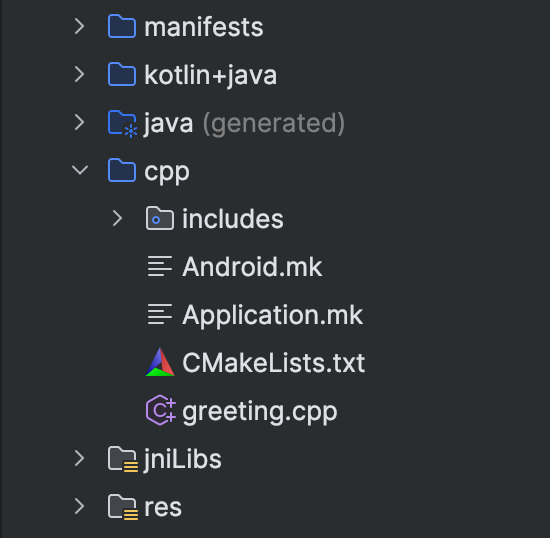
Early on, I tried mixing Gradle and an external build manually, and the first APK I got wouldn’t even load. Spent a day chasing UnsatisfiedLinkError before realizing the paths were wrong. Wrapping the external build in a Gradle plugin finally made everything consistent. That felt like the first small victory in this jungle. My initial structure:
Boilerplate Hell and Generators
JNI is boring as hell if you’re writing everything by hand: method stubs, reference handling, glue code... it stacks up. I remember writing a single interface manually and spending a full morning just fixing subtle bugs in jstring conversions. My hairline was receding faster than the app was building.
Some popular generators:
- Djinni (Dropbox, cross-platform, kinda dead since 2020)
- SWIG (classic wrapper generator for tons of languages)
- JNI Zero (Chromium, annotation-based, modern, but tied to Chromium build)
In my case, we adapted a JNI Zero-style generator into Gradle. Watching the generator spit out working JNI stubs felt like magic after days of repetitive coding. Saved a ton of hours and prevented countless silly bugs.
My Example: An AI Assistant in an Android App
Imagine integrating a C++ AI assistant into an app. Instead of rewriting logic in Java/Kotlin, you just reuse the same C++ code everywhere. JNI is unavoidable.
Scale:
- ~5k lines of C++
- ~50k lines of Java/Kotlin
- Generator produces JNI wrappers automatically
The flow:
- In Kotlin, create listener with
@JNINamespace+ native methods - Annotate methods called from C++ with
@CalledByNative - Generator spits out simplified JNI stubs
- Implement listener in C++ using the generated headers
- Initialize listener in C++ so Java UI gets updates
Seeing the generator work felt like watching the pieces of a puzzle finally click into place. Suddenly, instead of worrying about glue code, we could focus on features. It was surprisingly satisfying to see the C++ assistant pop up in the UI without crashes.
CI/CD and Gradle Tricks
Integrating C++ into a proper Android build pipeline was a lesson in patience:
- Wrap external builds in Gradle tasks so the pipeline is aware of native dependencies
- Output
.sofiles tojniLibsfolders for automatic packaging - Use variant-aware tasks for debug/release flavors to avoid mismatched builds
- Cache compiled
.soartifacts in CI to cut build times drastically - Run small instrumentation tests after every build to catch subtle JNI errors early
I remember one morning when a CI build failed due to mismatched .so files. It took me three cups of coffee and a couple of “why is this happening” mutterings to fix it. After wrapping everything neatly, the pipeline became almost boringly reliable.
Gotchas
- References: Always clean up local references. Local Reference Table overflow is silent until your app crashes randomly.
- Compiler/linker quirks: If the compiler thinks a JNI function isn't used, it strips it. Workaround: call a dummy
noinlinefunction inJNI_OnLoad. - CheckJNI mode: Run in emulator or rooted device. Catches thread misuse, invalid references, UTF issues, null pointers... basically all the weird stuff that makes you pull your hair out.
- Unit tests: Instrumentation tests covering the JNI layer are lifesavers. I remember one subtle bug that caused a crash only on Pixel devices – it took tests like that to catch it before users did.
TL;DR
JNI is tricky but powerful. If you:
- Automate repetitive code with generators
- Carefully manage references
- Test with CheckJNI and instrumented tests
... you'll avoid most pain.
Even an imaginary AI assistant shows how you can scale JNI: fast updates, unified C++ code, good performance, and way less boilerplate headaches.
Honestly, after fighting through the initial chaos, JNI starts to feel... kinda satisfying — like taming a beast. Some days I even miss the weird thrill of debugging a random crash caused by a missing reference. It’s like a mix of fear, frustration, and eventual victory that only JNI can deliver.
Opinions expressed by DZone contributors are their own.