

Expose Any MCP Server as a Web API
Transform your MCP server into an HTTP API anyone can access from anywhere. This guide shows how to wrap your local MCP server with Express.js and tunnel via ngrok.
Join the DZone community and get the full member experience.
Join For FreeTransform your MCP server into an HTTP API that anyone can access from anywhere
The Goal
You have an MCP server running locally. You want others to use it via HTTP calls.
Before: Only works on your machine via stdio
After: Works from anywhere via HTTP requests
Tech Stack
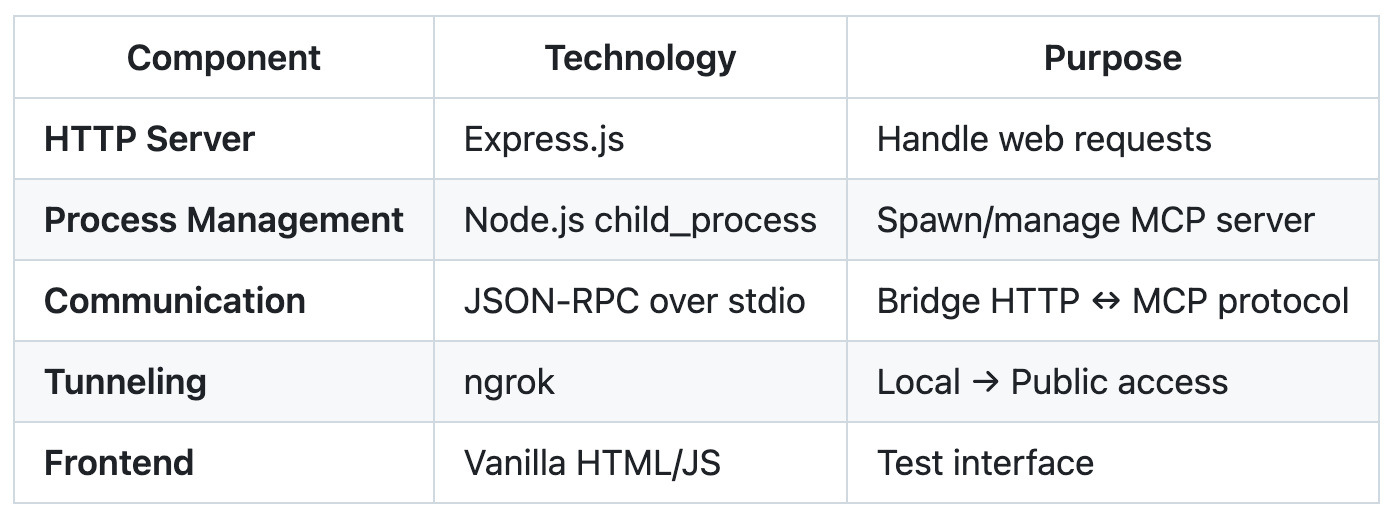
Architecture
┌─────────────────┐                    ┌───────────────────────────────────┐
│   Internet      │                    │          Your Machine             │
│   Users         │                    │                                   │
│                 │    ngrok tunnel    │  ┌─────────────┐  stdio pipes     │
│     Mobile      │◄──────────────────►│  │ Express.js  │◄────────────────► │
│     Browser     │                    │  │ HTTP API    │  ┌─────────────┐ │
│     API Calls   │                    │  │ (Port 3000) │  │ MCP Server  │ │
│                 │                    │  └─────────────┘  │ (Your Code) │ │
└─────────────────┘                    │                   └─────────────┘ │
                                       └───────────────────────────────────┘

HTTP Requests                          MCP Protocol Messages      MCP Tools
(GET/POST)            ←────────→       (stdin/stdout)       ←────► (Unchanged)
Communication Flow
- Internet → ngrok: HTTP requests from anywhere
- ngrok → Express.js: Tunneled to your local machine
- Express.js → MCP: JSON-RPC via stdio pipes
- MCP → Express.js: Results via stdio
- Express.js → Internet: HTTP responses back to caller
How MCP Communication Works
Your MCP server uses the Model Context Protocol, which can communicate via different transports:
Common transports:
- stdio (stdin/stdout) – Most common for local servers
- Server-Sent Events (SSE) – HTTP-based communication
- WebSockets – Real-time bidirectional communication
For this guide, we assume your MCP server uses stdio, which is the most typical setup for local MCP servers.
The key concept: Our Express.js wrapper handles all protocol translation, regardless of the specific MCP message format your server uses.
The Bridge: HTTP to MCP
Pseudo code flow:
START MCP_SERVER_PROCESS
ON HTTP_REQUEST:
  - Convert HTTP to MCP message format
  - Send to MCP process via stdin
  - Wait for response from stdout
  - Convert MCP response to HTTP
  - Return to client
Create server.js:
const express = require('express');
const { spawn } = require('child_process');

const app = express();
app.use(express.json());

let mcp = null;
let requestId = 1;
const pending = new Map();
let buffer = '';
// Start MCP server
function startMCP() {
  // Replace with your MCP server command
  mcp = spawn('uvx', ['your-mcp-package']);

  mcp.stdout.on('data', (data) => {
    buffer += data.toString();

    // Process complete JSON messages
    const lines = buffer.split('\n');
    buffer = lines.pop(); // Keep incomplete line

    lines.forEach(line => {
      if (line.trim()) {
        try {
          const response = JSON.parse(line);

          // TODO: Adjust this to match your MCP server's response format
          // This assumes responses have an 'id' field - modify as needed
          const requestId = response.id; // Change this line for your format
          const request = pending.get(requestId);

          if (request) {
            pending.delete(requestId);
            request.resolve(response);
          }
        } catch (error) {
          console.log('MCP output:', line);
        }
      }
    });
  });
  mcp.stderr.on('data', (data) => {
    console.error('MCP error:', data.toString());
  });
  mcp.on('close', (code) => {
    console.log(`MCP server closed with code ${code}`);
    // Auto-restart in production
    setTimeout(startMCP, 1000);
  });
}
// Send request to MCP
async function callMCP(tool, arguments) {
  if (!mcp) throw new Error('MCP server not running');

  const id = requestId++;

  // TODO: Replace this with YOUR MCP server's exact message format
  // This is just an example - check your MCP server's documentation
  const request = {
    id,
    method: "your_method_name",  // Replace with actual method
    params: {
      tool: tool,
      args: arguments
      // Adjust structure to match your server
    }
  };
  return new Promise((resolve, reject) => {
    pending.set(id, { resolve, reject });
    mcp.stdin.write(JSON.stringify(request) + '\n');

    // Timeout after 30 seconds
    setTimeout(() => {
      if (pending.has(id)) {
        pending.delete(id);
        reject(new Error('Request timeout'));
      }
    }, 30000);
  });
}
// API Endpoints
app.post('/api/:tool', async (req, res) => {
  try {
    const result = await callMCP(req.params.tool, req.body);

    // TODO: Adjust error checking based on your MCP server's response format
    // This is just an example - modify based on how your server indicates errors
    if (result.error) {
      return res.status(400).json({ error: result.error });
    }

    // Return the full response - adjust as needed for your format
    res.json(result);
  } catch (error) {
    res.status(500).json({ error: error.message });
  }
});
app.get('/health', (req, res) => {
  res.json({
    status: mcp ? 'running' : 'stopped',
    uptime: process.uptime()
  });
});
// Test interface
app.get('/', (req, res) => {
  res.send(`
    <h2>MCP API Test</h2>
    <form onsubmit="test(event)">
      <input name="tool" placeholder="Tool name" required><br><br>
      <textarea name="args" placeholder='{"key": "value"}'></textarea><br><br>
      <button>Execute</button>
    </form>
    <pre id="output"></pre>

    <script>
      async function test(e) {
        e.preventDefault();
        const form = new FormData(e.target);
        const tool = form.get('tool');
        const args = JSON.parse(form.get('args') || '{}');

        try {
          const res = await fetch('/api/' + tool, {
            method: 'POST',
            headers: {'Content-Type': 'application/json'},
            body: JSON.stringify(args)
          });

          const result = await res.json();
          document.getElementById('output').textContent =
            JSON.stringify(result, null, 2);
        } catch (error) {
          document.getElementById('output').textContent = 'Error: ' + error.message;
        }
      }
    </script>
  `);
});
// Graceful shutdown
process.on('SIGINT', () => {
  if (mcp) mcp.kill();
  process.exit(0);
});
// Start everything
startMCP();
app.listen(3000, () => {
  console.log('API running on http://localhost:3000');
  console.log('Test interface available at the root URL');
});
Important: Customize for Your MCP Server
The code above is a template. You must customize these parts:
- Spawn command (line ~15): Replace
['uvx', ['your-mcp-package']]with your server's start command - Message format (line ~45): Replace the request object with your server’s expected format
- Response handling (line ~25): Adjust
response.idto match your server's response structure - Error checking (line ~75): Modify based on how your server indicates errors
To find your format, run your MCP server manually and observe the exact JSON messages it expects/returns.
Dependencies
{
  "name": "mcp-api-wrapper",
  "dependencies": {
    "express": "^4.18.2"
  }
}
Setup and Test
# 1. Install dependencies
npm install

# 2. Update the spawn command in server.js to match your MCP server:
# spawn('node', ['your-server.js'])
# spawn('python', ['server.py'])
# spawn('uvx', ['your-package'])

# 3. Start the API
node server.js

# 4. Make it public (new terminal)
npx ngrok http 3000
Usage Examples
Test in browser: Visit your ngrok URL
Call from code:
curl -X POST https://your-url.ngrok.io/api/your_tool \
  -H "Content-Type: application/json" \
  -d '{"param": "value"}'
From mobile: Same URL works anywhere
Production Deployment
Replace ngrok with proper hosting:
- Railway/Render: Push to GitHub, auto-deploy
- VPS: Docker + nginx reverse proxy
- Cloud Run: Containerized deployment
Add rate limiting, authentication, and monitoring as needed. The core pattern works with any MCP server. Just change the spawn command.
Published at DZone with permission of Vivek Vellaiyappan Surulimuthu. See the original article here.
Opinions expressed by DZone contributors are their own.
Comments