

Foxit MCP Server: Give AI Agents Direct Access to 30+ PDF Tools via Model Context Protocol
Foxit MCP Server gives any AI agent direct access to 30+ PDF tools for conversion, OCR, merge, and compare via the Model Context Protocol.
Wiring a document automation agent directly to REST endpoints forces you to repeat the same plumbing for every operation: push a file up, poll until the task finishes, pull the result down, catch failures, and juggle auth tokens across several services. With PDFs, that cycle runs again for each conversion, OCR pass, or merge in your pipeline. The Foxit PDF API MCP Server replaces all of that with 30+ tools an agent can invoke directly, while the MCP Server absorbs the upstream REST mechanics behind the scenes.
This article walks through registering the server, the full tool catalog it advertises, how Foxit’s eSign and DocGen REST APIs carry the same agent session forward into signing and document generation, and a concrete four-step workflow you can reproduce with your own files.
MCP Architecture in 90 Seconds
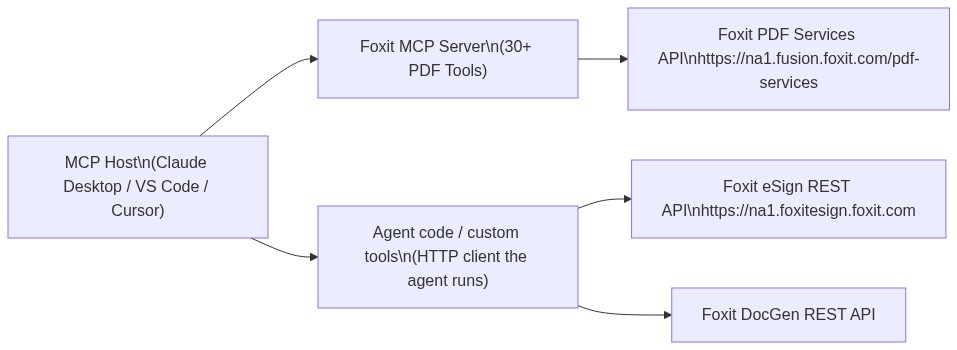
The MCP specification splits responsibility across three roles. The Host is the LLM runtime, such as Claude Desktop, VS Code with GitHub Copilot, or Cursor, which owns the conversation and chooses when a tool should run. The Server is the capability provider, a process that publishes tools over the MCP protocol and runs them against an underlying service. Tools are the individual operations a server makes callable, each described by a JSON schema so the host knows what goes in and what comes out.
Foxit sits on both ends of this picture. Foxit PDF Editor ships as an MCP Host, the first PDF application to take that role, reaching outward to external MCP servers such as Gmail or Salesforce so its built-in AI assistant can use those services. The Foxit PDF API MCP Server points the other way, publishing Foxit’s cloud PDF Services API as 30+ tools that any MCP Host can invoke.
The operations the MCP Server surfaces span format conversion, content extraction, OCR, merge, split, compress, flatten, linearize, compare, watermark, form data import/export, security, and property inspection. Foxit’s eSign API and DocGen API sit outside the MCP Server as independent REST services, which means they never appear as MCP tools. An agent workflow can still call them within the same session, just through the agent’s own code-execution layer instead of the MCP protocol itself, a difference the eSign section unpacks fully. PDF processing belongs to the MCP tools; signing and template generation belong to code the agent executes.
Prerequisites and Configuration
Three things need to be in place before you register the server:
- A Foxit developer account to obtain a
client_idandclient_secret(the free plan at developer-api.foxit.com needs no credit card) - Python 3.11+ alongside the
uvpackage manager, or Node.js 18+ withpnpmif you prefer the TypeScript version - Any MCP-compatible host, such as Claude Desktop, VS Code, or Cursor
Grab the repo from github.com/foxitsoftware/foxit-pdf-api-mcp-server and add it to your host’s MCP configuration. Claude Desktop is the host used in the walkthrough below, but the identical command, args, and env values carry over to any MCP host. In Claude Desktop, open Settings, switch to the Developer tab, and choose Edit Config.
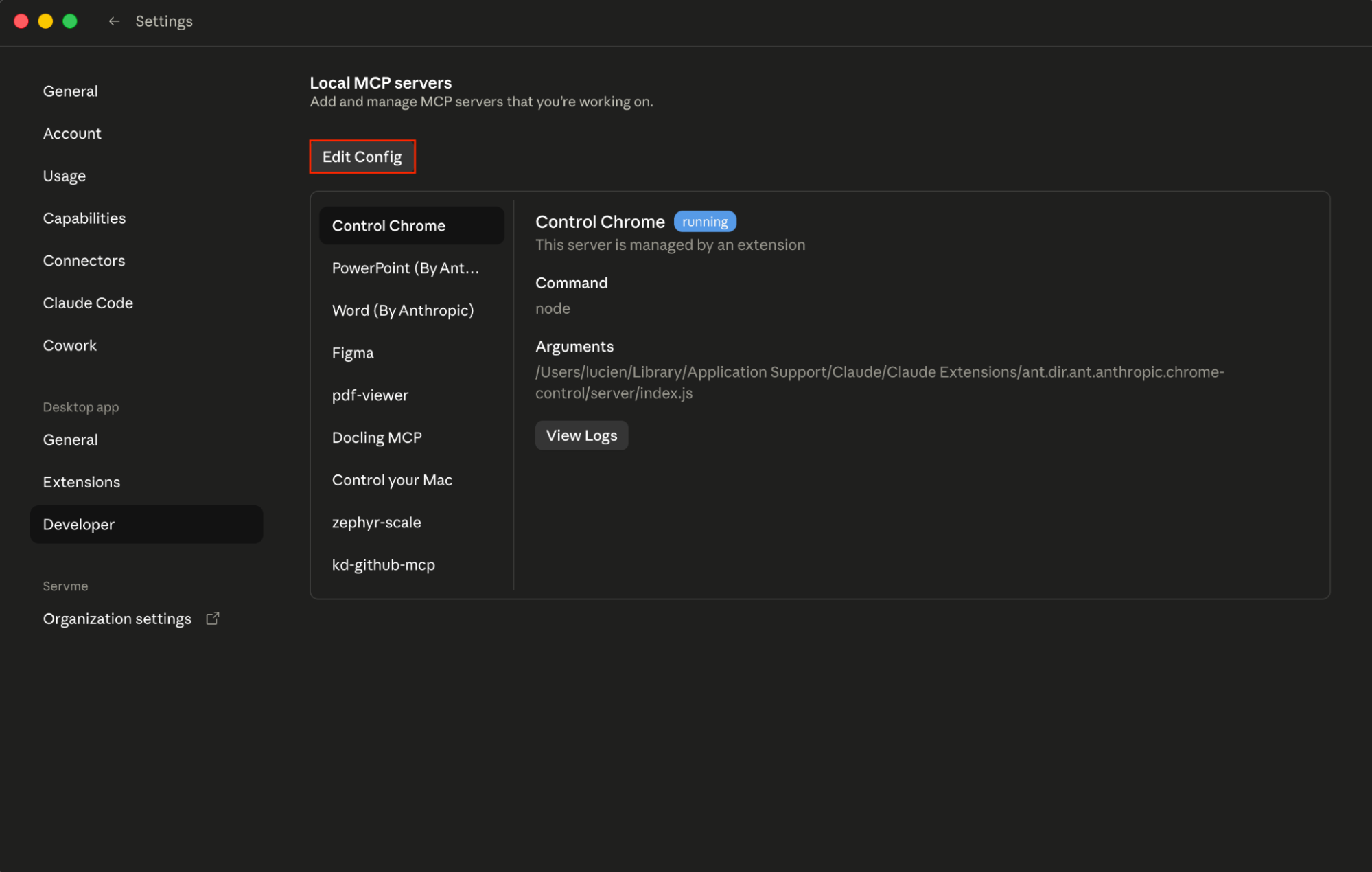
Next, open claude_desktop_config.json in any text editor. The file lives at ~/Library/Application Support/Claude/ on macOS or %APPDATA%\Claude\ on Windows.
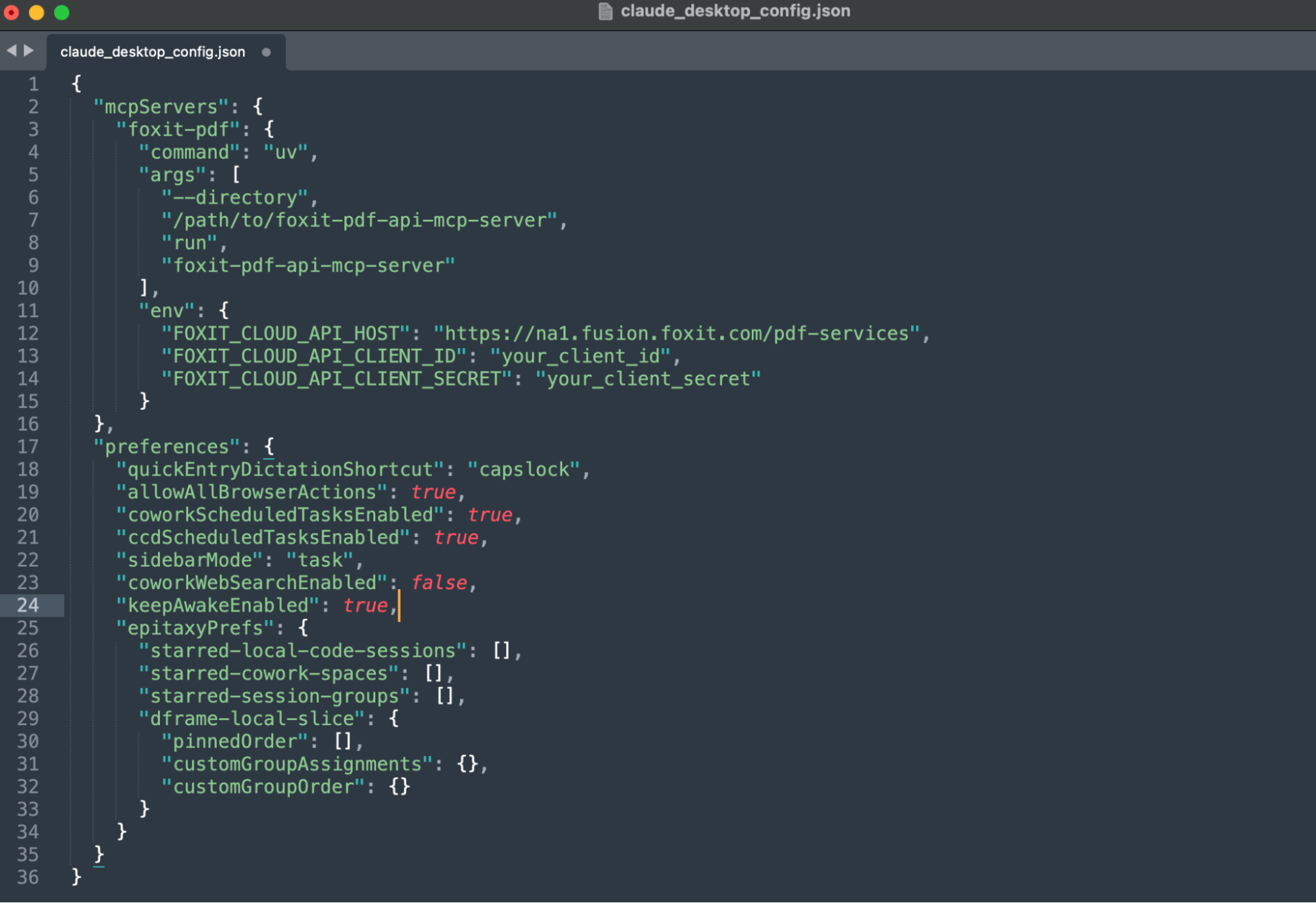
Register the Foxit server beneath the mcpServers key:
{
  "mcpServers": {
    "foxit-pdf": {
      "command": "uv",
      "args": [
        "--directory",
        "/path/to/foxit-pdf-api-mcp-server",
        "run",
        "foxit-pdf-api-mcp-server"
      ],
      "env": {
        "FOXIT_CLOUD_API_HOST": "https://na1.fusion.foxit.com/pdf-services",
        "FOXIT_CLOUD_API_CLIENT_ID": "your_client_id",
        "FOXIT_CLOUD_API_CLIENT_SECRET": "your_client_secret"
      }
    }
  }
}
Define FOXIT_CLOUD_API_CLIENT_ID and FOXIT_CLOUD_API_CLIENT_SECRET as system environment variables before the host process starts. Feeding credentials in through prompt context is a security exposure that any production setup should close off. The client_id and client_secret from your developer portal cover authentication for every MCP tool call against the PDF Services API. Bringing eSign into the same agent session means performing its own OAuth2 token exchange (detailed in the next section), so the two credential scopes never mix.
Once you save the file, quit Claude Desktop entirely and relaunch it. On startup, it reads the config and spawns the server as a local subprocess communicating over standard input and output, which is the transport the Foxit server speaks.
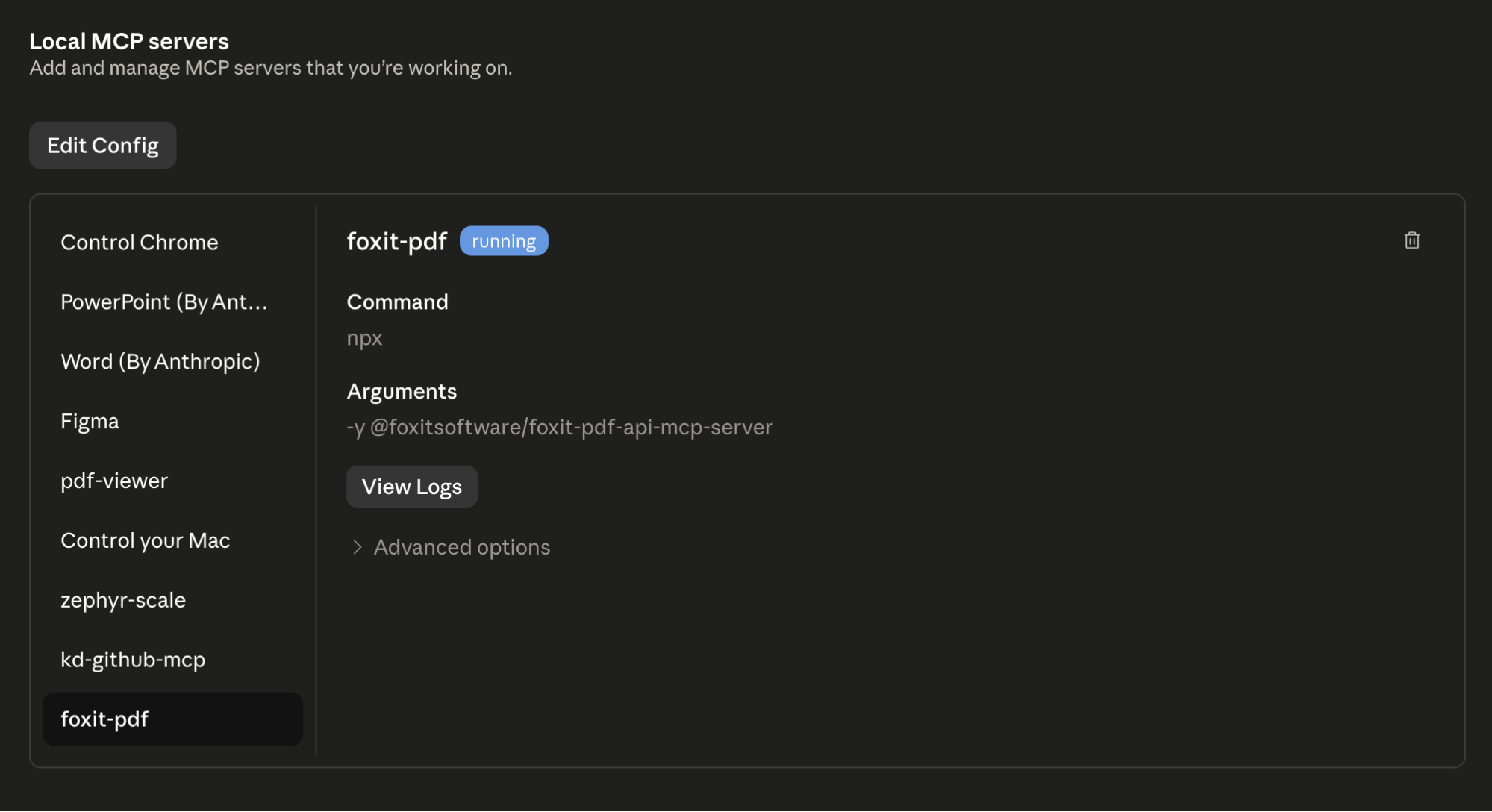
After the restart, the Foxit MCP server should appear as Running under local MCP servers in the Developer tab. Head to the Customize tab, open Connectors, and click foxit-pdf to inspect the tools the Foxit MCP server provides; the full set of 30+ registered tools should be listed there.
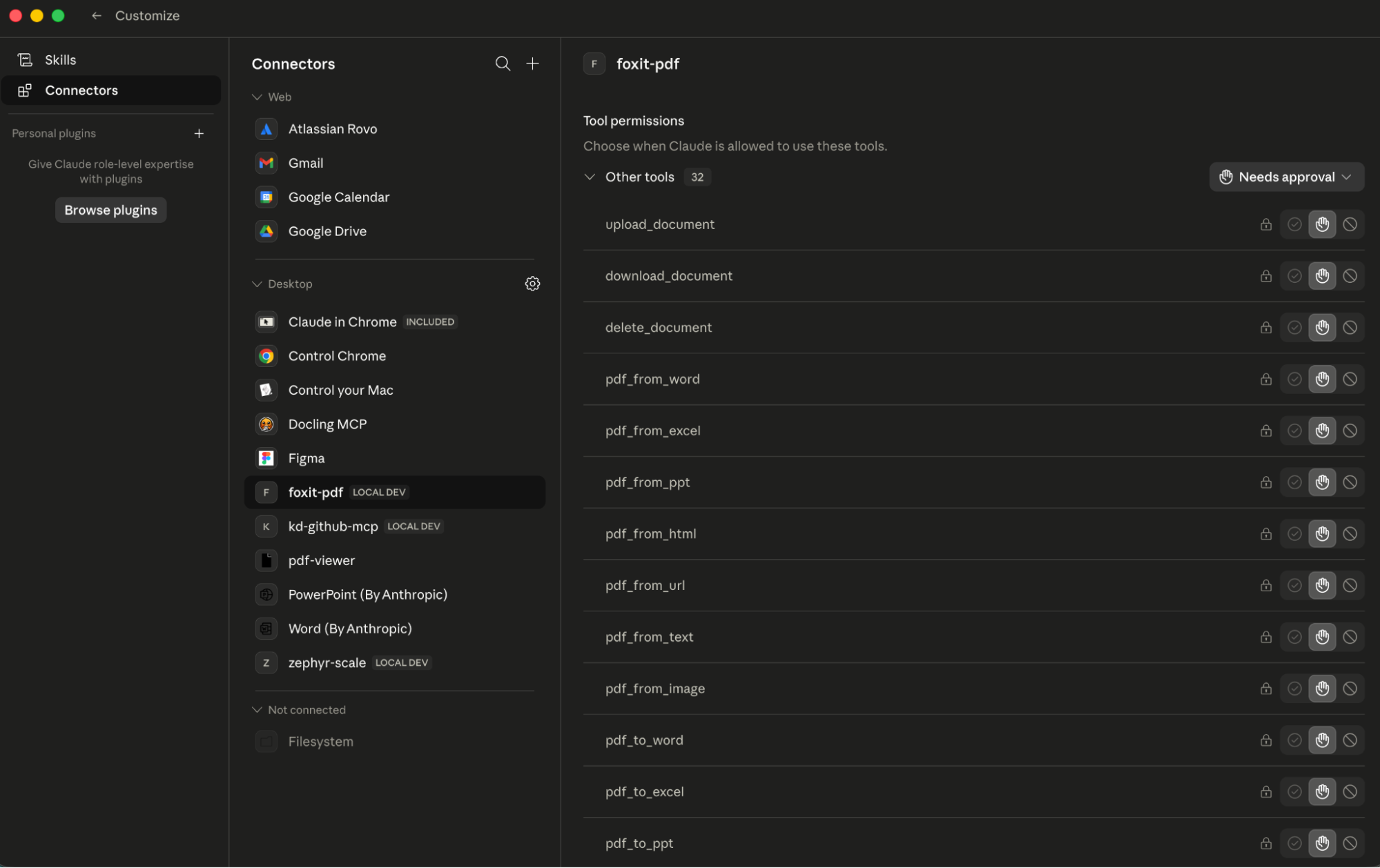
If the connector never appears, the server failed to launch. Claude’s logs at
~/Library/Logs/Claude/mcp*.logusually reveal why, most often a missinguvbinary or an incorrect--directorypath.
Invoking a tool is as simple as typing a natural-language request like “Convert this Word file to PDF and compress it.” The agent picks pdf_from_word and pdf_compress, and before each call executes, Claude Desktop displays an approval prompt listing the exact tool name and arguments; the tool’s JSON result then streams back into the chat.
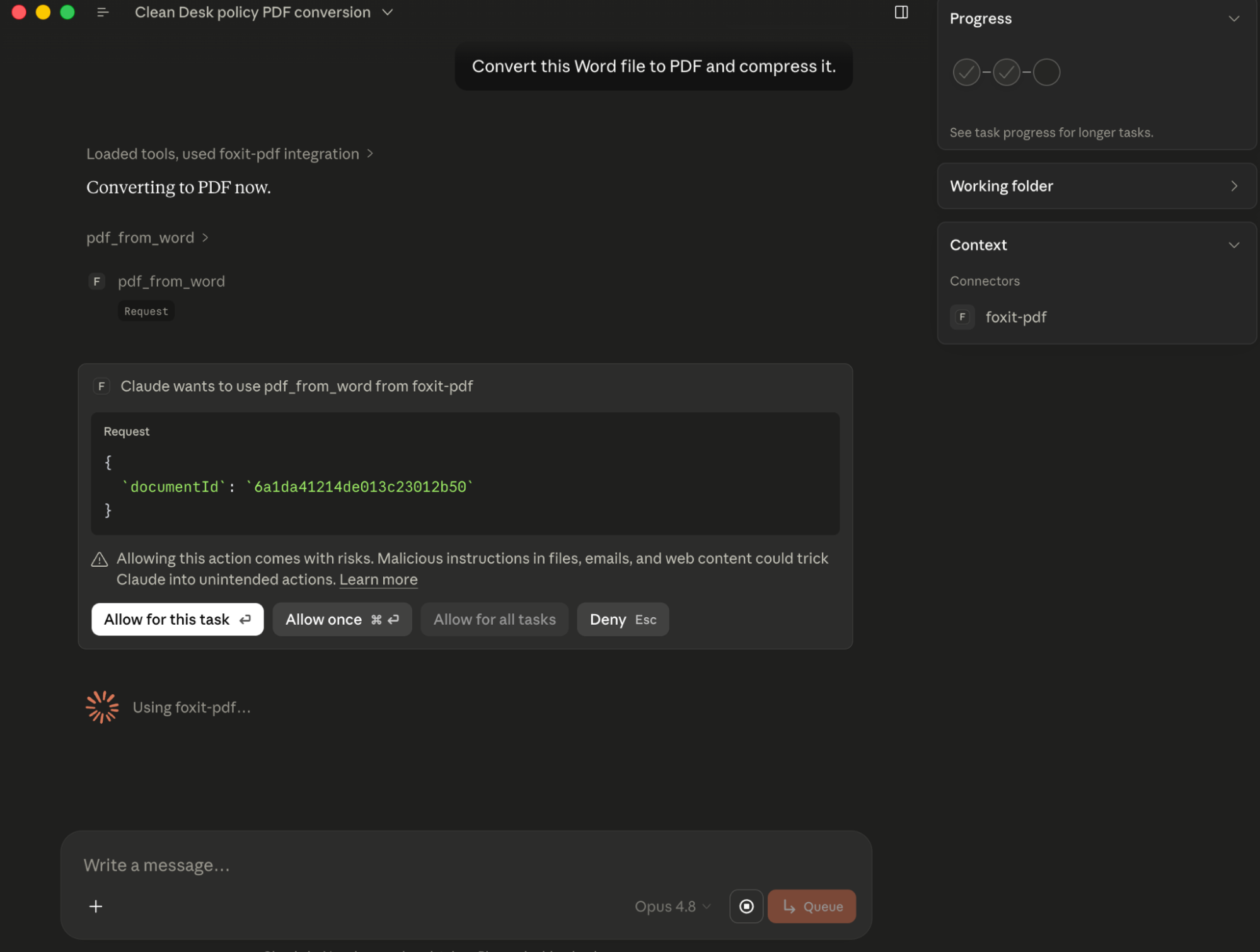
That per-call approval doubles as your audit point, because it shows precisely which tool the agent selected and the arguments it supplied.
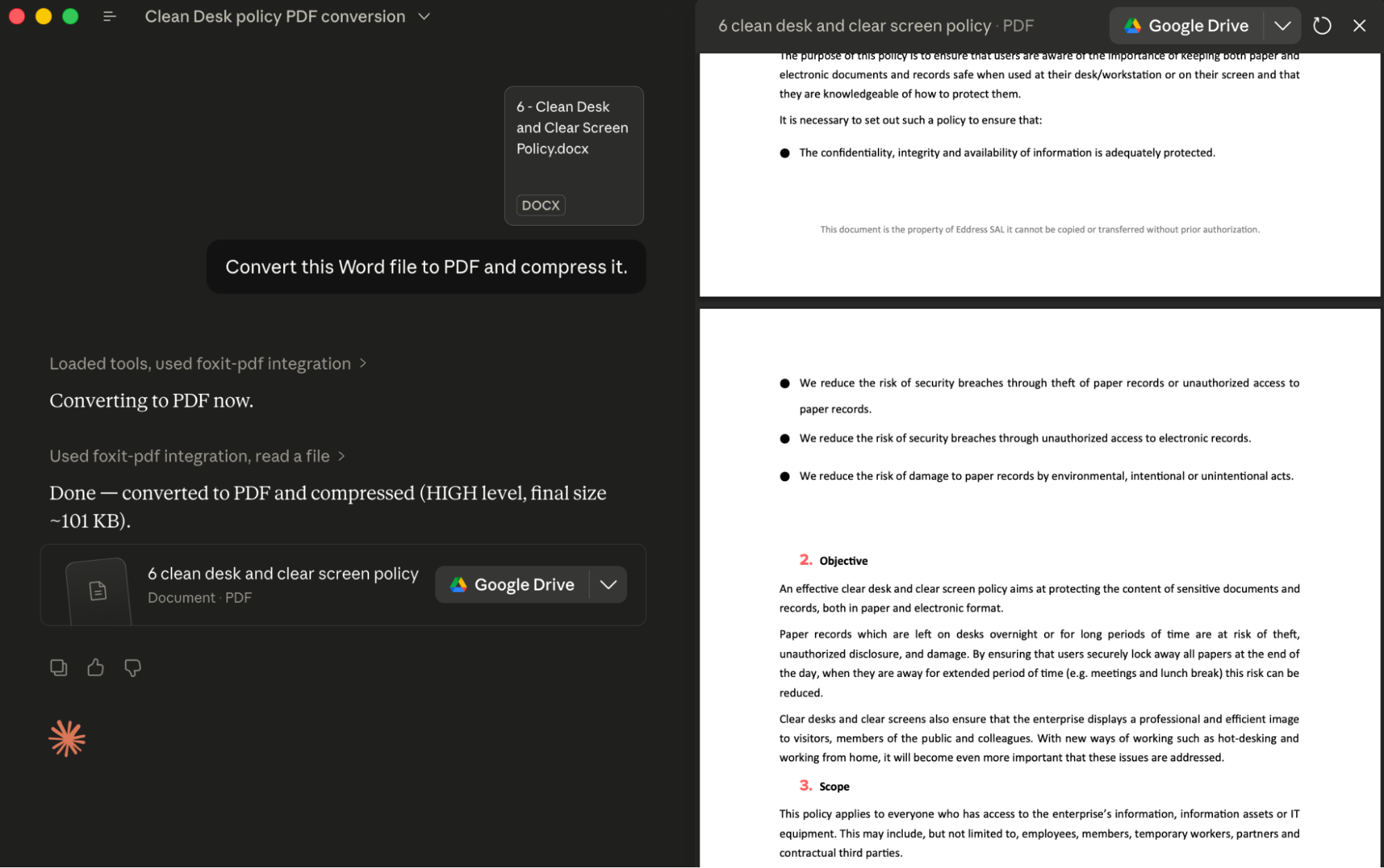
To run the server in VS Code instead, place the equivalent entry in .vscode/mcp.json under a top-level servers key, adding a "type": "stdio" field, so VS Code launches the process the same way:
{
  "servers": {
    "foxit-pdf": {
      "type": "stdio",
      "command": "uv",
      "args": [
        "--directory",
        "/path/to/foxit-pdf-api-mcp-server",
        "run",
        "foxit-pdf-api-mcp-server"
      ],
      "env": {
        "FOXIT_CLOUD_API_HOST": "https://na1.fusion.foxit.com/pdf-services",
        "FOXIT_CLOUD_API_CLIENT_ID": "your_client_id",
        "FOXIT_CLOUD_API_CLIENT_SECRET": "your_client_secret"
      }
    }
  }
}
An alternative path is running MCP: Add Server from the Command Palette (Cmd+Shift+P or Ctrl+Shift+P), selecting Command (stdio), then choosing Workspace to store the entry in .vscode/mcp.json or Global to keep it in your user profile. After saving, VS Code displays inline Start, Stop, and Restart actions above the server entry and adds it to the MCP SERVERS - INSTALLED view, where a green indicator and the discovered tool count confirm everything is connected.
PDF Services MCP Tools: Full Catalog
The 30+ tools fall into seven functional categories. Nearly all of them expect a documentId produced by an earlier upload_document call and hand back a resultDocumentId you can feed to download_document whenever you need the output on disk. The one exception is pdf_from_url, which takes a URL directly.
Document Lifecycle
upload_document: push a PDF, Office file, image, HTML file, or plain text file to the cloud; returns adocumentIdused by every later operationdownload_document: pull a processed result down to a local file pathdelete_document: remove stored files from cloud storage when you are done with them
PDF Creation (File to PDF)
pdf_from_word,pdf_from_excel,pdf_from_ppt: turn Office documents into PDFspdf_from_text,pdf_from_image,pdf_from_html: turn plaintext, image files, or HTML into PDFspdf_from_url: fetch a live URL and render the page as a PDF
PDF Conversion (PDF to File)
pdf_to_word,pdf_to_excel,pdf_to_ppt: recover editable Office formats from a PDFpdf_to_text,pdf_to_html,pdf_to_image: produce text, HTML, or image representations
Manipulation
pdf_merge: join multiple PDFs into a single filepdf_split: divide a PDF by page ranges, page count, or one file per pagepdf_extract: lift a subset of pages out of a PDFpdf_compress: shrink file size by 30-70% depending on content typepdf_flatten: bake form fields and annotations into static content (a requirement for compliance archiving workflows)pdf_linearize: prepare a file for Fast Web View so browsers can stream pages as they loadpdf_watermark: stamp text or image watermarks with configurable position, opacity, and rotationpdf_manipulate: rotate, delete, or rearrange pages
Analysis
pdf_compare: diff two PDFs and produce a color-coded annotation document highlighting the changespdf_ocr: turn scanned or image-based PDFs into searchable text, with multi-language supportpdf_structural_analysis: detect document structure (titles, headings, paragraphs, tables with cell grids, images, form fields, hyperlinks, and metadata) with bounding boxes, following the Foxit PDF structural extraction engine schema. The output is JSON delivered inside a downloadable ZIP rather than a set of named business entities; it describes layout and structure only, and converting that into fields such as party names falls to the agent’s LLM, which performs the semantic extraction over the JSON
Security and Forms
pdf_protect: lock a document with password protection using 128-bit or 256-bit AES encryption plus granular permission flagspdf_remove_password: lift password protection off a documentexport_pdf_form_data: read form field values out as JSONimport_pdf_form_data: fill form fields from a JSON payload
Properties
get_pdf_properties: report page count, page dimensions, PDF version, encryption status, digital signature info, embedded files, font inventory, and document metadata
In production document pipelines, the operation that gets called most is pdf_from_word. The agent uploads a DOCX, receives a documentId, then invokes pdf_from_word with that ID. Under the hood the PDF Services API performs the conversion asynchronously, but the MCP Server takes care of polling internally and hands the finished result straight back to the agent.
MCP tool call:
{
  "name": "pdf_from_word",
  "input": {
    "documentId": "doc_abc123"
  }
}
MCP tool response:
{
  "success": true,
  "taskId": "task_xyz789",
  "resultDocumentId": "doc_result456",
  "message": "Word document converted to PDF successfully. Download using documentId: doc_result456"
}
From here, hand doc_result456 to download_document to save the PDF locally, or pipe it straight into the next tool in a chain, such as pdf_structural_analysis or pdf_compress.
Extending to eSign: Foxit’s Signing API as a Complementary REST Layer
Once the MCP tools finish PDF processing, the workflow’s next stage sends a document out for signature through Foxit’s eSign REST API, hosted at https://na1.foxitesign.foxit.com. Everything in this guide targets the na1 (US) region.
Foxit also runs regional eSign hosts for the EU (
eu1.foxitesign.foxit.com), Canada (na2.foxitesign.foxit.com), and Australia (au1.foxitesign.foxit.com). Payloads and endpoints stay identical across regions; only the host differs, so select whichever host satisfies your data residency requirements.
The eSign API lives outside the Foxit MCP Server, so it is not an MCP tool, and that detail shapes how the agent gets to it. Most MCP hosts have no ability to fire arbitrary HTTP requests themselves, which means eSign is never reached “through MCP.” The agent instead calls eSign from its own code-execution layer, whether that takes the form of a host-provided code interpreter, an agent framework executing Python, or a custom tool you register that wraps the eSign endpoints. The cleanest pattern for production is wrapping the eSign operations you need as custom MCP tools so the host invokes them exactly as it invokes the PDF tools; the production considerations section comes back to this. The code below is what runs inside that layer.
Authentication relies on OAuth2 client_credentials. This eSign token exchange is a separate flow from the PDF Services header auth that powers your MCP tools:
import requests

resp = requests.post(
    "https://na1.foxitesign.foxit.com/api/oauth2/access_token",
    data={
        "client_id": ESIGN_CLIENT_ID,
        "client_secret": ESIGN_CLIENT_SECRET,
        "grant_type": "client_credentials",
        "scope": "read-write"
    }
)
access_token = resp.json()["access_token"]
“Folder” is the term the Foxit eSign API developer guide uses throughout its documentation. An automated signing flow centers on these endpoints:
POST /api/folders/createfolder: build a signing folder from one or more PDF documents, including signers, subject, and messagePOST /api/folders/sendDraftFolder: send a draft folder out to its signersPOST /api/templates/createtemplate: store a reusable template from a PDF with pre-placed signature fields (later instantiate a folder from it viaPOST /api/templates/createFolder)GET /api/folders/viewActivityHistory?folderId={id}: fetch the activity audit trail for a folder after it has been sent (a draft that was never shared returns an error)- Webhook channels for status callbacks: register a callback URL to get real-time events whenever signers view, sign, or decline
A createfolder call accepts the PDF produced by your MCP pipeline, uploaded into eSign’s document storage after download_document fetches it, and configures the signing workflow:
POST /api/folders/createfolder

   Authorization: Bearer {access_token}

    Content-Type: application/json
{
  "folderName": "Acme Corp Contract - Q3 2025",
  "sendNow": false,
  "fileUrls": ["https://your-storage.example.com/acme_contract_final.pdf"],
  "fileNames": ["acme_contract_final.pdf"],
  "parties": [
    {
      "firstName": "John",
      "lastName": "Smith",
      "emailId": "[email protected]",
      "permission": "FILL_FIELDS_AND_SIGN",
      "sequence": 1
    }
  ]
}
With sendNow at false, the call creates a draft folder you dispatch later through a separate request to /api/folders/sendDraftFolder. Setting sendNow to true instead creates and sends in one step. When a file cannot be reached by URL, include "inputType": "base64" and supply the documents as a base64FileString array in place of fileUrls; leaving out inputType causes the API to reject the base64 payload as empty.
Foxit’s eSign API comes with HIPAA, eIDAS, ESIGN Act, UETA, 21 CFR Part 11, FERPA, and FINRA compliance built in. Each audit trail record captures signer location, IP address, recipient identity, event timestamp, consent confirmation, security level, and the complete folder history. If legal defensibility matters in your regulated industry, persist those fields in your own data layer as well, since depending entirely on Foxit’s folder history API for compliance record-keeping leaves a single point of failure in your audit chain.
End-to-End Workflow: AI Agent Automates a Sales Contract
Imagine a sales ops agent handed one natural language goal, “Generate a contract for Acme Corp, $48,000 ARR, and send it for signature.” No part of the tool sequence is hard-coded. Because the MCP Server advertises its PDF tools to the host at connection time, the agent can interpret the goal, recognize it has a template to render and a document to route for signature, and choose which operations to run and in what order. The PDF steps execute as MCP tool calls, while the DocGen and eSign steps execute from the agent’s code layer. The sequence shown below is one plausible run the agent could produce, not a fixed script assembled ahead of time.
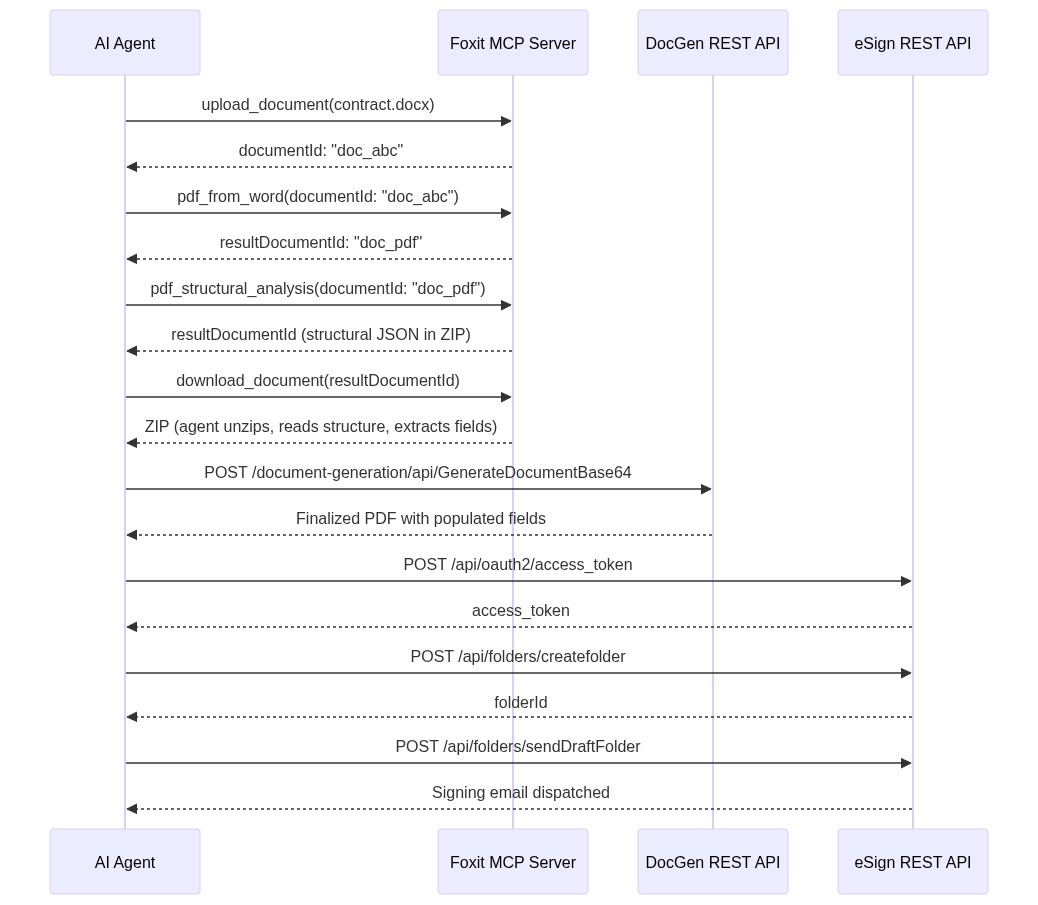
The agent starts with MCP tools to get a PDF in hand. It uploads the DOCX contract template through upload_document, gets documentId: "doc_abc" back, and runs pdf_from_word. The MCP Server manages the async conversion internally and reports resultDocumentId: "doc_pdf" when the job finishes.
To understand what the PDF contains, the agent runs pdf_structural_analysis against documentId: "doc_pdf". The tool never returns named entities such as “party” or “ARR.” What comes back is a resultDocumentId pointing at a ZIP archive, so the agent fetches it with download_document, unpacks it, and reads the structural JSON describing headings, paragraphs, and table cells along with their positions. Semantic extraction is the job of the agent’s LLM, which reads that structural JSON and lifts “Acme Corp” from a heading or a contract value from a table cell, verifying the fields it needs exist. Structure comes from the tool; meaning comes from the model. If you would rather have an API return business entities directly instead of relying on the model to interpret layout, that capability belongs to Foxit’s iDox.ai Document API, a separate service purpose-built for entity and PII extraction.
Holding the field values, the agent produces the finished contract via the DocGen API, posting to /document-generation/api/GenerateDocumentBase64 so the values merge into the template through {{dynamic_tags}} syntax. Because DocGen is synchronous, the finalized PDF arrives in the response body with Acme Corp’s name, the $48,000 ARR figure, and the right dates filled in. There is no polling step.
The last move is routing the document for signature. The agent authenticates against the eSign OAuth2 endpoint, uploads the DocGen output, builds a signing folder through /api/folders/createfolder with [email protected] as the signer, and sends it via /api/folders/sendDraftFolder.
The thread running through all of this is that the model derives the order from the goal rather than following a script. PDF steps resolve to MCP tool calls the host already knows about, while DocGen and eSign steps pass through the agent’s code layer because those APIs are not MCP tools. Each step’s output feeds the next step’s input, and the only orchestration left for you to maintain is whatever exposes that code layer to the model, ideally a set of custom tools rather than ad hoc scripting.
Production Considerations: Error Handling, Rate Limits, and Data Governance
Calling PDF Services through the MCP Server means async polling stays inside the server process, and your agent only ever sees the final resultDocumentId once the task completes. Calling the raw PDF Services REST API directly is different, since every operation hands back a taskId you must poll yourself. The pattern below uses exponential backoff capped at 10 seconds per interval with a 30-second overall timeout:
import time, requests

API_HOST = "https://na1.fusion.foxit.com/pdf-services"
auth_headers = {
    "client_id": "your_client_id",
    "client_secret": "your_client_secret"
}

def poll_task(task_id: str, max_wait: int = 30) -> str:
    delay = 1
    elapsed = 0
    while elapsed < max_wait:
        resp = requests.get(
            f"{API_HOST}/api/tasks/{task_id}",
            headers=auth_headers
        )
        data = resp.json()
        if data["status"] == "COMPLETED":
            return data["resultDocumentId"]
        time.sleep(delay)
        elapsed += delay
        delay = min(delay * 2, 10)
    raise TimeoutError(f"Task {task_id} timed out after {max_wait}s")
Since eSign and DocGen are not MCP tools, be deliberate about how the agent reaches them. Allowing the model to emit raw HTTP from a free-form code interpreter is fragile and difficult to audit. The sturdier approach is wrapping the specific eSign and DocGen operations you actually use, such as create-folder, send-folder, and generate-document, as custom MCP tools with typed inputs. The host then invokes them over the same protocol it uses for the PDF tools, credentials remain inside the tool process instead of the prompt, and the agent’s decisions surface as inspectable tool calls rather than opaque scripts.
The output of pdf_structural_analysis warrants a caution of its own. For a long contract, the structural JSON can contain many thousands of elements, and pushing the whole file into the model can silently exceed its context window, a failure that usually shows up as truncated or confused extraction instead of a clean error. The code that unzips the archive should filter the JSON before the model ever sees it, retaining only the element types and pages that matter (for a contract, typically the heading blocks and the relevant table) instead of forwarding the entire document.
The free developer plan at developer-api.foxit.com is sized for development and testing volumes. Production workloads beyond the free-tier threshold call for a volume plan requested through the Developer Portal.
On the data governance side, every API call travels over TLS 1.2+, and documents at rest are protected with AES-256 encryption. Foxit’s API security documentation details SOC 2 Type II audit status, HIPAA BAA support, GDPR, CCPA, eIDAS, ESIGN Act, UETA, 21 CFR Part 11, FERPA, and FINRA requirements. Customer data is kept in logically segmented environments. Teams in healthcare, legal, or financial services should confirm data residency requirements before wiring up production document flows, then pick the matching regional eSign host described earlier, because the host you call determines where the data gets processed.
Run Your First Tool Call Now
A working MCP tool call is under 15 minutes away:
- Sign up for a free developer account at developer-api.foxit.com (no credit card, instant access), then copy your
client_idandclient_secretfrom the dashboard. - Set the three environment variables:
Shell
export FOXIT_CLOUD_API_HOST="https://na1.fusion.foxit.com/pdf-services" export FOXIT_CLOUD_API_CLIENT_ID="your_client_id" export FOXIT_CLOUD_API_CLIENT_SECRET="your_client_secret" - Clone the repo, register it with the config block from the Prerequisites section, restart your MCP host, and call
pdf_from_urlagainst any public URL. A confirmed PDF lands in your working directory. The Developer Portal also offers a live API Playground where you can validate request payloads against the PDF Services API before connecting them to an agent.
To extend toward a full signing workflow, the smallest useful addition on top of the MCP setup is authenticating against the eSign OAuth2 endpoint and posting a static PDF to /api/folders/createfolder. From there, DocGen field population, pdf_structural_analysis extraction, and webhook callbacks build on the same pattern step by step.
Claim your free API access at developer-api.foxit.com.
Comments