

GenAI: From Prompt to Production
GenAI-Logic is a prompt-driven approach to describing a model and logic using natural language. Create a time tracking system and post to production in less than 2 hours.
Join the DZone community and get the full member experience.
Join For FreeThe Idea
A project time-tracking system should allow entry of:
- Clients have one or more projects consisting of one or more tasks.
- Tasks have timesheet entries, completed by persons entering hours working for a client.
- Invoices are created by adding invoice items linked to billable timesheet lines.
- Once the invoice is marked as ready, send the information to Kafka for invoice processing.
The Prompt
GenAI Logic is a web page, like many chatbots, that allows the user to enter a prompt. The more details provided, the better the result (although you can iterate to add or change the outcome using the “Iterate” button).
You want to describe the model and attribute, the logic, and the use cases as fully as possible. Then, simply click “Create Projects” and wait about 90 seconds.
One note: Under “Advance Settings,” change the data model size to 8 (the number of tables to create). This prevents GenAI from adding more tables that are needed.

Use these names for tables and attributes:

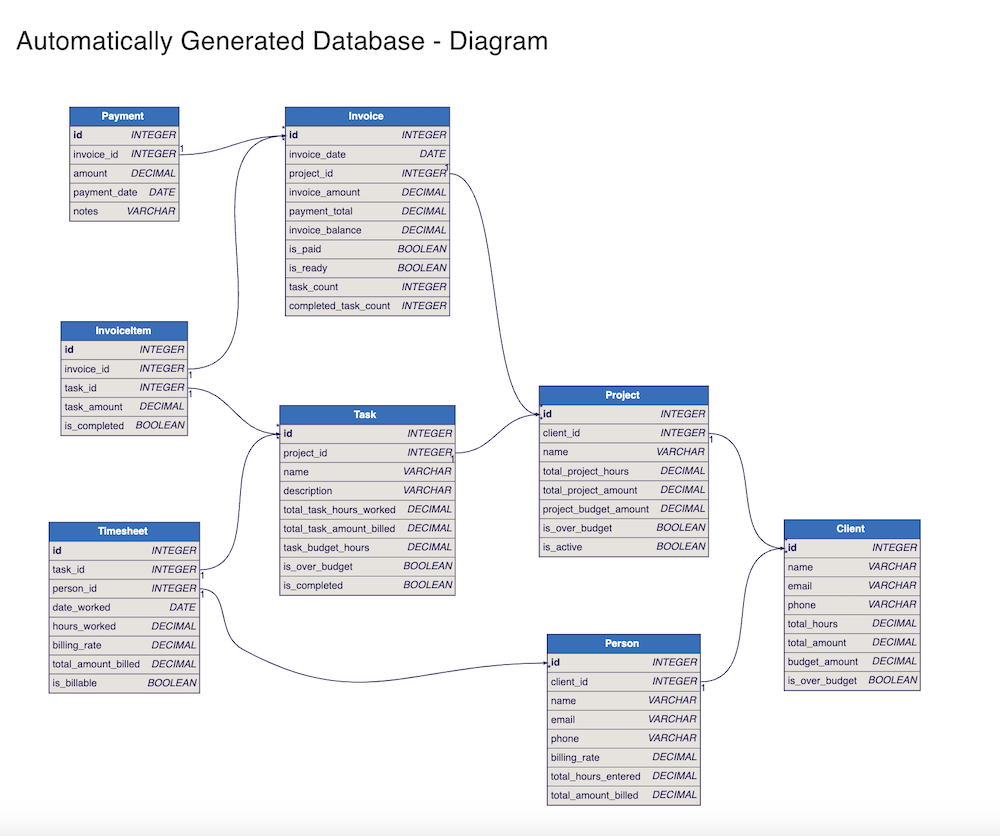
* Client (id, name, email, phone, total_hours, total_amount, budget_amount, is_over_budget)
* Project ( id, client_id, name, total_project_hours, total_project_amount, project_budget_amount, is_over_budget, is_active)
* Invoice: (id, invoice_date, project_id, invoice_amount, payment_total, invoice_balance, is_paid, is_ready,task_count,completed_task_count)
* InvoiceItem(id, invoice_id, task_id, task_amount, is_completed)
* Task (id, project_id, name, description, total_task_hours_worked, total_task_amount_billed, task_budget_hours, is_over_budget,is_completed)
* Person (id, client_id, name, email, phone, billing_rate, total_hours_entered, total_amount_billed)
* Timesheet (id,task_id, person_id, date_worked, hours_worked, billing_rate, total_amount_billed, is_billable)
* Payment (id, invoice_id, amount, payment_date, notes)
Business Logic
Break down the logic into use cases, starting with timesheets, to describe the business logic. For example: “Copy the person’s billing_rate multiplied by the hours_worked to get the total_amount_billed.”
Then, modify the use case rule to only perform the calculation if the is_billable flag is set to True (some tasks are non-billable). The sums and counts are rolled up from Task to Project to Client. The is_over_budget flag is determined based on the budget_amount of the Client and Project.
The invoice has an is_ready flag that, when set to true, sends the invoice row to Kafka. This allows a Kafka consumer to initiate the workflow integration in a separate container. Other workflows and integrations can be easily added to the use cases.
Business Rules (Logic)
Use LogicBank to enforce business logic.

Use case: Person
Total Hours entered is sum of timesheet hours worked
Total amount billed is total hours entered times billing rate
Billing rate must be greater than 0 and less than 200

Use case: Timesheet
Copy billing rate from Person billing rate
If is_billable then the total amount billed is the billing rate times hours worked
Hours worked must be greater than 0 and less than 15

Use Case: Task
Total task hours worked is the sum of the Timesheet hours worked
Total task amount billed is the sum of the Timesheet total amount billed
Formula: is Over Budget  when total task hours worked exceeds task budget hours

Use Case: Project
Total project hours is the sum of Task total task hours worked
Total project amount is the sum of Task total amount billed
Formula: is Over Budget when total project amount exceeds project budget amount

Use Case: Client
Total hours is the sum of Project total project hours
Total amount is the sum of Project total project amount
Formula: is Over Budget equals true when total amount exceeds budget amount

Use Case: Invoice
Invoice Amount is the sum of InvoiceItem task amount
Payment total is the sum of Payment amount
Invoice balance is invoice amount less payment total
Formula: is_paid when invoice balance is than or equal to zero
Task Count is count of InvoiceItem
Task completed count is count of InvoiceItem where is_completed is True
Formula: is ready when Task Count is equal to Task Completed Count
Send invoice to Kafka when is_ready is True

Use Case: InvoiceItem
InvoiceItem task amount is copied from Task total task amount billed
InvoiceItem is_completed is sum of Task is_completed when True
The Project
When completed, GenAI Logic creates an SQL Database (SQLite), a SQLAlchemy ORM model, an API (JSON API), a react-admin client, complete business logic (25+ rules), and sample data for testing. This would easily be over 1,000 lines of code to handle all the use cases of adding, updating, deleting, and reparenting entries. The entire project can be downloaded from GitHub or a zip file for the developer to review.
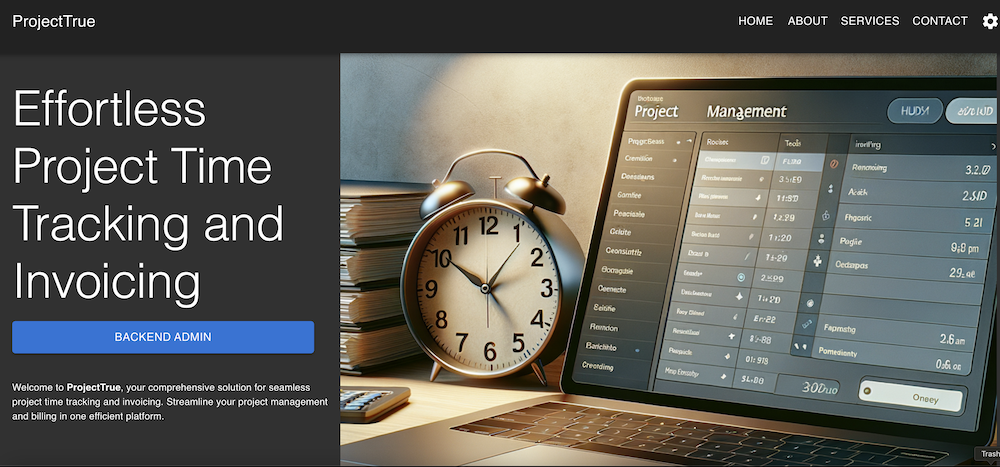
Just for fun, the system also created a single-page application landing page to demonstrate your project prompt.
The Data Model
The “Backend Admin” button leads to the working page that includes the logic, the model, a sample react-admin application (for testing the rules), and tools for the developer. This was the model created from the prompt.
Explore the Project
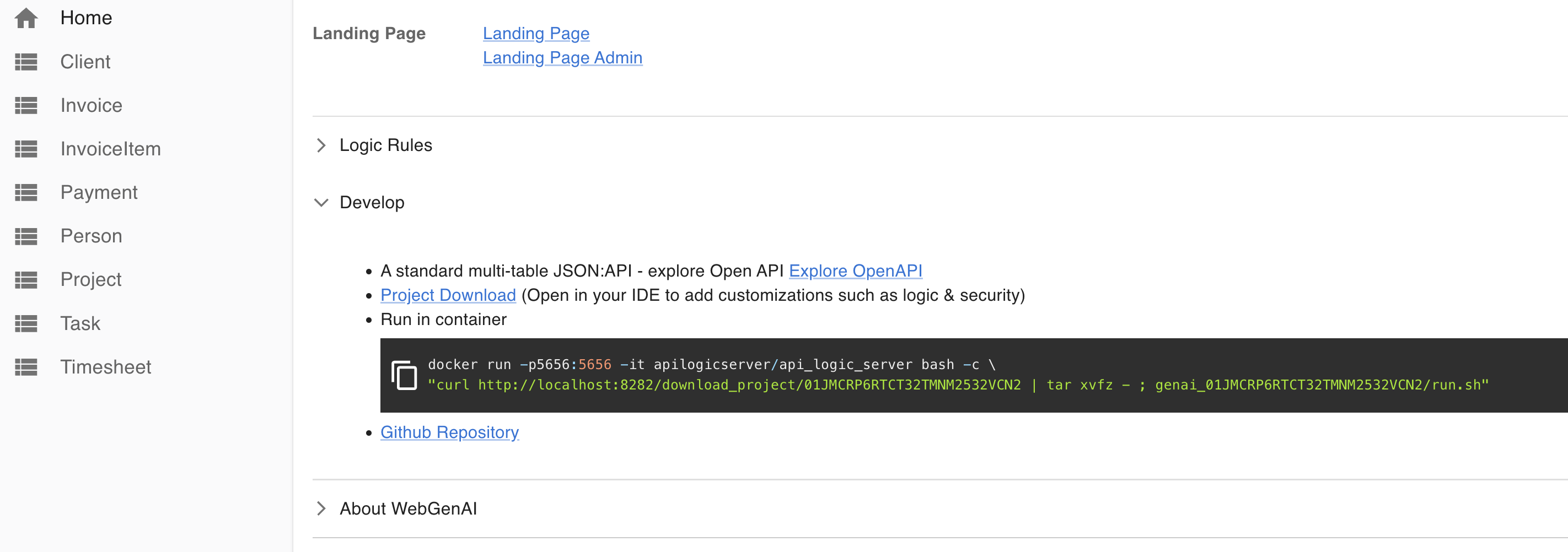
The API entities are now ready to test on the left (a react application) to see test data. Enter a Client, Project, Task, and Timesheet for a Person and watch the sums, counts, and constraint rules change value.
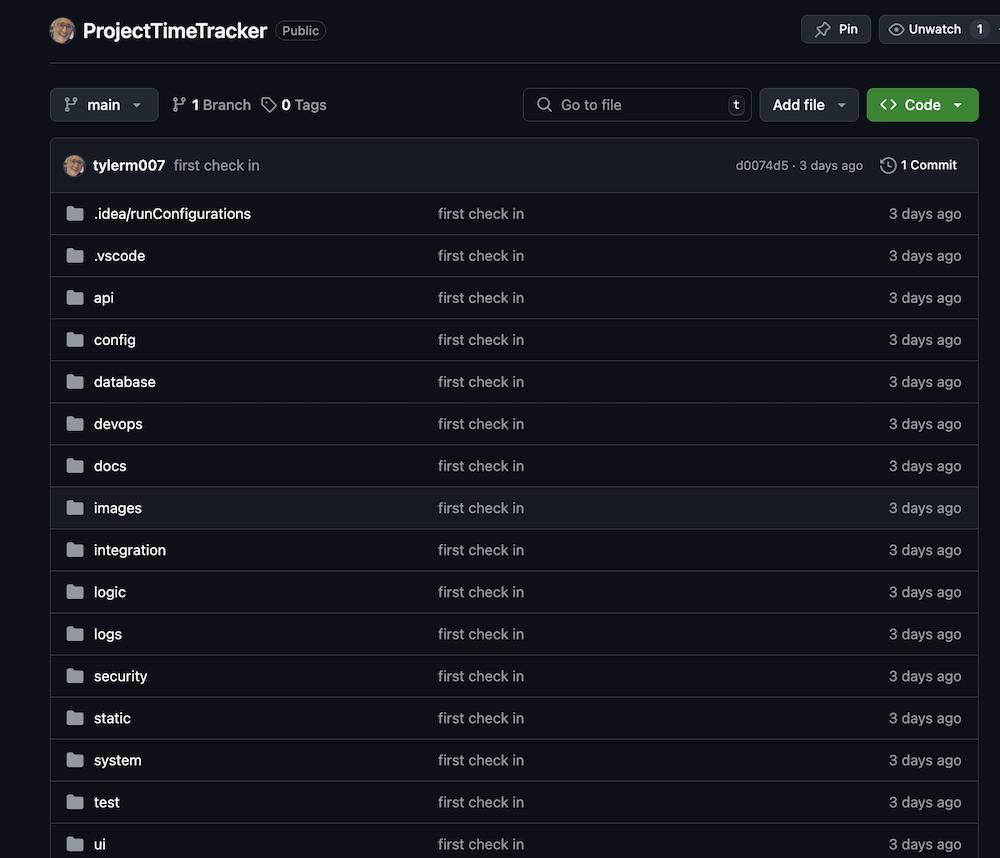
You can also run the generated application locally using Docker or click on the GitHub link to see the code and run the application using GitHub CodeSpaces.
Finally, explore the API endpoints using OpenAPI (Swagger). If the “> Logic Rules” have any issues, they can be individually reviewed, edited, rejected, or accepted. GenAI can even suggest logic based on your model (see the “Logic” button).
Note: You can also run the Docker version locally.

The Logic Logs: Auditable and Transparent
Business logic is not a black box. As API endpoints are accessed (POST, PATCH, and DELETE), the rules fire on state changes of dependent entities and attributes. A complete log of rules that fired and the order they fired, along with the row values impacted, gives a full, transparent view of the processing. This is not a black box but a true companion to businesses that require auditable and transparent logic transactions.
Note that the before_flush shows the state change of each row impacted in order, and the after_flush shows the final collection of rules that fired (this is a lot of detail, but it is important if you need to pass an audit).
Also, note that the order starts with the timesheet change and cascades up to the parent Client. Rules are unordered in the declaration (see logic folder) and can easily be added/modified without impacting other rules.
Logic Phase:		ROW LOGIC		(session=0xffffac2f0bf0) (sqlalchemy before_flush)
..Timesheet[3] {Update - client} id: 3, task_id: 12, person_id: 6, date_worked:  [2025-02-20-->] 2025-02-20 00:00:00, hours_worked:  [12.00-->] 10, billing_rate: 100, total_amount_billed: 1200, is_billable: True  row: 0xffffac2443b0  session: 0xffffac2f0bf0  ins_upd_dlt: upd, initial: upd
..Timesheet[3] {Formula total_amount_billed} id: 3, task_id: 12, person_id: 6, date_worked:  [2025-02-20-->] 2025-02-20 00:00:00, hours_worked:  [12.00-->] 10, billing_rate: 100, total_amount_billed:  [1200-->] 1000, is_billable: True  row: 0xffffac2443b0  session: 0xffffac2f0bf0  ins_upd_dlt: upd, initial: upd
....Person[6] {Update - Adjusting person: total_hours_entered} id: 6, client_id: 8, name: Person (New Client), email: [email protected], phone: 8885551212, billing_rate: 100.00, total_hours_entered:  [12.00-->] 10.00, total_amount_billed: 1200.00  row: 0xffffac244380  session: 0xffffac2f0bf0  ins_upd_dlt: upd, initial: upd
....Person[6] {Formula total_amount_billed} id: 6, client_id: 8, name: Person (New Client), email: [email protected], phone: 8885551212, billing_rate: 100.00, total_hours_entered:  [12.00-->] 10.00, total_amount_billed:  [1200.00-->] 1000.0000  row: 0xffffac244380  session: 0xffffac2f0bf0  ins_upd_dlt: upd, initial: upd
....Task[12] {Update - Adjusting task: total_task_hours_worked, total_task_amount_billed} id: 12, project_id: 6, name: New Task, description: , total_task_hours_worked:  [12.00-->] 10.00, total_task_amount_billed:  [1200.00-->] 1000.00, task_budget_hours: 1000.00, is_over_budget: False, is_completed: False  row: 0xffffac2450a0  session: 0xffffac2f0bf0  ins_upd_dlt: upd, initial: upd
......Project[6] {Update - Adjusting project: total_project_hours, total_project_amount} id: 6, client_id: 8, name: New Project, total_project_hours:  [12.00-->] 10.00, total_project_amount:  [1200.00-->] 1000.00, project_budget_amount: 1000.00, is_over_budget: True, is_active: False  row: 0xffffac247860  session: 0xffffac2f0bf0  ins_upd_dlt: upd, initial: upd
......Project[6] {Formula is_over_budget} id: 6, client_id: 8, name: New Project, total_project_hours:  [12.00-->] 10.00, total_project_amount:  [1200.00-->] 1000.00, project_budget_amount: 1000.00, is_over_budget:  [True-->] False, is_active: False  row: 0xffffac247860  session: 0xffffac2f0bf0  ins_upd_dlt: upd, initial: upd
........Client[8] {Update - Adjusting client: total_hours, total_amount} id: 8, name: New Client, email: , phone: , total_hours:  [12.00-->] 10.00, total_amount:  [1200.00-->] 1000.00, budget_amount: 0.00, is_over_budget: True  row: 0xffffac2321e0  session: 0xffffac2f0bf0  ins_upd_dlt: upd, initial: upd

Logic Phase:		COMMIT LOGIC		(session=0xffffac2f0bf0)
Logic Phase:		AFTER_FLUSH LOGIC	(session=0xffffac2f0bf0)
These Rules Fired (see Logic Phases, above, for actual order):		##
  Client		##
    1. Derive <class 'database.models.Client'>.total_hours as Sum(Project.total_project_hours Where  - None)		##
    2. Derive <class 'database.models.Client'>.total_amount as Sum(Project.total_project_amount Where  - None)		##
    3. Derive <class 'database.models.Client'>.is_over_budget as Formula (1): Rule.formula(derive=Client.is_over_budget, as_exp [...]		##
  Person		##
    4. Derive <class 'database.models.Person'>.total_amount_billed as Formula (1): Rule.formula(derive=Person.total_amount_billed, a [...]		##
    5. Derive <class 'database.models.Person'>.total_hours_entered as Sum(Timesheet.hours_worked Where  - None)
  Project		##
    6. Derive <class 'database.models.Project'>.total_project_amount as Sum(Task.total_task_amount_billed Where  - None)
    7. Derive <class 'database.models.Project'>.is_over_budget as Formula (1): Rule.formula(derive=Project.is_over_budget,
       as_ex [...]		##
    8. Derive <class 'database.models.Project'>.total_project_hours as Sum(Task.total_task_hours_worked Where  - None)	  Task		##
    9. Derive <class 'database.models.Task'>.total_task_amount_billed as Sum(Timesheet.total_amount_billed Where  - None)
    10. Derive <class 'database.models.Task'>.is_over_budget as Formula (1): Rule.formula(derive=Task.is_over_budget,
        as_expre [...]		##
    11. Derive <class 'database.models.Task'>.total_task_hours_worked as Sum(Timesheet.hours_worked Where  - None)
  Timesheet		##
    12. Derive <class 'database.models.Timesheet'>.total_amount_billed as Formula (1): Rule.formula(derive=Timesheet.total_amount_billed [...]		##

Logic Phase:		COMPLETE(session=0xffffac2f0bf0))
ApiLogicServer: The Developer Journey
The entire generative approach is built on top of the open-source ApiLogicServer (ALS). Once the project is downloaded, it can be edited using VSCode (or your favorite IDE). The platform is built on Python 3.12, SQLAlchemy ORM, and Flask.
The super-power is the declarative rules engine LogicBank.
- Are expressive – 40X the expressive power of procedural code
- Promote quality – Automatically invoked
- Are maintainable – Automatically ordered
- Rule execution logs – Auditable, traceable, and transparent
The project is organized into folders: API, config, logic, database, integration, security, DevOps, and test. Each folder is thoroughly documented and provides the developer with the ability to add/modify features and services (e.g., custom API endpoints, integrations, behave test cases, or declarative role-based access control) in an IDE. (Bring your own favorite AI tool 0.— CoPilot, Sourcery, Cursor, etc.)
Here are the steps taken to edit/modify the local project. While it is possible to use SQLIte in production (8 billion smartphones can’t be wrong), I chose the PostgreSQL route.
- Convert SQLite to PostgreSQL (sqlite3 database/db.sqlite .dump > timetrack_pg.sql).
- Modify the SQL file for PostgreSQL specific (e.g., change sequence to SERIAL8).
- Create the PostgreSQL database and rebuild the model ($als rebuild-from-database).
- Add KeyCloak security ($als add-auth –provider-type=keycloak or SQL).
- Modify the config.py to point to Keycloak or SQL instance.
- Add role-based access control for different roles (e.g,. manager, consultant, accounting). See security/declare_security.py.
- Initialize the GitHub repository and push changes.
- Use devops/docker-image ($sh build-image.sh) to create and push the container to the Docker hub.
Note: You may need to change the linux/amd64 to linux/arm64 for your deployed environment.
Amazon EC2 and RDS Work
- Create an RDS PostgreSQL instance and deploy timetrack_pg.sql (create database timetracker).
- Create an EC2 instance and pull the docker image into the container.
- Add a docker-compose file to start the image and connect to RDS.
- Test the authorization http://ec2……compute-1.amazonaws.com:5656.
Test Driven Development
One quick word about testing logic. Using the Behave scenario feature shown below, we quickly added the implementation to insert various API entities and test the derivations, aggregations, and events with full log traceability.
  Scenario: New Timesheet
    Given Enter Timesheet Data
      When Timesheet Post
      Then Timesheet entered and balances


@given('Enter Timesheet Data')
def step_impl(context):
    context.data = {"task_id": task_id, "person_id": person_id, "hours_worked": 10, "date_worked": "2025-01-01","is_billable": True}
    assert True is not False

@when('Timesheet Post')
def step_impl(context):
    print(context.data)
    r = test_utils.post("Timesheet", context.data)
    context.response = r
    assert True is not False

@then('Timesheet entered and balances')
def step_impl(context):
    scenario = "New Timesheet"
    test_utils.prt(f'Rules Report', scenario)
    global timesheet_id
    timesheet_id = int(context.response["data"]["id"])
    r = test_utils.get("Client", client_id)
    total_hrs = r["data"]["attributes"]["total_hours"] ## 10
    assert total_hrs == 10, f"Total Hours: {total_hrs} expected: 10"

 The Log
 Mapped Class[Timesheet] rules:		##   - 2025-02-25 13:49:22,057 - logic_logger - INFO
  Derive <class 'database.models.Timesheet'>.billing_rate as Copy(person.billing_rate)		##   - 2025-02-25 13:49:22,057 - logic_logger - INFO
  Derive <class 'database.models.Timesheet'>.total_amount_billed as Formula (1): Rule.formula(derive=Timesheet.total_amount_billed [...]		##   - 2025-02-25 13:49:22,057 - logic_logger - INFO
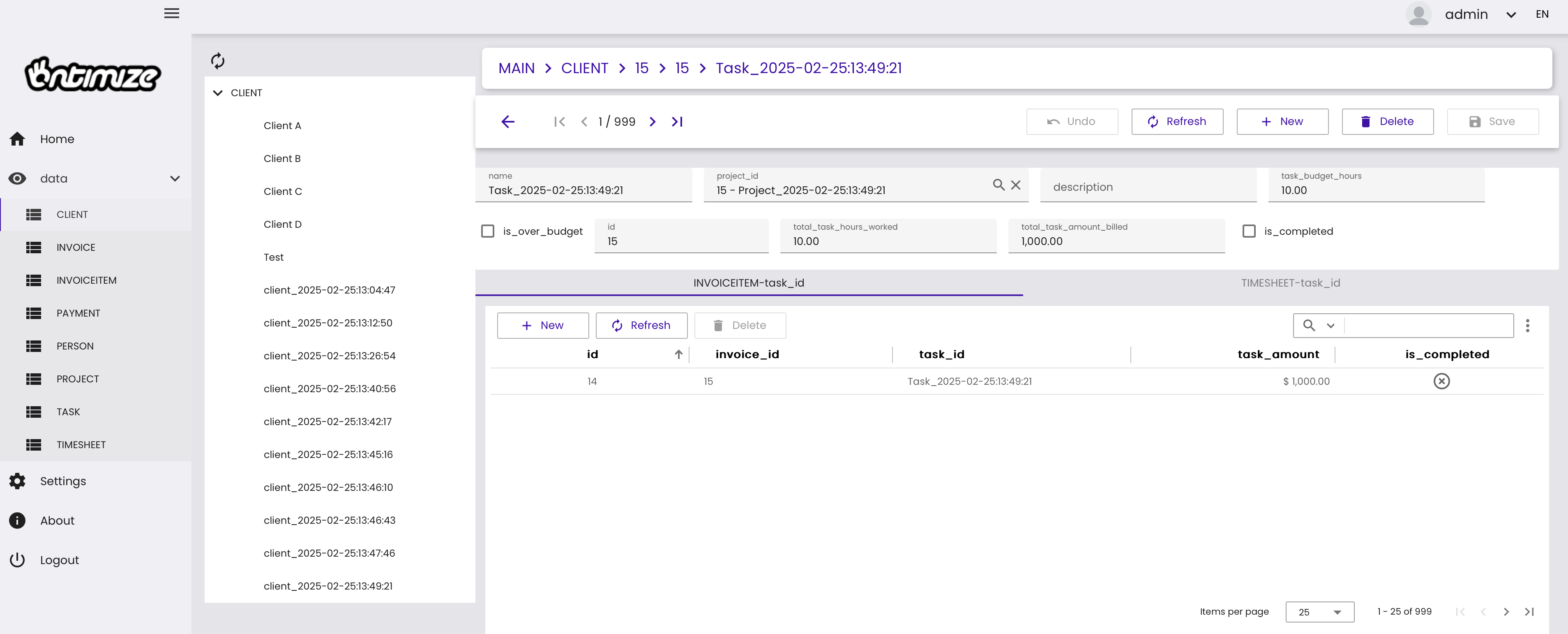
Angular Front-End Using OntimizeWeb
ApiLogicServer can also generate an Angular front-end using OntimizeWeb from Imatia. Each API endpoint is used to create pages that can be modified using standard tools or regenerated by modifying the templates (jinja style) used to build page styles (tables, grids, master/detail, treeview, etc.).
From the command line:
$als app-create --app=timetracker
$als app-build --app=timetracker
$cd ui/timetracker
$npm install && npm start
Docker and NGINX
Once the Angular front-end has been approved by the UX team, it is ready to be dockerized and pushed.
- cd ui/timetracker
- Review nginx/nginx.conf for production routing
- Review src/environments/timetracker.prod.ts routing
- $docker build -f Dockerfile -t ${dockerhub}/timetracker --rm
- Check in changes to GitHub
Modify EC2 Compose File
Add the new front-end to the docker-compose.yml file and restart. The new Ontimize application should be running on port 80. Use Keycloak to log in (or add SQL authentication and use a name/password). Once logged in, create a client, a project, task, or person and enter a timesheet (below). Then, see the logs to watch how rules fire.

TreeView List of Clients and Tasks
Summary: Prompt to Production in 2 Hours, Human in the Loop
The prompt to production process required approximately 2 hours to complete. Although “Prompt to Production” is the headline, human involvement was still necessary for tasks such as security configuration (authentication and authorization), docker compose file configuration, and UX/UI fine-tuning.
Furthermore, Kafka and Workflow integrations and configurations required the expertise of a separate team member. The UX team may want to enhance the look and feel, but this is 100% functional and tested.
See the Project Time Tracker on GitHub repository here.
Opinions expressed by DZone contributors are their own.
Comments