

Generating JSON Schema from XSD with JAXB and Jackson
Join the DZone community and get the full member experience.
Join For FreeIn this post, I demonstrate one approach for generating JSON Schema from an XML Schema (XSD). While providing an overview of an approach for creating JSON Schema from XML Schema, this post also demonstrates use of a JAXB implementation (xjc version 2.2.12-b150331.1824 bundled with JDK 9 [build 1.9.0-ea-b68]) and of a JSON/Java binding implementation (Jackson 2.5.4).
The steps of this approach for generating JSON Schema from an XSD can be summarized as:
- Apply JAXB's xjc compiler to generate Java classes from XML Schema (XSD).
- Apply Jackson to generate JSON schema from JAXB-generated Java classes.
Generating Java Classes from XSD with JAXB's xjc
For purposes of this discussion, I'll be using the simple Food.xsd used in my previous blog post A JAXB Nuance: String Versus Enum from Enumerated Restricted XSD String. For convenience, I have reproduced that simple schema here without the XML comments specific to that earlier blog post:
Food.xsd
<?xml version="1.0" encoding="utf-8"?>
<xs:schema xmlns:xs="http://www.w3.org/2001/XMLSchema"
           xmlns:dustin="http://marxsoftware.blogspot.com/foodxml"
           targetNamespace="http://marxsoftware.blogspot.com/foodxml"
           elementFormDefault="qualified"
           attributeFormDefault="unqualified">

   <xs:element name="Food">
      <xs:complexType>
         <xs:sequence>
            <xs:element name="Vegetable" type="dustin:Vegetable" />
            <xs:element ref="dustin:Fruit" />
            <xs:element name="Dessert" type="dustin:Dessert" />
         </xs:sequence>
      </xs:complexType>
   </xs:element>

   <xs:simpleType name="Vegetable">
      <xs:restriction base="xs:string">
         <xs:enumeration value="Carrot"/>
         <xs:enumeration value="Squash"/>
         <xs:enumeration value="Spinach"/>
         <xs:enumeration value="Celery"/>
      </xs:restriction>
   </xs:simpleType>

   <xs:element name="Fruit">
      <xs:simpleType>
         <xs:restriction base="xs:string">
            <xs:enumeration value="Watermelon"/>
            <xs:enumeration value="Apple"/>
            <xs:enumeration value="Orange"/>
            <xs:enumeration value="Grape"/>
         </xs:restriction>
      </xs:simpleType>
   </xs:element>

   <xs:simpleType name="Dessert">
      <xs:restriction base="xs:string">
         <xs:enumeration value="Pie"/>
         <xs:enumeration value="Cake"/>
         <xs:enumeration value="Ice Cream"/>
      </xs:restriction>
   </xs:simpleType>

</xs:schema>
It is easy to use the xjc command line tool provided by the JDK-provided JAXB implementation to generate Java classes corresponding to this XSD. The next screen snapshot shows this process using the command:
xjc -d jaxb .\Food.xsd
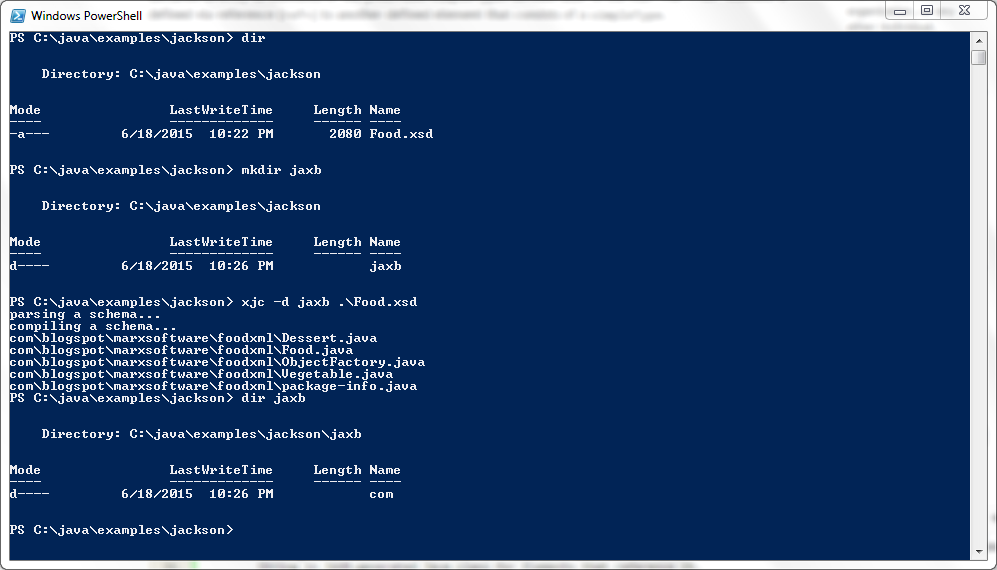
This simple command generates Java classes corresponding to the provided Food.xsd and places those classes in the specified "jaxb" subdirectory.
Generating JSON from JAXB-Generated Classes with Jackson
With the JAXB-generated classes now available, Jackson can be applied to these classes to generate JSON from the Java classes. Jackson is described on its main portal page as "a multi-purpose Java library for processing" that is "inspired by the quality and variety of XML tooling available for the Java platform." The existence of Jackson and similar frameworks and libraries appears to be one of the reasons that Oracle hasdropped the JEP 198 ("Light-Weight JSON API") from Java SE 9. [It's worth noting that Java EE 7 already hasbuilt-in JSON support with its implementation of JSR 353 ("Java API for JSON Processing"), which is not associated with JEP 198).]
One of the first steps of applying Jackson to generating JSON from our JAXB-generated Java classes is to acquire and configure an instance of Jackson's ObjectMapper class. One approach for accomplishing this is shown in the next code listing.
Acquiring and Configuring Jackson ObjectMapper for JAXB Serialization/Deserialization
/**
 * Create instance of ObjectMapper with JAXB introspector
 * and default type factory.
 *
 * @return Instance of ObjectMapper with JAXB introspector
 *    and default type factory.
 */
private ObjectMapper createJaxbObjectMapper()
{
   final ObjectMapper mapper = new ObjectMapper();
   final TypeFactory typeFactory = TypeFactory.defaultInstance();
   final AnnotationIntrospector introspector = new JaxbAnnotationIntrospector(typeFactory);
   // make deserializer use JAXB annotations (only)
   mapper.getDeserializationConfig().with(introspector);
   // make serializer use JAXB annotations (only)
   mapper.getSerializationConfig().with(introspector);
   return mapper;
}
The above code listing demonstrates acquiring the Jackson ObjectMapper instance and configuring it to use a default type factory and a JAXB-oriented annotation introspector.
With the Jackson ObjectMapper instantiated and appropriately configured, it's easy to use thatObjectMapper instance to generate JSON from the generated JAXB classes. One way to accomplish this using the deprecated Jackson class JsonSchema is demonstrated in the next code listing.
Generating JSON from Java Classes with Deprecated com.fasterxml.jackson.databind.jsonschema.JsonSchema Class
/**
 * Write JSON Schema to standard output based upon Java source
 * code in class whose fully qualified package and class name
 * have been provided.
 *
 * @param mapper Instance of ObjectMapper from which to
 *     invoke JSON schema generation.
 * @param fullyQualifiedClassName Name of Java class upon
 *    which JSON Schema will be extracted.
 */
private void writeToStandardOutputWithDeprecatedJsonSchema(
   final ObjectMapper mapper, final String fullyQualifiedClassName)
{
   try
   {
      final JsonSchema jsonSchema = mapper.generateJsonSchema(Class.forName(fullyQualifiedClassName));
      out.println(jsonSchema);
   }
   catch (ClassNotFoundException cnfEx)
   {
      err.println("Unable to find class " + fullyQualifiedClassName);
   }
   catch (JsonMappingException jsonEx)
   {
      err.println("Unable to map JSON: " + jsonEx);
   }
}
The code in the above listing instantiates acquires the class definition of the provided Java class (the highest level Food class generated by the JAXB xjc compiler in my example) and passes that reference to the JAXB-generated class to ObjectMapper's generateJsonSchema(Class<?>) method. The deprecated JsonSchemaclass's toString() implementation is very useful and makes it easy to write out the JSON generated from the JAXB-generated classes.
For purposes of this demonstration, I provide the demonstration driver as a main(String[]) function. That function and the entire class to this point (including methods shown above) is provided in the next code listing.
JsonGenerationFromJaxbClasses.java, Version 1
package dustin.examples.jackson;

import com.fasterxml.jackson.databind.AnnotationIntrospector;
import com.fasterxml.jackson.databind.JsonMappingException;
import com.fasterxml.jackson.databind.ObjectMapper;
import com.fasterxml.jackson.databind.type.TypeFactory;
import com.fasterxml.jackson.module.jaxb.JaxbAnnotationIntrospector;

import com.fasterxml.jackson.databind.jsonschema.JsonSchema;

import static java.lang.System.out;
import static java.lang.System.err;

/**
 * Generates JavaScript Object Notation (JSON) from Java classes
 * with Java API for XML Binding (JAXB) annotations.
 */
public class JsonGenerationFromJaxbClasses
{
   /**
    * Create instance of ObjectMapper with JAXB introspector
    * and default type factory.
    *
    * @return Instance of ObjectMapper with JAXB introspector
    *    and default type factory.
    */
   private ObjectMapper createJaxbObjectMapper()
   {
      final ObjectMapper mapper = new ObjectMapper();
      final TypeFactory typeFactory = TypeFactory.defaultInstance();
      final AnnotationIntrospector introspector = new JaxbAnnotationIntrospector(typeFactory);
      // make deserializer use JAXB annotations (only)
      mapper.getDeserializationConfig().with(introspector);
      // make serializer use JAXB annotations (only)
      mapper.getSerializationConfig().with(introspector);
      return mapper;
   }

   /**
    * Write out JSON Schema based upon Java source code in
    * class whose fully qualified package and class name have
    * been provided.
    *
    * @param mapper Instance of ObjectMapper from which to
    *     invoke JSON schema generation.
    * @param fullyQualifiedClassName Name of Java class upon
    *    which JSON Schema will be extracted.
    */
   private void writeToStandardOutputWithDeprecatedJsonSchema(
      final ObjectMapper mapper, final String fullyQualifiedClassName)
   {
      try
      {
         final JsonSchema jsonSchema = mapper.generateJsonSchema(Class.forName(fullyQualifiedClassName));
         out.println(jsonSchema);
      }
      catch (ClassNotFoundException cnfEx)
      {
         err.println("Unable to find class " + fullyQualifiedClassName);
      }
      catch (JsonMappingException jsonEx)
      {
         err.println("Unable to map JSON: " + jsonEx);
      }
   }

   /**
    * Accepts the fully qualified (full package) name of a
    * Java class with JAXB annotations that will be used to
    * generate a JSON schema.
    *
    * @param arguments One argument expected: fully qualified
    *     package and class name of Java class with JAXB
    *     annotations.
    */
   public static void main(final String[] arguments)
   {
      if (arguments.length < 1)
      {
         err.println("Need to provide the fully qualified name of the highest-level Java class with JAXB annotations.");
         System.exit(-1);
      }
      final JsonGenerationFromJaxbClasses instance = new JsonGenerationFromJaxbClasses();
      final String fullyQualifiedClassName = arguments[0];
      final ObjectMapper objectMapper = instance.createJaxbObjectMapper();
      instance.writeToStandardOutputWithDeprecatedJsonSchema(objectMapper, fullyQualifiedClassName);
   }
}
To run this relatively generic code against the Java classes generated by JAXB's xjc based upon Food.xsd, I need to provide the fully qualified package name and class name of the highest-level generated class. In this case, that's com.blogspot.marxsoftware.foodxml.Food (package name is based on the XSD's namespace because I did not explicitly override that when running xjc). When I run the above code with that fully qualified class name and with the JAXB classes and Jackson libraries on the classpath, I see the following JSON written to standard output.
Generated JSON
{"type":"object","properties":{"vegetable":{"type":"string","enum":["CARROT","SQUASH","SPINACH","CELERY"]},"fruit":{"type":"string"},"dessert":{"type":"string","enum":["PIE","CAKE","ICE_CREAM"]}}}
Humans (which includes many developers) prefer prettier print than what was just shown for the generated JSON. We can tweak the implementation of the demonstration class's methodwriteToStandardOutputWithDeprecatedJsonSchema(ObjectMapper, String) as shown below to write out indented JSON that better reflects its hierarchical nature. This modified method is shown next.
Modified writeToStandardOutputWithDeprecatedJsonSchema(ObjectMapper, String) to Write Indented JSON
/**
 * Write out indented JSON Schema based upon Java source
 * code in class whose fully qualified package and class
 * name have been provided.
 *
 * @param mapper Instance of ObjectMapper from which to
 *     invoke JSON schema generation.
 * @param fullyQualifiedClassName Name of Java class upon
 *    which JSON Schema will be extracted.
 */
private void writeToStandardOutputWithDeprecatedJsonSchema(
   final ObjectMapper mapper, final String fullyQualifiedClassName)
{
   try
   {
      final JsonSchema jsonSchema = mapper.generateJsonSchema(Class.forName(fullyQualifiedClassName));
      out.println(mapper.writerWithDefaultPrettyPrinter().writeValueAsString(jsonSchema));
   }
   catch (ClassNotFoundException cnfEx)
   {
      err.println("Unable to find class " + fullyQualifiedClassName);
   }
   catch (JsonMappingException jsonEx)
   {
      err.println("Unable to map JSON: " + jsonEx);
   }
   catch (JsonProcessingException jsonEx)
   {
      err.println("Unable to process JSON: " + jsonEx);
   }
}
When I run the demonstration class again with this modified method, the JSON output is more aesthetically pleasing:
Generated JSON with Indentation Communicating Hierarchy
{
  "type" : "object",
  "properties" : {
    "vegetable" : {
      "type" : "string",
      "enum" : [ "CARROT", "SQUASH", "SPINACH", "CELERY" ]
    },
    "fruit" : {
      "type" : "string"
    },
    "dessert" : {
      "type" : "string",
      "enum" : [ "PIE", "CAKE", "ICE_CREAM" ]
    }
  }
}
I have been using Jackson 2.5.4 in this post. The classcom.fasterxml.jackson.databind.jsonschema.JsonSchema is deprecated in that version with the comment, "Since 2.2, we recommend use of external JSON Schema generator module." Given that, I now look at using the new preferred approach (Jackson JSON Schema Module approach).
The most significant change is to use the JsonSchema class in the com.fasterxml.jackson.module.jsonSchemapackage rather than using the JsonSchema class in the com.fasterxml.jackson.databind.jsonschema package. The approaches for obtaining instances of these different versions of JsonSchema classes are also different. The next code listing demonstrates using the newer, preferred approach for generating JSON from Java classes.
Using Jackson's Newer and Preferred com.fasterxml.jackson.module.jsonSchema.JsonSchema
/**
 * Write out JSON Schema based upon Java source code in
 * class whose fully qualified package and class name have
 * been provided. This method uses the newer module JsonSchema
 * class that replaces the deprecated databind JsonSchema.
 *
 * @param fullyQualifiedClassName Name of Java class upon
 *    which JSON Schema will be extracted.
 */
private void writeToStandardOutputWithModuleJsonSchema(
   final String fullyQualifiedClassName)
{
   final SchemaFactoryWrapper visitor = new SchemaFactoryWrapper();
   final ObjectMapper mapper = new ObjectMapper();
   try
   {
      mapper.acceptJsonFormatVisitor(mapper.constructType(Class.forName(fullyQualifiedClassName)), visitor);
      final com.fasterxml.jackson.module.jsonSchema.JsonSchema jsonSchema = visitor.finalSchema();
      out.println(mapper.writerWithDefaultPrettyPrinter().writeValueAsString(jsonSchema));
   }
   catch (ClassNotFoundException cnfEx)
   {
      err.println("Unable to find class " + fullyQualifiedClassName);
   }
   catch (JsonMappingException jsonEx)
   {
      err.println("Unable to map JSON: " + jsonEx);
   }
   catch (JsonProcessingException jsonEx)
   {
      err.println("Unable to process JSON: " + jsonEx);
   }
}
The following table compares usage of the two Jackson JsonSchema classes side-by-side with the deprecated approach shown earlier on the left (adapted a bit for this comparison) and the recommended newer approach on the right. Both generate the same output for the same given Java class from which JSON is to be written.
| |
This blog post has shown two approaches using different versions of classes with name JsonSchema provided by Jackson to write JSON based on Java classes generated from an XSD with JAXB's xjc. The overall process demonstrated in this post is one approach for generating JSON Schema from XML Schema.
Published at DZone with permission of Dustin Marx. See the original article here.
Opinions expressed by DZone contributors are their own.
Comments