

Build AI Agents with Phidata: YouTube Summarizer Agent
In this article, we will explore the value of AI agents, introduce popular agentic AI platforms, and walk through a hands-on tutorial for building a simple AI agent.
Join the DZone community and get the full member experience.
Join For FreeThis is the first article in a two-part series on building AI agents from the ground up.
- In this article, we will explore the value of AI agents, introduce popular agentic AI platforms, and walk through a hands-on tutorial for building a simple AI Agent.
- The second part of the series will dive deeper with a hands-on tutorial, where we’ll build agents that can automate tasks and interact with external tools and APIs.
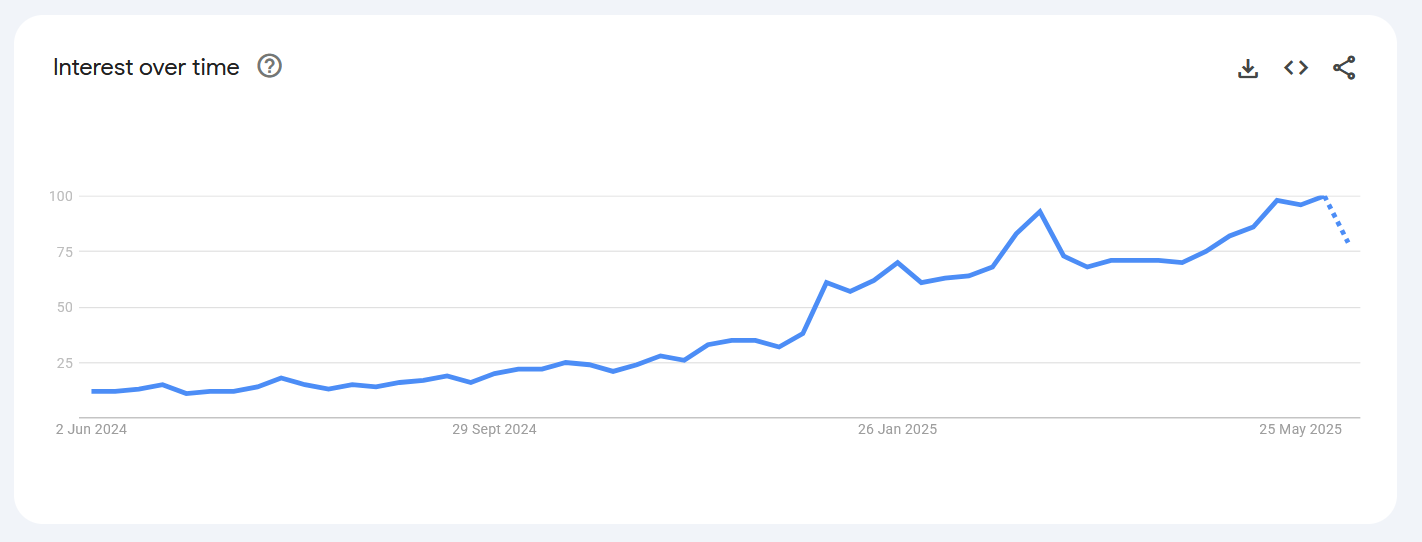
Example of an AI agent application
Before diving into the working of AI agents, let’s begin with a relatable example of how AI agents can transform everyday tasks in the near future.
Imagine planning for a vacation.
Today’s world: Hotels, flights, and rental cars are booked independently, and places to visit are planned based on weather, preferences, and family composition (single, couple, with kids). It is a time-consuming and fragmented process.
Agentic AI world: Now, imagine simply giving a prompt like the following:
I would like to book a family trip with 2 kids in the months of June/July for a weekend plus 2 days. Do not include 2nd week/3rd week of June. I would just need to carry two cabin bags, and prefer tasting the best local food. Plan for an itinerary not longer than 2-3 hours drive from the city.
An AI agent could instantly generate a few tailored travel packages – with flights, hotels, cars and provide food recommendations, and an optimized itinerary, so you can just pick the one that fits your needs.
Fundamentals of AI agents
In simple terms, AI agents are systems that can perform tasks autonomously by interpreting the data from the environment, making decisions based on that data to achieve the goals. Think of them as orchestrators – connecting various tools, using Large Language Models (LLM) to reason, plan and execute tasks.
Let’s break down this definition using the above vacation planning example:
- Perform tasks autonomously: Book flight, hotel, and rental car reservations through the respective vendors.
- Interpreting the data: It takes into account factors such as weather, traffic, and local events to suggest the best activities that suit the pace.
- Making decisions: Given the dozens of restaurants available, agents can provide recommendations based on the indicated preference and past reviews.
- Achieve goals: Ultimately, it puts together a travel plan that matches the requirements – dates, duration, preferences, and family needs.
Agentic AI Platforms
An agentic AI framework is a toolkit that enables the creation of AI systems capable of reasoning, planning, and taking actions autonomously or semi-autonomously through tool use and memory. These frameworks provide the structure needed to create agents that can interact with their environment, make decisions, and execute tasks.
There are several popular agentic AI platforms, such as LangChain, CrewAI, and Phidata. For this tutorial, we will use the Phidata platform—a lightweight, developer-friendly platform. Phidata comes with built-in access to a variety of tools and LLMs, allowing you to build and deploy AI Agents within just a few lines of code.
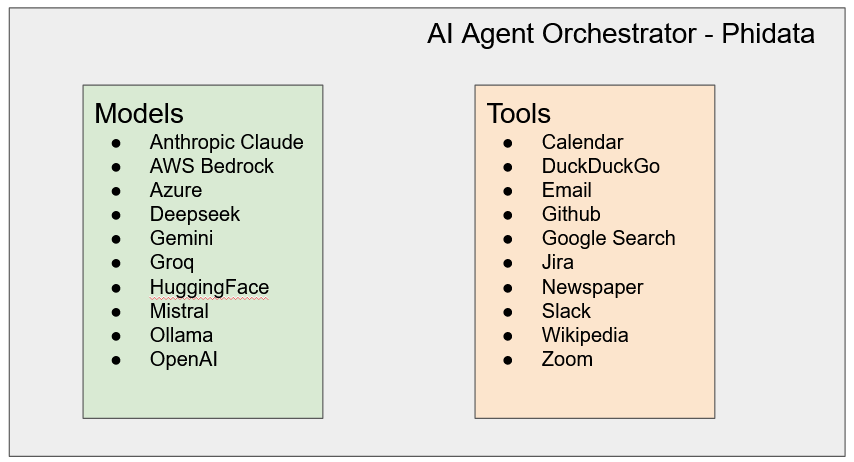
Build a YouTube summarizer agent
The YouTube Summarizer agent is designed to extract key insights and main points from any YouTube video. It saves time by providing concise summaries without needing to watch the entire content. For the purpose of the tutorial, we will use a Google Colab notebook to write and execute the code, and the Phidata Agentic AI Platform to power the Agent.
Model: Within Phidata, we will leverage the Groq model hosting platform—an inference service that runs LLMs on dedicated GPU infrastructure (note that it is different from Grok, an LLM from xAI). Since LLMs are resource-intensive, using Groq helps offload computation from local or Colab-provided hardware, ensuring faster, more efficient execution. Groq has access to multiple models from different LLM providers.
Tools: To retrieve YouTube video data, we will use YouTubeTools, the Phidata framework's built-in tool. This tool helps us access video metadata and captions, which the agent then passes to the chosen LLM to generate accurate, insightful summaries.
Here is the code for a YouTube summarizer agent:
from phi.agent import Agent
from phi.model.groq import Groq
from phi.model.openai import OpenAIChat
from phi.tools.youtube_tools import YouTubeTools

agent = Agent(
    # model=Groq(id="llama3-8b-8192"),
    model=Groq(id="llama-3.3-70b-versatile"),  ## Toggle with different LLM model
    tools=[YouTubeTools()],
    show_tool_calls=True,
    # debug_mode=True,
    description="You are a YouTube agent. Obtain the captions of a YouTube video and answer questions.",
)

agent.print_response("Summarize this video https://www.youtube.com/watch?v=vStJoetOxJg", markdown=True, stream=True)
The following is the output generated by the YouTube Summarizer agent (see the code above). The YouTube link in the above code is a video of Andrew Ng on the Machine Learning specialization. As shown below, it accurately summarizes the video content. Note that the response may vary across runs due to the probabilistic nature of LLMs.
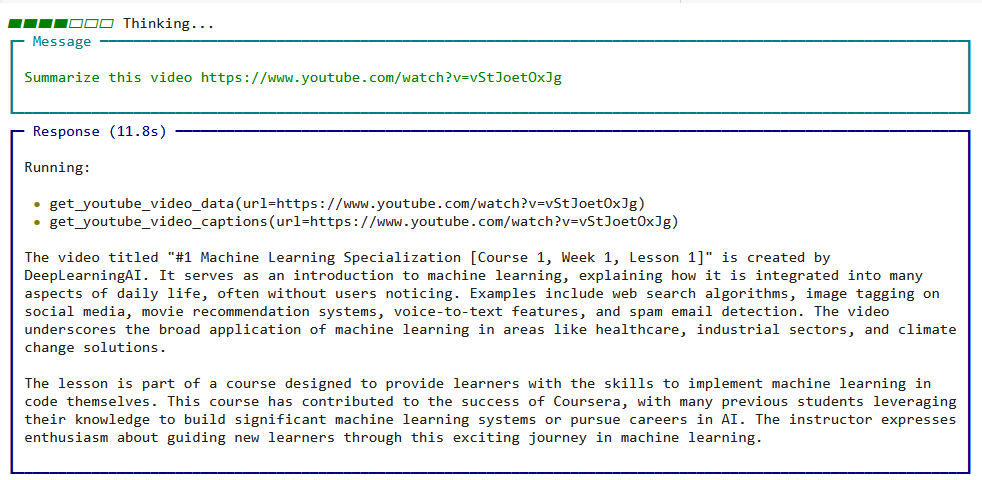
Detailed Tutorial
To run the above code, we need to get API Keys for Groq model hosting platform as described here.
Step 1: Clone Notebook
- Clone colab notebook here (it requires Google account)
- Install dependencies (first cell with code)
Step 2: Get API key for Groq
In order to run the agent, given we use the Groq model hosting platform, we need an account with Groq. Follow the below steps to sign up / log in to Groq and get an API key.
- Visit the Groq Developer Portal. Open your browser and go to: https://console.groq.com
- Sign Up or Log In. If you already have an account, click Log In. If you’re new, click Sign Up and follow the prompts to create an account (you may need to verify your email).
- Access the API Section. Once logged in, you'll land on the Groq Console. Then navigate to the API Keys section from the sidebar or dashboard.
- Generate a New API Key. Click the “Create API Key” button. Give your key a name (e.g., "workshop-key"), then click Create or Generate.
- Copy and Store the Key Securely. Your API key will be shown only once — copy it immediately and store it in a secured location. Never expose your API key in client-side code or public repositories.
Step 3. Add the API key in the Secret Manager
- Click on Secrets (Key sign) on the left pane of colab
- Provide the name as GROQ_API_KEY and Value as API Key copied in Step 5 of
- Toggle "ON" the notebook access.
Opinions expressed by DZone contributors are their own.
Comments