

GraphRAG in Practice Using Spring AI, Neo4j, and Goodreads Data
Building a GraphRAG application with Spring AI and Neo4j, covering data modeling, Cypher-based data loading, vector search, and key gotchas.
 CORE
·
CORE
·
Join the DZone community and get the full member experience.
Join For FreeLarge language models (LLMs) are impressive — until they are not. If you ask one about your internal data, your product catalog, or your users' reviews, it will either hallucinate an answer or admit it does not know. The solution most teams reach for is retrieval-augmented generation (RAG). This retrieves relevant data first, injects it into the prompt as context, and lets the model answer from that context rather than from memory.
GraphRAG takes this a step further. Instead of retrieving only text chunks, it can use graph relationships to retrieve connected context, following relationships between entities to build richer, more structured context. The result can provide answers grounded in both data and the relationships between that data.
In this article, we'll walk through a practical GraphRAG implementation using Spring AI and Neo4j, built on top of a Goodreads book and review dataset. We'll cover the data model, loading the data, setting up the vector index, running the Spring Boot application, and some lessons learned along the way.
The full source code is available on GitHub.
What We Are Building
The application answers natural language queries like "find books with a happy ending" or "something encouraging" by combining two retrieval mechanisms in Neo4j:
- Vector search – embeds the search phrase via OpenAI and finds semantically similar book reviews using cosine similarity.
- Graph traversal – follows the
WRITTEN_FORrelationship from matched reviews to their associated books, giving the LLM structured book context rather than raw review text.
This example uses a simple GraphRAG pattern where vector search identifies relevant reviews and graph traversal expands the retrieved context to connected books.
The LLM then summarizes the retrieved books in the context of the original search phrase. The architecture looks like Figure 1.
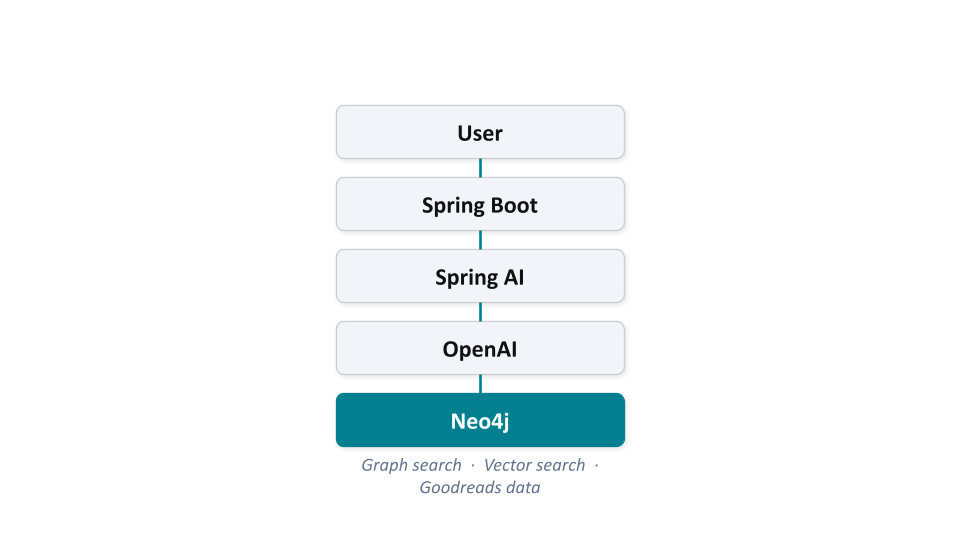
Figure 1. Architecture.
Prerequisites
Before we start, we will need:
- Java 21 or later
- A Neo4j AuraDB instance
- An OpenAI API key
Installing Java
If Java is not already installed, the recommended distribution is Temurin from the Adoptium project, available at adoptium.net. Installers are available for Windows, macOS, and Linux. Once installed, verify with:
java -versionWe should see something like openjdk version "21.x.x". The project uses the Maven wrapper, so there is no need to install Maven separately.
Setting Up Neo4j AuraDB
AuraDB is Neo4j's fully managed cloud database. A free tier is available.
- Sign up at neo4j.com/product/auradb/.
- Create a new AuraDB Free instance.
- When the instance is created, download or note the credentials — the URI, username, and password. Neo4j only shows the password once, so save it somewhere safe.
- Once the instance is running, open the built-in Query tab and verify connectivity:
cypher MATCH (n) RETURN count(n). This should return0. We are ready to load data.
AuraDB Free includes Awesome Procedures on Cypher (APOC), a utility that provides numerous procedures and functions for data handling. We'll use APOC for the data loading steps.
The Data Model
The dataset is built around three core node types:
- Book – 10,000 books from the Goodreads UCSD dataset
- Author – 12,371 authors
- Review – 69,791 user reviews, each linked to a book via a
WRITTEN_FORrelationship
There is also a User node (44,827 users) linked to reviews via a PUBLISHED relationship, although the main application focuses on Books and Reviews.
The graph model is shown in Figure 2.
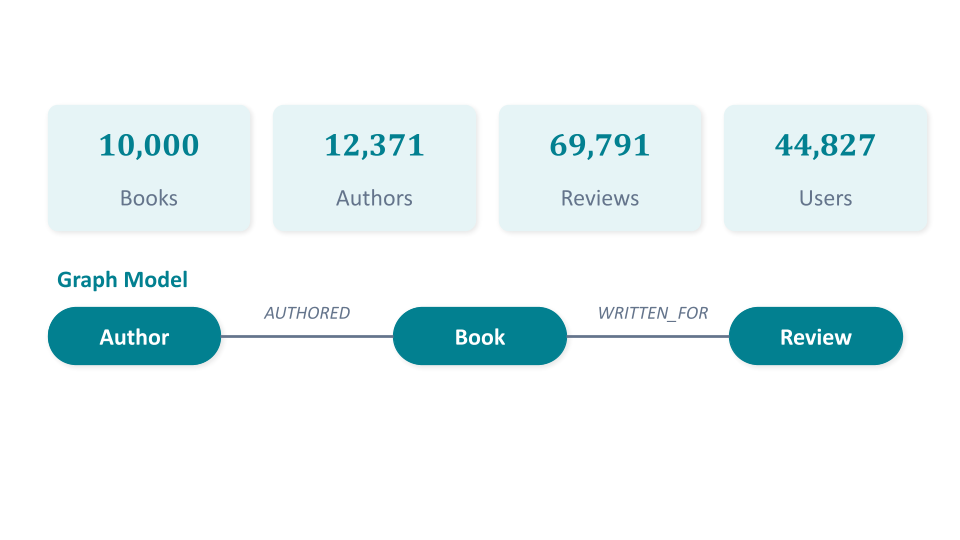
Figure 2. The Goodreads Dataset.
The key insight is that the Review node carries two things: the review text and 1,536-dimension embeddings generated using an OpenAI embedding model. This is what makes vector similarity search possible without a separate vector database — Neo4j handles both the graph and the vectors.
The Goodreads data used in this article is derived from the UCSD Book Graph dataset and related Goodreads datasets released by researchers at the University of California, San Diego, including Mengting Wan, Julian McAuley, and collaborators. The data is provided for research and educational purposes.
If you use these datasets in your own work, please cite the following publications:
- Mengting Wan and Julian McAuley, Item Recommendation on Monotonic Behavior Chains, RecSys 2018.
- Mengting Wan, Rishabh Misra, Ndapa Nakashole, and Julian McAuley, Fine-Grained Spoiler Detection from Large-Scale Review Corpora, ACL 2019.
Loading the Data
Let's load the data step by step in the AuraDB Query tab. Run each of the following blocks separately.
Constraints and Indexes
First, let's set up the constraints and the vector index:
CREATE CONSTRAINT FOR (b:Book) REQUIRE b.book_id IS UNIQUE;
CREATE CONSTRAINT FOR (a:Author) REQUIRE a.author_id IS UNIQUE;
CREATE CONSTRAINT FOR (r:Review) REQUIRE r.id IS UNIQUE;
CREATE CONSTRAINT FOR (u:User) REQUIRE u.user_id IS UNIQUE;
CREATE INDEX FOR (r:Review) ON (r.user_id);
Then create the vector index on the Review node's embedding property:
CREATE VECTOR INDEX `review-text` IF NOT EXISTS
FOR (n:Review) ON (n.embedding)
OPTIONS { indexConfig: {
  `vector.dimensions`: 1536,
  `vector.similarity_function`: 'cosine'
}};
Note the index name review-text — we will come back to this in the lessons learned section.
Loading Books and Authors
The data are hosted on Neo4j's public servers, so we can load them directly via APOC:
CALL apoc.load.json("https://data.neo4j.com/goodreads/goodreads_books_10k.json") YIELD value as book
MERGE (b:Book {book_id: book.book_id})
SET b += apoc.map.clean(book, ['authors','similar_books'],[""]);
Next, we'll load the initial author stubs:
CALL apoc.load.json("https://data.neo4j.com/goodreads/goodreads_books_10k.json") YIELD value as book
WITH book
UNWIND book.authors as author
MERGE (a:Author {author_id: author.author_id});
and then populate the author nodes with the full data:
CALL apoc.periodic.iterate(
'CALL apoc.load.json("https://data.neo4j.com/goodreads/goodreads_book_authors.json.gz") YIELD value as author',
'WITH author MATCH (a:Author {author_id: author.author_id}) SET a += apoc.map.clean(author, [],[""])',
{batchsize: 10000}
);
Next, we'll create the AUTHORED and SIMILAR_TO relationships:
CALL apoc.load.json("https://data.neo4j.com/goodreads/goodreads_books_10k.json") YIELD value as book
WITH book
MATCH (b:Book {book_id: book.book_id})
WITH book, b
UNWIND book.authors as author
MATCH (a:Author {author_id: author.author_id})
MERGE (a)-[w:AUTHORED]->(b);CALL apoc.load.json("https://data.neo4j.com/goodreads/goodreads_books_10k.json") YIELD value as book
WITH book
MATCH (b:Book {book_id: book.book_id})
WITH book, b
WHERE book.similar_books IS NOT NULL
UNWIND book.similar_books as similarBookId
MATCH (b2:Book {book_id: similarBookId})
MERGE (b)-[r:SIMILAR_TO]->(b2);Loading Reviews
This step can take several minutes, as it is pulling and processing approximately 70,000 reviews from a gzipped JSON file:
CALL apoc.load.json("https://data.neo4j.com/goodreads/goodreads_reviews_dedup.json.gz") YIELD value as review
CALL { WITH review
 MATCH (b:Book) WHERE b.book_id = review.book_id
 WITH review, b
 MERGE (r:Review {id: review.review_id}) SET r += apoc.map.clean(review, [],[""])
 WITH b, r
 MERGE (b)<-[rel:WRITTEN_FOR]-(r)
} in transactions of 20000 rows;
Note that review.review_id is stored as the Review node's id property, which Spring AI expects when mapping vector search results.
Then we'll separate the User nodes from the Review data:
MATCH (r:Review)
WHERE r.user_id IS NOT NULL
CALL {
    WITH r
    MERGE (u:User {user_id: r.user_id})
    WITH r, u
    MERGE (r)<-[:PUBLISHED]-(u)
} in transactions of 20000 rows;
Adding the text Property
Spring AI maps vector search results to Document objects using a property named text. Our review data uses review_text, so we need to add the text property:
MATCH (r:Review)
CALL {
    WITH r
    SET r.text = r.review_text
} IN TRANSACTIONS OF 20000 ROWS;
Loading Pre-Generated Embeddings
Rather than generating embeddings at runtime, which costs tokens and time, we'll load pre-computed embeddings hosted by Neo4j. This step also takes several minutes:
LOAD CSV WITH HEADERS FROM "https://data.neo4j.com/goodreads/review_embeddings.psv" as row
FIELDTERMINATOR '|'
CALL {
    WITH row
    MATCH (r:Review {id: row.reviewId})
    CALL db.create.setNodeVectorProperty(r, 'embedding', apoc.convert.fromJsonList(row.embedding))
    RETURN r
} in transactions of 1000 rows
WITH r
RETURN count(r);
Once complete, we can verify the embeddings loaded correctly:
MATCH (r:Review)
WHERE r.embedding IS NOT NULL
RETURN count(r) AS reviews_with_embeddings
We should see 69791.
Exploring the Data
Before running the application, let's take a look at what we have loaded. Here are a few useful queries to run in the AuraDB Query tab. Browse the top-rated books:
MATCH (b:Book)
RETURN b.title, b.average_rating
ORDER BY b.average_rating DESC
LIMIT 10
Browse books with their authors:
MATCH (a:Author)-[:AUTHORED]->(b:Book)
RETURN a.name, b.title, b.average_rating
ORDER BY b.average_rating DESC
LIMIT 10
Inspect a sample embedding — we can see the first few dimensions of a review's vector:
MATCH (r:Review)
WHERE r.embedding IS NOT NULL
RETURN r.id, r.text, r.embedding[0..5] AS embedding_sample
LIMIT 5
Building and Running the Application
Let's clone the GitHub repo and get the application running:
git clone https://github.com/JMHReif/springai-goodreads.git
cd springai-goodreads
Set the environment variables for Neo4j AuraDB and OpenAI, as follows:
export SPRING_NEO4J_URI=neo4j+s://xxxx.databases.neo4j.io
export SPRING_NEO4J_AUTHENTICATION_USERNAME=your_username_here
export SPRING_NEO4J_AUTHENTICATION_PASSWORD=your_password_here
export SPRING_AI_OPENAI_API_KEY=your_openai_key_here
These variables must be set in the terminal session used to run the Spring Boot application, specifically the window where you run ./mvnw spring-boot:run. The terminal used for curl commands does not need them. To avoid having to re-export them each time, you can add them to your shell profile (e.g. ~/.zshrc on macOS or ~/.bashrc on Linux) or save them in a small shell script and source it before starting the app.
Now we'll start the application from the root of the cloned repo, where the pom.xml and mvnw files live, as follows:
./mvnw spring-boot:runMaven will download dependencies on the first run. Once the startup banner appears, the app is ready on port 8080.
The Four Endpoints
The application exposes four REST endpoints, each representing a different retrieval strategy:
/hello — Baseline LLM Call
curl "http://localhost:8080/hello"A simple call to the LLM with no retrieval. Useful to verify the OpenAI connection is working.
/llm — LLM With No Context
curl "http://localhost:8080/llm?searchPhrase=happy%20ending"This sends the search phrase directly to the LLM with no data from Neo4j. The model answers from its training data — fast, but prone to hallucination and not grounded in our Goodreads data.
/vector — Vector Search Only
curl "http://localhost:8080/vector?searchPhrase=happy%20ending"Spring AI embeds the search phrase via OpenAI, queries the review-text vector index in Neo4j, and passes the matching review text to the LLM. Semantic matching works well here — the phrase does not need to match any exact words in the reviews.
/graph — Full GraphRAG Pipeline
curl "http://localhost:8080/graph?searchPhrase=happy%20ending"This is the full pipeline. Vector search finds the most semantically similar reviews, the graph traversal follows the WRITTEN_FOR relationship to retrieve the associated Book nodes, and the LLM receives structured book context rather than raw review text. Let's look at the output for a few different search phrases:
curl "http://localhost:8080/graph?searchPhrase=encouragement"
curl "http://localhost:8080/graph?searchPhrase=high%20tech"
curl "http://localhost:8080/graph?searchPhrase=caffeine"
The contrast between /llm and /graph on the same phrase is the most compelling comparison — the LLM answers from memory in one case and from our actual Goodreads data in the other.
GraphRAG Uses Both Vector Search and Graph Traversal
It's worth comparing the two retrieval strategies directly, as shown in Figure 3.
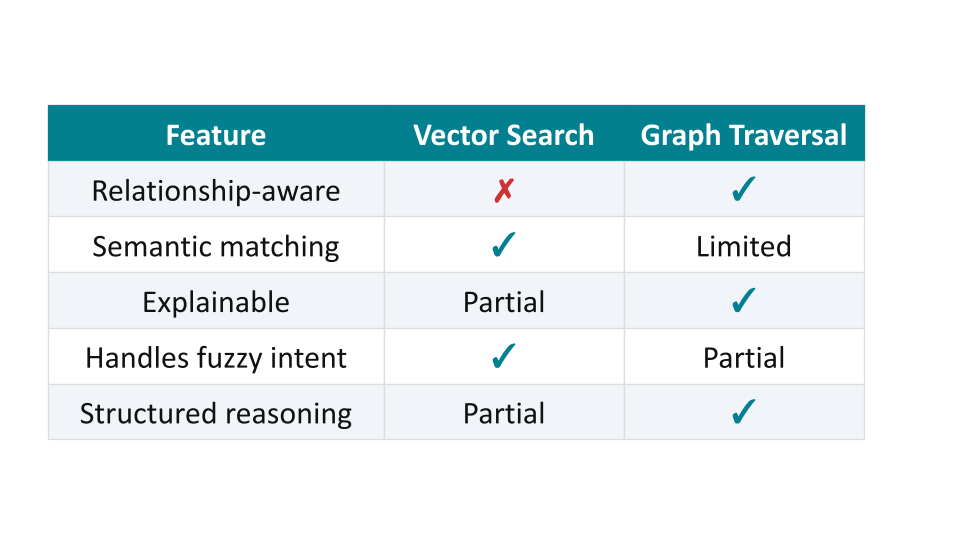
Figure 3. Vector Search and Graph Traversal.
Neither approach is strictly better. Rather, they are complementary. Vector search handles fuzzy, intent-driven queries that keyword search would miss entirely. Graph traversal adds relationship-aware context that makes the LLM response richer and easier to trace back to source data. The /graph endpoint combines both.
Lessons Learned
Here are four things worth knowing before setting this up from scratch.
- Vector index naming matters. Spring AI's default vector index name is
spring-ai-document-index. This project requiresreview-text. If the index is created with the wrong name, the application throws a runtime error that is not immediately obvious. Always check the index name configured in the application against the one created in Neo4j. - Review nodes need
idandtextproperties. Spring AI maps vector search results toDocumentobjects using properties namedidandtext. In this dataset,review_idis mapped to the Review node'sidproperty during loading, but the review text is stored asreview_text. We therefore add atextproperty so Spring AI can map the results correctly. Without the expected properties, vector search returns results, but the book list comes back empty — the model gets no context and answers from memory instead. - Pre-generated embeddings save time and money. Generating 69,791 embeddings at runtime via the OpenAI API would be slow and costly. Loading pre-computed embeddings from a file is much faster for initial development setups. The trade-off is that the embeddings are fixed, as they were generated with a specific OpenAI model and will need to be regenerated if the model changes.
- Data loading takes patience. The two long-running steps are the review load and the embedding load. Plan for this, although both steps only need to be done once and the database can be left running between sessions.
Summary
GraphRAG is a practical pattern, not just a research concept. By combining Neo4j's graph traversal with its vector index, we get two retrieval mechanisms in a single database, and no separate vector store is required for this architecture. Spring AI provides the abstractions to wire it all together in a way that will feel familiar to any Spring developer. The Goodreads domain is approachable and familiar to many readers, but the architecture generalizes to any graph of connected entities, such as product catalogs, knowledge graphs, and collections of documents. If you have relationships in your data, a graph database gives you relationship-aware retrieval capabilities that a plain vector store does not provide.
The full source code is on GitHub.
Acknowledgements
I thank my colleague Jennifer Reif for sharing the Spring AI example.
Opinions expressed by DZone contributors are their own.
Comments