

HAIP 1.0 for Verifiable Presentations: Securing the VP Flow
HAIP 1.0 mandates signed requests (JAR), encrypted responses, and certificate-based verifier identity for VP flows. Here's how to approach it with Spring and Android.
 CORE
·
CORE
·
Join the DZone community and get the full member experience.
Join For FreeIn my previous article, I covered DPoP for securing the credential issuance (VCI) flow. This follow-up focuses on the Verifiable Presentation (VP) flow, in which a wallet presents credentials to a verifier.
The VP Security Challenge
Before HAIP, VP flows had significant vulnerabilities:
- Request tampering: Plain JSON authorization requests could be modified in transit
- Response interception: Unencrypted VP tokens exposed sensitive credential data
- Verifier impersonation: Wallets had no reliable way to authenticate verifiers
HAIP 1.0 addresses all three with mandatory requirements for production deployments.
HAIP 1.0 VP Requirements
The OpenID4VC High Assurance Interoperability Profile mandates:
- Signed Authorization Requests (JAR) with X.509 certificate chain
- x509_hash client identification for verifier identity
- Response encryption using "direct_post.jwt" with ECDH-ES
- DCQL query format (replacing "presentation_definition")
- haip-vp:// URI scheme (additionally to "openid4vp://")
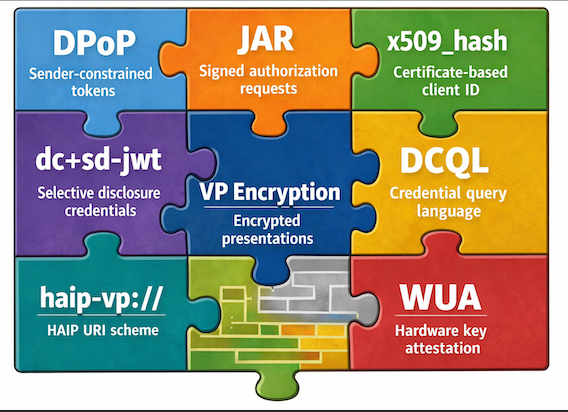
We previously looked at DPoP, and we’ll cover WUA (Wallet Unit Attestation) in the next article.
The Flow
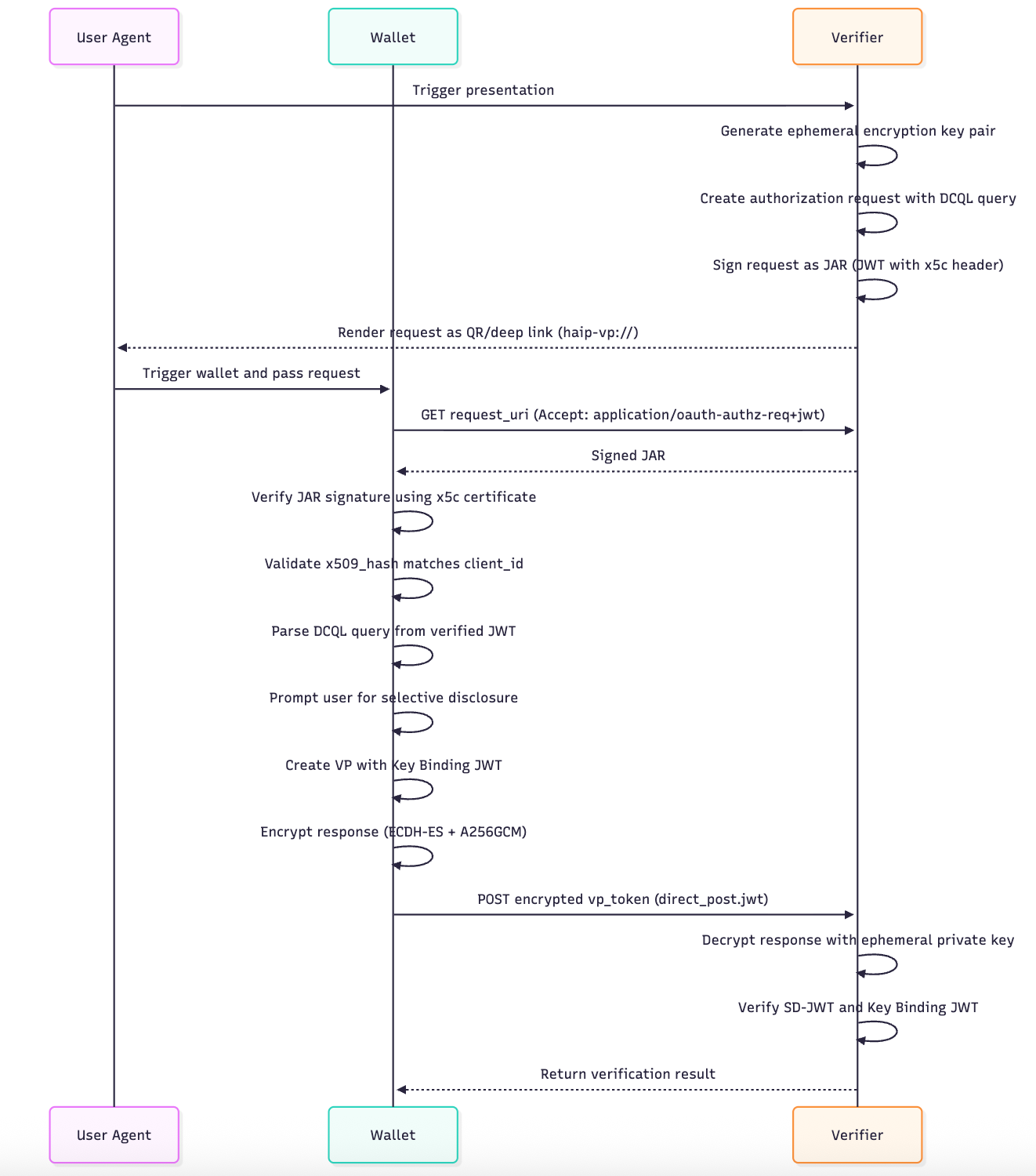
Here is a sequence diagram describing the VP flow with HAIP features added:
Implementation Highlights
Below are implementation snippets covering the backend through to the Android app.
1. Verifier Identity: x509_hash
HAIP uses X.509 certificates for verifier identification. The client_id is derived from the certificate's SHA-256 hash.
Spring Boot SSL Bundle configuration:
spring:
  ssl:
    bundle:
      pem:
        verifier-signing:
          keystore:
            certificate: classpath:verifier_cert.pem
            private-key: classpath:verifier_key.pem
Computing the hash:
private String computeX509Hash() throws Exception {
    byte[] derEncoded = certificate.getEncoded();
    MessageDigest digest = MessageDigest.getInstance("SHA-256");
    byte[] hash = digest.digest(derEncoded);
    return Base64.getUrlEncoder().withoutPadding().encodeToString(hash);
}

public String getClientId() {
    return "x509_hash:" + x509Hash;
}
And so the result is something like: x509_hash:a54_NCUlnbgC-1PfaZIppUTinKy4ITcmSo6KtXxyFCE.
2. Signed Requests (JAR)
Authorization requests are signed JWTs with the certificate in the x5c header:
JWSHeader header = new JWSHeader.Builder(JWSAlgorithm.ES256)
    .type(new JOSEObjectType("oauth-authz-req+jwt"))
    .x509CertChain(List.of(Base64.encode(certificate.getEncoded())))
    .build();
Our verifier serves this with Content-Type: application/oauth-authz-req+jwt.
3. Response Encryption
Each presentation request generates an ephemeral EC key pair. The public key is included in client_metadata:
{
  "client_metadata": {
    "jwks": {
      "keys": [{ "kty": "EC", "crv": "P-256", "x": "...", "y": "..." }]
    },
    "authorization_encrypted_response_alg": "ECDH-ES",
    "authorization_encrypted_response_enc": "A256GCM"
  }
}
The wallet encrypts its response using this key. Only the verifier (holding the private key) can decrypt it.
4. Credential Format: dc+sd-jwt With x5c
HAIP mandates the dc+sd-jwt format (replacing vc+sd-jwt) with the issuer's certificate chain in the header:
{
  "alg": "ES256",
  "typ": "dc+sd-jwt",
  "x5c": ["<base64-encoded-issuer-certificate>"]
}
This enables verifiers to validate the credential signature using the embedded certificate, without needing a separate JWKS endpoint lookup. The certificate can then be validated against the issuer's Trust List entry (see section below).
5. DCQL Queries
DCQL (Digital Credentials Query Language) replaces the verbose presentation_definition:
{
  "dcql_query": {
    "credentials": [{
      "id": "pda1_credential",
      "format": "dc+sd-jwt",
      "meta": { "vct_values": ["urn:eu.europa.ec.eudi:pda1:1"] },
      "claims": [
        { "path": ["credential_holder"] },
        { "path": ["nationality"] }
      ]
    }]
  }
}
6. Android Wallet: JAR Verification
The wallet validates the verifier's identity before processing requests:
suspend fun getRequestObject(requestUri: String, expectedClientId: String): AuthorizationRequestResponse {
    val jwtString: String = client.get(requestUri) {
        accept(ContentType("application", "oauth-authz-req+jwt"))
    }.body()

    val signedJwt = SignedJWT.parse(jwtString)

    // Extract certificate from x5c header
    val certBytes = signedJwt.header.x509CertChain[0].decode()
    val certificate = CertificateFactory.getInstance("X.509")
        .generateCertificate(ByteArrayInputStream(certBytes)) as X509Certificate

    // Verify signature
    val verifier = ECDSAVerifier(certificate.publicKey as ECPublicKey)
    if (!signedJwt.verify(verifier)) {
        throw SecurityException("Invalid JAR signature")
    }

    // Validate x509_hash matches client_id
    val computedHash = computeX509Hash(certificate)
    val expectedHash = expectedClientId.substringAfter("x509_hash:")
    if (computedHash != expectedHash) {
        throw SecurityException("x509_hash mismatch")
    }

    return json.decodeFromString(signedJwt.payload.toString())
}
7. Android Wallet: Response Encryption
The wallet app encrypts the vp_token using the Verifier's public key:
private fun encryptVpResponse(vpToken: String, request: AuthorizationRequestResponse): String {
    val verifierKey = ECKey.parse(request.client_metadata?.jwks?.keys?.first().toString())

    val header = JWEHeader.Builder(JWEAlgorithm.ECDH_ES, EncryptionMethod.A256GCM).build()
    val payload = Payload("""{"vp_token":{"${credentialId}":["$vpToken"]}}""")

    val jweObject = JWEObject(header, payload)
    jweObject.encrypt(ECDHEncrypter(verifierKey))

    return jweObject.serialize()
}
Verification
You may test the issuance flow by running all back-end services on localhost and having the Android app point at them. Moreover, once you have a VC issued and stored, you can then switch to the online EU Reference Verifier for interoperability tests.
Testing Localhost
Positive test:
- Complete the flow end-to-end — the verifier should successfully decrypt and validate the VP.
Negative tests:
- Modify the JAR in transit → Wallet rejects with signature validation failure
- Use wrong encryption key → Verifier fails to decrypt
- Tamper with x509_hash → Wallet rejects with hash mismatch
Testing With EU Reference Verifier
You can validate your implementation against the EU Reference Verifier:
- Select credential type: "Portable Document A1 (PDA1)"
- Select format: "dc+sd-jwt"
- Choose attributes: "credential_holder", "nationality", "competent_institution"
- Add your issuer's certificate as trusted issuer (copy the PEM content from our "issuer_cert.pem")
Note: Credentials issued by our Issuer running localhost will fail signature verification unless you add the issuer certificate to the trusted list.
Production Considerations: Trust Lists
Our implementation covers the cryptographic mechanisms, but production EUDI deployments will require an additional authorization layer: Trust Lists. In our demo, the wallet trusts any valid certificate. In production, wallets will:
- Validate certificate chains: The verifier's certificate must chain to a recognized CA in the EUDI PKI
- Perform Trust List lookup: Check if the x509_hash is registered as an authorized Relying Party
- Enforce credential-type authorization: Trust Lists will specify which credentials each RP can request
- Display verified identity: Show the RP's registered name from the Trust List (not self-declared client_name)
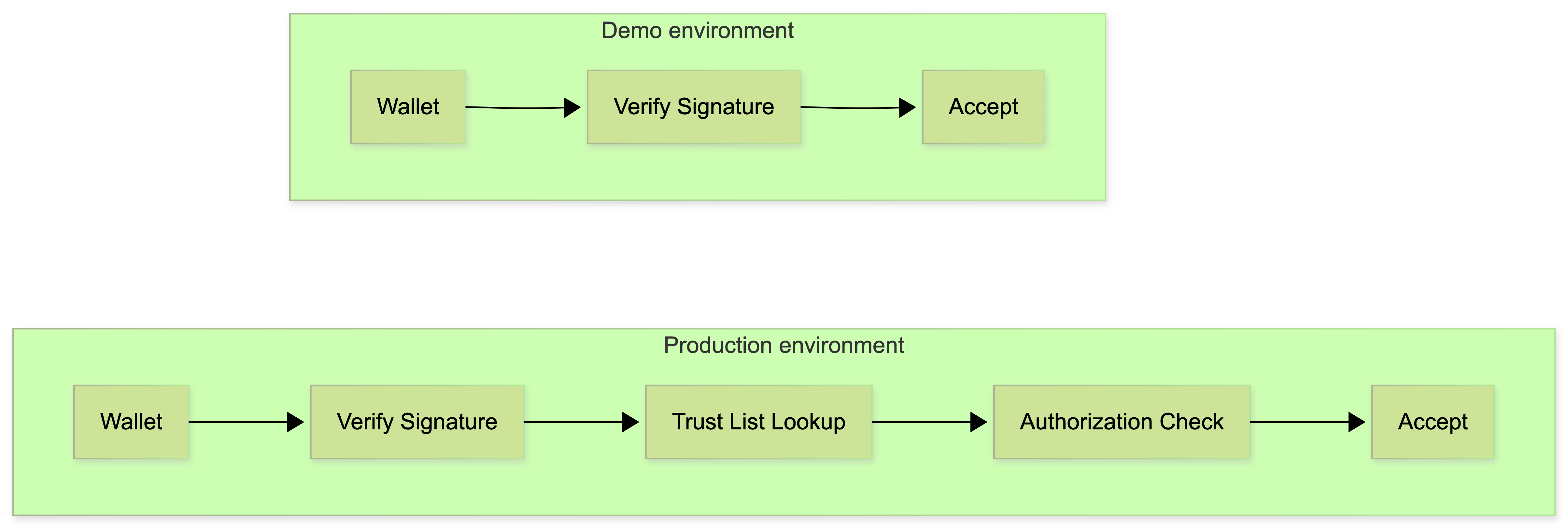
The EUDI Architecture Reference Framework (ARF) defines Trust List formats, RP registration requirements, and cross-border trust establishment between Member States.
Conclusion
HAIP 1.0 transforms VP flows from simple HTTP exchanges into cryptographically secured interactions. The combination of JAR, x509_hash, and response encryption ensures:
- Request authenticity: Wallets verify they're talking to the real verifier
- Response confidentiality: Credentials are encrypted end-to-end
- Non-repudiation: Signed requests create an audit trail
While the implementation requires more moving parts than basic OpenID4VP, Spring Boot's SSL Bundles and the Nimbus JOSE library make it manageable. Coming up next: the WUA (Wallet Unit Attestation).
Opinions expressed by DZone contributors are their own.
Comments