

From Repetition to Reusability: How Maven Archetypes Save Time
Teaching teams to rely on Maven archetypes means less setup, fewer errors, and more time spent on solving real problems.
Join the DZone community and get the full member experience.
Join For FreeWithin the discipline of software engineering, practitioners are frequently encumbered by the monotonous ritual of initializing identical project scaffolds — configuring dependencies, establishing directory hierarchies, and reproducing boilerplate code prior to engaging in substantive problem‑solving. Although indispensable, such preliminary tasks are inherently repetitive, susceptible to human error, and inimical to efficiency.
Maven, a cornerstone of the Java build ecosystem, furnishes an elegant mechanism to mitigate this redundancy through the construct of archetypes. An archetype functions as a canonical blueprint, enabling the instantaneous generation of standardized project structures aligned with organizational conventions. By engineering bespoke archetypes, development teams can institutionalize consistency, accelerate delivery, and reallocate intellectual effort toward innovation rather than procedural repetition.
Though teaching and training remain tucked away, learning and development are indispensable to the successful execution of any project. Your author understood the pain of repeating the housekeeping staff over and over while training groups of folks. It is never wise, nor a happy warm-up activity, to build, for example, a Spring Boot microservice application from scratch while the agenda was to illustrate the compensating Saga pattern. The reference to an example involving Spring Boot is intentional, as we shall use a Spring Boot application to build our custom Maven archetype.
The Rationale for Archetypes
In contemporary software development, efficiency is not merely desirable but imperative. The proliferation of repetitive initialization tasks undermines productivity and introduces unnecessary variance. Maven archetypes, by contrast, institutionalize uniformity and expedite project genesis.
Conceptual Foundations
At its core, a Maven archetype is nothing more than a template for projects. Think of it as a blueprint: instead of starting from a blank canvas every time, you begin with a predefined structure that already contains the essentials.
What It Encapsulates
- Directory layout: Standard
src/main/java,src/test/java, resources, etc. - Dependencies: Pre‑configured
pom.xmlentries for frameworks like Spring Boot, JUnit, or logging libraries. - Boilerplate code: Starter classes, configuration files, or compliance headers.
- Metadata: Variables (like
${groupId},${artifactId},${package}) that adapt the template to each new project.
Why It Matters
- Consistency: Every project generated from the archetype follows the same conventions.
- Efficiency: Developers skip repetitive setup and move straight to business logic.
- Knowledge transfer: Best practices are “baked in,” so even new team members start with a compliant, production‑ready structure.
How It Works
When you run mvn archetype:generate, Maven takes the archetype, substitutes the variables with your inputs, and produces a fully scaffolded project. In effect, the archetype transforms abstract rules into concrete, reproducible codebases.
Constructing a Custom Archetype
Creating a Maven archetype is essentially the act of capturing a project’s structure once and transforming it into a reusable template. The process is systematic and can be approached in a few deliberate stages:
Step 1: Establish a Prototype Project
Begin with a fully functional project that reflects the conventions you want to standardize. This prototype should include:
- A well‑structured directory layout (
src/main/java,src/test/java, resources). - A
pom.xmlwith the dependencies and plugins your team regularly uses. - Any boilerplate code, configuration files, or compliance headers that should appear in every new project.
Step 2: Generate the Archetype
Maven provides a direct command to convert your prototype into an archetype:
mvn archetype:create-from-projectThis command analyses the prototype and produces an archetype module under target/generated-sources/archetype.
Step 3: Install or Deploy the Archetype
To test locally, install the archetype into your Maven repository:
mvn installFor team‑wide use, deploy it to a shared repository such as Nexus or Artifactory.
Step 4: Generate New Projects From the Archetype
Once installed, you can scaffold new projects instantly:
mvn archetype:generate \ -DarchetypeGroupId=com.example \ -DarchetypeArtifactId=my-custom-archetype \ -DarchetypeVersion=1.0.0Maven will prompt for parameters like groupId, artifactId, and version, then generate a ready‑to‑use project.
Step 5: Refine With Parameters and Metadata
To make the archetype flexible:
- Replace hard‑coded values with variables (e.g.,
${package},${artifactId}). - Define rules in
archetype-metadata.xmlto control which files are included, filtered, or optional. - Add documentation so future users understand the archetype’s purpose and scope.
Create Your First Custom Archetype
An archetype is a blueprint of a project that we use and are much familiar with; often, oblivious of their power, we could have leveraged.
Here are a few common ones:
| Archetype Artifact ID | Purpose |
|---|---|
|
maven-archetype-quickstart |
Basic Java project with App.java and JUnit test. Great for beginners. |
|
maven-archetype-webapp |
Generates a simple Java web application with web.xml and index.jsp. |
|
maven-archetype-archetype |
Used to create a new archetype project itself. |
|
maven-archetype-j2ee-simple |
Simplified J2EE application structure. |
|
maven-archetype-plugin |
Template for building a custom Maven plugin. |
|
maven-archetype-site |
Generates a Maven site project with documentation support. |
|
maven-archetype-site-simple |
A simpler version of the Maven site archetype. |
|
maven-archetype-portlet |
Template for creating JSR-268 Portlet applications. |
|
maven-archetype-simple |
Minimal Maven project with basic structure. |
|
spring-boot-archetype (community) |
Spring Boot starter template (often custom or community-maintained). |
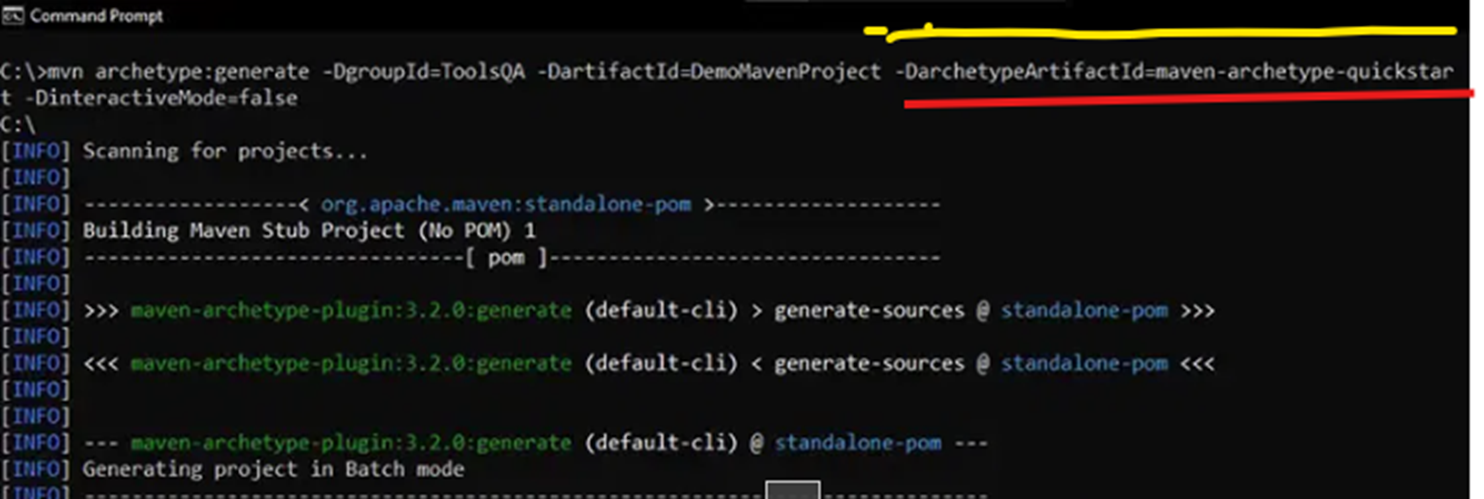
To create a simple Maven project, for example, the maven-archetype-quickstart archetype is used, as shown in Fig. 1.
We can see the list of archetypes using the command:
mvn archetype:generateOr to narrow down the search results with a filter:
mvn archetype:generate -Dfilter=org.apache.maven.archetypes: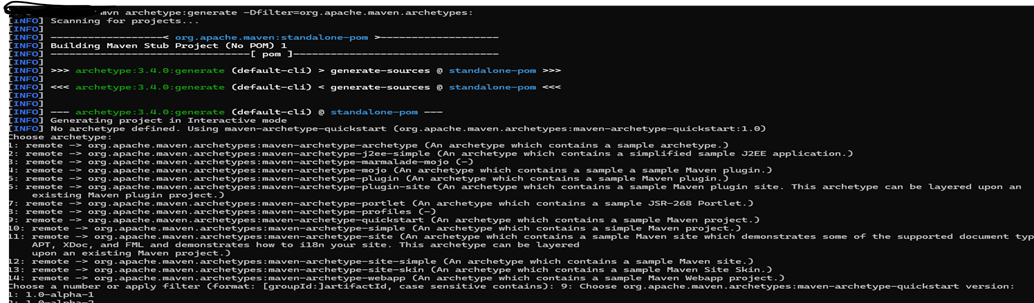
Note: Though developers usually don’t use this, this can speed up one’s learning or upskilling , internal knowledge transfer, prototyping adhering to standardization and compliance
Assuming that we have a well-structured Maven project, spring-simple-rest-service-application, with required and compliant dependencies, complying with organizational coding and security standards. This is our prototype project, available at https://github.com/trainerpb/spring-simple-rest-service-application.
Navigate to the project root and execute the Maven command:
mvn archetype:create-from-projectMaven will analyse the project and generate an archetype under: target/generated-sources/archetype.
Install the archetype locally: move into the generated archetype folder:
cd target/generated-sources/archetype

mvn installOptionally, this can be deployed to the organizational repository.
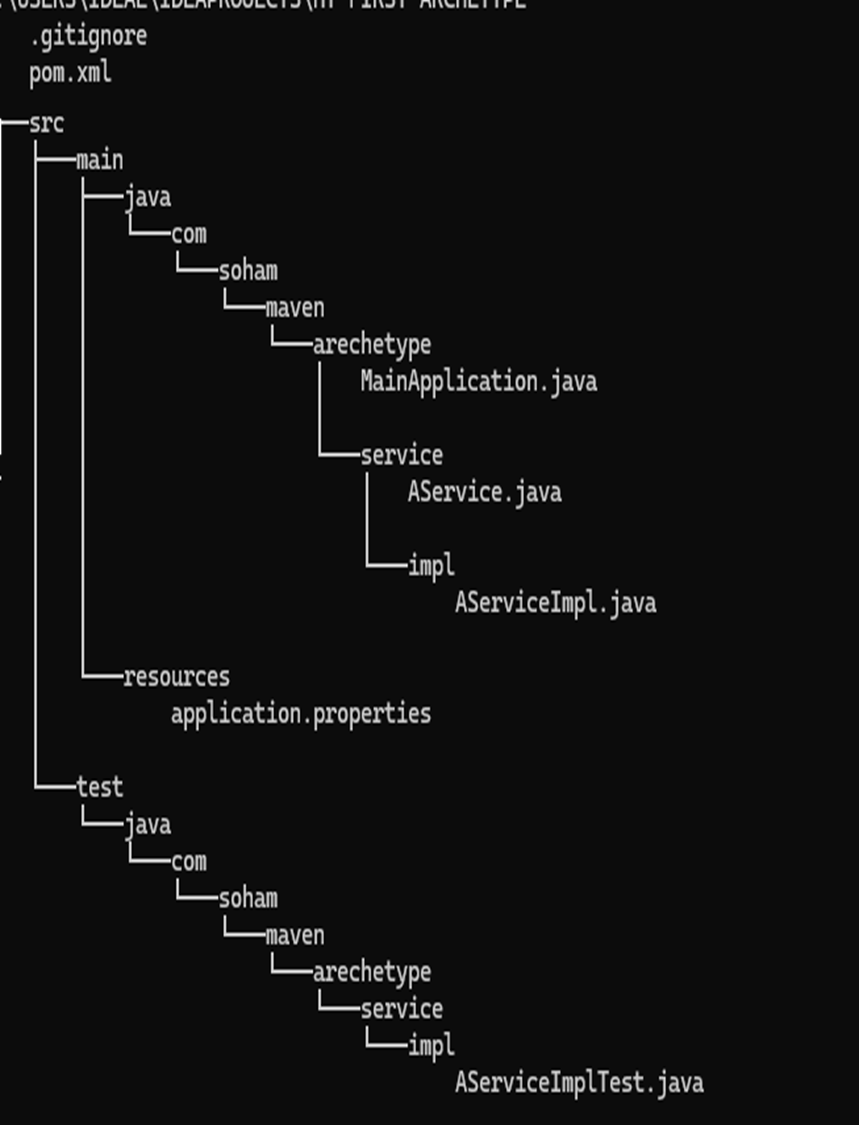
To use this archetype, we use below steps:
mvn archetype:generate -DarchetypeCatelog=local -Dfilter=com.soham.maven.arechetype: The command creates a project with the archetype that matches the above filter. Here, the archetype's groupId is provided.
While this works, an inevitable question regarding the new (created from the prototype) project structure, its configurable stuff, like groupId, artifactId, package name, etc., arises.
We note that these can be refined by the file: target/generated-sources/archetype/src/main/resources/META-INF/maven/archetype-metadata.xml.
Purpose of the File
- Defines which files are copied into new projects.
- Specifies variables (like
${groupId},${artifactId},${package}) that should be substituted. - Allows you to mark files as required, optional, or filtered.
- Ensures the archetype adapts to different contexts instead of being a rigid copy.
An arbitrary example:
<archetype-descriptor name="my-custom-archetype">
  <fileSets>
    <fileSet filtered="true" packaged="true">
      <directory>src/main/java</directory>
      <includes>
        <include>**/*.java</include>
      </includes>
    </fileSet>
  </fileSets>
</archetype-descriptor>
The snippet dictates Maven to:
- Copy everything under
src/main/java. - Apply variable substitution (
filtered="true"). - Respect the package structure (
packaged="true").
After generating your archetype, you’ll find archetype-metadata.xml under src/main/resources/META-INF/maven/. That’s the file you edit to fine‑tune what your archetype produces.
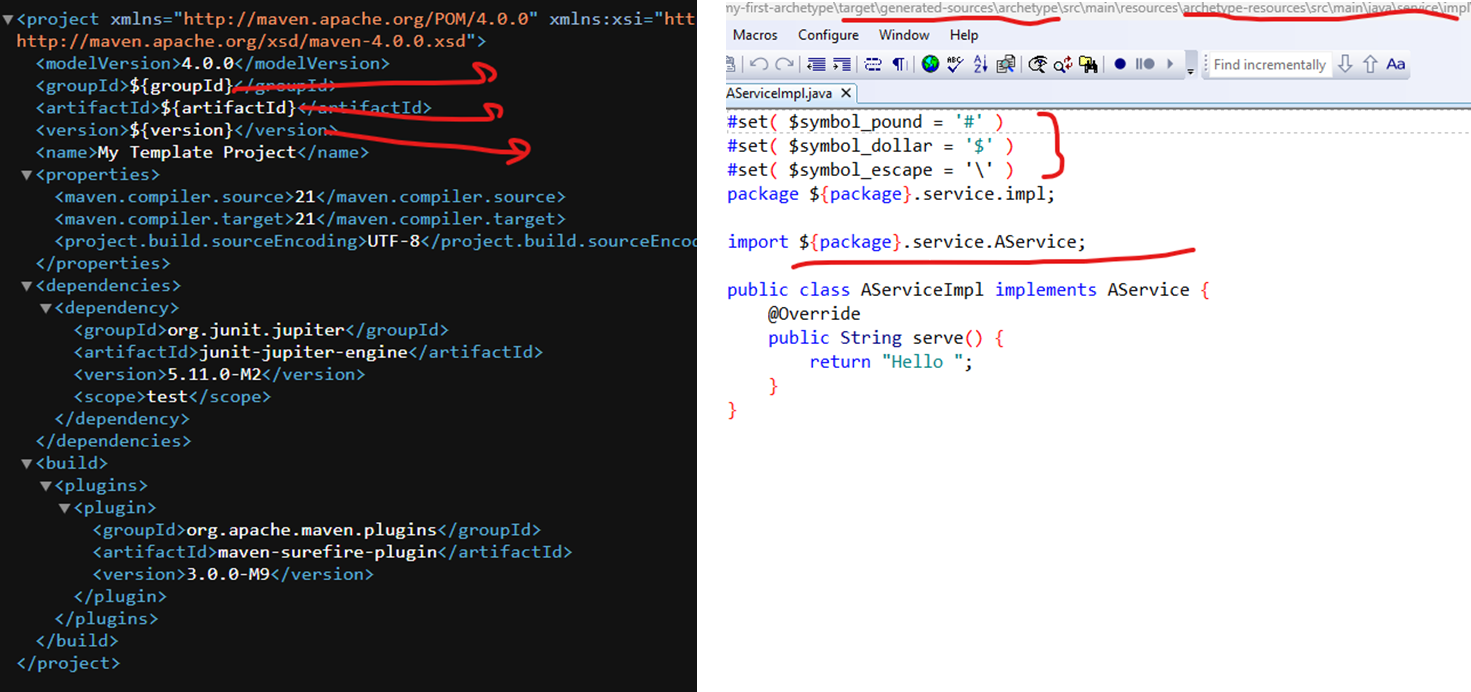
However, there are alternative approaches, but this one works for individuals/small teams or when a well-defined prototype is available. A comparison of different methods is shown in the table below.
Maven Archetype Creation Approaches
|
Approach |
How It Works |
Pros |
Cons |
Use Case |
|---|---|---|---|---|
|
From Project
|
Convert an existing project into an archetype. |
|
|
When you already have a well‑structured prototype project. |
|
Empty Archetype
|
Generate a barebones archetype project with |
|
|
When you want a curated archetype, but no prototype exists. |
|
Built‑in Catalog
|
Choose from Maven’s predefined archetypes. |
|
|
When you need a quick start or want to explore existing templates. |
|
Custom Catalogue (Enterprise/Team) |
Maintain a shared catalogue of archetypes in a repo. |
|
|
When teams need consistent, org‑wide templates. |
Final Words
A Maven custom archetype serves its purpose well — it’s both useful and enjoyable to explore; it does exactly what it is designed for — streamlining project setup — and can be both practical and enjoyable to experiment with.
However, it is by no means the only option available. The Java ecosystem offers a variety of alternatives, each with its own strengths and trade-offs. In the following sections, we will compare some of the most viable approaches, highlighting where they shine and where they may fall short. Ultimately, the decision is less about which tool is objectively ‘best’ and more about which one integrates most naturally into your existing ecosystem. The right fit depends on your team’s workflows, long-term maintainability goals, and the level of flexibility you require.
Comparison Table
|
Feature/Tool |
JHipster |
Maven Custom Archetype |
Spring Initializr |
|---|---|---|---|
|
Purpose |
Full-stack app generator (Spring Boot + frontend) |
Reusable Maven-based project template |
Spring Boot project starter |
|
Tech Stack Support |
Spring Boot + Angular/React/Vue + microservices |
Any Maven-compatible tech stack |
Spring Boot only |
|
Customization Level |
High (via blueprints, JDL, entity modeling) |
High (custom templates, parameters, plugins) |
Moderate (limited to form inputs) |
|
Frontend Support |
Yes (generates UI with chosen JS framework) |
No (backend only, unless manually added) |
No (backend only) |
|
DevOps Integration |
Docker, Kubernetes, CI/CD, monitoring, and scaffolding |
Manual setup required |
Basic Docker support |
|
Learning Curve |
Moderate to high (Yeoman, JDL, microservices) |
Moderate (Maven plugin and template logic) |
Low (simple web UI or API) |
|
Best For |
Rapid full-stack development with microservices |
Standardizing internal project setups |
Quick Spring Boot app generation |
|
Entity Modeling |
Yes (JDL or CLI-based) |
No (manual entity creation) |
No (manual entity creation) |
|
Community and Ecosystem |
Large, active community with frequent updates |
Niche, mostly internal use |
Backed by the Spring team, widely used |
|
Offline Usage |
Yes (CLI-based) |
Yes |
Yes |
|
Extensibility |
Via blueprints and custom generators |
Via Maven plugin and template logic |
Limited |
References
Opinions expressed by DZone contributors are their own.
Comments