

How to Exclude Code From Code Coverage
This blog post focuses on how to leave out all code that will not be covered with unit tests from code coverage and correctly display the numbers shown in code coverage reports.

Join the DZone community and get the full member experience.
Join For FreeRecently I blogged about how to generate nice code coverage reports for ASP.NET Core and .NET Core applications. This blog post focuses on how to leave out all code that will not be covered with unit tests from code coverage and get numbers shown on code coverage reports correct.
What to Exclude From Code Coverage?
I think almost all applications have some classes we don't want to test. The usual candidates are primitive models and Data Transfer Objects (DTO). One example is given below:
public class EditFolderModel
{
    public int Id { get; set; }
    public string Title { get; set; }
    public int? parentFolderId { get; set; }
}
Without any additional information, these classes will be part of code coverage calculations.
Excluding Code From Code Coverage
The easiest way to exclude code from code coverage analysis is to use the ExcludeFromCodeCoverage attribute. This attribute tells tooling that a class or some of its members are not planned to be covered with the tests. TheEditFormModel class shown above can be left out from code coverage by simply adding this attribute.
TheExcludeFromCodeCoverage attribute works also on the class member level.
ExcludeFromCodeCoverage Attribute in Action
I take my simple demo application and generate a code coverage report for it. There's no code excluded, everything is counted in.
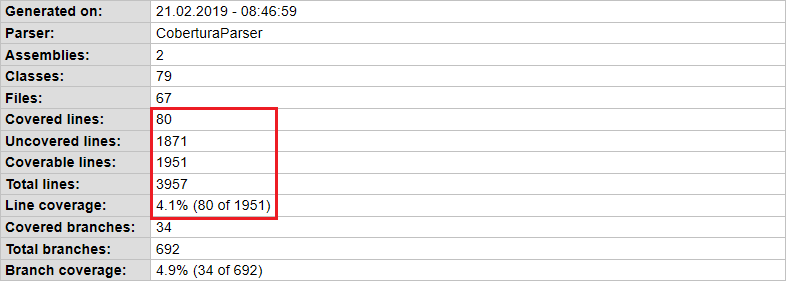
Now I add theExcludeFromCodeCoverate attribute to all classes and members that don't need testing. After this, I generate a new report.

I left out a load of primitive models, DTOs, constructors, and scaffolded ASP.NET Identity code-behind files. As a result, the numbers on my code coverage report changed around 50 percent and that's huge even for a small web application.
Should I Use the ExcludeFromCodeCoverage Attribute?
I think it makes a lot of sense to exclude from code coverage reports the code that will never be covered with tests. The reports above were generated for a relatively small web application and the change in numbers was pretty big. I don't want to say that the same effects appear with every application but there will be changes in numbers.
Over time, these metrics may be an important part of estimating the need for unit tests. If these numbers lie, then the work ahead may seem way bigger than it actually is. This is why it is important to keep these metrics correct.
Wrapping Up
Although code coverage reports are easy to set up there's still some work needed to get numbers right. In .NET we can use the ExcludeFromCodeCoverage attribute to leave out whole classes and structs or members like methods, properties, constructors, and events. As example reports show, corrections to code coverage numbers can be significant.
Published at DZone with permission of Gunnar Peipman. See the original article here.
Opinions expressed by DZone contributors are their own.
Comments