

How to Securely Access Bank Account Data With the Plaid API
With fintech applications on the rise, an API that allows devs to integrate financial importation, securely, is a good thing to have in the tool belt
Join the DZone community and get the full member experience.
Join For FreeEvery day financial activities are increasingly being conducted through online applications, and as the Fintech industry continues to explode, having API-based access to users' bank account data is not only convenient, but necessary. Considering the mass of privacy, security, and reliability regulations that govern financial data transactions, building this functionality from scratch is no easy feat. That's why so many current financial applications use the Plaid API.
Plaid offers unified authentication for thousands of global financial institutions. Once users authorize access to their bank data, you can use the Plaid API to authorize the account for ACH (without microtransactions), retrieve statement and real-time balance data, and validate the user's identity and employer info. Plaid is already being used by industry-leading finance applications such as Acorns, Venmo, Expensify, and Stash, and if your application relies on bank account authorization, integrating the Plaid API will likely be one of your best options.
The Plaid Element is the newest addition to the Cloud Elements Finance Hub, which means you can now harness the full power of the Plaid API with Cloud Elements' unified, RESTful APIs. If you're already integrated with Cloud Elements, you can start defining Plaid virtual data resources and using them in your existing connected apps within minutes.
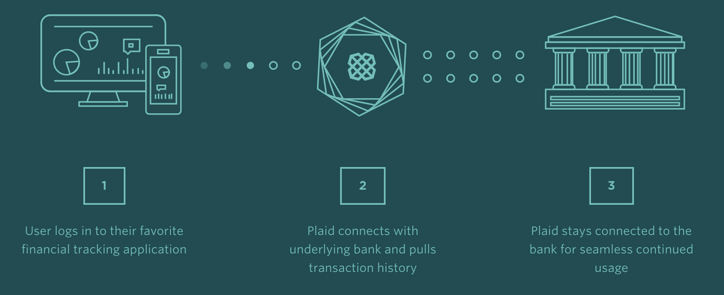
Source: How Plaid's API Brings Finance into the 21st Century
Let's Look at an Example of How to Use Cloud Elements to Integrate the Plaid API:
Let's say you made an awesome new personal finance app that helps users set budgets and track how much money they're spending in certain purchasing categories. Right now, your app scans receipts or uses manual data entry to track users' spending, but you're a visionary, and you want the app to become an awesome cooperative app!
Currently, your app uses the following data structure for a transaction:
{
	transactionID: “string”,
	accountID: “string”,
	amount: number,
	date: “string”,
	type: “string”
}
We're going to use the Plaid element to pull this data directly from the user's live bank statement. The first step to do this is to create a common Virtual Data Resource in Cloud Elements that we'll call plaidTransaction. If you're not sure how to create common resources in Cloud Elements, Get a refresher with our guide to the basics of common resources.
For simplicity sake, we will match our virtual data resource's structure to the current data structure for a transaction in the app:
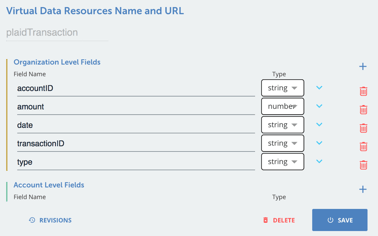
You can then create a transformation which maps each of these fields to specific response fields of a GET /transactions call to your Plaid instance. If you need some guidance on how to make Plaid API calls with Cloud Elements, log in and check out the Plaid Element API docs here.
Once you've got your virtual data resource set up, you can call it any time to get the transactions from a user's account, already normalized to the data structure of your app.
Pro Tip: You can also use Cloud Elements' built-in Eventing operations to set up webhooks or polling (P.S. webhooks are better) to access data with the Plaid API. If you're looking for tips on how to set up Eventing with Cloud Elements, check out this guide.
Ready to get started? Log into Cloud Elements, authenticate your Plaid API instance, and you'll be up-and-running in no time!
Published at DZone with permission of Ross Garrett. See the original article here.
Opinions expressed by DZone contributors are their own.
Comments