

How to Upgrade TiDB Safely
How to use this toolkit to test your upgrade process and how it helps you upgrade your TiDB with ease and happiness.
 ·
·
Join the DZone community and get the full member experience.
Join For FreeAs a fast-growing open source NewSQL database, TiDB frequently releases new features and improvements. If you are a TiDB user, you may have found it hard to decide whether or not to upgrade your version. You may have also wondered how to make your upgrade journey safer, smoother, and even unnoticed by business.
On the one hand, new TiDB versions have new features that can support some of the new demands in your business or can fix some known security loopholes or bugs.
On the other hand, however, upgrading itself has potential risks. For example, there are new configuration parameters in the new TiDB versions that you need to adapt your system to, and problems might occur in this process; new versions usually have tighter access permissions to fix security loopholes, so you’ll need to upgrade some old access modes, and some SQL execution plans have been stabilized through various means, but new versions may bring uncertainties.
In this post, I want to offer you a solution—TiDB upgrade toolkit. By introducing a user case, I will show you how to use this toolkit to test your upgrade process and how it helps you upgrade your TiDB with ease and happiness.
TiDB Upgrade Toolkit
How do you ensure that your TiDB upgrade is safe and smooth? The TiDB upgrade toolkit is the answer. It can help you identify any parameter changes by comparing the old and new versions and simulating and replaying the whole upgrade process. You can choose the whole toolkit or different tool combinations from this toolkit to meet your actual needs at the best cost.
We have four upgrade tools in the TiDB upgrade toolkit: TiDBA, Pt-upgrade, Plan Change Capturer (PCC), and Workload-sim.
- TiDBA helps you quickly identify parameter changes by comparing the old and new versions of TiDB.
- Pt-upgrade helps you test TiDB’s SQL compatibility by using the slow query log to play back on the source cluster (old version) and the target cluster (new version). This tool has been used by many of our business customers, such as MySQL, MariaDB, and Aurora, and is also the main upgrade tool of Percona Database Consulting. It has proven valuable and reliable in practice.
- PCC helps you identify regressed SQL statements by detecting the changes of execution plans between different versions of TiDB and further identifying potential risks brought by these changes before upgrading.
- Workload-sim helps you evaluate the effects of upgrading by collecting the real workloads and replaying them on the testing cluster.
These tools vary in the number of resources they consume and the granularity of their results. You can choose any tool or tool combination according to your own needs.
User Case — A Leading Q&A Company
This customer is China’s leading question and answers community with over 100 million users and contributors. They wanted to upgrade their TiDB database because the newer version would fix some of their known problems. They also wanted to make sure that all their business was run on the same version of TiDB. This would unify database operation, maintenance, and management.
This customer was going to upgrade one of their most important TiDB clusters—the one that supports their commercial and advertising business. So, They attached great importance to the security of their TiDB upgrade.
They decided to use our upgrade tool combination of TiDBA and Workload-sim to test the upgrading process and identify potential risks.
Next, let’s go into details on how these two upgrade tools worked in practice.
Upgrade Environment
The deployment scale and information of this customer’s TiDB cluster is as follows.
TiDB Cluster in the Production environment
| Business supported | XXXX |
| K8s version | v1.17.6 |
| Deployment method | TiDB Operator |
| Operator version | 1.2.0-rc.2 |
| TiDB version | v4.0.9 |
| Placement Driver (PD) nodes | 5 |
| TiDB nodes | 30 |
| TiKV nodes | 25 |
Deployment information of TiDB cluster in production
TiDB Cluster in the Testing Environment
| Business supported | XXXX |
| K8s version | v1.17.6 |
| Deployment method | TiDB Operator |
| Operator version | 1.2.0-rc.2 |
| TiDB version | v4.0.9 (will upgrade to v4.0.14) |
| PD nodes | 3 |
| TiDB nodes | 10 |
| TiKV nodes | 20 |
Deployment information of TiDB cluster in testing environment
Note: To make the risk evaluation more accurate, we recommend creating a new cluster for testing with similar specifications to those in the production environment.
Upgrade Process
Now, let’s see how to test the upgrade process. The TiDB versions used for testing are specified in the table below.
| TiDB cluster | Version |
| TiDB cluster in production | v4.0.9 |
| TiDB test cluster | V4.0.9 (It will be upgraded to v4.0.14) |
TiDB versions used for testing
The testing upgrade process is as follows:
- Use the Backup & Restore (BR) tool to back up the full data of the TiDB cluster in production.
- Use the BR tool to restore all the backup data to the TiDB v4.0.9 test cluster.
Note: Before you collect traffic data in Step 3, you have to confirm that all the TiDB nodes support balanced business traffic. - While Step 2 is in progress, use Workload-sim to collect traffic data from one of the TiDB nodes in the production environment.
- Use Workload-sim to play back the traffic data you just collected on the TiDB v4.0.9 test cluster and collect playback information.
- Clear all the data and then upgrade the TiDB test cluster from v4.0.9 to v4.0.14.
- Use the BR tool to restore its backup data again to the upgraded TiDB cluster v4.0.14. (Note: It is recommended to create a new TiDB cluster for this testing, and the testing will not be impacted by empty regions.)
- Use Workload-sim to play back the traffic data you just collected in the production environment on the upgraded TiDB cluster v4.0.14, and collect the playback information.
- Compare the playback information collected respectively from the testing TiDB cluster v4.0.9 and TiDB cluster v4.0.14.
- Use TiDBA to compare the parameters of TiDB v4.0.9 in production and the testing cluster of TiDB v4.0.14.
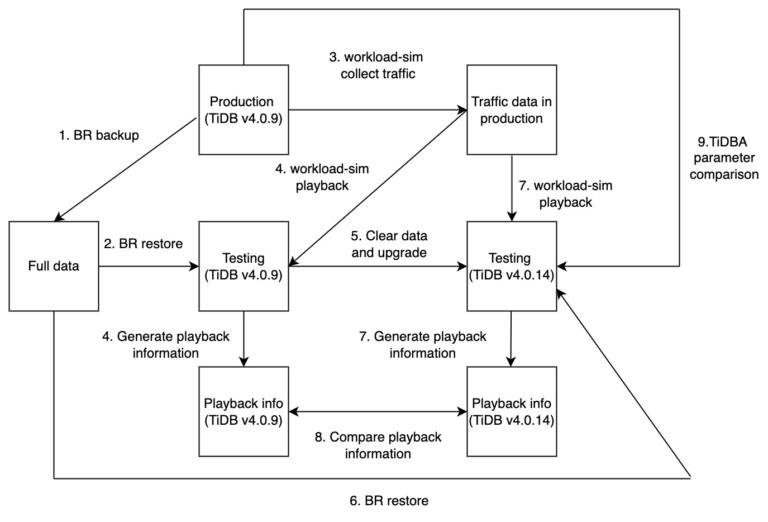 Flow chart of the testing upgrade process
Upgrade Comparison
Next, let’s compare the playback information collected before and after the testing upgrade.
Before Upgrading
The traffic data before upgrading is shown in the image below.

After Upgrading
The traffic data after upgrading is shown in the image below.

It can be clearly seen from the images above that business traffic was not impacted by the testing upgrade. The testing results were within expectations.
Three days after the testing upgrade with our upgrade tools, our customer decided to upgrade their TiDB cluster in production during their off-peak hours. It turned out the real upgrade process was safe and smooth and did not cause any problems or impact any of their business traffic. Things went as exactly as in the testing upgrade.
Because the results of the testing and actual upgrade were the same, you may wonder why it was so important to use upgrade tools to test the upgrade process beforehand.
The reason is that there are uncertainties in the database upgrade process. Our upgrade tools are designed to reduce those uncertainties by identifying potential risks so that you address them beforehand and guarantee a safe and reliable upgrade. You don’t have to hesitate any more about the gains and losses in the face of upgrade options.
Published at DZone with permission of Canyu Zhang. See the original article here.
Opinions expressed by DZone contributors are their own.
Comments