

Important Note for Targeting iOS Emulators in Cordova
A great tip to help you work out which emulators are available when testing your applications
Join the DZone community and get the full member experience.
Join For FreeWith the recent changes to iOS9, I’ve had to do more testing in iOS 8.4 versus 9.0 when working on Ionic/Cordova applications. It is relatively easy to switch which emulator you are using if you use the –target argument in the CLI:
cordova emulate ios --target="something"
Of course, the question is, what value do you use for “something”? My coworker Carlos Santana has an excellent answer over on Stackoverflow. Basically if you run:
./platforms/ios/cordova/lib/list-emulator-imagesYou will get a list of valid targets for your simulator. As an aside, how many of you ever dig around in your platforms folder? Did you even know this tool existed? Should I write up an exploration of this folder? Ok, stay on target, Raymond.
Running this command will give you output that looks like this:
iPad-Air, 8.4
iPad-Air, 8.4
iPad-Air, 8.4
iPad-Air, 9.0
iPhone-6, 8.4
iPhone-6, 8.4
iPhone-6, 8.4
iPhone-6, 9.0
iPhone-6-Plus, 8.4
iPhone-6-Plus, 8.4
iPhone-6-Plus, 8.4
iPhone-6-Plus, 9.0
The list above is about half of my list and your list will be different. Ok, problem solved, right? Not so fast. What happens when you try to target the 8.4 version of the iPhone?
cordova emulate ios --target="iPhone-6, 8.4"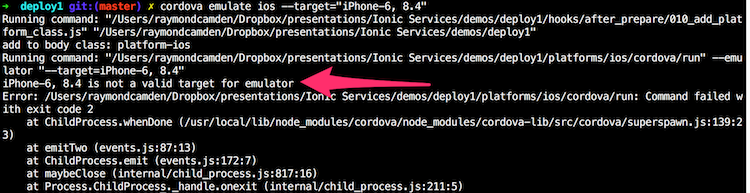
Wtf? Confusing, right? If you keep reading on that StackOverflow page, you come to this answer by Ruslan Soldatenko. He points out that the platforms/ios/cordova/lib/run.js file has a specific list of allowed targets. I’m sure there is a good reason for this. Maybe the Cordova CLI doesn’t want to keep asking the system for valid targets. Either way, if you open it up, you will find a line like this:
var validTargets = ['iPhone-4s', 'iPhone-5', 'iPhone-5s', 'iPhone-6-Plus', 'iPhone-6',
        'iPad-2', 'iPad-Retina', 'iPad-Air', 'Resizable-iPhone', 'Resizable-iPad'];
Add “iPhone-6, 8.4” to the end of the array and you are good to go… for this project only. You’ll need to modify this line in every project you work with where you need to target different iOS versions.
As an aside, this (obviously) applies to Ionic and their CLI.
Published at DZone with permission of Raymond Camden. See the original article here.
Opinions expressed by DZone contributors are their own.
Comments