

Java Bytecode Simplified: Journey to the Wonderland (Part 1)
Interestingly, we don’t even need the whole set of bytecode in Java. Today we use around 205. These are called operation codes or simply "opcodes."
 CORE
·
CORE
·
Join the DZone community and get the full member experience.
Join For FreeThere are two ways to see a thing. One, see it as it appears to us; two, see it and appreciate it. For example, we get light when we switch on a lightbulb. We press the button and then get busy with our lives. It's pretty simple, but boring. On the other hand, if we know how light gets energy from an electrical power grid far from our home with wires, and while traveling through the wires and filament, the filament heats up and starts emitting photons, we get to see in the light; we can then appreciate the blessing.
In the same way, when we write a piece of code, and if we know the mechanism behind it, we can then appreciate it more, how excellent engineering effort went into it, making our life so amazing.
Today I will make an attempt to appreciate how unique the JVM is. So, let's begin the journey to how Java works!
Introduction
We all know that the Java compiler takes Java source and then compiles it to bytecode. The process is pretty straightforward. It takes a file and transforms it into bytecode. The just-in-time compiler (JIT) interprets the bytecode to machine code so that it can run. While interpreting it, it collects data, for example, how frequently a particular method is called. When a specific portion of code (in hotspot terminology, "hot code") reaches a certain threshold, the JIT optimizes it and further compiles it to direct machine code so that it can perform better. This may seem an oversimplification, which begs for a more extensive explanation.
So in this article, we will keep it short: only one part of it, which is the bytecode itself. What it is and its internals. It's definitely a fun journey.
Now the first question gets to be: what is bytecode?
If we put it simply, bytecode is a set of instructions that are emitted from the Java compiler and the JVM then executes them.
Each bytecode is 1 byte long, and that's why it is called bytecode. We know there are 8 bits in a byte. That's why there are only 2^8 = 256 possible instructions that we could have in bytecode. Interestingly, we don't even need the whole set of bytecode in Java. Today we use around 205. These are called operation codes, or simply "opcodes."
Example
First, we will write a simple Java program and then compile it to see what the Java compiler emits:
public class Calculator {
  public int add(int a, int b) {
    return a + b;
  }
}
That's the simplest Java program we could ever write. It's a class with a public method, "add," which takes two integer arguments and then returns, summing them. That's it.
Let's compile it.
javac Calculator.java
The above command will produce a class file named "Calculator. class." This file contains a series of bytes and it's not readable. You won't be able to open it with a text file or anything.
However, an excellent Java command-line tool called "javap" allows us to read this bytecode from a class file. Let's read them, as follows:
javap -c Calculator
If we run the above command in our terminal, we will get the following output.
Compiled from "Calculator.java"
public class Calculator {
  public Calculator();
    Code:
       0: aload_0
       1: invokespecial #1                  // Method java/lang/Object."<init>":()V
       4: return

  public int add(int, int);
    Code:
       0: iload_1
       1: iload_2
       2: iadd
       3: ireturn
}
Look, we can see a constructor here. However, we haven't added that in our Java source code. Well, the Java compiler did that. That's our default constructor. The Java compiler added it.
Let's change gears a bit.
We know the JVM interprets byte code, and it is a stack machine. It has an operand stack. It works like Reverse polish notation (RPN). For example, if we have an expression, as follows:
1 + 2 , then the RPN would be 1 2 +.
If we want to evaluate this using the following images:

Firstly, we will push 1 and 2 into the stack. And then we will pop these two, add them, and put them in the stack again. The same thing is done in JVM by two instructions: iconst_<> and iadd.
iconst_1 and iconst_2, these two opcodes push 1 and 2 to the stack, and iadd opcode pops them from the stack and put them back after adding them. The iconst_1 and iconst_2 are two special opcodes for loading 1 and 2 as they are constant.
Let's get back to bytecode again.
Bytecode is nothing but a list of instructions. For example, if we want to get back from the method, then the bytecode would be 'return.'
This return opcode is nothing but a representation so that we can read bytecode and reason about it. In the class file, it is just a series of bytes. The hex value of the return is B1, and its binary is- 1011 0001.
The JVM can understand these byte series and then convert them to appropriate machine code.
Let's see another example:
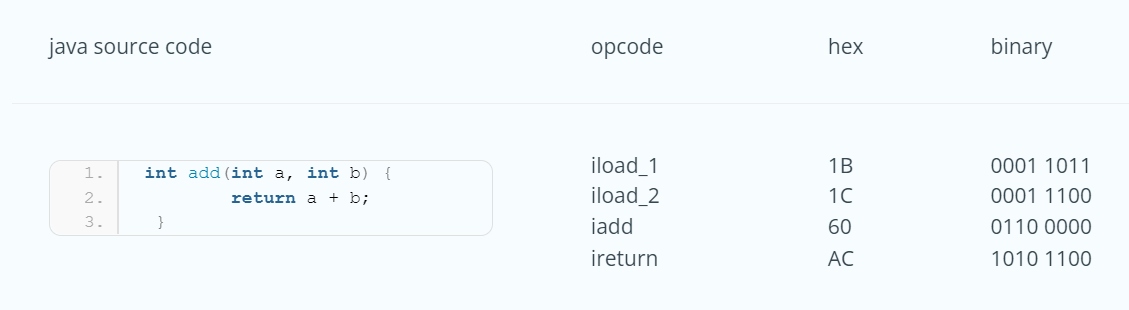
In the above table, we have a method that takes two integers arguments and then adds them. Over here, a and b are not constant; that's why with iload_1 and iload_2, these two opcodes are used. The generic format of this bytecode for loading integers is: iload_<n>. It essentially means that the is an index of the array of the local variables. The parameters are, in fact, local variables. iload_1 loads the a and iload_2 loads the b.
Now look at the following method:
public int add() {
    return 1 + 2;
}
However, here is a caveat. If you write the above method, then compile it and try javap to read it, you will find something like this:
0: iconst_3
1: ireturn
The reason is that the Java compiler does a bit of optimization: when it sees we are just adding 1 and 2 and then returning their value, it can just load the 3 into the stack with one instruction, rather than using 3 instructions. We will know much more about these sorts of optimizations later.
Let's assume the Java compiler doesn't do this little optimization in this article. The opcodes, iconst_1, and iconst_2 will put the 1 and 2 in the stack and then use iadd to pop these two, add them and then put their result back into the stack and return.
Conclusion
That's a brief introduction to how Java bytecode looks and works. We will go a bit further in our next article.
However, before I wrap up this article, I feel compelled to show you a small snippet of Java code that will read a class file, convert it as a sequence of bytes, and then print it out so you can see it as the JVM sees it.
package ca.bazlur;

import java.io.IOException;
import java.nio.file.Files;
import java.nio.file.Path;

public class BytecodeReader {

  public static void main(String[] args) throws IOException {
    Path classfile = Path.of("src/Calculator.class");// put path of your classfile here
    byte[] bytes = Files.readAllBytes(classfile);
    for (byte aByte : bytes) {
      //ref https://stackoverflow.com/a/12310078/893197
      String byteString = String.format("%8s", Integer.toBinaryString(aByte & 0xFF))
          .replace(' ', '0');
      System.out.println(byteString);
    }
  }
}
If you run this program, you will get a series of 1 and 0. Those are bits. Every 8 bits make a byte, and each byte represents an opcode (see the list of all opcodes).
That's all for today!
Happy Coding!
Published at DZone with permission of A N M Bazlur Rahman. See the original article here.
Opinions expressed by DZone contributors are their own.
Comments