

Java 21 Virtual Threads vs Cached and Fixed Threads
Discover how Java concurrency improved from Java 8’s enhancements to Java 21’s virtual threads, enabling lightweight, scalable, and efficient multithreading.
Join the DZone community and get the full member experience.
Join For FreeIntroduction
Concurrent programming remains a crucial part of building scalable, responsive Java applications. Over the years, Java has steadily enhanced its multithreaded programming capabilities. This article reviews the evolution of concurrency from Java 8 through Java 21, highlighting important improvements and the impactful addition of virtual threads introduced in Java 21.
Starting with Java 8, the concurrency API saw significant enhancements such as Atomic Variables, Concurrent Maps, and the integration of lambda expressions to enable more expressive parallel programming.
Key improvements introduced in Java 8 include:
- Threads and Executors
- Synchronization and Locks
- Atomic Variables and ConcurrentMap
Java 21, released in late 2023, brought a major evolution with virtual threads, fundamentally changing how Java applications can handle large numbers of concurrent tasks. Virtual threads enable higher scalability for server applications, while maintaining the familiar thread-per-request programming model.
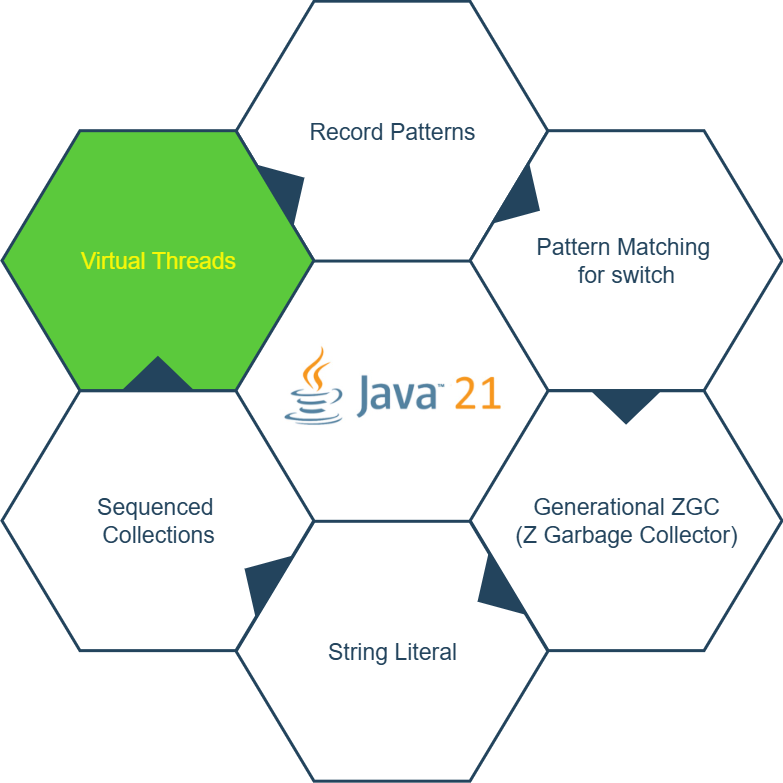
Probably, the most important feature in Java 21 is Virtual Threads.
In Java 21, the basic concurrency model of Java remains unchanged, and the Stream API is still the preferred way to process large data sets in parallel.
With the introduction of Virtual Threads, the Concurrent API now delivers better performance. In today’s world of microservices and scalable server applications, the number of threads must grow to meet demand. The main goal of Virtual Threads is to enable high scalability for server applications, while still using the simple thread-per-request model.
Virtual Threads
Before Java 21, the JDK’s thread implementation used thin wrappers around operating system (OS) threads. However, OS threads are expensive:
- If each request consumes an OS thread for its entire duration, the number of threads quickly becomes a scalability bottleneck.
- Even when thread pools are used, throughput is still limited because the actual number of threads is capped.
The aim of Virtual Threads is to break the 1:1 relationship between Java threads and OS threads.
A virtual thread applies a concept similar to virtual memory. Just like virtual memory maps a large address space to a smaller physical memory, Virtual Threads allow the runtime to create the illusion of having many threads by mapping them to a small number of OS threads.
Platform threads (traditional threads) are thin wrappers around OS threads.
Virtual Threads, on the other hand, are not tied to any specific OS thread. A virtual thread can execute any code that a platform thread can run. This is a major advantage—existing Java code can often run on virtual threads with little or no modification. Virtual threads are hosted by platform threads ("carriers"), which are still scheduled by the OS.
For example, you can create an executor with virtual threads like this:
ExecutorService executor = Executors.newVirtualThreadPerTaskExecutor();Example With Comparison
Virtual threads only consume OS threads while actively performing CPU-bound tasks. A virtual thread can be mounted or unmounted on different carrier threads throughout its lifecycle.
Typically, a virtual thread will unmount itself when it encounters a blocking operation (such as I/O or a database call). Once that blocking task is complete, the virtual thread resumes execution by being mounted on any available carrier thread. This mounting and unmounting process occurs frequently and transparently—without blocking OS threads.
Example — Source Code
Example01CachedThreadPool.java
In this example, an executor is created using a Cached Thread Pool:
var executor = Executors.newCachedThreadPool()package threads;
import java.time.Duration;
import java.util.concurrent.Executors;
import java.util.stream.IntStream;
/**
*
* @author Milan Karajovic <[email protected]>
*
*/
public class Example01CachedThreadPool {
public void executeTasks(final int NUMBER_OF_TASKS) {
final int BLOCKING_CALL = 1;
System.out.println("Number of tasks which executed using 'newCachedThreadPool()' " + NUMBER_OF_TASKS + " tasks each.");
long startTime = System.currentTimeMillis();
try (var executor = Executors.newCachedThreadPool()) {
IntStream.range(0, NUMBER_OF_TASKS).forEach(i -> {
executor.submit(() -> {
// simulate a blicking call (e.g. I/O or db operation)
Thread.sleep(Duration.ofSeconds(BLOCKING_CALL));
return i;
});
});
} catch (Exception e) {
throw new RuntimeException(e);
}
long endTime = System.currentTimeMillis();
System.out.println("For executing " + NUMBER_OF_TASKS + " tasks duration is: " + (endTime - startTime) + " ms");
}
}package threads;
import org.junit.jupiter.api.MethodOrderer;
import org.junit.jupiter.api.Order;
import org.junit.jupiter.api.Test;
import org.junit.jupiter.api.TestMethodOrder;
/**
*
* @author Milan Karajovic <[email protected]>
*
*/
@TestMethodOrder(MethodOrderer.OrderAnnotation.class)
public class Example01CachedThreadPoolTest {
@Test
@Order(1)
public void test_1000_tasks() {
Example01CachedThreadPool example01CachedThreadPool = new Example01CachedThreadPool();
example01CachedThreadPool.executeTasks(1000);
}
@Test
@Order(2)
public void test_10_000_tasks() {
Example01CachedThreadPool example01CachedThreadPool = new Example01CachedThreadPool();
example01CachedThreadPool.executeTasks(10_000);
}
@Test
@Order(3)
public void test_100_000_tasks() {
Example01CachedThreadPool example01CachedThreadPool = new Example01CachedThreadPool();
example01CachedThreadPool.executeTasks(100_000);
}
@Test
@Order(4)
public void test_1_000_000_tasks() {
Example01CachedThreadPool example01CachedThreadPool = new Example01CachedThreadPool();
example01CachedThreadPool.executeTasks(1_000_000);
}
}Test results on my PC:
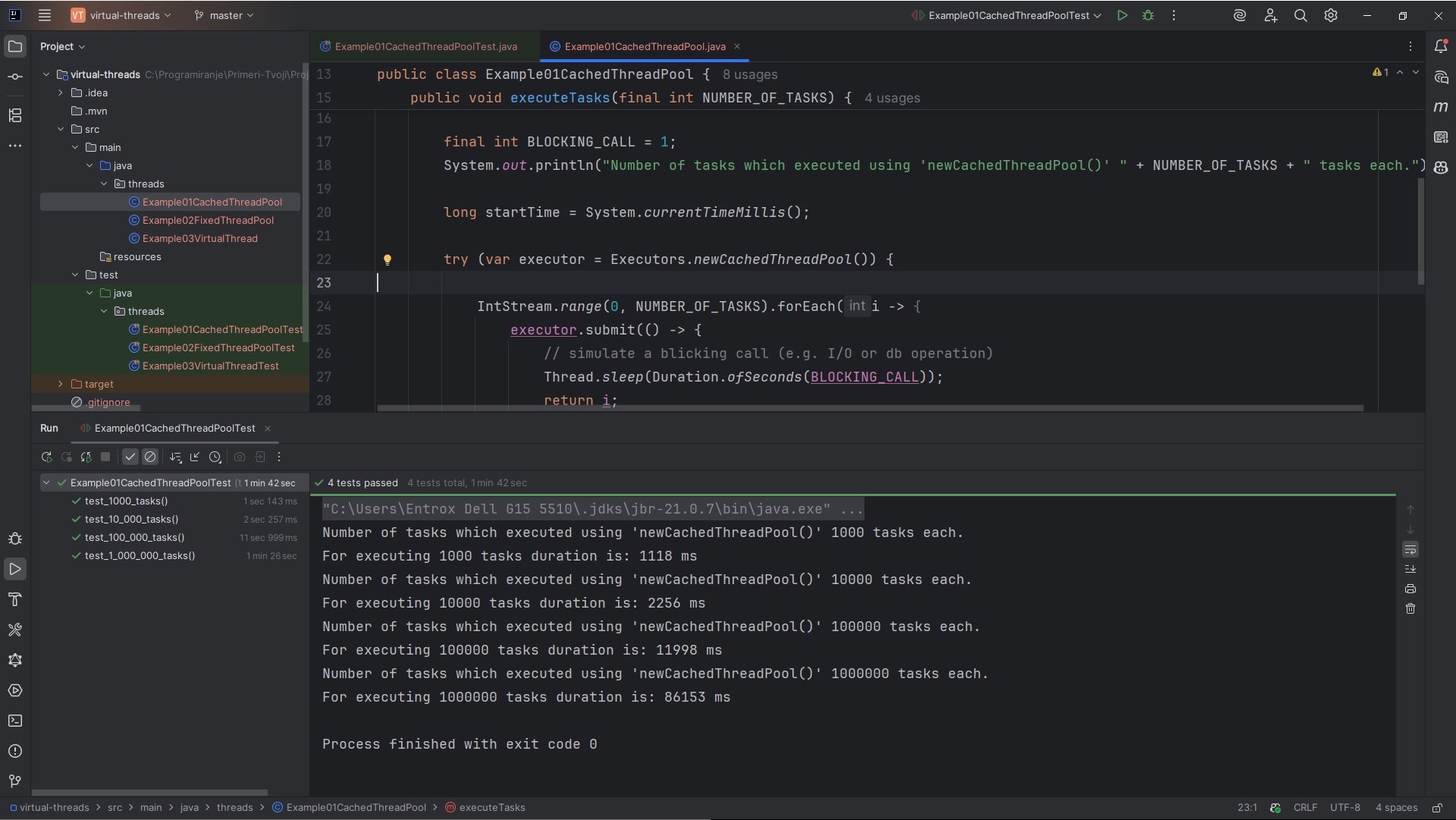
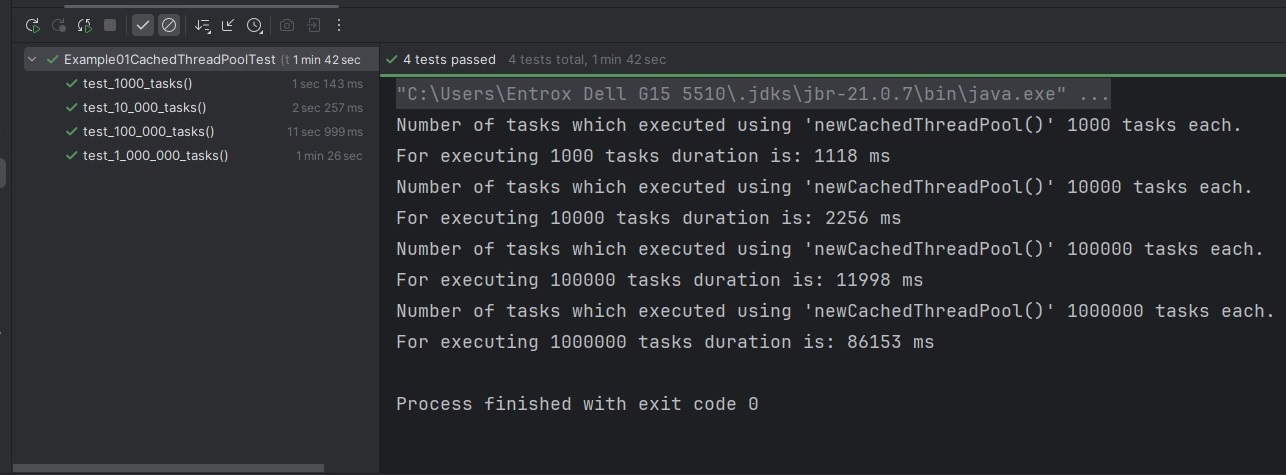
- Example02FixedThreadPool.java
Executor is created using Fixed Thread Pool:
var executor = Executors.newFixedThreadPool(500)package threads;
import java.time.Duration;
import java.util.concurrent.Executors;
import java.util.stream.IntStream;
/**
*
* @author Milan Karajovic <[email protected]>
*
*/
public class Example02FixedThreadPool {
public void executeTasks(final int NUMBER_OF_TASKS) {
final int BLOCKING_CALL = 1;
System.out.println("Number of tasks which executed using 'newFixedThreadPool(500)' " + NUMBER_OF_TASKS + " tasks each.");
long startTime = System.currentTimeMillis();
try (var executor = Executors.newFixedThreadPool(500)) {
IntStream.range(0, NUMBER_OF_TASKS).forEach(i -> {
executor.submit(() -> {
// simulate a blicking call (e.g. I/O or db operation)
Thread.sleep(Duration.ofSeconds(BLOCKING_CALL));
return i;
});
});
} catch (Exception e) {
throw new RuntimeException(e);
}
long endTime = System.currentTimeMillis();
System.out.println("For executing " + NUMBER_OF_TASKS + " tasks duration is: " + (endTime - startTime) + " ms");
}
}package threads;
import org.junit.jupiter.api.MethodOrderer;
import org.junit.jupiter.api.Order;
import org.junit.jupiter.api.Test;
import org.junit.jupiter.api.TestMethodOrder;
/**
*
* @author Milan Karajovic <[email protected]>
*
*/
@TestMethodOrder(MethodOrderer.OrderAnnotation.class)
public class Example02FixedThreadPoolTest {
@Test
@Order(1)
public void test_1000_tasks() {
Example02FixedThreadPool example02FixedThreadPool = new Example02FixedThreadPool();
example02FixedThreadPool.executeTasks(1000);
}
@Test
@Order(2)
public void test_10_000_tasks() {
Example02FixedThreadPool example02FixedThreadPool = new Example02FixedThreadPool();
example02FixedThreadPool.executeTasks(10_000);
}
@Test
@Order(3)
public void test_100_000_tasks() {
Example02FixedThreadPool example02FixedThreadPool = new Example02FixedThreadPool();
example02FixedThreadPool.executeTasks(100_000);
}
@Test
@Order(4)
public void test_1_000_000_tasks() {
Example02FixedThreadPool example02FixedThreadPool = new Example02FixedThreadPool();
example02FixedThreadPool.executeTasks(1_000_000);
}
}Test results on my PC:
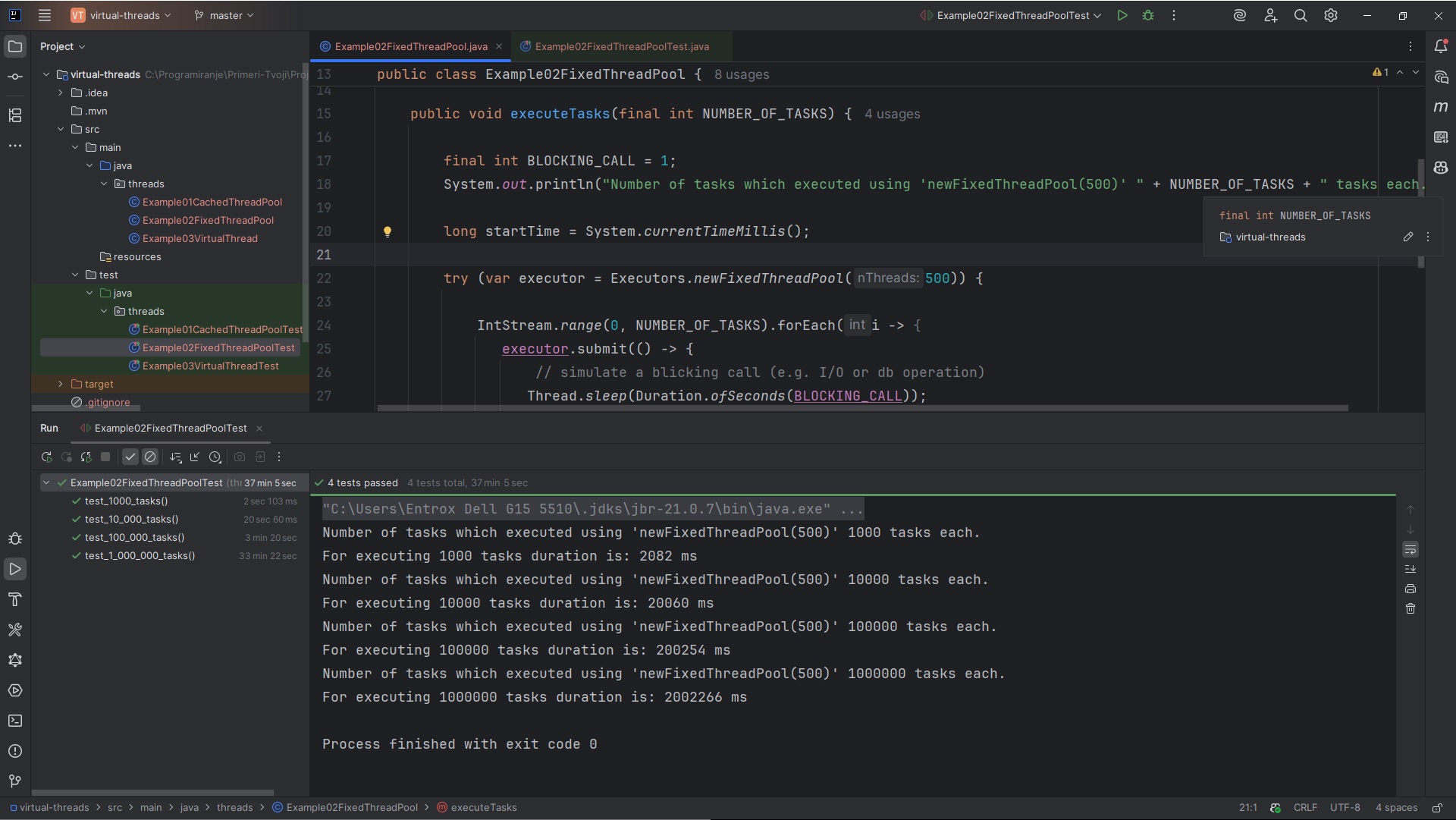

- Example03VirtualThread.java
Executor is created using Virtual Thread Per Task Executor:
var executor = Executors.newVirtualThreadPerTaskExecutor()package threads;
import java.time.Duration;
import java.util.concurrent.ExecutorService;
import java.util.concurrent.Executors;
import java.util.stream.IntStream;
/**
*
* @author Milan Karajovic <[email protected]>
*
*/
public class Example03VirtualThread {
public void executeTasks(final int NUMBER_OF_TASKS) {
final int BLOCKING_CALL = 1;
System.out.println("Number of tasks which executed using 'newVirtualThreadPerTaskExecutor()' " + NUMBER_OF_TASKS + " tasks each.");
long startTime = System.currentTimeMillis();
try (ExecutorService executor = Executors.newVirtualThreadPerTaskExecutor()) {
IntStream.range(0, NUMBER_OF_TASKS).forEach(i -> {
executor.submit(() -> {
// simulate a blicking call (e.g. I/O or db operation)
Thread.sleep(Duration.ofSeconds(BLOCKING_CALL));
return i;
});
});
} catch (Exception e) {
throw new RuntimeException(e);
}
long endTime = System.currentTimeMillis();
System.out.println("For executing " + NUMBER_OF_TASKS + " tasks duration is: " + (endTime - startTime) + " ms");
}
}package threads;
import org.junit.jupiter.api.MethodOrderer;
import org.junit.jupiter.api.Order;
import org.junit.jupiter.api.Test;
import org.junit.jupiter.api.TestMethodOrder;
/**
*
* @author Milan Karajovic <[email protected]>
*
*/
@TestMethodOrder(MethodOrderer.OrderAnnotation.class)
public class Example03VirtualThreadTest {
@Test
@Order(1)
public void test_1000_tasks() {
Example03VirtualThread example03VirtualThread = new Example03VirtualThread();
example03VirtualThread.executeTasks(1000);
}
@Test
@Order(2)
public void test_10_000_tasks() {
Example03VirtualThread example03VirtualThread = new Example03VirtualThread();
example03VirtualThread.executeTasks(10_000);
}
@Test
@Order(3)
public void test_100_000_tasks() {
Example03VirtualThread example03VirtualThread = new Example03VirtualThread();
example03VirtualThread.executeTasks(100_000);
}
@Test
@Order(4)
public void test_1_000_000_tasks() {
Example03VirtualThread example03VirtualThread = new Example03VirtualThread();
example03VirtualThread.executeTasks(1_000_000);
}
@Test
@Order(5)
public void test_2_000_000_tasks() {
Example03VirtualThread example03VirtualThread = new Example03VirtualThread();
example03VirtualThread.executeTasks(2_000_000);
}
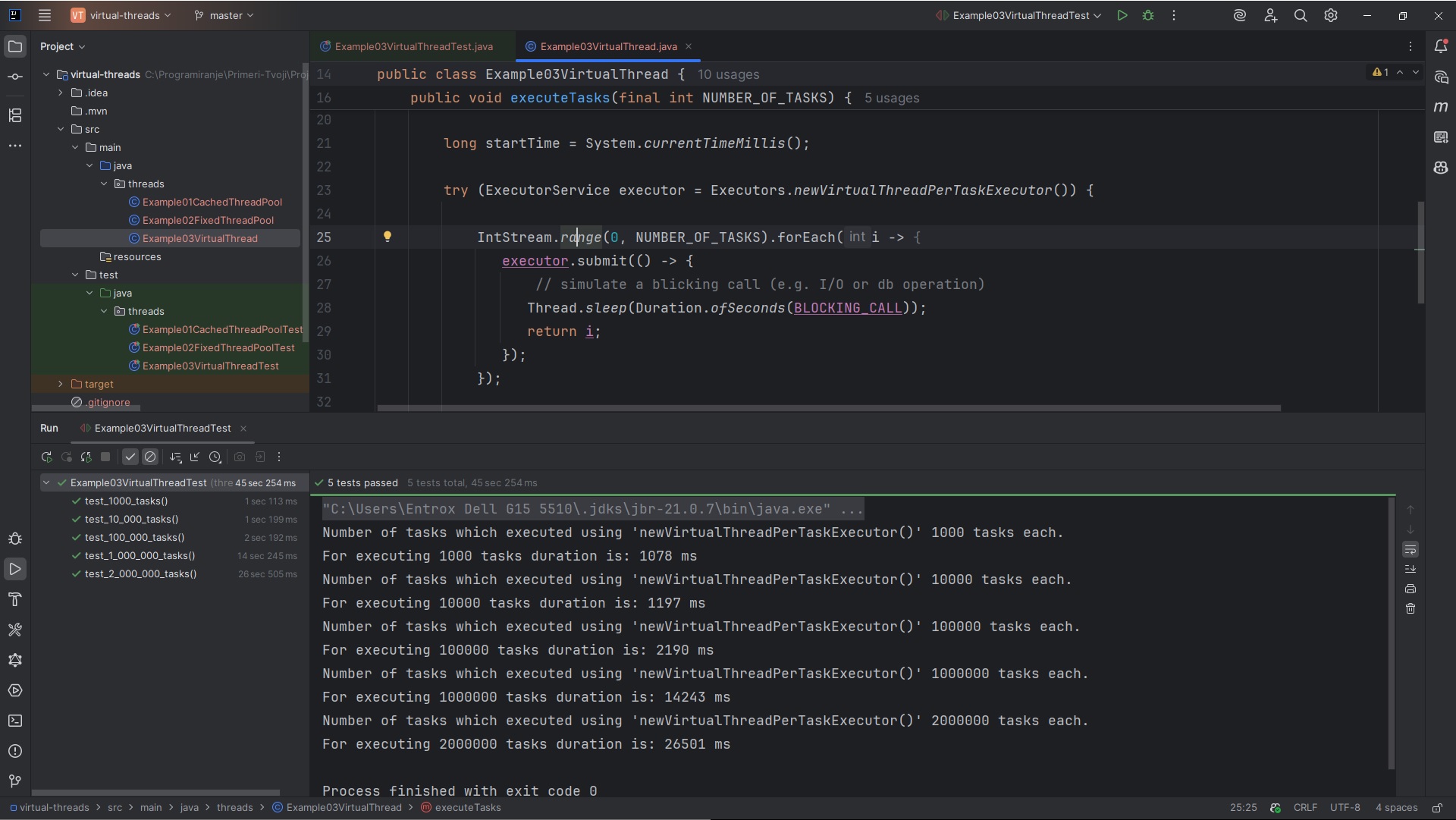
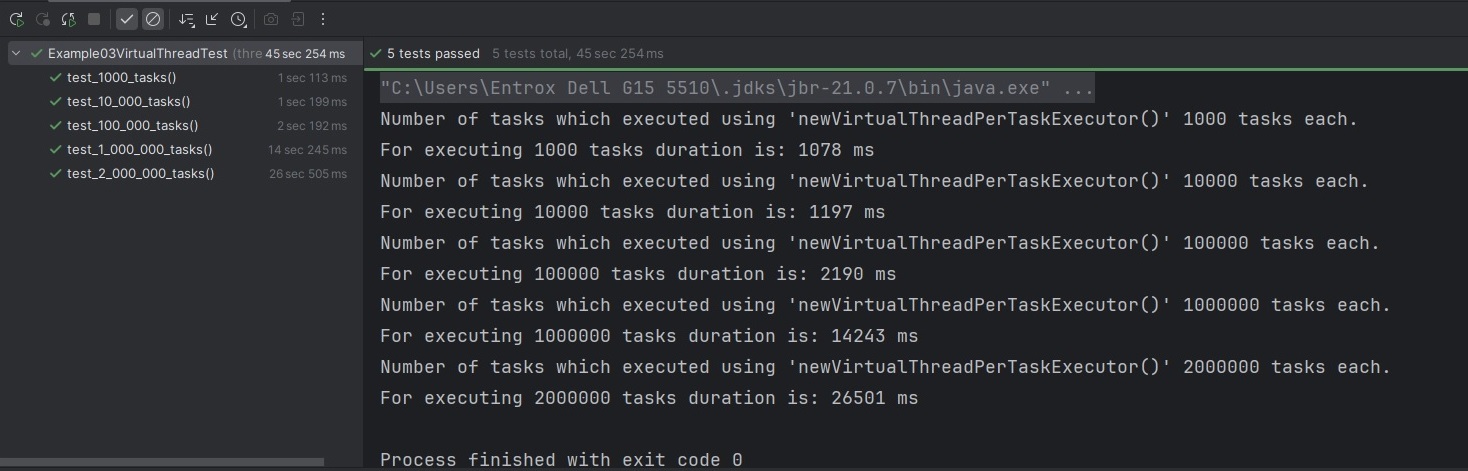
}Test results on my PC:
Conclusion
You can clearly see the difference in execution time (in milliseconds) between the various executor implementations used to process all NUMBER_OF_TASKS. It's worth experimenting with different values for NUMBER_OF_TASKS to observe how performance varies.
The advantage of virtual threads becomes especially noticeable with large task counts. When NUMBER_OF_TASKS is set to a high number—such as 1,000,000—the performance gap is significant. Virtual threads are much more efficient at handling a large volume of tasks, as demonstrated in the table below:

I'm confident that after this clarification, if your application processes a large number of tasks using the concurrent API, you'll strongly consider moving to Java 21 and taking advantage of virtual threads. In many cases, this shift can significantly improve the performance and scalability of your application.
Source code: GitHub Repository – Comparing Threads in Java 21
Published at DZone with permission of Milan Karajovic. See the original article here.
Opinions expressed by DZone contributors are their own.
Comments