

JMeter + Pepper-Box Plugin for Kafka Performance Testing to Choose or Not to Choose?
Pepper-Box Plugin + JMeter to provide performance testing for Apache Kafka or just create Kafka Producer and Consumer clients on your own in JMeter?
Agenda for This Article
- Several words about Apache Kafka
- How to start Kafka performance testing with JMeter + Pepper-Box plugin?
- Is it possible to write samplers for JMeter on your own to provide Kafka performance testing?
- Pros and cons. When it is necessary to choose between the Pepper-Box plugin and your own Kafka load samplers for JMeter
- Conclusion
Several Words About Apache Kafka
Kafka is an open-source streaming software platform developed by the Apache Software Foundation, written in Scala and Java. And it is not a secret that Apache Kafka is becoming more widespread as a component to be selected for complex programming solutions. Apache Kafka is a distributed data store optimized for ingesting and processing streaming data in real-time. That is why it is a great opportunity to know what approach to choose for performance test design for this system component.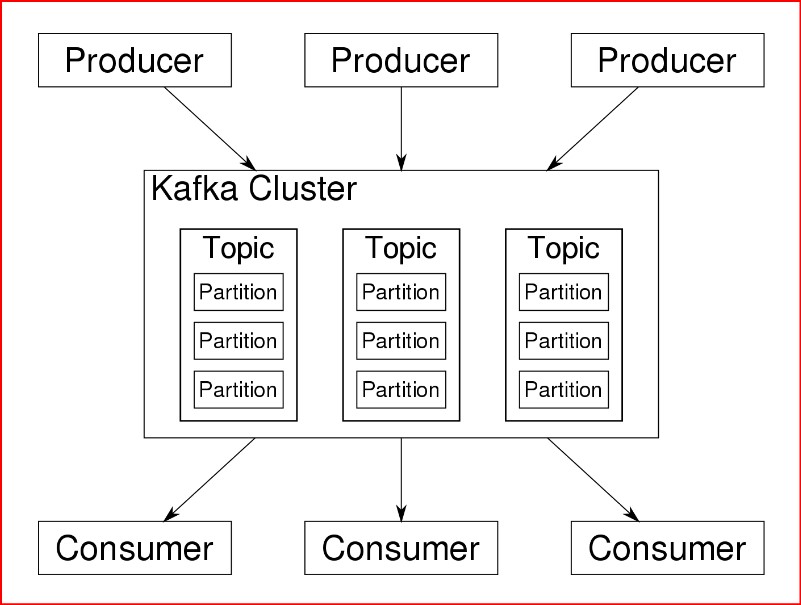
Kafka provides three main functions:
Publish and subscribe to streams of records
Effectively store streams of records in the order in which records were generated
Process streams of records as they occur or retrospectively
Kafka is a distributed system consisting of servers and clients that communicate via TCP network protocol. Usually, Kafka runs on a cluster of one or more servers (called brokers). So-called clients are Producers and Consumers of Events or messages. So, Producers publish messages and send them to Kafka Cluster and Consumers subscribe and listen to particular messages from Kafka.
Each event has a key, value, and timestamp. Events are organized and durably stored in topics. That is why it is necessary to subscribe to a particular topic and listen to it for consumers to receive proper messages. And in its turn Producer have to send messages with a correctly specified topic for proper delivery to the Consumer. Topics in Kafka are always multi-producer and multi-subscriber. Topics are partitioned which means a topic is spread over several "buckets" so topics have partitions distributed across the cluster nodes at Kafka brokers for better scalability. This allows client applications to both read and write the data from/to many brokers at the same time and share the load.
How To Start Kafka Performance Testing With Jmeter + Pepper-Box Plugin?
From the Performance testing perspective, it is possible to mimic high Kafka load with the help of the JMeter tool. And the second usual question whether this plugin is alive or not. Well, it is alive and even has a stable and updated version at GitHub. You just need to set up everything correctly and Pepper-Box Plugin will do terrific work for your performance testing task of Apache Kafka. Pepper-Box plugin will generate load as Kafka Producer and send a huge number of messages.
Setting up the process:
Download master branch of the Pepper-box project from GitHub https://github.com/GSLabDev/pepper-box
Build jar file for this project
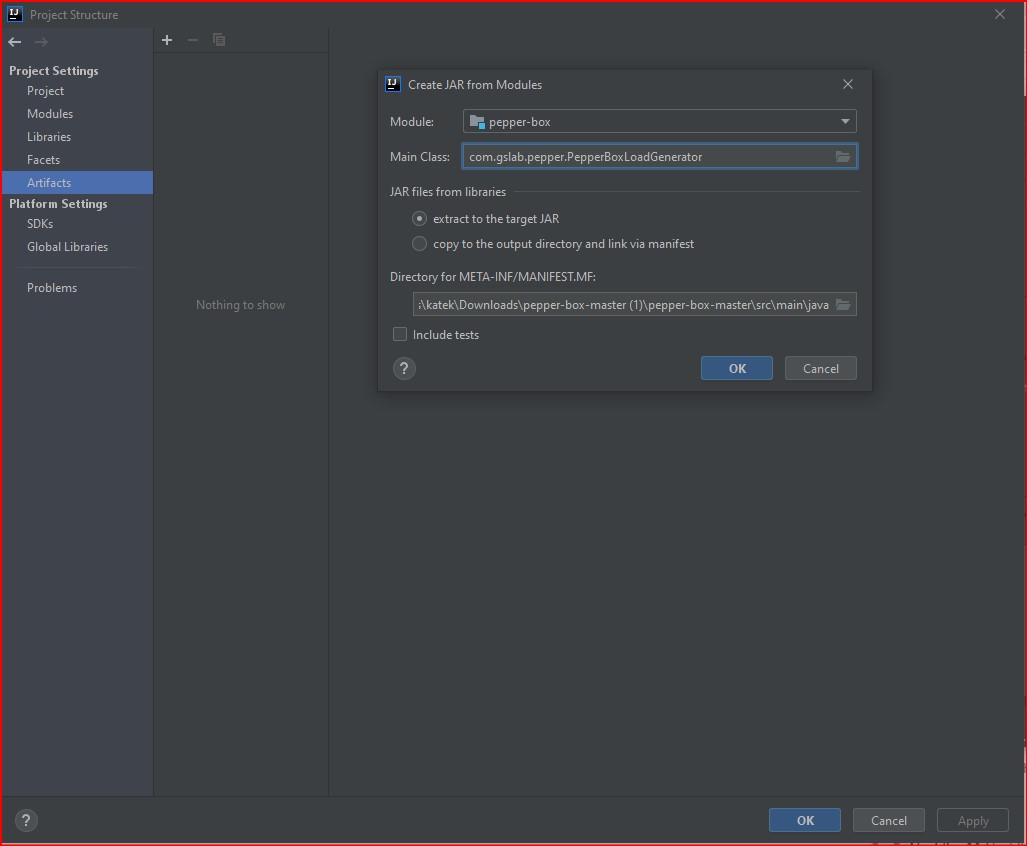
Open at your IDE Project structure -> artifacts tab -> click + icon -> add JAR -> from modules with dependencies -> specify where main method is located -> click apply button and OK button
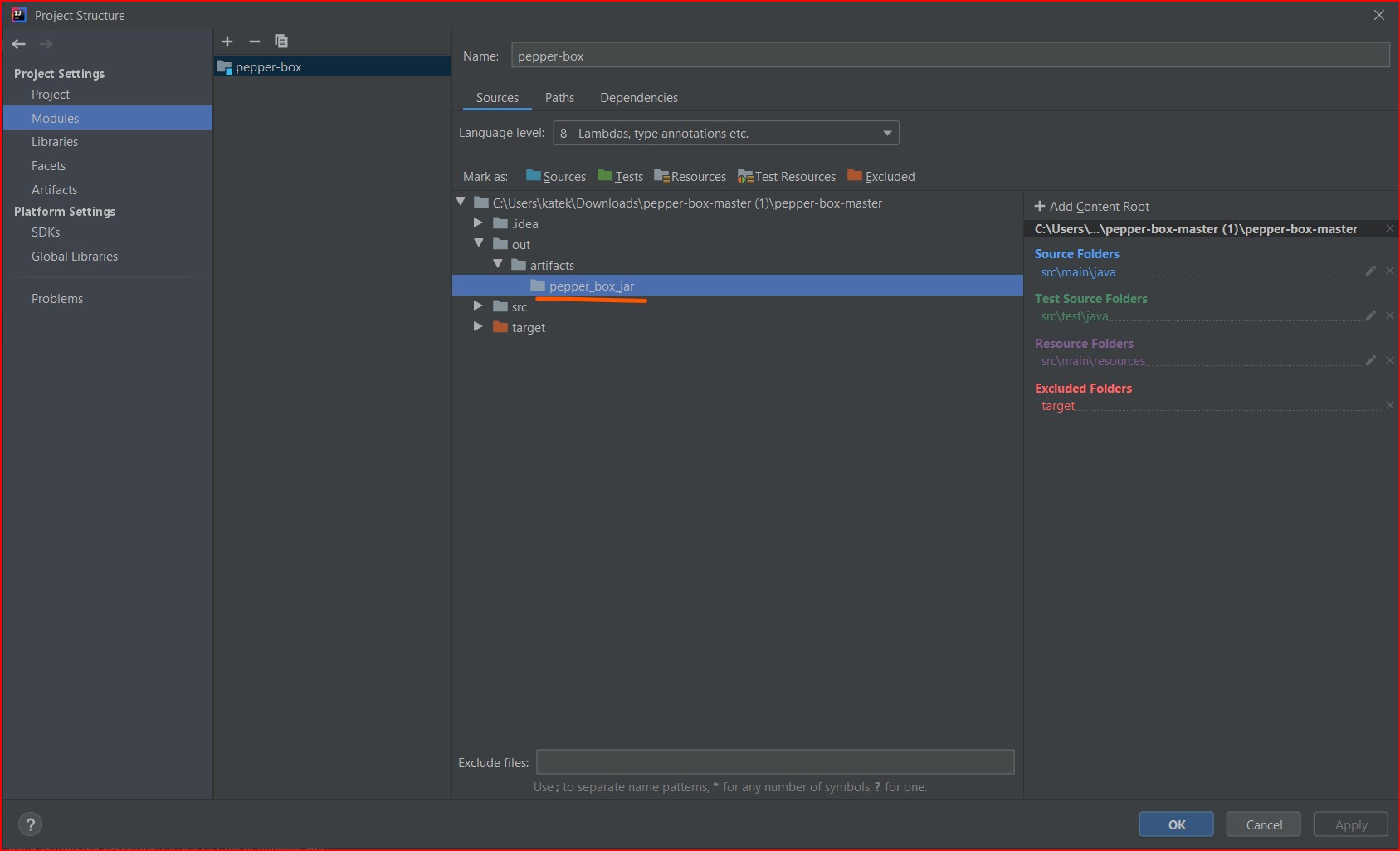
Find out where will be located jar file: open project structure -> Modules-> project location -> out -> artifacts -> pepper_box_jar
Build the project
Navigate to the folder inside your project -> “out”-> “artifacts” and copy the jar file
For more details https://www.jetbrains.com/help/idea/compiling-applications.html#compilation_output_folders
Open root folder for JMeter -> paste the jar to the lib/ext directory and restart JMeter
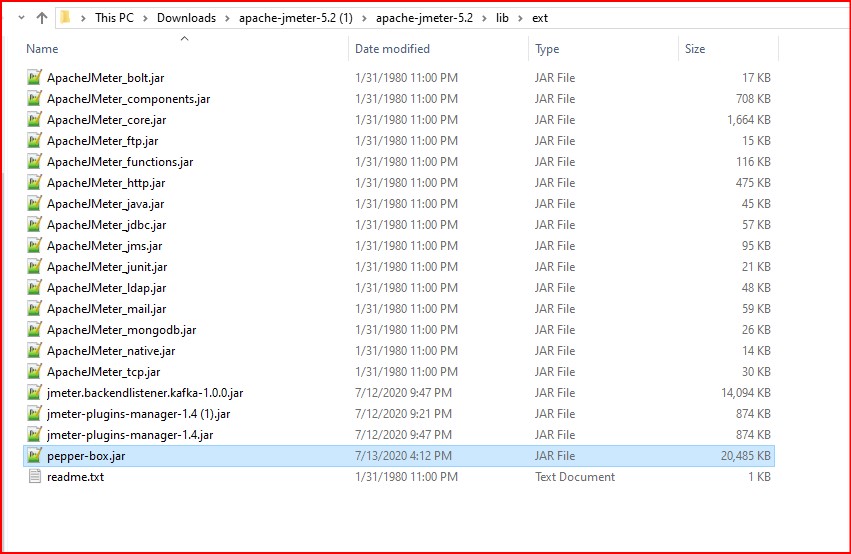
This plugin has 3 elements:
Pepper-Box Plain Text Config for building messages regarding a created template.
Pepper-Box Serialized Config allows building a message that is a serialized java object.
Pepper-Box Kafka Sampler initiates a connection to Kafka and sends messages
Let us look at each of them.
Pepper-Box Plain Text Config
To add this item, go to the Thread group -> Add -> Config Element -> Pepper-Box Plain Text Config
xxxxxxxxxx
{
"messageId":{{SEQUENCE("messageId", 1, 1)}},
"messageBody":"{{RANDOM_ALPHA_NUMERIC("abcedefghijklmnopqrwxyzABCDEFGHIJKLMNOPQRWXYZ", 100)}}",
"messageCategory":"{{RANDOM_STRING("Finance", "Insurance", "Healthcare", "Shares")}}",
"messageStatus":"{{RANDOM_STRING("Accepted","Pending","Processing","Rejected")}}",
"messageTime":{{TIMESTAMP()}}
}
Pepper-Box Plain Text Config will be responsible for the Kafka message schema and messages will be sent accordingly to it.
The first thing you need to specify Message Placeholder key which will be used at Pepper-Box Kafka Sampler during load generation. And the second one is your Schema template which could be in JSON or XML formats.
Author of the Pepper-box plugin developed Schema Template Functions like:
DATE(format), FIRST_NAME() for random first name, LAST_NAME() for random last name, and many other, please observe details at https://github.com/GSLabDev/pepper-box/blob/master/README.md
If you think that it is not enough, you could create your own functions in Java and add them at a Custom Functions Class: com.gslab.pepper.input.CustomFunctions and rebuild the project to create a new jar file. After that add it inside the lib/ext directory as was described before.
Pepper-Box Serialized Config
Java serialized objects can be sent to Kafka using Pepper-Box Serialized Config Element. To add this element, go to Thread group -> Add -> Config Element -> Pepper-Box Serialized Config. 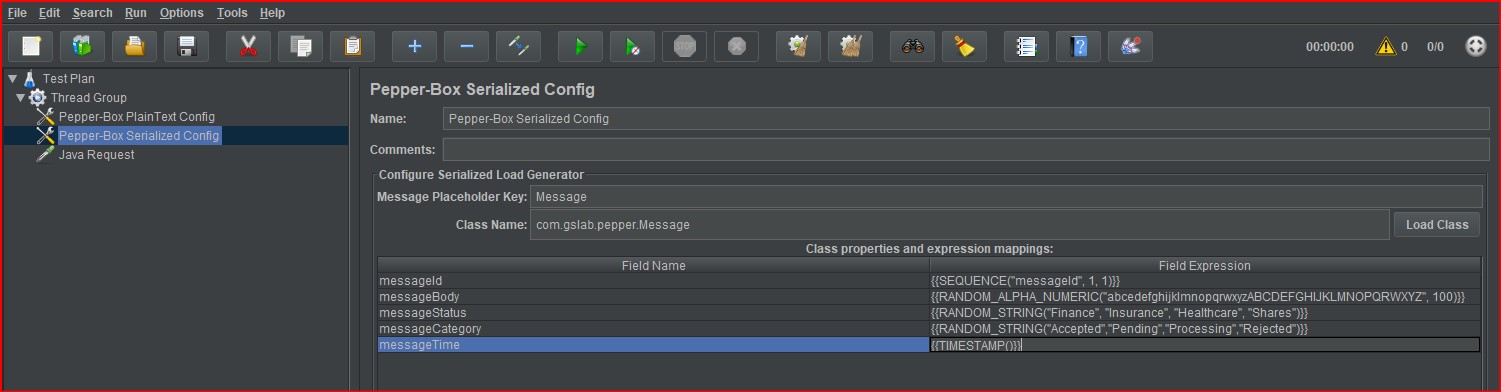
To use this config element, you need:
Add your Message class inside the package com.gslab.pepper of Pepper-box project
Ensure this class should be present inside the compiled jar file
Add the appropriate jar file to the lib/ext directory
Rerun JMeter
Open Serialized Config and specify class names like “com.gslab.pepper.Message”
Click the load button at Serialized Config
Specify the necessary field expressions for field names
Pepper-Box Kafka Sampler
The last but not least component which initiates a connection to send messages to Kafka is Pepper-Box Kafka Sampler.
To add this element, go to Thread group -> Add -> Sampler -> Java Request. Select Class name com.gslab.pepper.sampler.PepperBoxKafkaSampler from the drop-down list.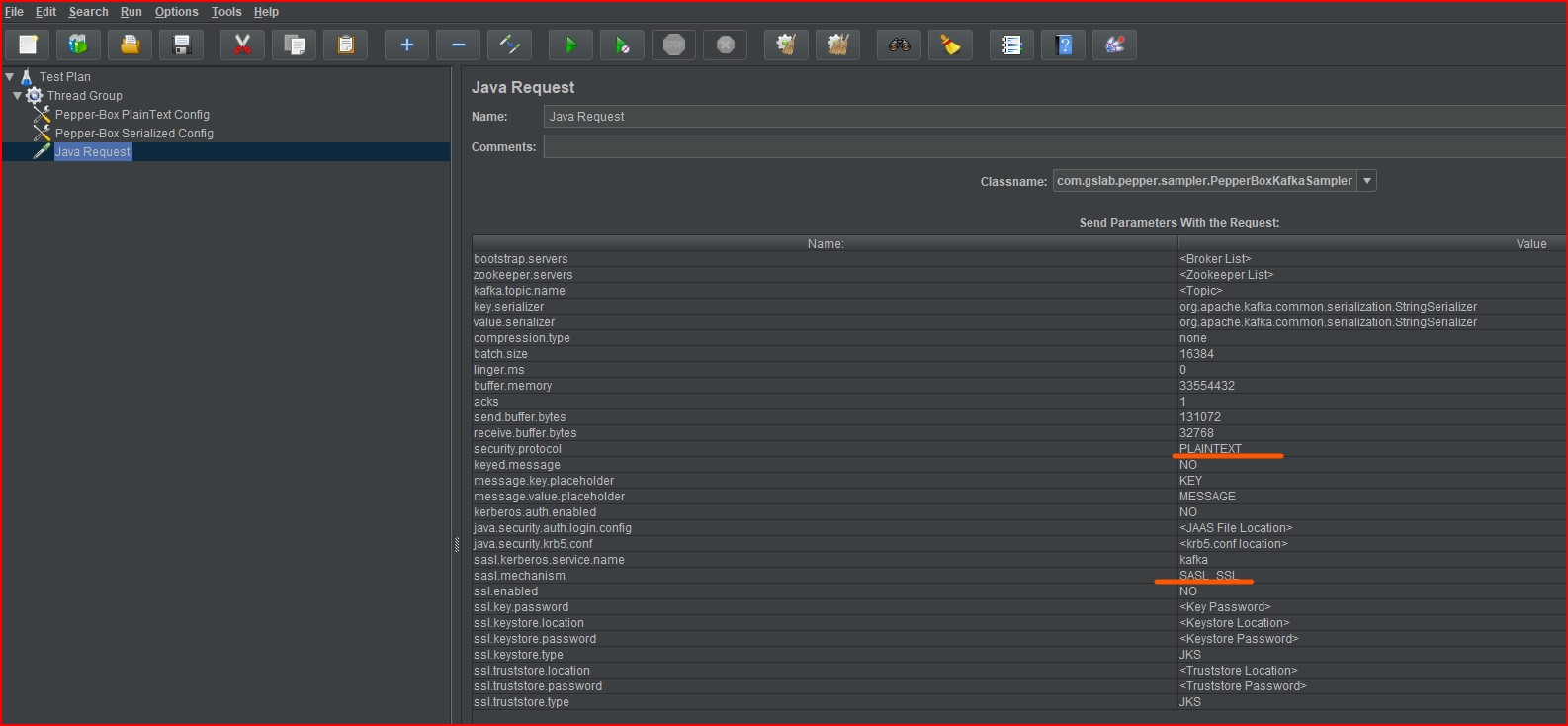
Obligatory parameters which need to be filled:
bootstrap.servers: broker-IP-1:port, broker-IP-2:port, broker-IP-3:port
zookeeper.servers: zookeeper-IP-1:port, zookeeper-IP-2:port, zookeeper-IP-3:port. Note: Anyone of bootstrap or zookeeper server detail is enough. if zookeeper servers are given then bootstrap.servers are retrieved dynamically from zookeeper servers.
kafka.topic.name: Topic on which messages will be sent
key.serializer: Key serializer (This is optional and can be kept as it is as we are not sending keyed messages).
value.serializer: For plaintext config, element value can be kept the same as default but for serialized config element, value serializer can be "com.gslab.pepper.input.serialized.ObjectSerializer"
security.protocol: Kafka producer protocol. Valid values are: PLAINTEXT, SSL, SASL_PLAINTEXT, SASL_SSL.
message.placeholder.key: Config element message variable name. This name should be the same as the message placeholder key in the serialized/plaintext config element.
sasl.mechanism: Kafka producer SASL (Simple Authentication and Security Layer) Mechanism. Valid values are GSSAPI, PLAIN, etc.
java.security.auth.login.config: jaas.conf of Kafka Kerberos
sasl.kerberos.service.name: Kafka Kerberos service name
All the other items can be left with default values.
If you still need details about the Pepper-Box Kafka Sampler please look at https://github.com/GSLabDev/pepper-box.
Is It Possible To Write Samplers for JMeter by Your Own To Provide Kafka Performance Testing?
For sure it is possible to create Kafka Producer in JSR223 sampler of JMeter moreover, it is not so complicated as you may think. So, let us dive into details and assure it by ourselves.
Kafka Producer Sampler
Setting up the process:
Add Plugins Manager for JMeter – download plugins-manager.jar and put it in the lib/ext directory. Direct link and details here https://JMeter -plugins.org/wiki/PluginInstall/
Restart JMeter
From Plugin Manager “Available plugins” choose “Kafka backend listener” for proper import of Kafka classes
Apply changes and restart JMeter
Get in touch with the developer and define what endpoint and other necessary connection data you need for the file
kafka-jaas.confand for Producer and Consumer (pay attention to what security protocol and SASL mechanism are used for connection)Specify
kafka-jaas.confin JMeter system properties likeSystem.setProperty("java.security.auth.login.config" ,"C:/Users/kafka-jaas.conf")at JSR223 sampleSpecify Kafka Producer sampler at JSR223 sampler like at the following code block:
xxxxxxxxxx
System.setProperty("java.security.auth.login.config" , "C:/Users/kafka/kafka-jaas.conf");
import org.apache.kafka.clients.producer.KafkaProducer;
import org.apache.kafka.clients.producer.ProducerRecord;
import org.apache.kafka.clients.producer.*;
import java.util.Properties;
Properties properties = new Properties();
properties.put("bootstrap.servers", "${kafka_bootstrap_server}");
properties.put("security.protocol", "GSSAPI");
properties.put("sasl.mechanism", "PLAINTEXT");
properties.put("acks", "1");
properties.put("retries", 1);
properties.put("batch.size", 16384);
properties.put("linger.ms", 0);
properties.put("buffer.memory", 33554432);
properties.put("key.serializer", "org.apache.kafka.common.serialization.StringSerializer");
properties.put("value.serializer", "org.apache.kafka.common.serialization.StringSerializer");
properties.put("compression.type", "none");
properties.put("send.buffer.bytes", 131072);
properties.put("receive.buffer.bytes", 32768);
properties.put("sasl.kerberos.service.name", "kafka");
properties.put("ssl.keystore.type", "JKS");
properties.put("ssl.truststore.type", "JKS");
Producer<String, String> producer = new KafkaProducer<>(properties);
producer.send(new ProducerRecord<String, String>("${kafka_topic_producer}", "{\n\t\"messageId\":{{SEQUENCE(\"messageId\", 1, 1)}},\n\t\"messageBody\":\"{{RANDOM_ALPHA_NUMERIC(\"abcedefghijklmnopqrwxyzABCDEFGHIJKLMNOPQRWXYZ\", 100)}}\",\n\t\"messageCategory\":\"{{RANDOM_STRING(\"Finance\", \"Insurance\", \"Healthcare\", \"Shares\")}}\",\n\t\"messageStatus\":\"{{RANDOM_STRING(\"Accepted\",\"Pending\",\"Processing\",\"Rejected\")}}\",\n\t\"messageTime\":{{TIMESTAMP()}}\n}"));
producer.close();
You may probably notice from the previous code that the Properties object contains all the necessary properties for connection. After that Kafka Producer object receives as a parameter all these properties. The next step is to use the producer send method with the Producer Record string and a proper topic. The producer's close method will close the connection.
Double-check that you have changed bootstrap servers, security protocol, and SASL mechanism parameters.
Other details and copy/paste example regarding Kafka Producer you may find at https://kafka.apache.org/20/javadoc/org/apache/kafka/clients/producer/KafkaProducer.html
Kafka Consumer Sampler
Setting up the process:
If you are using the Pepper-box plugin specify
kafka-jaas.confin JMeter system properties like
System.setProperty("java.security.auth.login.config" ,"C:/Users/kafka-jaas.conf")at JSR223 samplePlease be careful and use the same parameters for Kafka Consumer as you have set up for Kafka Producer for correct connection
Specify Kafka Producer sampler at JSR223 sampler like at the following code block:
x
System.setProperty("java.security.auth.login.config" , "C:/Users/kafka/kafka-jaas.conf");
import org.apache.kafka.clients.consumer.ConsumerConfig;
import org.apache.kafka.clients.consumer.KafkaConsumer;
import org.apache.kafka.common.serialization.StringDeserializer;
import org.apache.kafka.common.serialization.StringSerializer;
import org.apache.kafka.clients.consumer.*;
import java.util.Properties;
Properties properties = new Properties();
properties.put("bootstrap.servers", "${kafka_bootstrap_server}");
properties.put("security.protocol", "GSSAPI");
properties.put("sasl.mechanism", "PLAINTEXT");
properties.put("group.id", "${group_id_var}");
properties.put("enable.auto.commit", "true");
properties.put("auto.commit.interval.ms", "1000");
properties.put("session.timeout.ms", "30000");
properties.put("connections.max.idle.ms", "60000");
properties.put("max.poll.interval.ms", "500000");
properties.put("max.poll.records", "100");
properties.put("key.deserializer", "org.apache.kafka.common.serialization.StringDeserializer");
properties.put("value.deserializer", "org.apache.kafka.common.serialization.StringDeserializer");
KafkaConsumer<String, String> consumer = new KafkaConsumer<String, String>(properties);
consumer.subscribe(List.of("${kafka_topic_consumer}"));
System.out.println("Subscribed to topic " + "${kafka_topic_consumer}");
log.info("Subscribed to topic " + "${kafka_topic_consumer}");
while (true) {
ConsumerRecords<String, String> records = consumer.poll(Duration.ofSeconds(1));
System.out.println("Iteration");
for (ConsumerRecord<String, String> record : records) {
System.out.printf("!!! offset = %d, key = %s, value = %s\n",
record.offset(), record.key(), record.value());
log.info("!!! offset = %d, key = %s, value = %s\n" + record.offset() + " " + record.key() + " " + record.value());
consumer.close();
}
}
You may probably notice again that the Properties object contains all the necessary properties for connection. After that Kafka Consumer object receives as a parameter with all these properties. Kafka Consumer has a method subscribe to start listening to a particular topic. To get Consumer records use the poll method specifying how often should be this method performed. After that, you could apply methods offset, key, and value for the record instance.
Other details and copy/paste example regarding Kafka Consumer you may find at https://kafka.apache.org/10/javadoc/index.html?org/apache/kafka/clients/consumer/KafkaConsumer.html
Also please note if you are using several consumers for the same topic, then please add a group.id parameter with unique values for the proper work of consumers at the same time.
Pros and Cons. When It Is Necessary To Choose Between Pepper-Box Plugin and Your Own Kafka Load Samplers for JMeter
Pepper-Box Plugin
Pros
- The plugin is stable, supported by the author
- Possible to create Kafka messages simply and initiate a connection with Kafka
- Possible to send Java Objects to Kafka
- Possible to use built-in functions (random values, timestamps)
Cons
- Necessary to write Kafka Consumer on your own
- If implemented functions are insufficient for you, then it is necessary to write your functions in Java and rebuild the Pepper-box jar file
- Impossible to pass variable inside Plain Text config
- If you need additional parameters for Pepper-Box Kafka Sampler then you will need to update the Pepper-box plugin on your own or ask the author of the plugin for updates.
Kafka Load Sampler on JSR223 Sampler Basis
Pros
Possible to create Kafka messages of any complexity
Possible to configure any Kafka connection parameter with a line of code
Possible to pass variable inside sampler
Possible to use any function written by you in any JMeter samplers
If you understand how to write Kafka Consumer, then it will not be a big deal with Kafka Producer
Cons
Necessary to write Consumer and Producer by your own
Conclusion
To sum up the pros and cons above I will tell that if you expect to have simple Kafka messages which will not interact with other variables in your scenario or with each other, then continue test design with the Pepper-Box plugin. However, if you anticipate complex logic for Kafka messages in your scenarios, passing some variables or counter values into messages then it will be more flexible and efficient to use the JSR223 sampler and write Kafka Producer on your own.
Good luck folks with your Kafka tasks!
Opinions expressed by DZone contributors are their own.