
DZone
Thanks for visiting DZone today,
Edit Profile
  • Manage Email Subscriptions
  • How to Post to DZone
  • Article Submission Guidelines
Sign Out View Profile
  • Post an Article
  • Manage My Drafts
Newsletter
Log In / Join
Refcards Trend Reports
Events Video Library
Refcards
Trend Reports

Events

View Events Video Library

Related

  • Setting Up a Local Development Environment With IntelliJ, DevContainers, and Amazon Linux 2023
  • IntelliJ and Java Spring Microservices: Productivity Tips With GitHub Copilot
  • Using Unblocked to Fix a Service That Nobody Owns
  • How To Approach Dependency Management in Java [Video]

Trending

  • Designing the Runtime Layer for Stateful AI Agents: Where Agent Substrate Fits
  • PWA on iOS, Part 3: Chrome on iPhone Is WebKit Too. How One Engine Sets the Rules for PWAs on iOS
  • From Issue to Reviewable Patch: Build a Sandboxed Coding Agent With Deep Agents and Automated Tests
  • Java 27 Makes G1 the Default Everywhere: How to Test Your Small Containers Before You Upgrade

Draft This article hasn't been published, so readers can't see it.

In moderation This article is waiting for review, so readers can't see it yet.

Deleted This article has been deleted, so readers can't see it.

  1. DZone
  2. Coding
  3. Tools
  4. Killing IntelliJ Launched Processes

Killing IntelliJ Launched Processes

By 
Jay Fields
·
Jun. 07, 12 · Interview
Post on X (opens in a new tab) Share on LinkedIn (opens in a new tab)
16.7K Views

Join the DZone community Save articles, join the discussion, and download Refcards and Trend Reports with a free account.

Join for free Already a member? Log in
I often use IntelliJ to run applications, and on occasion things go wrong. For example, a thread that wont terminate can cause a running application to become unstoppable via the IntelliJ UI. Usually when this happens I end up running ps aux | grep java and following up with a kill -9 for each process that looks like it might be the one I'm looking for. On good days there's only a few processes; however, things are more complicated when I have several to look through.

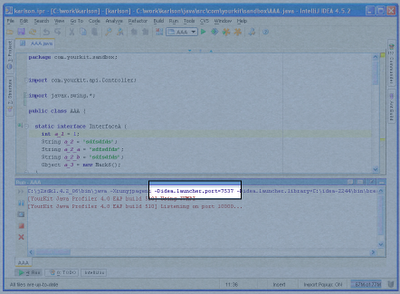
Last week I noticed that the command used to launch the process printed in the Console window, and, more importantly, the idea.launcher.port is part of that command: e.g. idea.launcher.port=7538. Assuming the port is unique, or even almost unique it's much easier to ps aux | grep for than java.
intellij

Published at DZone with permission of Jay Fields. See the original article here.

Opinions expressed by DZone contributors are their own.

Related

  • Setting Up a Local Development Environment With IntelliJ, DevContainers, and Amazon Linux 2023
  • IntelliJ and Java Spring Microservices: Productivity Tips With GitHub Copilot
  • Using Unblocked to Fix a Service That Nobody Owns
  • How To Approach Dependency Management in Java [Video]

Partner Resources

×

Comments

Loading comments

The comments didn't load

Please try again in a moment.

Likes

Loading

The next likes didn't load. Please try again.

The likes didn't load

Please try again in a moment.

See who liked this

Log in or join DZone for free to see who liked this article.

Log in Join for free
  • RSS
  • X
  • Facebook

ABOUT US

  • About DZone
  • Support and feedback
  • Community research

ADVERTISE

  • Advertise with DZone

CONTRIBUTE ON DZONE

  • Article Submission Guidelines
  • Become a Contributor
  • Core Program
  • Visit the Writers' Zone

LEGAL

  • Terms of Service
  • Privacy Policy

CONTACT US

  • 3343 Perimeter Hill Drive
  • Suite 215
  • Nashville, TN 37211
  • [email protected]

Let's be friends:

  • RSS
  • X
  • Facebook