

KMeans Silhouette Score Explained With Python Example
In this post, you will learn about the concepts of KMeans Silhouette Score in relation to assessing the quality of K-Means clusters fit on the data.
Join the DZone community and get the full member experience.
Join For FreeIn this post, you will learn about the concepts of KMeans Silhouette Score concerning assessing the quality of K-Means clusters fit on the data. As a data scientist, it is of utmost importance to understand the concepts of the Silhouette score as it would help in evaluating the quality of clustering done using the K-Means algorithm. In this post, the following topics will be covered:
- Introduction to Silhouette Score concepts
- Silhouette score explained using Python example
You may want to check some of the following posts in relation to clustering:
Introduction to Silhouette Score Concepts
Silhouette score is used to evaluate the quality of clusters created using clustering algorithms such as K-Means in terms of how well samples are clustered with other samples that are similar to each other. The Silhouette score is calculated for each sample of different clusters. To calculate the Silhouette score for each observation/data point, the following distances need to be found out for each observations belonging to all the clusters:
- Mean distance between the observation and all other data points in the same cluster. This distance can also be called a mean intra-cluster distance. The mean distance is denoted by a
- Mean distance between the observation and all other data points of the next nearest cluster. This distance can also be called a mean nearest-cluster distance. The mean distance is denoted by b
Silhouette score, S, for each sample is calculated using the following formula:
\(S = \frac{(b - a)}{max(a, b)}\)
The value of the Silhouette score varies from -1 to 1. If the score is 1, the cluster is dense and well-separated than other clusters. A value near 0 represents overlapping clusters with samples very close to the decision boundary of the neighboring clusters. A negative score [-1, 0] indicates that the samples might have got assigned to the wrong clusters.
Silhouette Score Explained Using Python Example
The Python Sklearn package supports the following different methods for evaluating Silhouette scores.
- silhouette_score (sklearn.metrics) for the data set is used for measuring the mean of the Silhouette Coefficient for each sample belonging to different clusters.
- silhouette_samples (sklearn.metrics) provides the Silhouette scores for each sample of different clusters.
We will learn about the following in relation to Silhouette score:
- Calculate Silhouette score for K-Means clusters with n_clusters = N
- Perform comparative analysis to determine the best value of K using the Silhouette plot
Calculate Silhouette Score for K-Means Clusters With n_clusters = N
Here is the code calculating the silhouette score for the K-means clustering model created with N = 3 (three) clusters using the Sklearn IRIS dataset.
from sklearn import datasets
from sklearn.cluster import KMeans
#
# Load IRIS dataset
#
iris = datasets.load_iris()
X = iris.data
y = iris.target
#
# Instantiate the KMeans models
#
km = KMeans(n_clusters=3, random_state=42)
#
# Fit the KMeans model
#
km.fit_predict(X)
#
# Calculate Silhoutte Score
#
score = silhouette_score(X, km.labels_, metric='euclidean')
#
# Print the score
#
print('Silhouetter Score: %.3f' % score)
Executing the above code predicts the Silhouette score of 0.55.
Perform Comparative Analysis to Determine Best Value of K Using Silhouette Plot
You can find detailed Python code to draw Silhouette plots for a different number of clusters and perform Silhouette analysis appropriately to find the most appropriate cluster. In this section, we will use YellowBrick - a machine learning visualization library to draw the silhouette plots and perform comparative analysis.
Yellowbrick extends the Scikit-Learn API to make a model selection and hyperparameter tuning easier. It provides some very useful wrappers to create the visualization in no time. Here is the code to create a Silhouette plot for K-Means clusters with n_cluster as 2, 3, 4, 5.
from yellowbrick.cluster import SilhouetteVisualizer

fig, ax = plt.subplots(2, 2, figsize=(15,8))
for i in [2, 3, 4, 5]:
    '''
    Create KMeans instance for different number of clusters
    '''
    km = KMeans(n_clusters=i, init='k-means++', n_init=10, max_iter=100, random_state=42)
    q, mod = divmod(i, 2)
    '''
    Create SilhouetteVisualizer instance with KMeans instance
    Fit the visualizer
    '''
    visualizer = SilhouetteVisualizer(km, colors='yellowbrick', ax=ax[q-1][mod])
    visualizer.fit(X)
Executing the above code will result in the following Silhouette plots for 2, 3, 4, and 5 clusters:
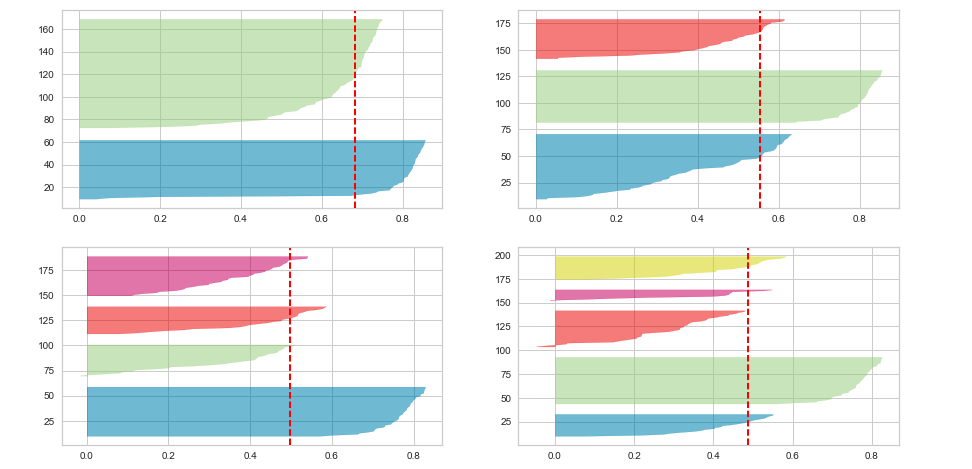
Here is the Silhouette analysis done on the above plots to select an optimal value for n_clusters.
- The value of n_clusters as 4 and 5 looks to be suboptimal for the given data due to the following reasons:
- Presence of clusters with below-average silhouette scores
- Wide fluctuations in the size of the silhouette plots.
- The value of 2 and 3 for n_clusters looks to be the optimal one. The silhouette score for each cluster is above average silhouette scores. Also, the fluctuation in size is similar. The thickness of the silhouette plot representing each cluster also is a deciding point. For the plot with n_cluster 3 (top right), the thickness is more uniform than the plot with n_cluster as 2 (top left) with one cluster thickness much more than the other. Thus, one can select the optimal number of clusters as 3.
Conclusions
Here is the summary of what you learned in this post in relation to silhouette score concepts:
- Silhouette score for a set of sample data points is used to measure how dense and well-separated the clusters are.
- Silhouette score takes into consideration the intra-cluster distance between the sample and other data points within the same cluster (a) and inter-cluster distance between the sample and the next nearest cluster (b).
- The silhouette score falls within the range [-1, 1].
- The silhouette score of 1 means that the clusters are very dense and nicely separated. The score of 0 means that clusters are overlapping. The score of less than 0 means that data belonging to clusters may be wrong/incorrect.
- The silhouette plots can be used to select the most optimal value of the K (no. of cluster) in K-means clustering.
- The aspects to look out for in Silhouette plots are cluster scores below the average silhouette score, wide fluctuations in the size of the clusters, and also the thickness of the silhouette plot.
Published at DZone with permission of Ajitesh Kumar. See the original article here.
Opinions expressed by DZone contributors are their own.
Comments