

Testing Java and Spring Applications With Kotlin: Low-Risk to Adoption
The low-risk path to Kotlin adoption: write tests for your Java and Spring Boot app in Kotlin with JUnit, MockK, and Kotest. No production changes needed.
Teams considering or committed to adopting Kotlin often plan a migration as a series of rewrites, swapping Java services for Kotlin counterparts one microservice at a time. In practice, that kind of plan tends to stall before it produces any shipped code.
Kotlin's role in the JVM ecosystem is expanding because it doesn't require that kind of commitment. Companies such as Netflix, Adobe, and DoorDash have adopted it incrementally, alongside existing JVM systems, rather than through a full rewrite. The lowest-risk starting point is tests. They give you Kotlin's language benefits, including null-safety, data classes, and expressive lambdas, without touching anything that runs in production.
This guide walks through adding Kotlin to an existing Java + Spring Boot project for test sources only. You'll configure Gradle, write JUnit 5 tests in Kotlin, use MockK for Kotlin-native mocking, and apply Kotest assertions to improve test readability. Your production services don't change, and your team starts experiencing Kotlin in a bounded, no-risk context.
Why Testing Is the Safest Place to Introduce Kotlin
Kotlin test sources are isolated from the production application artifact and don't require Kotlin in the production runtime. They can still affect CI and test infrastructure, but leave production services untouched. That separation from production makes tests the right entry point for a language your team hasn't yet committed to.
Introducing Kotlin in test sources means that your existing Java services remain completely unchanged, with no refactoring, no migration risk, and no regressions in production paths. It also allows your team to experiment with real Kotlin syntax on tests they'd be writing anyway, rather than on contrived examples. Developer buy-in builds faster when engineers are writing tests they actually want to write. Kotlin tests tend to be shorter, more readable, and easier to scan at code review.
Leadership and platform teams are skeptical of language changes for good reasons. The proposal "we want to use Kotlin for tests" carries almost no risk to evaluate, since it doesn't touch production or your deployment infrastructure. It's a clean, bounded experiment, and the pattern has been validated by engineering organizations across the industry.

Adding Kotlin to an Existing Java + Spring Boot Project
You don't need to migrate your entire build to use Kotlin in tests. If you're running a standard Spring Boot + Gradle project, you add the Kotlin JVM plugin, pull in kotlin("stdlib") and io.mockk:mockk at test scope, and IntelliJ IDEA recognizes src/test/kotlin as a source set automatically.
Open the project in IntelliJ IDEA and update your build.gradle.kts, adding the Kotlin JVM plugin in the plugins block and the test-scoped dependencies:
plugins {
java
id("org.springframework.boot") version "4.1.0" // example version, check for latest
id("io.spring.dependency-management") version "1.1.5" // example version, check for latest
// Add the Kotlin JVM plugin alongside your existing Java plugin
kotlin("jvm") version "2.4.10" // example version, check kotlinlang.org for latest stable
}

dependencies {
// Your existing production dependencies remain untouched
implementation("org.springframework.boot:spring-boot-starter-web")

// Existing test dependency
    testImplementation("org.springframework.boot:spring-boot-starter-test")


    // Required for coroutines

    testImplementation("org.jetbrains.kotlinx:kotlinx-coroutines-test:1.11.0")

// Kotlin stdlib (test scope only)
testImplementation(kotlin("stdlib"))

// MockK: Kotlin-native mocking library (check GitHub for latest stable)
testImplementation("io.mockk:mockk:1.14.11")

// SpringMockK: @MockkBean and @SpykBean for Spring context tests (check GitHub for latest stable)
testImplementation("com.ninja-squad:springmockk:5.0.1")

// Kotest assertions, no need for the full test runner (check kotest.io for latest stable)
testImplementation("io.kotest:kotest-assertions-core:6.2.3")
}

tasks.withType<Test> {
useJUnitPlatform()
}
Always check the Kotlin and library documentation for the latest stable releases before pinning versions in a new project.
If you’re using Maven, you need to add the kotlin-maven-plugin:
<properties>
    <kotlin.version>2.4.10</kotlin.version>
</properties>

<dependencies>
    <!-- Existing Spring Boot test dependencies -->
    <dependency>
        <groupId>org.springframework.boot</groupId>
        <artifactId>spring-boot-starter-test</artifactId>
        <scope>test</scope>
    </dependency>

    <!-- Kotlin standard library, test scope -->
    <dependency>
        <groupId>org.jetbrains.kotlin</groupId>
        <artifactId>kotlin-stdlib</artifactId>
        <version>${kotlin.version}</version>
        <scope>test</scope>
    </dependency>

    <!-- MockK -->
    <dependency>
        <groupId>io.mockk</groupId>
        <artifactId>mockk</artifactId>
        <version>1.14.11</version>
        <scope>test</scope>
    </dependency>

    <!-- Kotest assertions -->
    <dependency>
        <groupId>io.kotest</groupId>
        <artifactId>kotest-assertions-core</artifactId>
        <version>6.2.3</version>
        <scope>test</scope>
    </dependency>
</dependencies>

<build>
    <plugins>
        <plugin>
            <groupId>org.jetbrains.kotlin</groupId>
            <artifactId>kotlin-maven-plugin</artifactId>
            <version>${kotlin.version}</version>
            <executions>
                <execution>
                    <id>test-compile</id>
                    <phase>test-compile</phase>
                    <goals>
                        <goal>test-compile</goal>
                    </goals>
                    <configuration>
                        <sourceDirs>
                            <source>src/test/kotlin</source>
                            <source>src/test/java</source>
                        </sourceDirs>
                    </configuration>
                </execution>
            </executions>
        </plugin>

        <plugin>
            <groupId>org.apache.maven.plugins</groupId>
            <artifactId>maven-surefire-plugin</artifactId>
        </plugin>
    </plugins>
</build>
After saving, IntelliJ IDEA displays a notification to reload the Gradle project. Use Shift+Cmd+I on macOS or Ctrl+Shift+O on Windows and Linux to trigger the sync. Once complete, IntelliJ IDEA automatically recognizes src/test/kotlin as a source set, allowing you to use Kotlin alongside the existing Java test infrastructure, like base classes, testcontainer setup, test data factories, etc.
Writing JUnit 6 Tests in Kotlin
Writing JUnit 6 tests in Kotlin removes a lot of the friction of test setup. The language's expressiveness lets you focus on the scenario and expected behavior instead. Consider a Spring service that manages orders. Test code often spends more time constructing test data than testing behavior.
In Java, creating several variations of the same object can require repeatedly calling setters:
Order order = new Order();
order.setId(1L);
order.setCustomerId(42L);
order.setTotal(new BigDecimal("99.99"));
order.setStatus(OrderStatus.PENDING);

Order cancelledOrder = new Order();
cancelledOrder.setId(1L);
cancelledOrder.setCustomerId(42L);
cancelledOrder.setTotal(new BigDecimal("99.99"));
cancelledOrder.setStatus(OrderStatus.CANCELLED);
The setup becomes even more repetitive as a test suite introduces additional scenarios. A test for a large order, for example, would need to repeat the same boilerplate just to change the total.
Kotlin's named and default arguments can already reduce that repetition, but you can go further by creating a small test-data DSL that describes orders in terms of the scenarios your tests care about:
fun orderScenario(block: OrderScenario.() -> Unit): Order =
    OrderScenario().apply(block).build()

class OrderScenario {
    var id: Long = 1L
    var customerId: Long = 42L
    var total: BigDecimal = BigDecimal("99.99")
    var status: OrderStatus = OrderStatus.PENDING

    fun pending() {
        status = OrderStatus.PENDING
    }

    fun confirmed() {
        status = OrderStatus.CONFIRMED
    }

    fun cancelled() {
        status = OrderStatus.CANCELLED
    }

    fun forCustomer(id: Long) {
        customerId = id
    }

    fun withTotal(amount: String) {
        total = BigDecimal(amount)
    }

    fun build() = Order(id, customerId, total, status)
}
Tests can now describe the data they need as scenarios:
val pendingOrder = orderScenario {
    forCustomer(42L)
    withTotal("99.99")
    pending()
}

val cancelledOrder = orderScenario {
    forCustomer(42L)
    cancelled()
}

val largeOrder = orderScenario {
    withTotal("999.99")
    pending()
}
The DSL uses Kotlin's lambdas with receivers to make OrderScenario's properties and functions available directly inside the orderScenario { ... } block. Default values provide sensible test data, while individual tests override only the attributes relevant to their scenario. Most importantly, the production Order class can remain completely unchanged in Java.
This approach becomes particularly useful as a test suite grows. Instead of accumulating specialized factory methods such as cancelledOrder(), largePendingOrder(), or confirmedOrderForCustomer(), the DSL gives tests a small vocabulary for composing those scenarios themselves. The test describes *what state it needs* without repeating the mechanics of constructing the Java object.
A complete JUnit 6 test can then combine the scenario DSL with MockK and Kotest assertions:
import io.kotest.matchers.shouldBe
import io.mockk.every
import io.mockk.mockk
import io.mockk.verify
import org.junit.jupiter.api.Test

internal class OrderServiceTest {
    private val repository = mockk<OrderRepository>()
    private val orderService = OrderService(repository)

    @Test
    fun `returns order when found by id`() {
        val order = orderScenario {
            forCustomer(42L)
            withTotal("99.99")
            pending()
        }

        every { repository.findById(order.id) } returns order

        val result = orderService.getOrder(order.id)

        result shouldBe order

        verify(exactly = 1) {
            repository.findById(order.id)
        }
    }

    @Test
    fun `throws when order is not found`() {
        every { repository.findById(any()) } returns null

        shouldThrow<NoSuchElementException> {
            orderService.getOrder(99L)
        }
    }
}
Backtick-delimited test names (`returns order when found by id`) let you write descriptive test names directly in the function declaration, so the name appears naturally in test runner output. This can also save you from using JUnit's `@Named` annotation when you want a readable test name.
When a Java repository method returns a nullable `Order?`, the Kotlin compiler forces the test code to account for the null case before using the result. That can surface mismatches between the test and the Java API contract at compile time rather than as unexpected `NullPointerException`s during test execution.
A full guide is available in the docs.
MockK for Kotlin-Idiomatic Mocking
Mockito remains a viable choice when adding Kotlin tests to a Java application, but MockK provides an API designed around Kotlin's syntax. Its concise every { ... } returns ... and verify { ... } constructs make mocked interactions easier to read, while allowing Kotlin tests to mock existing Java classes without changing the production code.
This can be particularly useful when testing Java Spring applications that use Reactor. The production application can remain entirely in Java and continue to return Mono or Flux. Kotlin is only introduced in the test suite. MockK handles the mocked dependencies, while Reactor's StepVerifier verifies the resulting publishers.
Consider a Java service that returns an order reactively:
public Mono<Order> findOrder(Long id) {
    return repository.findById(id);
}
The service can be tested from Kotlin without changing its implementation:
import io.kotest.matchers.shouldBe
import io.mockk.every
import io.mockk.mockk
import io.mockk.verify
import org.junit.jupiter.api.Test
import reactor.core.publisher.Mono
import reactor.test.StepVerifier

internal class OrderServiceTest {
    private val repository = mockk<OrderRepository>()
    private val orderService = OrderService(repository)

    @Test
    fun `returns order when found`() {
        val order = Order(
            id = 1L,
            customerId = 42L,
            total = BigDecimal("99.99"),
            status = OrderStatus.CONFIRMED
        )

        every { repository.findById(1L) } returns Mono.just(order)

        val result = orderService.findOrder(1L)

        StepVerifier.create(result)
            .expectNext(order)
            .verifyComplete()

        verify(exactly = 1) {
            repository.findById(1L)
        }
    }
}
The production service and repository can remain in Java. The Kotlin test uses MockK's Kotlin-friendly syntax to define the mock behavior, while StepVerifier checks that the returned Mono emits the expected value and completes successfully.
The same pattern applies to Flux-returning APIs. For example, a test can verify multiple emitted values without manually subscribing to the publisher:
every { repository.findAll() } returns Flux.just(order1, order2)

StepVerifier.create(orderService.findAll())
    .expectNext(order1, order2)
    .verifyComplete()
MockK doesn't replace Reactor's testing tools. Each library handles a different part of the test. MockK provides concise mocking, while StepVerifier provides assertions over Reactor publishers. Kotlin brings those APIs together in a compact test that's focused on the behavior being verified.
In practice, that means you can adopt Kotlin for the test source set, use MockK to mock your existing Java dependencies, and test reactive Java code without introducing Kotlin or coroutines into the production application.
Kotest Assertions for Cleaner Test Intent
You don't need Kotest's full test runner to benefit from its assertion library. The kotest-assertions-core dependency adds infix matchers (shouldBe, shouldNotBe, shouldThrow, shouldContain) that layer on top of your standard JUnit 5 tests.
Compare JUnit's assertion style with Kotest's:
// JUnit 5 assertions
Assertions.assertEquals(OrderStatus.CONFIRMED, result.status)
Assertions.assertNotNull(result.id)

// Kotest matchers (same assertions, different shape)
result.status shouldBe OrderStatus.CONFIRMED
result.id shouldNotBe null
The Kotest versions read in the same order as a sentence describing what you expect. That ordering makes the intent visible without parsing the argument order of assertEquals.
shouldThrow is particularly useful for testing Spring service exception paths:
val exception = shouldThrow<NoSuchElementException> {
    orderService.getOrder(99L)
}
exception.message shouldBe "Order 99 not found"
The matcher returns the thrown exception, so you can chain further assertions on its properties without additional try/catch blocks.
Spring Boot Integration Tests With @MockkBean
For Spring slice tests (@WebMvcTest, @DataJpaTest, or a partial @SpringBootTest), you swap Spring's @MockBean for @MockkBean from the springmockk library. It integrates with Spring's test context the same way @MockBean does, but creates MockK instances:
package com.example.demo.controller

import com.example.demo.model.Order
import com.example.demo.model.OrderStatus
import com.example.demo.service.OrderService
import io.mockk.every
import org.junit.jupiter.api.Test
import org.springframework.beans.factory.annotation.Autowired
import org.springframework.boot.webmvc.test.autoconfigure.WebMvcTest
import org.springframework.test.web.servlet.MockMvc
import org.springframework.test.web.servlet.get
import com.ninjasquad.springmockk.MockkBean
import java.math.BigDecimal
import java.util.NoSuchElementException

@WebMvcTest(OrderController::class)
internal class OrderControllerTest {

    @Autowired
    private lateinit var mockMvc: MockMvc

    @MockkBean
    private lateinit var orderService: OrderService

    @Test
    fun `GET order returns 200 with order data`() {
        val order = Order(
            1L,
            42L,
            BigDecimal("99.99"),
            OrderStatus.CONFIRMED
        )

        every { orderService.getOrder(1L) } returns order

        mockMvc.get("/orders/1")
            .andExpect {
                status { isOk() }
                jsonPath("$.id") { value(1) }
                jsonPath("$.customerId") { value(42) }
                jsonPath("$.total") { value(99.99) }
                jsonPath("$.status") { value("CONFIRMED") }
            }
    }

    @Test
    fun `GET missing order returns 500`() {
        every {
            orderService.getOrder(99L)
        } throws NoSuchElementException("Order 99 not found")

        mockMvc.get("/orders/99")
            .andExpect {
                status { is5xxServerError() }
            }
    }
}
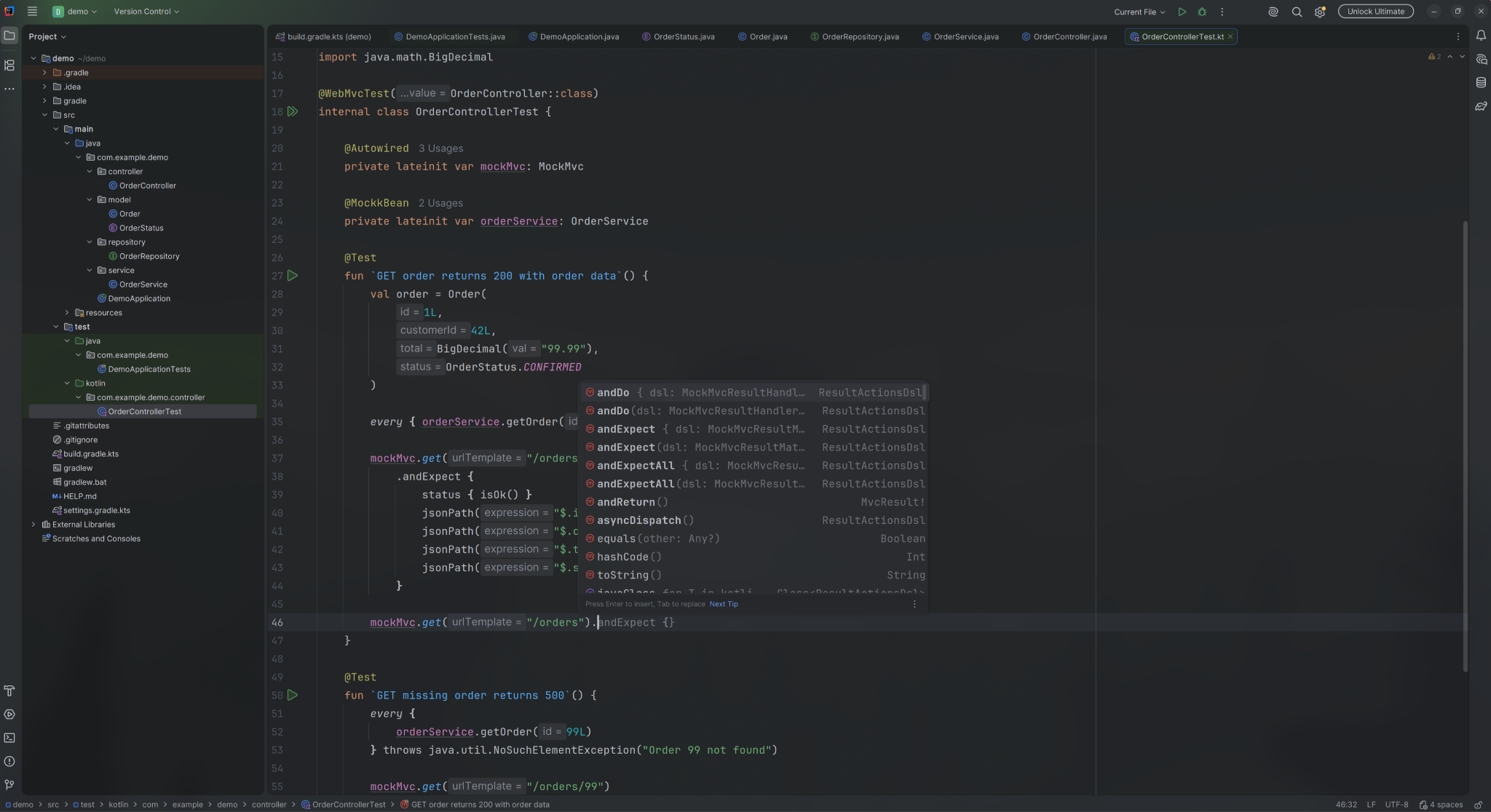
The @MockkBean annotation replaces the service in the Spring context for the duration of the test. IntelliJ IDEA resolves the Kotlin DSL for MockMvc (mockMvc.get(...)) with full autocomplete support, removing the friction of looking up chained method names.
Getting Started With Kotlin in Tests
Introducing Kotlin through test sources, before any production code changes, is a validated incremental strategy. The tooling is mature, the Gradle setup is a handful of lines, and the first Kotlin test can ship the same day you configure the dependency.
Over time, writing Kotlin tests can change how your team thinks about the language. Developers who spend a few months writing Kotlin tests start asking why they can't use data classes in production. They miss null safety in Java service code. Gradual adoption happens organically, driven by genuine preference rather than a top-down mandate.
JetBrains and the Spring team have an official strategic partnership focused on improving the developer experience for backend engineers. If you want to explore what Kotlin can do for your team beyond the test suite, kotlinlang.org is the right place to start.
Comments