

Mastering Azure Kubernetes Service: The Ultimate Guide to Scaling, Security, and Cost Optimization
Learn to optimize AKS with automated scaling, robust security policies, and cost-saving techniques for high-performance cloud clusters.
 CORE
·
CORE
·
Join the DZone community and get the full member experience.
Join For FreeAzure Kubernetes Service (AKS) has evolved from a simple managed orchestrator into a sophisticated platform that serves as the backbone for modern enterprise applications. However, as clusters grow in complexity, the challenge shifts from initial deployment to long-term operational excellence. Managing a production-grade AKS cluster requires a delicate balance between high availability through scaling, rigorous security postures, and aggressive cost management.
In this guide, we will explore the technical nuances of AKS, providing actionable best practices for scaling, security, and financial efficiency.
1. Advanced Scaling Strategies in AKS
Scaling in Kubernetes is not a one-size-fits-all approach. In AKS, scaling occurs at two levels: the Pod level (software) and the Node level (infrastructure). To achieve true elasticity, these two layers must work in harmony.
Horizontal Pod Autoscaler (HPA) and Vertical Pod Autoscaler (VPA)
HPA adjusts the number of pod replicas based on observed CPU utilization or custom metrics. VPA, conversely, adjusts the resource requests and limits of existing pods.
Best Practice: Use HPA for stateless workloads that can scale out easily. Use VPA for stateful or legacy workloads that cannot be easily replicated but require more "headroom" during peak loads. Avoid using HPA and VPA on the same resource for the same metric (e.g., CPU) to prevent scaling loops.
The Cluster Autoscaler (CA)
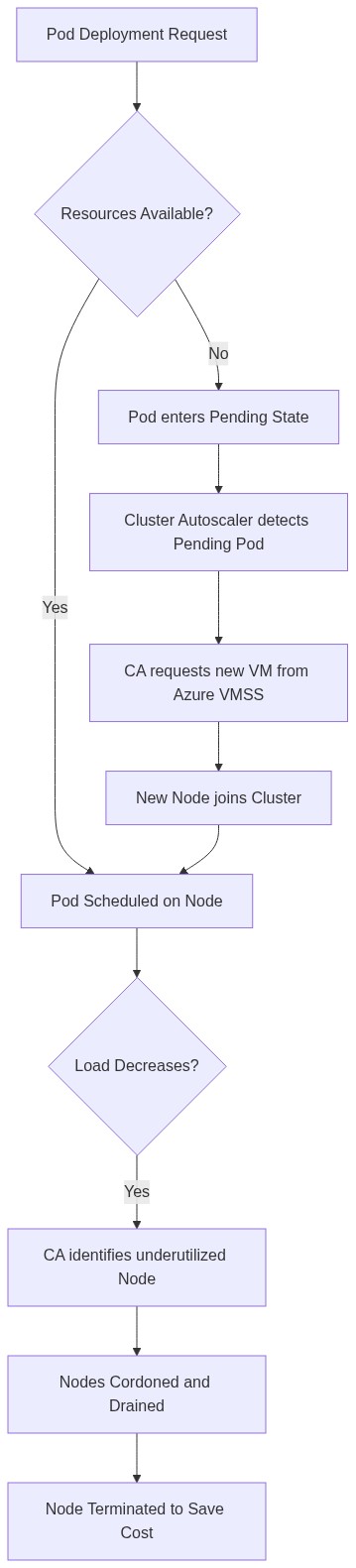
The Cluster Autoscaler monitors for pods that are in a "Pending" state due to insufficient resources. When detected, it triggers the Azure Virtual Machine Scale Sets (VMSS) to provision new nodes.
Event-Driven Scaling with KEDA
For workloads that scale based on external events (like Azure Service Bus messages or RabbitMQ queue depth), the Kubernetes Event-driven Autoscaling (KEDA) add-on is essential. KEDA allows you to scale pods down to zero when there is no traffic, significantly reducing costs.
Example: KEDA Scaler for Azure Service Bus
apiVersion: keda.sh/v1alpha1
kind: ScaledObject
metadata:
  name: service-bus-scaler
  namespace: default
spec:
  scaleTargetRef:
    name: my-deployment
  minReplicaCount: 0
  maxReplicaCount: 100
  triggers:
  - type: azure-servicebus
    metadata:
      queueName: orders-queue
      messageCount: "5"
      connectionFromEnv: SERVICE_BUS_CONNECTION_STRING
2. Security Hardening and Policy Management
Security in AKS is built on a multi-layered defense strategy, encompassing identity, networking, and runtime security.
Azure AD Workload Identity
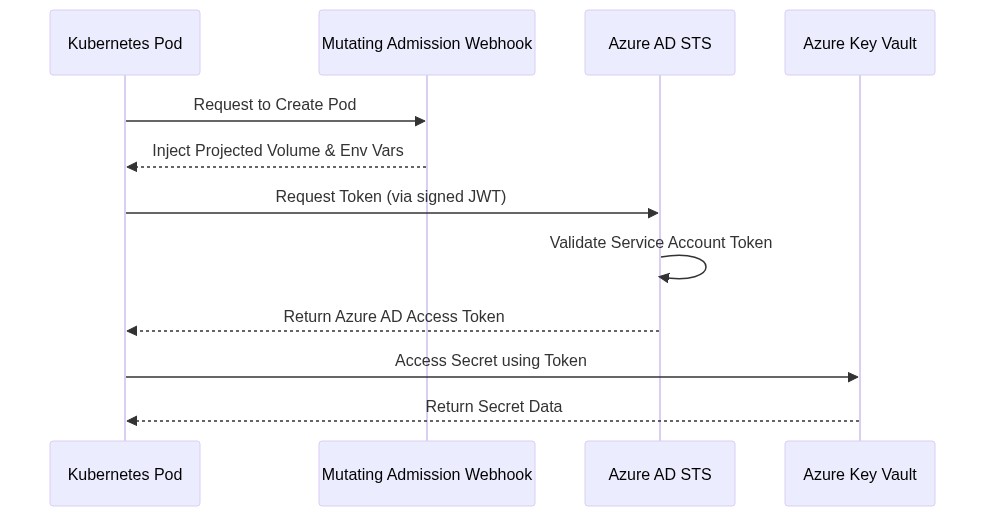
Traditional methods of managing secrets (like storing Azure Service Principal credentials in Kubernetes Secrets) are prone to leakage. Azure AD Workload Identity (the successor to Managed Identity for pods) allows pods to authenticate to Azure services using OIDC federation without needing to manage explicit credentials.
Network Isolation and Policies
By default, all pods in a Kubernetes cluster can communicate with each other. In a production environment, you must implement the Principle of Least Privilege using Network Policies.
| Feature | Azure Network Policy | Calico Network Policy |
|---|---|---|
| Implementation | Azure's native implementation | Open-source standard |
| Performance | High (VNet native) | High (Optimized data plane) |
| Policy Types | Standard Ingress/Egress | Extended (Global, IP sets) |
| Integration | Deeply integrated with Azure CNI | Requires separate installation/plugin |
Sample Network Policy (Deny all except specific traffic):
apiVersion: networking.k8s.io/v1
kind: NetworkPolicy
metadata:
  name: default-deny-all
spec:
  podSelector: {}
  policyTypes:
  - Ingress
  - Egress
---
apiVersion: networking.k8s.io/v1
kind: NetworkPolicy
metadata:
  name: allow-frontend-to-backend
spec:
  podSelector:
    matchLabels:
      app: backend
  ingress:
  - from:
    - podSelector:
        matchLabels:
          app: frontend
    ports:
    - protocol: TCP
      port: 8080
Azure Policy for Kubernetes
Azure Policy extends Gatekeeper (an OPA-based admission controller) to AKS. It allows you to enforce guardrails across your fleet, such as:
- Ensuring all images come from a trusted Azure Container Registry (ACR).
- Disallowing privileged containers.
- Enforcing resource limits on all deployments.
3. Cost Optimization: Doing More with Less
Cloud spending can spiral out of control without governance. AKS offers several native features to prune unnecessary costs.
Spot Node Pools
Azure Spot Instances allow you to utilize unused Azure capacity at a significant discount (up to 90%). These are ideal for fault-tolerant workloads, batch processing, or CI/CD agents.
Warning: Spot nodes can be evicted at any time. Always pair Spot node pools with a stable "System" node pool to ensure the cluster control plane remains functional.
Comparison of Node Pool Strategies
| Strategy | Ideal Use Case | Cost Impact |
|---|---|---|
| Reserved Instances | Steady-state production traffic | 30-50% savings over Pay-As-You-Go |
| Spot Instances | Dev/Test, Batch, Secondary Replicas | Up to 90% savings |
| Savings Plans | Flexible across various compute types | 20-40% savings |
| Right-Sizing (VPA) | Applications with unpredictable load | Reduces waste from overallocation |
Cluster Start and Stop
For development and staging environments that are only used during business hours, you can stop the entire AKS cluster (including the control plane and nodes) to halt billing for compute resources.
# Stop the AKS cluster
az aks stop --name myAKSCluster --resource-group myResourceGroup

# Start the AKS cluster
az aks start --name myAKSCluster --resource-group myResourceGroup
Bin Packing and Image Optimization
Ensure your scheduler is configured to maximize resource density. By using the MostAllocated strategy in the scheduler, Kubernetes will pack pods into as few nodes as possible, allowing the Cluster Autoscaler to decommission empty nodes more frequently. Additionally, using lightweight base images (like Alpine or Distroless) reduces storage costs and speeds up scaling operations by reducing image pull times.
4. Operational Excellence: Monitoring and Observability
Scaling and cost optimization are impossible without high-fidelity data. Managed Prometheus and Managed Grafana in Azure provide a native experience for scraping Kubernetes metrics without the overhead of managing a local Prometheus instance.
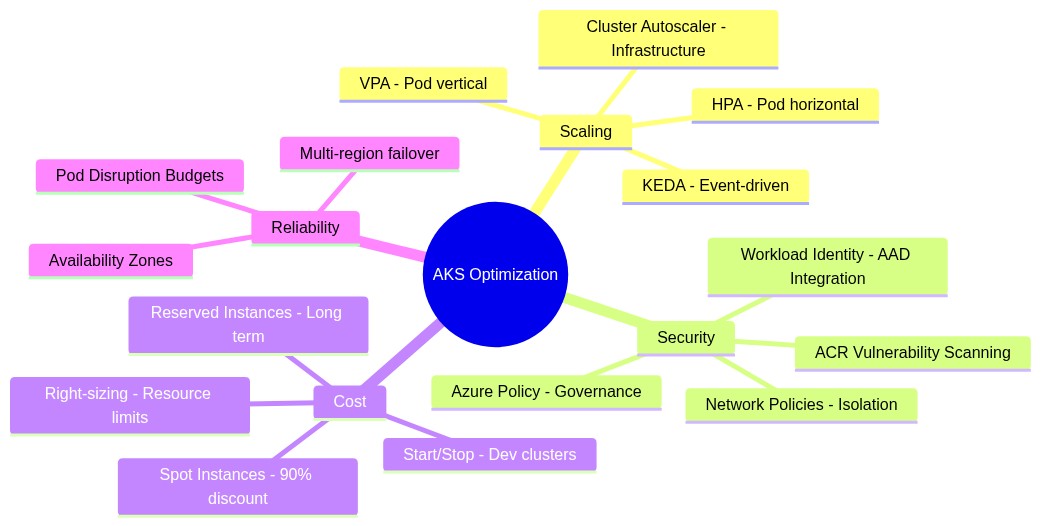
The AKS Best Practices Mindmap
Proactive Maintenance with Advisor
Azure Advisor provides specific recommendations for AKS, such as identifying underutilized node pools or clusters running on deprecated Kubernetes versions. Integrating Advisor alerts into your DevOps workflow ensures that optimization is an ongoing process rather than a one-time event.
5. Summary of Best Practices
- Never Use Default Namespaces for Production: Always isolate workloads using namespaces to apply specific Network Policies and RBAC.
- Define Resource Requests and Limits: Without these, neither VPA nor the Cluster Autoscaler can make informed decisions, leading to cluster instability.
- Use Managed Identities: Avoid Service Principals and secret rotation overhead by using Azure AD Workload Identity.
- Implement Pod Disruption Budgets (PDB): Ensure that during scaling or node upgrades, a minimum number of pods remain available to prevent service outages.
- Enable Container Insights: Use Log Analytics to correlate cluster performance with application logs for faster MTTR (Mean Time To Recovery).
Conclusion
Managing Azure Kubernetes Service at scale requires a mindset shift from "managing servers" to "managing policies and constraints." By automating your scaling logic with KEDA and the Cluster Autoscaler, hardening your perimeter with Workload Identity and Network Policies, and optimizing costs via Spot instances and cluster stop/start features, you can build a resilient, secure, and fiscally responsible cloud-native platform.
The Kubernetes landscape moves fast, but by adhering to these foundational pillars—Scaling, Security, and Cost — you ensure that your infrastructure remains an asset to the business rather than a liability.
Published at DZone with permission of Jubin Soni, FBCS. See the original article here.
Opinions expressed by DZone contributors are their own.
Comments