

Mule 3: Execute PHP Script in Mule ESB
In this article, I will explain how to execute a PHP Script within the Mule Flow. Also, take a look at the code.
Join the DZone community and get the full member experience.
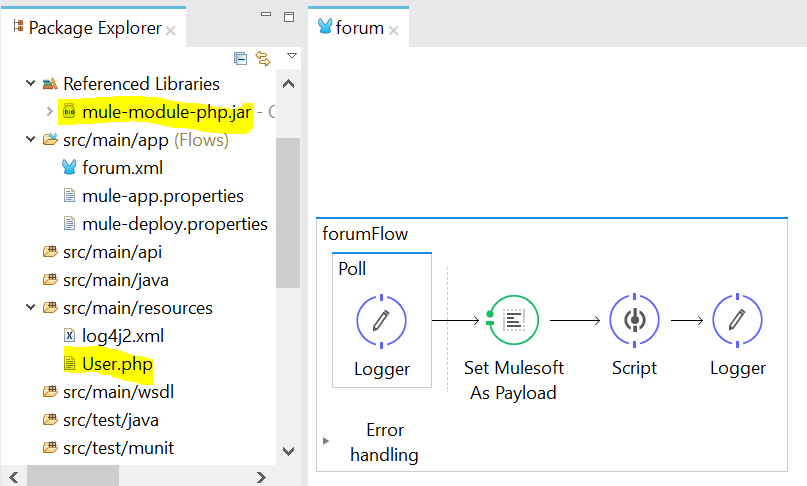
Join For FreeIn this article, I will explain how to execute a PHP Script within the Mule Flow. First, we need to include the mule-module-php.jar file on our project. Mule needs this library to be able to execute the PHP script at runtime. You can download the jar file here: https://github.com/jdeoliveira/mule-module-php/downloads.
<?xml version="1.0" encoding="UTF-8"?>

<mule xmlns:scripting="http://www.mulesoft.org/schema/mule/scripting" xmlns:metadata="http://www.mulesoft.org/schema/mule/metadata" xmlns:dw="http://www.mulesoft.org/schema/mule/ee/dw" xmlns="http://www.mulesoft.org/schema/mule/core" xmlns:doc="http://www.mulesoft.org/schema/mule/documentation"
xmlns:spring="http://www.springframework.org/schema/beans"
xmlns:xsi="http://www.w3.org/2001/XMLSchema-instance"
xsi:schemaLocation="http://www.springframework.org/schema/beans http://www.springframework.org/schema/beans/spring-beans-current.xsd
http://www.mulesoft.org/schema/mule/ee/dw http://www.mulesoft.org/schema/mule/ee/dw/current/dw.xsd
http://www.mulesoft.org/schema/mule/core http://www.mulesoft.org/schema/mule/core/current/mule.xsd
http://www.mulesoft.org/schema/mule/scripting http://www.mulesoft.org/schema/mule/scripting/current/mule-scripting.xsd">


<flow name="forumFlow">
        <poll doc:name="Poll">
            <fixed-frequency-scheduler frequency="5000"/>
            <logger message="Start Of Process" level="INFO" doc:name="Logger"/>
        </poll>
        <set-payload value="Mulesoft" doc:name="Set Mulesoft As Payload"/>

<scripting:component doc:name="Script">
  <scripting:script engine="php">
       <scripting:text><![CDATA[<?php
            require "src/main/resources/User.php";

            $h = new User("Enrico",15);
            $log->info("Hello, " . $h->getName(). "! You are ". $h->isAdult());
            $h = new User("Jose",39);
            $log->info("Hello, " . $h->getName(). "! You are ". $h->isAdult());

            return "Hi From PHP To " . $payload
?>]]></scripting:text>
  </scripting:script>
</scripting:component>
        <logger message="#[payload]" level="INFO" doc:name="Logger"/>
    </flow>
</mule>
The above Mule flow runs every 5 seconds to execute the Script Component that contains our PHP code. Inside that component, it's simply initialize the PHP class User located in /src/main/resources/ and invoke its methods or functions. Also, note that the Script Component engine should be set to php.
<scripting:script engine="php">/src/main/resources/User.php
<?php
  class User {

    private $name;
    private $age;

    function __construct( $name, $age ) {
      $this->name = $name;
      $this->age = $age;
    }

    function getName() {
      return $this->name;
    }

    function isAdult() {
      return $this->age >= 18?"an Adult":"Not an Adult";
    }
  }
?>
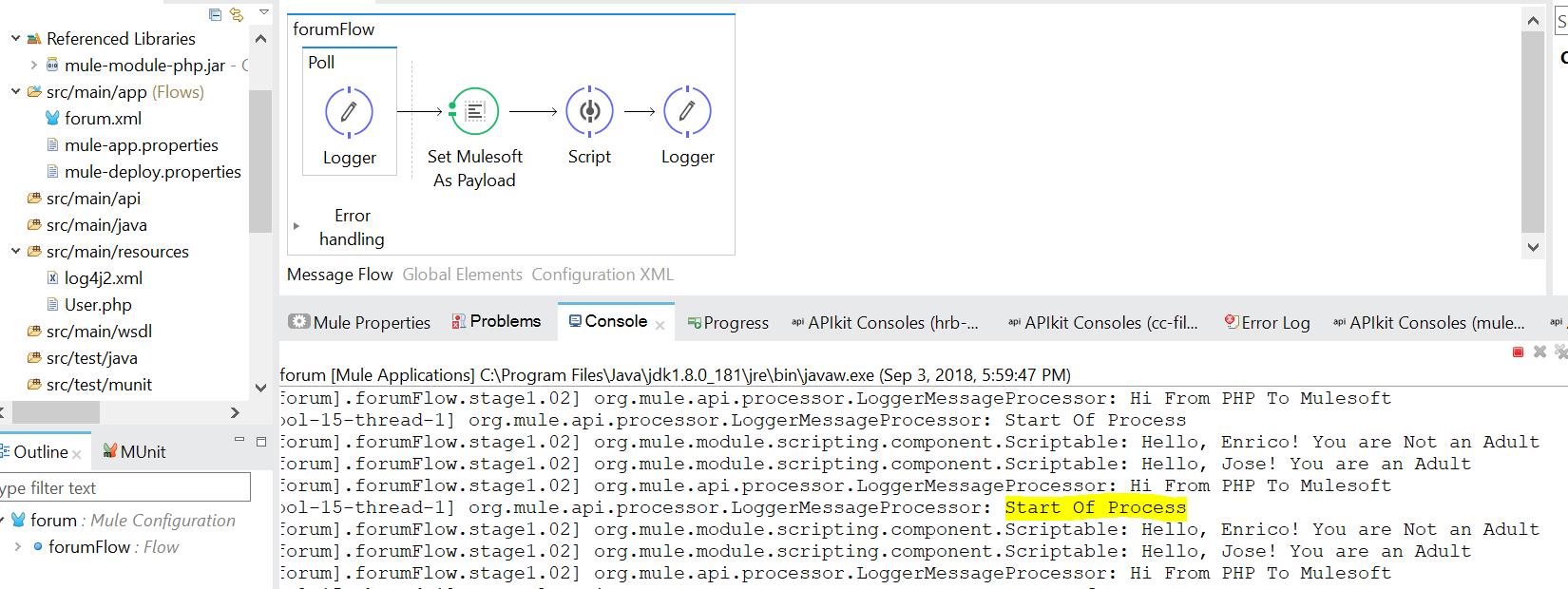
TESTING:
Thanks for reading, and let me know your thoughts in the comments section.
Opinions expressed by DZone contributors are their own.
Comments