

Multiple Entry Points for the NgxSimpleCharts Angular Library
Angular Libraries created with 'ng generate library ngx-simple-charts' are a single piece of code. Learn how to make the Angular Compiler split the code of a Library into Modules.
 ·
·
Join the DZone community and get the full member experience.
Join For FreeAngular Libraries can grow to a significant size. An Angular Library that is created with 'ng generate library ngx-simple-charts' is a single piece of code that will be included in the first module that includes/uses it. That module probably will impact the first initial useful paint.
To solve that problem multiple entry points can be used. These entry points provide the feature to include only the code of the entry point in the module. Lazy loaded modules can include the code of other entry points. That makes it possible to spread out the code to the modules that use it and lowers the size of the modules to the necessary size.
The Ngx-Simple-Charts library is the example used in this article. The project that uses it is the AngularPortfolioMgr. The article about creating the first iteration of the ngx-simple-charts can be found here.
Simple-Charts With Multiple Entry Points
The library has a new structure:
ngx-simple-charts/projects/ngx-simple-charts
   /bar
   /line
/src- The ‘bar’ directory has the entry point for the bar charts feature.
- The ‘line’ directory has the entry point for the line charts feature.
- The ‘src’ directory has the entry point for the common features, currently a placeholder service.
The package.json looks like this:
{
  "name": "ngx-simple-charts",
  "version": "13.1.0",
  "license": "Apache License Version 2.0",
  "peerDependencies": {
    "@angular/common": "^13.0.0",
    "@angular/core": "^13.0.0",
    "rxjs": "^7.4.0"
  },
  "dependencies": {
    "d3-array": "^3.0.0",
    "d3-axis": "^3.0.0",
    "d3-brush": "^3.0.0",
    "d3-color": "^3.0.0",
    "d3-format": "^3.0.0",
    "d3-interpolate": "^3.0.0",
    "d3-scale": "^4.0.0",
    "d3-selection": "^3.0.0",
    "d3-shape": "^3.0.0",
    "d3-time-format": "^4.0.0",
    "d3-transition": "^3.0.0",
    "tslib": "^2.3.1"
  }
}
The ‘peerDependencies’ define the required libraries of the application including the library.
The ‘dependencies’ define the libraries the whole library uses.
In the bar directory is the ng-package.json:
{
  "$schema": "../../../node_modules/ng-packagr/ng-package.schema.json",
  "lib": {
    "entryFile": "./public-api.ts"
  }
}
The ng-package.json tells the compiler that this is an entry point and registers the public api of the entry point.
In the bar directory is the public-api.ts:
export * from './src/lib/sc-bar-chart/sc-bar-chart.component';
export * from './src/lib/ngx-bar-charts.module';
export * from './src/lib/sc-bar-chart/model/chart-bars';
This file declares the public api of the entry point. In this case the component, the module and the input interface to the data. The Angular Cli build will include the needed parts of libraries in the dependencies in the entry point.
Similar files can be found in the line directory of the library.
Using the Library in AngularPortfolioMgr Project
In this package.json is the Ngx-Simple-Charts library included in a project:
  "dependencies": {
    ...
    "@angular/router": "~13.0.0",
    "ngx-simple-charts": "^13.1.0",
    "material-design-icons": "3.0.1",
    ...
  },
That makes the library available in the project.
Using the Bar Entry Point
The bar entry point is imported in the portfolios.module.ts:
import { NgxBarChartsModule } from 'ngx-simple-charts/bar';

@NgModule({
	declarations: [OverviewComponent, NewPortfolioComponent,
                   AddSymbolComponent, PortfolioTableComponent,
                   PortfolioChartsComponent, ProdConfigComponent,
                   DevConfigComponent],
	imports: [
		...
		MatCheckboxModule,
		NgxBarChartsModule,
		PortfoliosRoutingModule
	],
	entryComponents: [NewPortfolioComponent],
	providers: [DevAppInfoService, ProdAppInfoService,
                { provide: HTTP_INTERCEPTORS,
                 useClass: TokenInterceptor, multi: true }],
})
export class PortfoliosModule { }
The import declares the ‘NgxBarChartsModule’ of the ‘ngx-simple-charts/bar’ entry point.
In the ‘@NgModule’ the ‘NgxBarChartsModule’ is imported in the ‘PortfoliosModule’.
The ‘<sc-bar-chart>’ component of the library is then used in the portfolio-charts component of the module.
Using the Line Entry Point
The line entry point is imported in the portfolio-detail.module.ts:
import { NgxLineChartsModule } from 'ngx-simple-charts/line';

@NgModule({
	declarations: [PortfolioComponent, SymbolComponent],
	imports: [
                ...
		BaseModule,
		NgxLineChartsModule,
		MatCheckboxModule,
		...
	],
})
export class PortfolioDetailModule { }
The import declares the ‘NgxLineChartsModule’ of the ‘ngx-simple-charts/line' entry point.
In the ‘@NgModule’ the ‘NgxLineChartsModule’ is imported in the ‘PortfolioDetailModule’.
The ‘<sc-line-chart>’ component of the library is then used in the symbol component of the module.
Having a look at the result
The AngularPortfolioMgr project has these commands in the package.json:
 "scripts": {
    ...
    "build-stats": "ng build --localize
        --configuration production --stats-json",
    "analyse": "webpack-bundle-analyzer dist/manager/de/stats.json",
    ...
}
With the command ‘npm run build-stats’ a build is run that creates a ‘stats.json’ file.
With the command ‘npm run analyze’ the ‘webpack-bundle-analyzer’ is started and shows in the browser the content of the ‘stats.json’ file in a visual format.
The result looks like this:
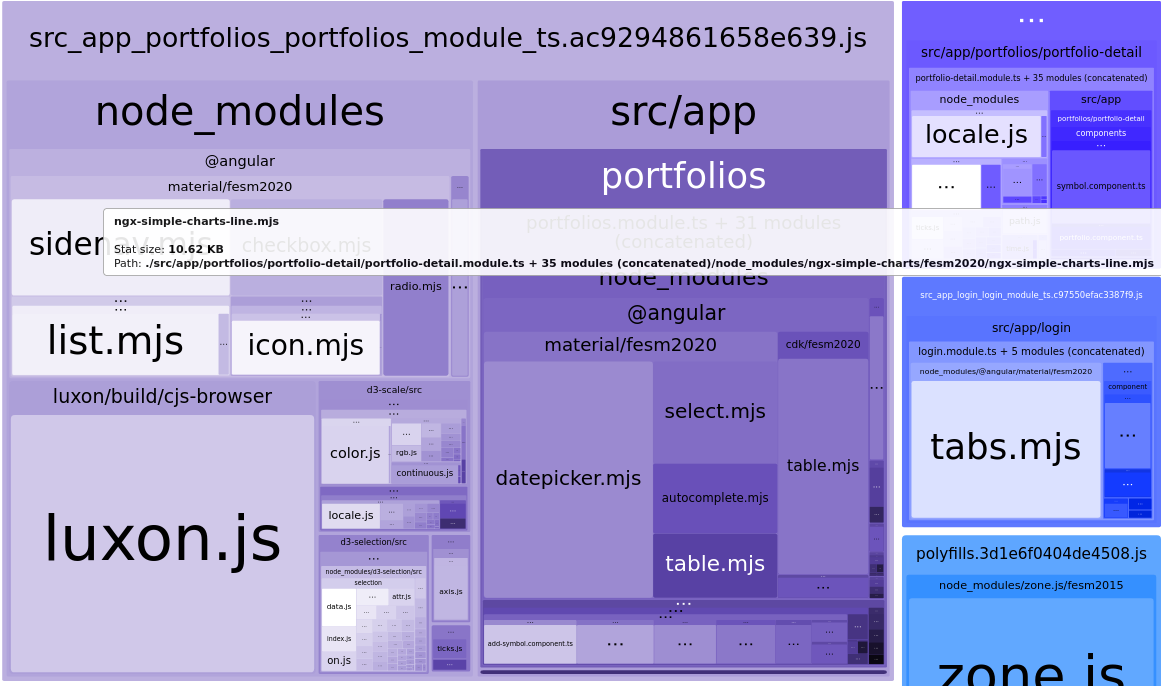
In the portfolios.module the ‘d3-scale’ code for the bar-charts can be seen and in the portfolio-detail.module the ‘ngx-simple-charts-line’ code is shown.
Conclusion
Angular enables the creation of libraries with multiple entry points. That enables Angular to put only the code for the required entry point in its modules. That shrinks the modules to the minimum size they need to run and can provide a fast initial load with lazy-loaded modules. Creating an Angular library with multiple entry points is made easy by the Angular Cli.
Published at DZone with permission of Sven Loesekann. See the original article here.
Opinions expressed by DZone contributors are their own.
Comments