

Building an OCR Data Pipeline: From Unstructured Images to Structured Data
How to treat OCR text as just another data source — build a repeatable ingestion, transformation, and validation workflow for unstructured data.
 ·
·
Join the DZone community and get the full member experience.
Join For FreeThe Problem: Unstructured Data Is Everywhere
If you've ever tried to pull data out of a scanned document or image, like receipts, invoices, restaurant menus, or even handwritten forms, you know the pain.
OCR tools (like Tesseract or AWS Textract) are great at recognizing text, but they just output unstructured chaos. Recently, we faced this problem while extracting restaurant menu data from PDFs and photos. Each menu had a different layout, font, and price format, and what I got back from the OCR models was a wall of unstructured text: random words, misaligned prices — useless for queries, pricing analysis, or downstream systems.
The challenge here was not OCR accuracy. It was a data pipeline design — how to ingest, clean, validate, and deliver this unstructured data.
The Solution: Applying Pipeline Design to Unstructured OCR Data
In today's world, unstructured inputs from PDFs to images to AI-generated text are becoming increasingly common, and modern pipelines can no longer assume clean, tabular data; they must be designed to handle messy, unpredictable formats with the same reliability. So, we approached this as a data ingestion and reliability challenge, not a machine learning one.
In this article, I will walk you through how this OCR data pipeline works end-to-end.
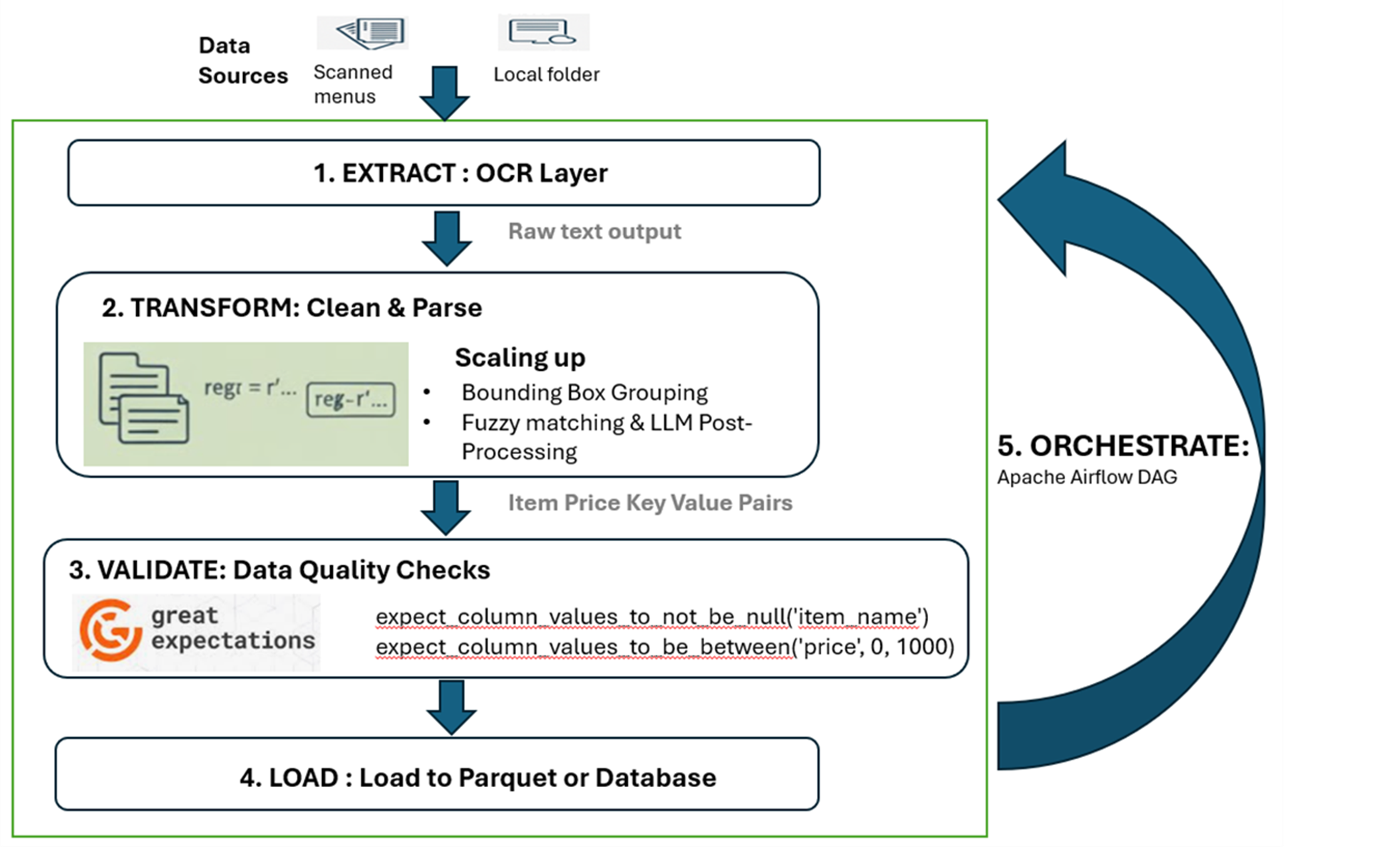
We wanted something that could take in menu images (from a local folder or S3 bucket) and:
- Extract – Apply OCR to extract raw text from image files.
- Load – Clean, validate, and structure the data into key-value pairs.
- Transform – Deliver the results to a target system (a database or a Parquet file).
- Orchestrate – Schedule and monitor the entire flow.
1. Extraction Layer: OCR as a Data Source
In this architecture, OCR is simply another data ingestion source, just like an API endpoint or a database dump. I have used Tesseract, but you could use AWS Textract, Google Vision, or Azure OCR.
from PIL import Image import pytesseract import os
def extract_text(image_path):    return pytesseract.image_to_string(Image.open(image_path))
# Example: Extract text from all menu images in a folder ocr_results = {f: extract_text(f"menus/{f}") for f in os.listdir("menus")}
The output here is a dictionary mapping the filename to a single, messy string of text, which is ugly, inconsistent, and filled with line breaks. Eg: "Pizza Margherita 14.50 Soup of Day... Cheeze Burger $12.00."
2. Transformation Layer: From Unstructured OCR Data to Structured Data
This is where the heavy lifting occurs. We enforce a schema by extracting key-value pairs (dish name-price) from the raw text.
Simple Transformation (The Fragile First Step)
For simple, single-column menus, a basic regular expression might work:
import re
import pandas as pd

def parse_menu_text_robust(raw_text):
    """
    Parse single-column OCR menu text into a structured DataFrame.
    Handles inconsistent spacing, dots, optional currency symbols, and decimals.
    """
    # 1. Normalize OCR text (flatten newlines, remove extra spaces)
    cleaned = re.sub(r'\s{2,}', ' ', raw_text.replace('\n', ' '))
    cleaned = cleaned.strip()

    # 2.Improved regex pattern:
    # - Matches item names (letters, spaces, -, &, ')
    # - Tolerates dots/spaces/hyphens between name and price
    # - Captures prices with or without $ and decimals
    pattern = re.compile(
        r'([A-Za-z][A-Za-z\s\-&\']{2,}?)'      # item name
        r'[\s\.\-:]*'                           # optional separators
        r'\$?\s*([0-9]+(?:\.[0-9]{1,2})?)\b'    # price (integer/decimal)
    )

    matches = pattern.findall(cleaned)
    df = pd.DataFrame(matches, columns=['item_name', 'price'])

    # Clean + normalize
    df['item_name'] = df['item_name'].str.strip().str.title()
    df['price'] = pd.to_numeric(df['price'], errors='coerce')
    df = df.dropna(subset=['price'])

    return df

structured_data = [parse_menu_text_robust(t) for t in ocr_results.values()]
final_df = pd.concat(structured_data, ignore_index=True)
Below is an example of how noisy OCR text would be and how the output of this step would be:
| Raw OCR Text (Example) | Final Structured DataFrame |
Pizza Margertia 14.50 Soup of Day ... Cheeze Burger $12.00(Messy, mixed lines, inconsistent spacing) |
item_name: Pizza Margertia, price: 14.50(Clean, validated schema) |
But still, this output contains spelling mistakes, missing prices, or duplicate entries, and quality rules need to be defined to prevent corrupted data from flowing to downstream systems. That leads us to the next step — validation and quality checks.
The problem with simple transformation:
Relying solely on regex is brittle. Real-world menus have multi-column layouts, item spanning multiple lines, or prices that don't immediately follow the item name. This basic regex will fail on such complex menus. "Section- Scaling up: The production-grade architecture" explains how to expand this simple transformation into a production-grade one.
3. Validation and Quality Checks
We can use Great Expectations or Pydantic to validate the basic constraints:
from great_expectations.dataset import PandasDataset

menu_df = PandasDataset(final_df)
# 1. Ensure no missing values for the item name
menu_df.expect_column_values_to_not_be_null('item_name')
# 2. Ensure prices are reasonable
menu_df.expect_column_values_to_be_between('price', 0, 1000)
4. Load: Delivering Structured Outputs
Once validated, the clean data is ready to be stored in an efficient, analytics-ready format like Parquet.
#Load
final_df.to_parquet("structured_menus.parquet")
Now, we have the analytics-ready data that a dashboard or a pricing API can read.
5. Orchestration: Scheduling the Flow
We can use a scheduler like Apache Airflow, Dagster, or even a simple Python scheduler to orchestrate this. This defines dependencies and manages the entire flow.
Below is a conceptual DAG in Airflow terms:
from airflow import DAG
from airflow.operators.python import PythonOperator
from datetime import datetime

dag = DAG("menu_ocr_pipeline", start_date=datetime(2025, 12, 1), schedule="@daily")

extract = PythonOperator(task_id="extract_text", python_callable=extract_text, dag=dag)
transform = PythonOperator(task_id="transform_data", python_callable=parse_menu_text, dag=dag)
load = PythonOperator(task_id="load_to_parquet", python_callable=df.to_parquet, dag=dag)

extract >> transform >> load
Scaling Up: The Production-Grade Architecture
To handle complex, multi-column, or stylized menus, the transformation layer must become more intelligent. Simple regex is replaced by spatial and context awareness.
- Bounding box grouping: We can use OCR coordinate data to align text spatially, thereby differentiating between columns or sections of the menu.
- Layout models: Tools like LayoutParser can be used to detect columns, headers, and item boundaries before applying text parsing, effectively solving the multi-column problem.
- Fuzzy matching and LLM post-processing: Common OCR spelling errors, e.g., Chiken to Chicken, can be fixed using libraries like rapidfuzz. Small LLM prompts can be used to normalize highly varied items like 'Paneer-Tikka' and 'Paneer Tikka (Vegan)' to just 'Paneer Tikka.'
These enhancements fit naturally within the same pipeline architecture, extending its intelligence without increasing operational complexity.
Final Takeaway
Working with OCR data reinforced something we often forget: data engineering isn’t about the tools or the source type — it’s about the discipline of turning messy inputs into reliable, trustworthy outputs. Whether your data comes from APIs, logs, scanned documents, or images, the principles stay the same: automate what you can, validate what matters, and design for repeatability.
Like any other ingestion workflow, the OCR pipeline also follows the same fundamentals — extraction, transformation, validations, loading, and orchestration. OCR might give you the text, but data engineering gives that text meaning.
Opinions expressed by DZone contributors are their own.
Comments