

An Open-Source ChatGPT App Generator
Create fully functional ChatGPT apps using AI — no coding needed. Build and deploy interactive UI widgets directly inside ChatGPT in just minutes.
 CORE
·
CORE
·
OpenAI released ChatGPT apps just a couple of days ago. Such apps are incredibly interesting from a UX perspective, because sometimes a chat user interface simply won't cut it. Sometimes, you simply need a graphical user interface. For such cases, there are "ChatGPT apps."
So, what is a ChatGPT app? Well, it's a fully functional user interface with buttons, dropdown lists, checkboxes, and everything you can create on the web. It can be as complex as Google Maps or as simple as a collect email form. It is basically "an app" hosted inside your AI chatbot. You can try a simple such app by clicking here.
Generate ChatGPT Apps Using AI
The unique thing about Magic is that it allows you to create such apps with vibe coding. This allows you to use natural language and AI to generate such apps without having to code. Think about Magic as "Lovable for ChatGPT apps." This is the prompt:
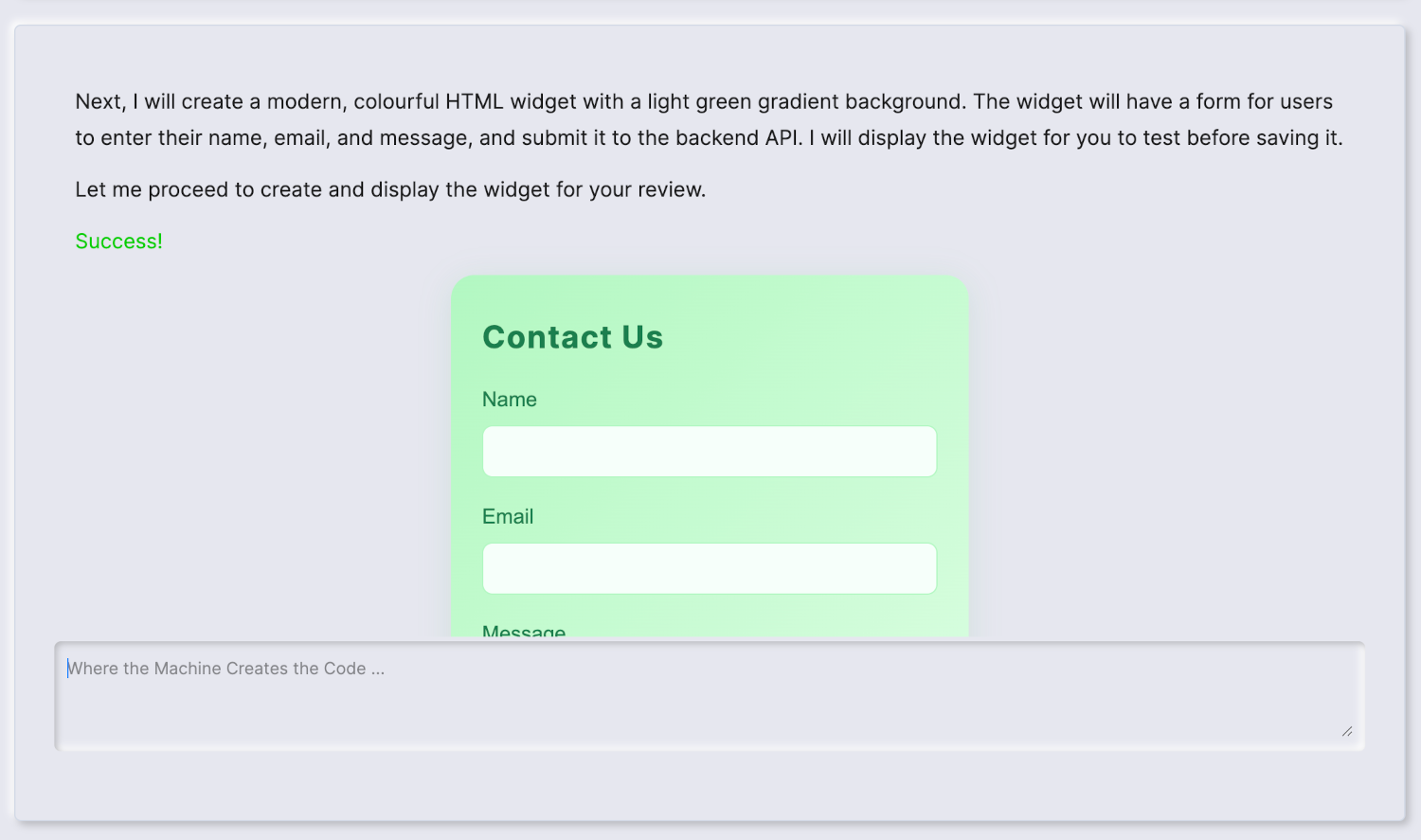
Create a new widget for me. I will need the widget to be colourful using some light green gradients and a modern design. I want it to allow users to send emails to [email protected], providing their names, emails, and email content, and using their email address as the reply-to property when sending emails. I'll need an API.
Three minutes later, and yes, this is a fully functional "ChatGPT app" that can be added to your AI agent in a few seconds...
What Do You Want to Create Today?
The above was a simple app sending emails. One prompt was enough for the AI to go through the entire process without bugs. But really, you can create any amount of complexity you wish in such apps. You just have to be careful when prompting the AI, and thoroughly test your apps before you put them into production.
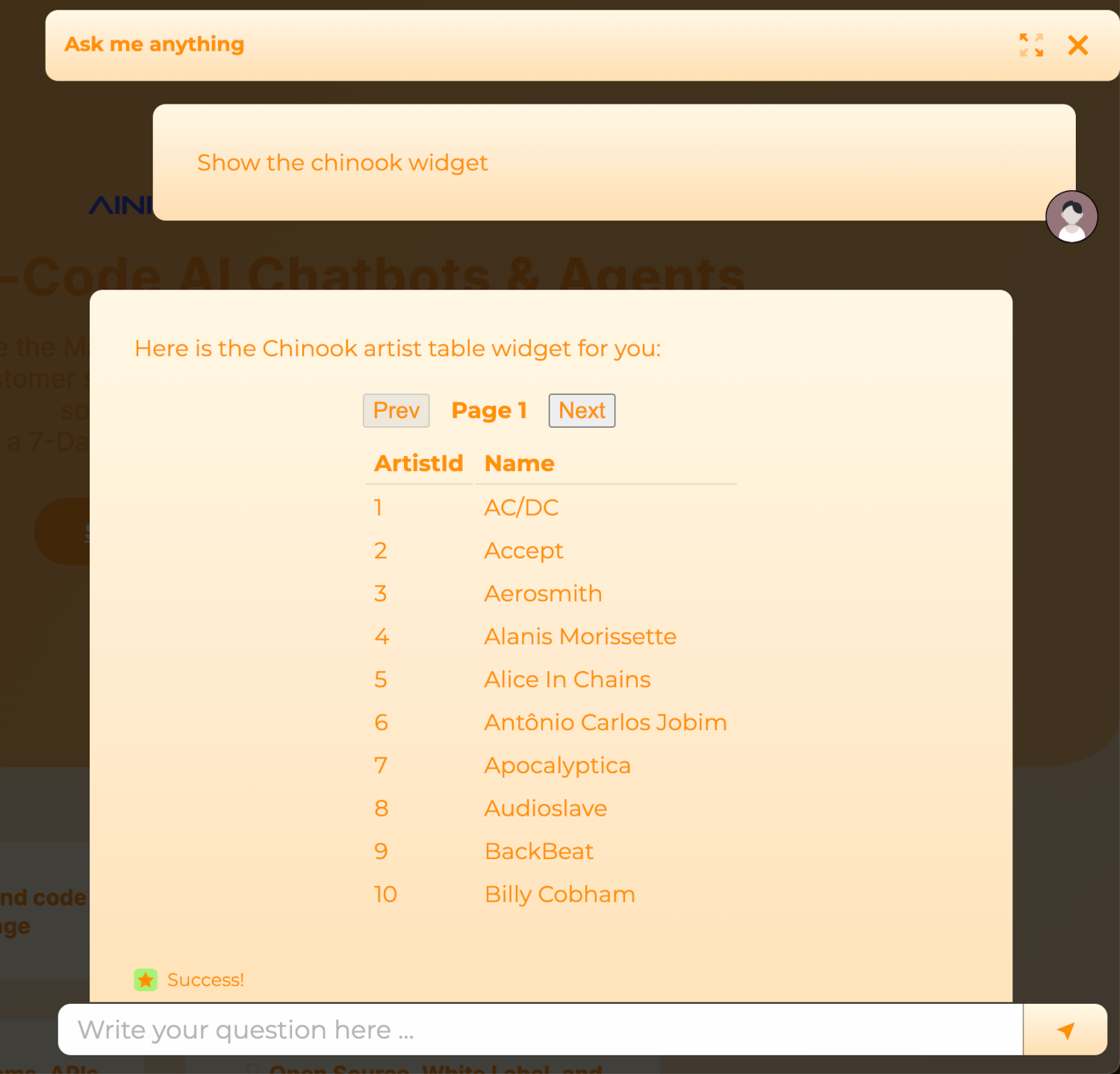
Below, I've created a complete CRUD app, allowing users to read records from the Chinook database. It allows for paging and sorting, and the AI generated a backend API endpoint for me, in addition to the GUI, 100% automatically.
Anything you can do in HTML, you can in theory do with such a ChatGPT app. Below, you can see the HTML we're using for our "Contact US ChatGPT app." But please realize that all of this code was 100% automatically generated using AI, no code, and natural language.
<style>
#WIDGET_ID_UNIQUE_NUMBER-contact-form {
  max-width: 400px;
  margin: 0 auto;
  padding: 1.5em;
  background: #f9f9f9;
  border-radius: 8px;
  box-shadow: 0 2px 8px rgba(0,0,0,0.07);
  font-family: sans-serif;
}
#WIDGET_ID_UNIQUE_NUMBER-title {
  margin-bottom: 1em;
  font-size: 1.3em;
  color: #222;
}
#WIDGET_ID_UNIQUE_NUMBER-contact-form label {
  display: block;
  margin-bottom: 0.3em;
  color: #333;
}
#WIDGET_ID_UNIQUE_NUMBER-name,
#WIDGET_ID_UNIQUE_NUMBER-email {
  width: 100%;
  padding: 0.5em;
  border: 1px solid #ccc;
  border-radius: 4px;
  color: #000 !important;
  background: #fff;
}
#WIDGET_ID_UNIQUE_NUMBER-contact-form > div {
  margin-bottom: 1em;
}
#WIDGET_ID_UNIQUE_NUMBER-submit {
  background: #0057ff;
  color: #fff;
  padding: 0.7em 1.5em;
  border: none;
  border-radius: 4px;
  cursor: pointer;
  font-size: 1em;
}
#WIDGET_ID_UNIQUE_NUMBER-message {
  margin-top: 1em;
  font-size: 0.95em;
}
</style>
<form id="WIDGET_ID_UNIQUE_NUMBER-contact-form">
  <h2 id="WIDGET_ID_UNIQUE_NUMBER-title">Contact Us</h2>
  <div>
    <label for="WIDGET_ID_UNIQUE_NUMBER-name">Name *</label>
    <input id="WIDGET_ID_UNIQUE_NUMBER-name" name="name" type="text" required>
  </div>
  <div>
    <label for="WIDGET_ID_UNIQUE_NUMBER-email">Email *</label>
    <input id="WIDGET_ID_UNIQUE_NUMBER-email" name="email" type="email" required>
  </div>
  <button id="WIDGET_ID_UNIQUE_NUMBER-submit" type="submit">Send</button>
  <div id="WIDGET_ID_UNIQUE_NUMBER-message"></div>
</form>
<script>
(function() {
  var form = document.getElementById('WIDGET_ID_UNIQUE_NUMBER-contact-form');
  var message = document.getElementById('WIDGET_ID_UNIQUE_NUMBER-message');
  form.onsubmit = function(e) {
    e.preventDefault();
    message.textContent = '';
    var name = document.getElementById('WIDGET_ID_UNIQUE_NUMBER-name').value.trim();
    var email = document.getElementById('WIDGET_ID_UNIQUE_NUMBER-email').value.trim();
    if(!name || !email) {
      message.textContent = 'Please fill in all required fields.';
      message.style.color = '#d00';
      return;
    }
    var payload = { name: name, email: email };
    fetch('https://ainiro.io/magic/modules/ainiro/contact-widget', {
      method: 'POST',
      headers: { 'Content-Type': 'application/json' },
      body: JSON.stringify(payload)
    })
    .then(function(res) { return res.json(); })
    .then(function(data) {
      if(data && data.result === 'success') {
        message.textContent = 'Thank you! Your message has been sent.';
        message.style.color = '#090';
        form.reset();
      } else {
        message.textContent = 'Sorry, something went wrong.';
        message.style.color = '#d00';
      }
    })
    .catch(function() {
      message.textContent = 'Sorry, something went wrong.';
      message.style.color = '#d00';
    });
  };
})();
</script>
The above widget was generated using a single prompt, and we put it into production immediately after having tested it. The whole process took about 5 minutes, and I suspect if you wanted to create something similar using the ChatGPT app SDK, you'd easily need several days to come up with something similar, and you'd have to be a fairly good software developer, too.
Using Magic Cloud, all you need is to phrase your prompt in English, have the AI generate your app, test it, and deploy it into your AI chatbot. A good prompt engineer, with a lot of ideas for such apps, can probably easily create 50 such apps every single day, and add all of these apps to their chatbots.
And if you don't want to use the AI to generate such apps, you can use Hyper IDE to manually create the HTML, JavaScript, and CSS.
UI Revolution
AI changes everything. It changes how we create, maintain, and deploy apps. But it also changes what we mean by apps when we use the word. From an AI perspective, apps are dynamic widgets that can be injected into an AI chatbot, completely changing the user experience. To understand why, consider this ...
Most asked themselves how to put the AI into the app, we asked ourselves how to put the app into the AI...
I've previously announced "The death of the GUI." Although that might have been a bit premature, being able to generate graphical user interface widgets and inject these into any AI chatbot will obviously change how we deliver such apps. Basically, the AI becomes the "host of apps," effectively replacing the operating system's traditional job.
This also creates an "marketplace for apps" opportunity, which OpenAI obviously seems to want to capitalise on with the "ChatGPT apps" release earlier this week. However, the most important opportunity is that with AINIRO's Magic Cloud, you can actually "generate" such apps with AI. This should result in "an explosion of creativity," where citizens are vibe-coding and using no-code constructs to generate thousands of such micro apps, solving highly specific problems they care about and can solve.
The above is called "the long tail of software development," and is roughly around 98% of the app market in value.
Micro Apps
In addition, it changes how we create such apps. First of all, being able to generate UI widgets, or "ChatGPT apps," and interact with APIs and databases obviously completely changes the software development process. However, it also changes the architecture of our apps, because we no longer need to create huge monolithic apps, but can create thousands of "micro apps" instead.
Take Salesforce as an example. Today, that's a monolithic app, with a single codebase, with millions of lines of code. If I were to "port" Salesforce to a ChatGPT app, first of all, I wouldn't create one app; I'd create thousands of "micro apps," resulting in high cohesion and encapsulation. Then I would prompt the AI to display these micro apps given triggers, such as...
I want to create a new contact ...
Which would trigger a "Create new Contact ChatGPT app," which would ask the user for contact details, and save it using Salesforce's contacts API. This results in a similar effect we traditionally got from micro services, where each little "unit of work" is a separate codebase, but instead of communicating using the network as its glue, it communicates using the AI as glue, and having the API and AI orchestrate what "micro app" to display at any particular point.
Micro apps or ChatGPT apps becomes the new micro services
... except this time, the promise of better encapsulation and cohesion actually holds true, because each "micro app" is 100% perfectly encapsulated, and the only common denominator is your API or your database.
Wrapping Up
ChatGPT apps are probably one of the most disruptive ideas we've ever had with AI, at least so far. It, among other things, becomes "the new App Store." With a billion weekly users of ChatGPT, I suspect that already one million of these have started investigating how to create such ChatGPT apps. With the ChatGPT app SDK, creating such apps requires coding and probably weeks of following tutorials. With Magic Cloud, it only requires English. You can see how I created the above apps in the following video:
Published at DZone with permission of Thomas Hansen. See the original article here.
Opinions expressed by DZone contributors are their own.