

Parallel Paths and Possibilities to Gen AI for Developers: The Saga of Two Stacks Unfolded via Building a RAG Application in Tandem
GenAI is reshaping apps, with Python leading in ML, and Java catching up via Spring AI. RAG demos bridge the AI gap with hybrid, scalable, and intelligent solutions.
Join the DZone community and get the full member experience.
Join For FreeGenerative AI (GenAI) is rapidly transforming the landscape of intelligent applications, driving innovation across industries. Python has emerged as the language of choice for GenAI development, thanks to its simplicity, agility in prototyping, and a rich ecosystem of machine learning libraries like TensorFlow, PyTorch, and LangChain. However, Java — long favored for enterprise-scale systems — is actively evolving to stay relevant in this new paradigm. With the rise of Spring AI, Java developers now have a growing toolkit to integrate GenAI capabilities without abandoning their existing infrastructure.
While switching from Java to Python is technically feasible, it often involves a shift in development culture and tooling preferences. The convergence of these two ecosystems — Python for experimentation and Java for scalability — offers a compelling narrative for hybrid GenAI architectures.
As GenAI continues to mature, both languages will play complementary roles in shaping robust, scalable, and intelligent systems. This article explores the Retrieval-Augmented Generation (RAG) architecture, a powerful approach that combines the strengths of information retrieval and generative models to build intelligent, context-aware question-answering systems.
The focus is on implementing a question-answering system grounded in the classic narratives of Aesop's Fables. To demonstrate the versatility of RAG, two parallel implementations are presented: one using Python, leveraging Hugging Face Transformers and relevant NLP libraries; and the other using Java, built upon the emerging capabilities of the Spring AI framework.
The comparative analysis of both implementations highlights practical considerations, including developer productivity, ecosystem maturity, and integration with existing enterprise systems. Accompanied by a comprehensive guide to kick-start journey to Spring AI, finally a viable weapon in Java arsenal, the article concludes that while developers already proficient in Python could continue leveraging its rich ML ecosystem, the Java engineers — especially those maintaining enterprise applications — finally have viable tools to adopt similar AI capabilities through Spring AI, enabling them to remain within their familiar development stack without compromising on innovation. Regardless of their respective ethos, the AI gap between Python and Java has started to close in.
1. Use Case:
This article demonstrates a Retrieval-Augmented Generation (RAG) system designed to enable users to interact with a web-based interface for querying arbitrary documents. The core functionality allows users to input natural language questions, which are then processed through a RAG pipeline to retrieve relevant content and generate contextually accurate responses.
To illustrate the system's capabilities, we use a sample document — Aesop's Fables in PDF format — as a reference corpus. However, the architecture is fully adaptable to any document type or domain-specific dataset, making it suitable for a wide range of applications, including legal, academic, and enterprise contexts.
The implementation is presented in two parallel technology stacks: Python, leveraging its rich ecosystem of machine learning and GenAI libraries for rapid prototyping; and Java, showcasing the emerging capabilities of the Spring AI framework. This dual-stack approach highlights the respective strengths and development philosophies of both languages, while emphasizing Java’s evolving relevance in the generative AI landscape.
.
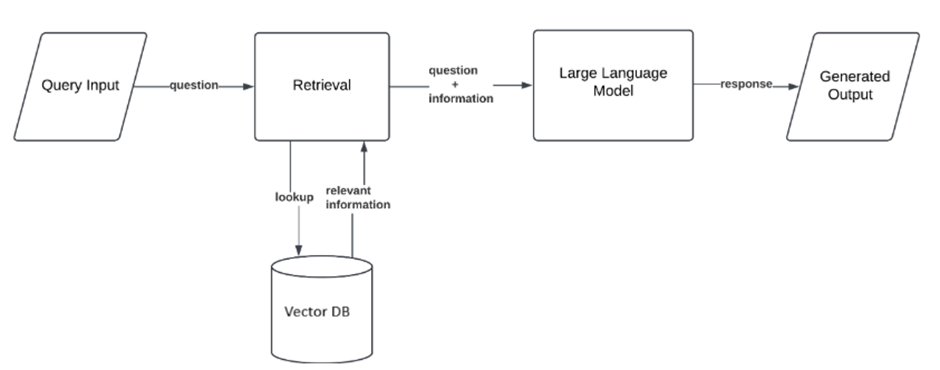
Figure 1: A Basic RAG Architecture
2. Python Implementation
Python has rapidly ascended to dominance in the fields of data science, machine learning, and artificial intelligence due to its simplicity, readability, and vast ecosystem of specialized libraries such as NumPy, Pandas, TensorFlow, and PyTorch. Its intuitive syntax and strong community support make it the preferred language for both rapid prototyping and production-grade AI solutions. As the demand for intelligent systems grows, Python continues to evolve as the backbone of modern computational innovation.
The full code base is available here: https://github.com/trainerpb/article-communications/blob/feature/manuscript/Building%20RAG-Powered%20AI%20in%20Python%20and%20Java%20Tales%20of%20Two%20Stacks/mauscript/rag_search_langchain_opensource_article/
2.1 How It Works
- User Interaction:
- The user enters a question about "Aesop's Fables" in the text area.
- The user clicks the "Find Answer" button to submit the question.
- Backend Processing:
- The StoryContentSearchinstance processes the question using the RAG pipeline:
- The PDF is loaded and split into chunks.
- Relevant chunks are retrieved based on the question.
- A language model generates an answer using the retrieved context.
- The StoryContentSearchinstance processes the question using the RAG pipeline:
- Answer Display:
- The generated answer is displayed on the web app.
2.2 rag_serach_ui.py
This Python script creates a simple web-based user interface (UI) for a question-answering system using Streamlit, a popular framework for building interactive web apps in Python. The script integrates with the class (defined in the rag_search_opensource_article.py file) to allow users to ask questions about the content of a specific PDF document, "Aesop's Fables for Children."
2.2.1 Overview of the Code
The script provides a user-friendly interface for interacting with a retrieval-augmented generation (RAG) pipeline. It allows users to input a question, processes the question using the RAG pipeline, and displays the generated answer. The backend logic for document processing and question answering is handled by the StoryContentSearch class.
2.2.2 Key Components
- Streamlit Setup
- The script uses Streamlit to create a web-based interface.
- st.title sets the title of the app: "You can ask questions from Aesop's Fables and this bot will answer."
- st.text_area provides a text box for users to input their question.
- st.button creates a button labeled "Find Answer" that triggers the question-answering process when clicked.
2.2.3 Integration
- The StoryContentSearch class is imported from the rag_search_opensource_article.py file. This class implements the RAG pipeline for processing the PDF document and generating answers.
- An instance of StoryContentSearch is created with the path to the PDF file of Aesop’s fable
- The process_in_chain method of the StoryContentSearch class is called with the user's question as input. This method:
- Retrieves relevant chunks from the PDF document.
- Generates an answer using a language model.
- Returns the answer as a string.
2.2.4 Displaying the Answer
- The result of the process_in_chain method is displayed using st.success, which highlights the answer in a visually appealing way.
2.3 rag_search_opensource_article.py
The full code is given and explained below:
from langchain_huggingface import ChatHuggingFace, HuggingFaceEndpoint
from langchain_community.document_loaders import PyPDFLoader
from langchain.text_splitter import RecursiveCharacterTextSplitter
from langchain_community.vectorstores import FAISS
from langchain_nomic import NomicEmbeddings
from langchain_core.prompts import PromptTemplate
from langchain_core.runnables import RunnableParallel, RunnablePassthrough, RunnableLambda
from langchain_core.output_parsers import StrOutputParser

from dotenv import load_dotenv
class StoryContentSearch:
    def __init__(self, file_path):
        load_dotenv()
        self.file_path = file_path
        self.faiss_file_name = file_path.replace(".pdf", "_faiss_index_nomic")
        self.loader = PyPDFLoader(file_path)

    def create_full_context(self, docs):
        full_content = ""
        for doc in docs:
            full_content += doc.page_content + " "
        return full_content

def check_faiss_file_exists(self, faiss_file_name):
        import os
        return os.path.exists(faiss_file_name)

    def format_docs(self, docs):
        return "\n\n".join([doc.page_content for doc in docs])

    def process_in_chain(self, question):
        print("Processing question:", question)
        embeddings = NomicEmbeddings(model="nomic-embed-text-v1.5")
        if self.check_faiss_file_exists(self.faiss_file_name):
            print(f"FAISS file {self.faiss_file_name} exists. Loading from file.")
            vector_store = FAISS.load_local(self.faiss_file_name, embeddings, allow_dangerous_deserialization=True)
            print("Vector store loaded from FAISS file.")
        else:
            docs = self.loader.load()
            full_context = self.create_full_context(docs)
            splitter = RecursiveCharacterTextSplitter(chunk_size=1000, chunk_overlap=100)
            docs = splitter.create_documents([full_context])
            print(f"Number of chunks: {len(docs)}")
            vector_store = FAISS.from_documents(docs, embeddings)
            print("Vector store created with FAISS.")
            vector_store.save_local(self.faiss_file_name)
            print(f"Vector store locally saved as {self.faiss_file_name}")


        retriever = vector_store.as_retriever(search_type="similarity", search_kwargs={"k":6})

        prompt = PromptTemplate(template="""
                                You are a helpful AI assistant. Use only the following pieces of context to answer the question at the end.
                                If the context is insufficient, just say you don't know. Do not try to make up an answer.

                                {context}
                                Question: {question}

                                """, input_variables=['context','question'])

        llm = HuggingFaceEndpoint(
            repo_id="meta-llama/Llama-3.2-3B-Instruct",
            task="text-generation"
        )
        opensourcemodel = ChatHuggingFace(llm=llm)

        parallel_chain = RunnableParallel(
            {"context": retriever | RunnableLambda(self.format_docs),
            "question": RunnablePassthrough()})

        parser = StrOutputParser()

        final_chain = parallel_chain | prompt | opensourcemodel | parser
        answer = final_chain.invoke(question)
        print(answer)
        return answer
2.3.1 Overview of the Code
The script uses the LangChain ecosystem to combine document processing, vector-based retrieval, and large language model (LLM) inference. It is designed to handle the following tasks:
- Load a PDF document and split it into manageable chunks.
- Create or load a FAISS vector store for semantic search.
- Retrieve the most relevant chunks based on a user query.
- Use a language model to generate an answer based on the retrieved context.
2.3.2 How It Works
Document Loading:
- The PDF is loaded, and its content is split into smaller chunks for efficient processing.
Vector Store Creation:
- The chunks are embedded into a vector space using, and a FAISS index is created for similarity search.
Question Answering:
- The input question is used to retrieve the most relevant chunks from the vector store.
- These chunks are passed as context to a language model, which generates an answer.
2.3.3 Key Components
Imports and Dependencies
The script relies on several key libraries:
- LangChain Modules:
- PyPDFLoader: Loads PDF documents.
- RecursiveCharacterTextSplitter: Splits text into smaller chunks for processing.
- FAISS: A vector store for efficient similarity search.
- NomicEmbeddings: Generates embeddings for text chunks.
- PromptTemplate: Structures the input for the language model.
- RunnableParallel, RunnablePassthrough, RunnableLambda: Enable parallel and modular processing.
- StrOutputParser: Parses the output of the language model.
- Hugging Face Integration:
- HuggingFaceEndpoint and ChatHuggingFace: Connect to a Hugging Face model for text generation.
- Environment Management:
- dotenv: Loads environment variables for configuration.
2.3.4 Class: StoryContentSearch
The StoryContentSearch class is the core of the script. It is initialized with the path to a PDF file and provides methods for processing the document and answering questions.
Initialization (__init__)
- The constructor accepts a file_path for the PDF document.
- It sets up the FAISS index file name by appending _faiss_index_nomic to the PDF file name.
- A PyPDFLoader instance is created to load the document.
create_full_context
- Combines the content of all pages in the document into a single string.
- This is used to prepare the document for chunking.
check_faiss_file_exists
- Checks if the FAISS index file already exists on disk.
- This avoids redundant computation by reusing the existing index.
format_docs
- Formats retrieved documents into a readable string by concatenating their content with double newlines.
2.3.5 Method:
This method implements the RAG pipeline using a chain-based approach. It performs the following steps:
Step 1: Load or Create FAISS Vector Store
Check for Existing Index:
If the FAISS index file exists, it is loaded using FAISS.load_local.
• Create a New Index:
If the index does not exist:
1. The PDF is loaded using PyPDFLoader.
2. The document is converted into a single string using create_full_context.
3. The text is split into smaller chunks using RecursiveCharacterTextSplitter (chunk size: 1000 characters, overlap: 100 characters).
4. Embeddings are generated for the chunks using NomicEmbeddings.
5. A FAISS vector store is created and saved locally.
Step 2: Retrieve Relevant Chunks
A retriever is created from the FAISS vector store to find the top 6 most relevant chunks based on the input question.
Step 3: Create a Prompt
A PromptTemplate is used to structure the context and question into a prompt for the language model. The template ensures that the model only uses the provided context to answer the question.
Step 4: Parallel Processing
A RunnableParallel chain is used to process the context and question in parallel:
- The retriever fetches relevant documents, which are formatted using a lambda function (RunnableLambda).
- The question is passed through as-is using RunnablePassthrough.
Step 5: Language Model Inference
The prompt is passed to a Hugging Face model (meta-llama/Llama-3.2-3B-Instruct) for generating an answer.
The output is parsed into a string format using StrOutputParser.
Step 6: Return the Answer
The generated answer is printed and returned.
2.4 Key Features
- Interactive Interface: The Streamlit app provides a simple and intuitive interface for users to interact with the question-answering system.
- Backend Integration: The app seamlessly integrates with the StoryContentSearch class, which handles the heavy lifting of document processing and language model inference.
- Efficient Retrieval: The FAISS vector store enables fast and accurate retrieval of relevant document chunks.
- Reusable Index: The FAISS index is saved locally, reducing computation for subsequent queries.
- Parallel Processing: The RunnableParallel chain allows for efficient and modular processing of the context and question.
- Customizable Prompt: The PromptTemplate ensures that the language model receives structured input.
- Real-Time Answering: The app processes the question and displays the answer in real time, making it responsive and user-friendly.
2.5 Summary
In summary, this script provides a simple yet powerful interface for a question-answering system based on "Aesop's Fables." By leveraging Streamlit for the UI and the StoryContentSearch class for backend processing, the app demonstrates how to build an interactive RAG-based application that combines semantic search and generative AI. The development is awfully fast and straightforward for prototyping. However, to deploy it to existing big Enterprise applications requires an HTTP / gRPC-based API call, bringing in yet another point of hop and thus, failure; especially for reactive service clients and a philosophical shift to Python.
3. Java + Spring AI Approach
Java and Spring Boot are widely recognized for their robust support of scalable, cloud-native microservices architectures. In the evolving landscape of generative AI, Spring AI introduces a powerful abstraction layer that simplifies integration with various GenAI providers. By embracing Spring’s core philosophy of auto-configuration and profile-specific beans, Spring AI enables developers to seamlessly adapt to provider-specific API changes while maintaining clean, modular, and maintainable codebases.
The full code base is available at https://github.com/trainerpb/simple-spring-ai-rag-example/tree/feature/article-manuscript
3.1 Spinning up a DEV environment
The Spring AI project was developed using Java 17 or later, with Maven for dependency management. Although any IDE could be used, IntelliJ IDEA was the one selected. Since a vector database was required, pgVector was deployed through Docker. In addition, the Docker model ai:gemma3 was executed, and Nomic Embed Text v1.5 was run within LM Studio. No further instruction on set up or installation of the Tools, IDE is discussed with the assumption that our readers are aware of those cross-cutting stuff; to ensure brevity.
However, the following extensions and table and index in the PostgreSQL were created
CREATE EXTENSION IF NOT EXISTS vector
CREATE EXTENSION IF NOT EXISTS hstore;
CREATE EXTENSION IF NOT EXISTS "uuid-ossp";
CREATE TABLE IF NOT EXISTS vector_store ( id UUID DEFAULT uuid_generate_v4() PRIMARY KEY, content text, metadata json, embedding vector(768) );
CREATE INDEX ON vector_store USING HNSW (embedding vector_cosine_ops);
3.2 Dependencies
To implement a Retrieval-Augmented Generation (RAG) use case within a Spring MVC application, several specialized dependencies from the Spring AI ecosystem are required. These libraries enable seamless integration with vector stores and generative AI models, while adhering to Spring Boot’s principles of auto-configuration and modular design. In addition to the standard dependencies commonly used in Spring MVC applications, the following components are essential for enabling document retrieval and generation capabilities:
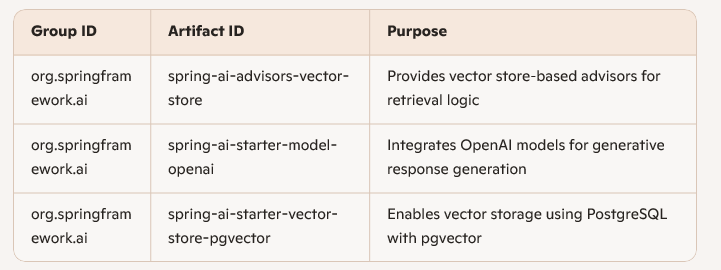
These dependencies collectively support the construction of a scalable, cloud-native RAG pipeline within the Spring framework, making it easier to build intelligent applications that interact with arbitrary documents through a web-based interface.
3.3 Configuration
The file application.properties is described as below:
App Specific
|
app.vector.load-on-start-up |
true |
Whether to load the PDF |
|
app.vector.pdf.file-path |
C:\Users\My User1\Downloads\Aesops_Fables_for_children.pdf |
Path to the PDF usd in the example |
Spring Application & Logging
|
spring.application.name |
<<Our app name>> |
App name |
|
logging.level.org.springframework.ai |
<< LOG_LEVEL>> |
Log level of the package |
Database (PostgreSQL)
|
spring.datasource.url |
jdbc:postgresql://myHost:PG_PORT/ragdb?options=-c%20TimeZone=MT%20%Timezone |
|
spring.datasource.username |
<<user name>> |
|
spring.datasource.password |
<<password> |
|
spring.datasource.driver-class-name |
org.postgresql.Driver |
AI (Spring AI / OpenAI Config)
|
spring.ai.openai.base-url |
http://localhost:1234 |
Embedding model via LM Studio |
|
spring.ai.openai.api-key |
<<ignored>> |
|
|
spring.ai.openai.embedding.options.model |
text-embedding-nomic-embed-text-v1.5 |
|
|
spring.ai.openai.chat.options.model |
ai/gemma3 |
|
|
spring.ai.openai.chat.base-url |
http://localhost:12434/engines |
Gemma3 via DMR |
|
spring.ai.openai.chat.api-key |
<<ignored>> |
Vector (pgVector Config)
|
spring.ai.vectorstore.pgvector.max-document-batch-size |
10000 |
|
|
spring.ai.vectorstore.pgvector.index-type |
HNSW |
|
|
spring.ai.vectorstore.pgvector.distance-type |
COSINE_DISTANCE |
|
|
spring.ai.vectorstore.pgvector.dimensions |
768 |
|
|
spring.ai.vectorstore.pgvector.schema-validation |
true |
|
|
spring.ai.vectorstore.pgvector.table-name |
vector_store |
Default name of the table |
3.4 Key Components
- The class PDFServiceprovides three methods for loading, chunking a PDF and saving embedding Documents to the VectorStore.
- The Vector service, in this small example, is auto-configured by Spring framework.
- Unlike the Python implementation, a very simple, non-recursive strategy is used to help understand quickly.
- Apache Tika library can safely parse a document regardless of file extension.
- The basic terminologies of Spring AI are mostly similar with the gen AI terminologies Python uses.
- The class PdfChunkIngestorOnStartup
- Ingests the Vector store with the documents , using the service class PDFService when Spring application loads.
- Ingest-on-start-up behavior is tuneable via the property app.vector.load-on-start-up.
- The class RagService
- Uses ChatClient and VectorStore.
- Contains a single method retrieveAndGenerateStreaming that returns Flux<String> to achieve streaming chat.
- We use a SearchRequest searchRequest = SearchRequest.builder().query(msg).topK(3).build(); to query similarity with top 3 results from the vecor store, and convert all documents thus retrieved to a single string :
List<Document> similaritySearchDocuments = vectorStore.similaritySearch(searchRequest);
String informationAsString = similaritySearchDocuments.stream().map(Document::getText).collect(Collectors.joining("\n\n"));
- Now we create a SystemPromptTemplate using
var systemPromptTemplate = new SystemPromptTemplate(promptResource);
- promptResource is an .st file placed in src/main/resource directory with the following text prompt
You are a helpful assistant. Use the following information to answer the question in detail.
Please use a friendly and professional tone. Please acknowledge the question and relate the answer
back to it.
If the answer is not in the provided information, say "I don't know."
Information:
{information}
Answer:
- Value for the placeholder {information} is substituted in this line
var prompt= new Prompt(List.of(systemPromptTemplate.createMessage(Map.of("information",informationAsString)),
new UserMessage(msg)
));
- Finally, we make call to the AI model to get a streaming response
chatClient.prompt(prompt).stream().content()
- Important: To support the reactive paradigm, all these lines of code are executed with subscribeOn using a boundedElastic scheduler. While this may not be the most optimal choice, it remains valid and allows the author to stay focused on the context of the topic.
return Mono.fromCallable(()->{
List<Document> similaritySearchDocuments = vectorStore.similaritySearch(searchRequest);
String informationAsString = similaritySearchDocuments.stream().map(Document::getText).collect(Collectors.joining("\n"));
SystemPromptTemplate systemPromptTemplate = new SystemPromptTemplate(promptResource);
var prompt= new Prompt(List.of(systemPromptTemplate.createMessage(Map.of("information",informationAsString)),
new UserMessage(msg)
));
return chatClient.prompt(prompt).stream().content();
})
.subscribeOn(Schedulers.boundedElastic())
.flatMapMany(flux -> flux);
- The RestController RagApiController
- Uses RagService to stream generated responses for the given query as a reactive Flux<String> by delegating to GET end point /search/stream
- The Controller WebMvcController
- Handles HTTP GET requests to/home and returns the view name ChatClient, which renders the chat client page. The frontend is built with Thymeleaf templating, providing a simple interface that accepts user input and invokes the streaming REST API.
- However, the frontend can be decoupled, and any technology stack may be used to consume the streaming API. The only requirement is the use of Server-Sent Events (SSE) to receive chunked responses.
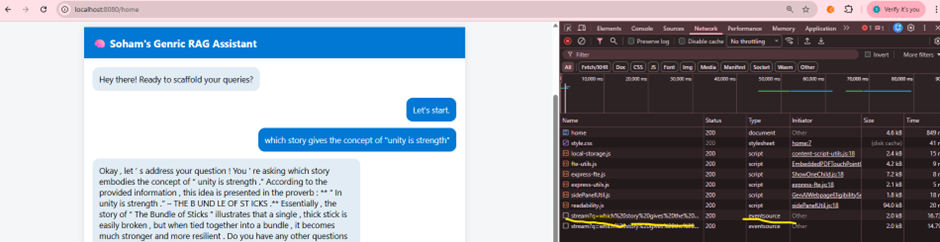
Figure 2: A simplistic UI for Spring AI Rag
- The RestController RagApiController
- Uses RagService to stream generated responses for the given query as a reactive Flux<String> by delegating to GET end point /search/stream.
- The Controller WebMvcController
- Handles HTTP GET requests to /home and returns the view name ChatClient, which renders the chat client page. The frontend is built with Thymeleaf templating, providing a simple interface that accepts user input and invokes the streaming REST API.
- However, the frontend can be decoupled, and any technology stack may be used to consume the streaming API. The only requirement is the use of Server-Sent Events (SSE) to receive chunked responses.
4. Comparison
In either implementation, the frontend can be decoupled since the architecture is API‑driven.
- In both cases, generative AI providers and core components can be externalized through configuration.
- For skilled developers, both stacks deliver comparable speed and efficiency:
- Python is less verbose.
- Java, supported by modern IDE tooling and AI plugins (such as Copilot), is nearly as concise.
- Spring AI offers the added advantage of provider abstraction, simplifying development, maintenance, and scalability for large enterprise projects.
- Thanks to well‑documented libraries and strong community support, both ecosystems keep their APIs aligned with generic terminology, enabling developers to adapt quickly even if they are not deeply proficient in one stack.
- Each stack reflects features that align with contemporary industry needs and standards.
- Both continue to borrow and adapt features from one another.
- At present, Python maintains a lead due to its extensive AI/ML libraries.
- However, Java AI and Spring are rapidly catching up, and the gap is narrowing.
- JavaScript, long dominant in web development, is rapidly evolving to meet the demands of the GenAI era. Frameworks like TensorFlow.js, ONNX.js, and Transformers.js are enabling in-browser and server-side AI capabilities, making JavaScript a viable player in the AI landscape. With the rise of Node.js-based backends and full-stack frameworks like Next.js and SvelteKit, developers can now integrate GenAI features into web apps without switching languages. While not yet as mature as Python or Java in AI tooling, JavaScript’s accessibility, community momentum, and growing ecosystem suggest it’s closing the gap fast—positioning itself as a strong contender in the GenAI race.
Final verdict: Choose the technology stack you are most comfortable with, and embrace the power of AI within it.
Opinions expressed by DZone contributors are their own.
Comments