

Playwright Fixtures vs. Lazy Approach
A guide comparing Fixture and Lazy patterns in test automation, showing how on-demand object creation improves performance and scalability in Playwright frameworks.
 CORE
·
CORE
·
Join the DZone community and get the full member experience.
Join For FreeWhen building scalable test automation frameworks, how you create and manage objects (pages, services, helpers) matters as much as the tests themselves. Two commonly used patterns are the Fixture Approach and the Lazy Approach. Each has its own strengths — and choosing the right one can significantly impact performance, readability, and maintainability.
In this blog, we take a deep dive into the Fixture Approach and the Lazy Approach, helping you understand when and why to use each one.
Fixture vs. Lazy Approach in Test Automation
The Fixture Approach and the Lazy Approach represent two different ways of managing object creation in test automation.
In the Fixture Approach, all required objects are created upfront before the test starts, even if some of them are never used. This can simplify setup but often leads to unnecessary resource usage and slower execution.
The Lazy Approach, on the other hand, creates objects only when they are actually needed during test execution. This results in better performance, reduced memory usage, and a cleaner, more scalable test design — making it the preferred approach for large automation suites.
Key Concept
- Eager (Fixture) loading: Create all objects immediately
- Lazy loading: Create objects on demand (recommended)
Simple Analogy
Think of it like a restaurant:
- Eager (Fixture): The chef prepares all menu items when the restaurant opens
- Lazy: The chef prepares dishes only when customers order them
Fixture Implementation
In the Fixture Approach, all required objects are created upfront before the test starts. These objects are injected into the test via fixtures and are available throughout the test lifecycle.
const { test: base } = require("@playwright/test");
const test = base.extend({
sitePage: async ({ page }, use) => {
await use(new SitePage(page));
},
commonPage: async ({ page }, use) => {
await use(new CommonPage(page));
},
adminEnvVars: async ({ page }, use) => {
await use(new AdminEnvVarsPage(page));
}
}
Problems in the Fixture Approach
- All page objects are created upfront
- Higher memory usage
In your test you will see all objects are created upfront...
In the code snippet below, commonPage, adminEnvVars, and sitePage are page objects. Even if you use only commonPage, the others are still created.
test("TC0023", async ({ commonPage, adminEnvVars, sitePage }) => {
  // ALL 3 objects already created before test runs
  // Even if you only use commonPage, others still created!
});
Fixture Approach Flow
All objects are created upfront, and memory is wasted on unused objects.
Test starts
  ↓
commonPage created ✓
↓
adminEnvVars created ✓
↓
sitePage created ✓
  ↓
Test code runs (uses only commonPage)

  ↓
Test ends
  ↓
Memory wasted on unused objects

!!!! NOTE : Here adminEnvVars ,sitePage objects are unused objects !!!!
Lazy Implementation (On-Demand Object Creation)
Objects are created only when they are used.
Below is the folder structure for the Lazy Implementation.
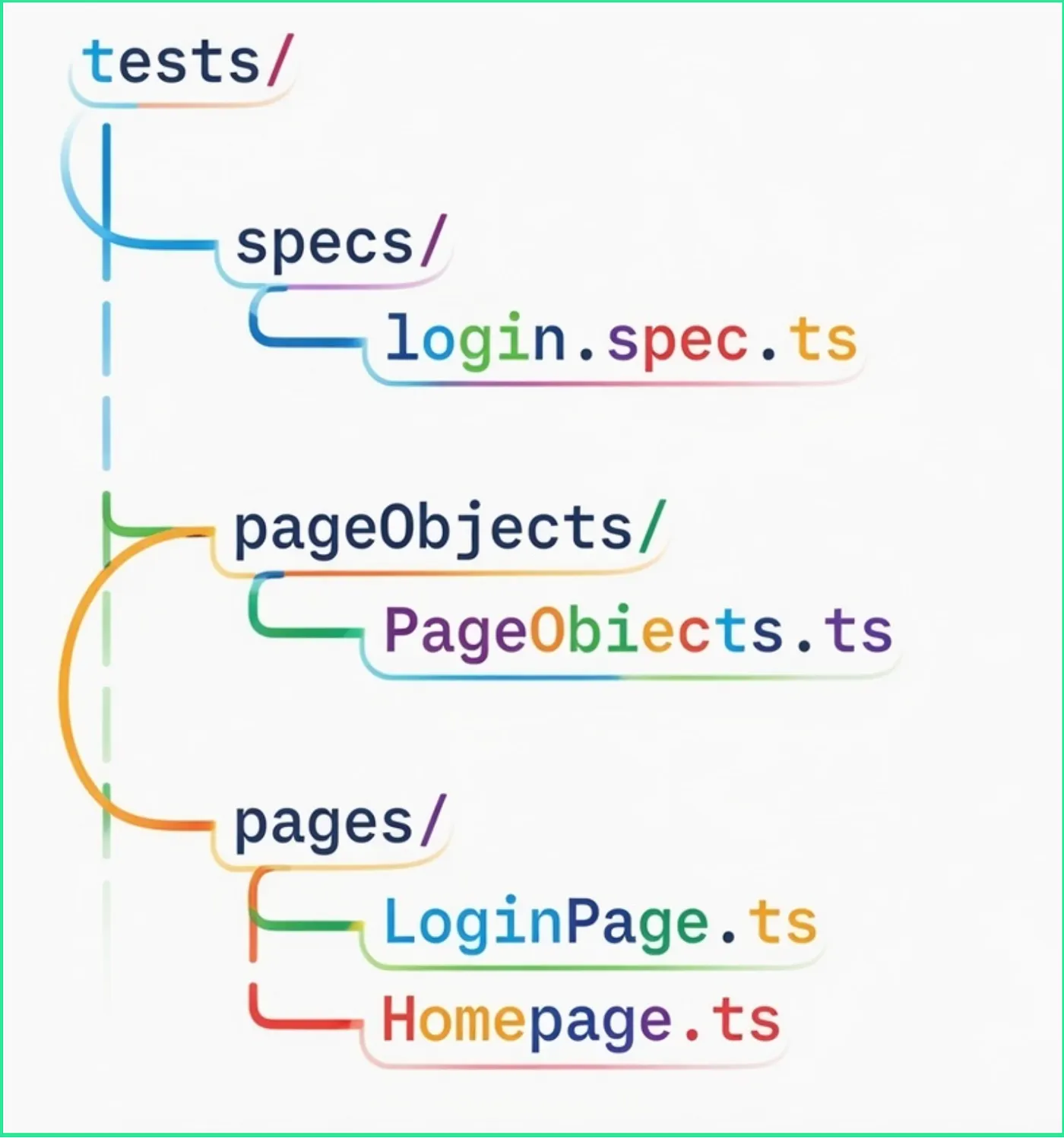
Creating the Pages
Let's create the Login and Home Pages.
LoginPage.ts
import { Page, expect } from '@playwright/test';

export class LoginPage {
  constructor(private page: Page) {}

  async goToLoginPage(baseURL: string) {
    await this.page.goto(`${baseURL}/login`);
  }

  async doLogin(username: string, password: string) {
    await this.page.fill('#username', username);
    await this.page.fill('#password', password);
    await this.page.click('#loginBtn');
  }
}
HomePage.ts
import { Page, expect } from '@playwright/test';

export class HomePage {
  constructor(private page: Page) {}

  async isUserLoggedIn() {
    await expect(this.page.locator('#logoutBtn')).toBeVisible();
  }
}
Lazy Implementation: The PageObjects Factory
The PageObjects class is the key to the Lazy Approach. It creates page objects only when requested.
PageObjects.ts
import { Page } from '@playwright/test';
import { LoginPage } from '../pages/LoginPage';
import { HomePage } from '../pages/HomePage';

export class PageObjects {
  constructor(private page: Page) {}

  createLoginPage(): LoginPage {
    return new LoginPage(this.page);
  }

  createHomePage(): HomePage {
    return new HomePage(this.page);
  }
}
Test Using the Lazy Approach
This test demonstrates how the Lazy Approach works in a Playwright automation framework — page objects are created only when needed, not upfront.
login.spec.ts
import { test } from '@playwright/test';
import { PageObjects } from '../pageObjects/PageObjects';

test('login test with Lar Pattern', async ({ page, baseURL }) => {
  const pageObjects = new PageObjects(page);

  const loginPage = pageObjects.createLoginPage();
  const homePage = pageObjects.createHomePage();

  await loginPage.goToLoginPage(baseURL);
  await loginPage.doLogin('abc', 'kailash@23');
  await homePage.isUserLoggedIn();
});
Flow of Lazy Implementation
Test starts
  ↓
Test code runs
  ↓
Access commonPage → Created on-demand ✓
  ↓
Access adminEnvVars → Created on-demand ✓
  ↓
Test ends
  ↓
sitePage was never used → Never created ✓ (Memory saved!)
Benefits: Fixture vs. Lazy
Fixture Approach
- Creates all page objects upfront
- Even unused ones
- Slower startup
- Harder to scale
Lazy Approach
- Creates only required pages
- Faster execution
- Cleaner tests
- Scales easily to 30–40+ pages
Conclusion
When your test setup involves only a small number of objects, using fixtures is a straightforward and effective approach. Fixtures provide a structured way to initialize and manage these objects, making the test setup predictable, readable, and easy to maintain.
However, as the application grows and the number of objects increases — typically 30–40 or more — eagerly creating all objects through fixtures can lead to unnecessary initialization, increased memory usage, and slower test execution. In such cases, the Lazy Approach is more suitable.
Opinions expressed by DZone contributors are their own.
Comments