

Renaming Columns in PySpark: withColumnRenamed vs toDF
Learn why toDF() outperforms withColumnRenamed in PySpark. Compare their impact on Spark’s DAG, performance, and readability for large-scale pipelines.
 CORE
·
CORE
·
If you’ve worked with PySpark DataFrames, you’ve probably had to rename columns. Either using withColumnRenamed repeatedly or toDF(). At first glance, both approaches work the same; you get the renamed columns you wanted. But under the hood, they interact with Spark’s Directed Acyclic Graph (DAG) in very different ways.
withColumnRenamedcreates a new projection layer for each rename, gradually stacking transformations in the logical plan.toDF(), on the other hand, applies all renames in a single step.
While both are optimized to the same physical execution, their impact on the DAG size, planning overhead, and code readability can make a real difference in larger pipelines.
Even small decisions like how you rename columns can add extra steps, making your pipeline more complex, harder to plan, and trickier to debug, especially with millions of rows or many chained transformations.
In this article, we’ll compare both methods, look at their query plans, and discuss which to favor in practice.
DAG Basics
When we perform operations on PySpark DataFrame (like select, filter, withColumnRenamed, toDF, etc.), Spark doesn’t execute them immediately; instead:
- Each operation is Lazy and adds a node (task) to Spark’s DAG of transformations.
- The DAG represents the sequence of transformations that Spark will execute once an action (show, collect,
withColumnRenamed,toDF, etc.) is triggered.
For example:
df.withColumnRenamed(“old”, “new”) # adds a new renaming transformation need to the DAG.
df.toDF("a", "b", "c") # also adds a transformation node to the DAG (renaming columns in bulk).
Why Does It Matter
If you chain multiple withColumnRenamed calls, each one adds a separate step to the DAG.
Example:
df = df.withColumnRenamed("a", "a1") \
       .withColumnRenamed("b", "b1") \
       .withColumnRenamed("c", "c1")
Now the DAG has three renaming steps.
Using toDF() :
df = df.toDF("a1", "b1", "c1")This adds only one renaming step in the DAG.
Example:
Consider a DataFrame:
data = [(1, "John", "Doe", "1990-01-01"),
        (2, "Jane", "Smith", "1985-05-12"),
        (3, "Sam", "Brown", "1992-07-30")]
df = spark.createDataFrame(data, ["id", "firstname", "lastname", "dob"])
Renaming Columns With “withColumnRenamed”
Let’s rename the columns of the Dataframe (firstname -> first_name, lastname -> last_name, dob -> date_of_birth) using the withColumnRenamed function.
renamed_df = (df.withColumnRenamed("firstname", "first_name").
                 withColumnRenamed("lastname", "last_name").
                withColumnRenamed("dob", "date_of_birth"))
Let's inspect the DAG using renamed_df.explain(True):
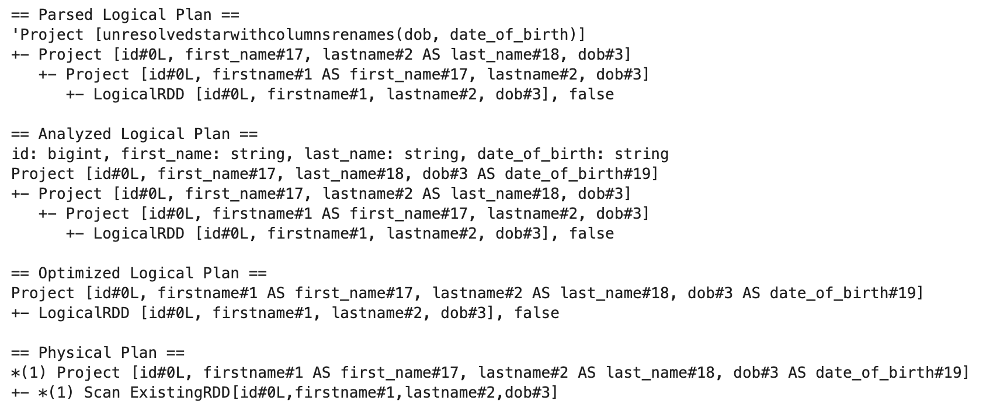
Each rename introduces a separate projection layer, leading to more nodes in the logical (unoptimized) DAG. While this does not change the actual data movement, it increases planning overhead and makes the logical plan more complex.
Renaming Columns With “toDF”
Let’s rename the columns of the Dataframe (firstname -> first_name, lastname -> last_name, dob -> date_of_birth) using the toDF function.
renamed_todf = df.toDF("id", "first_name", "last_name", "date_of_birth")
renamed_todf.show()
renamed_todf.explain(True)
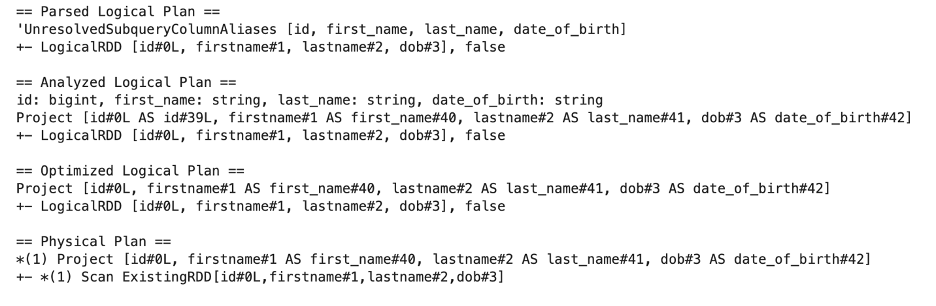
With toDF Spark builds a single projection directly, which means only one transformation node is added to the DAG.
This distinction becomes important in larger pipelines, where reducing DAG complexity enhances performance, planning speed, and maintainability. In most cases, prefer toDF() for bulk renaming, and reserve withColumnRenamed for isolated or programmatically determined renames.
Real-World Timing: Glue Job Benchmark
To see if chained withColumnRenamed calls add real overhead, here's a simple timing test performed on a Glue job using a DataFrame with 600,000 rows.
import time
from pyspark.sql import SparkSession

spark = SparkSession.builder.appName("RenameExample").getOrCreate()
big_data = [(i, f"name_{i}", f"lname_{i}", "2000-01-01", "a1", "dallas", "123", "dallas", "123", "[email protected]") for i in range(600000)]
big_df = spark.createDataFrame(big_data, ["id", "firstname", "lastname", "dob", "address", "city", "zip", "county", "phone", "email"])

#With withColumnRenamed
start = time.time()
df1 = (big_df
    .withColumnRenamed("firstname", "first_name")
    .withColumnRenamed("lastname", "last_name")
    .withColumnRenamed("dob", "date_of_birth")
    .withColumnRenamed("address", "address_1")
    .withColumnRenamed("city", "city_1")
    .withColumnRenamed("zip", "postalcode")
    .withColumnRenamed("county", "county")
    .withColumnRenamed("phone", "primary_phone")
    .withColumnRenamed("email", "personal_email"))
print("withColumnRenamed Count:", df1.count())
print("withColumnRenamed time:", time.time() - start)

#With toDF
start = time.time()
df2 = big_df.toDF("id", "first_name", "last_name", "date_of_birth", "address_1", "city_1", "postalcode", "county", "primary_phone", "personal_email")
print("toDF Count:", df2.count())
print("toDF time:", time.time() - start)
Example output:
withColumnRenamed Count: 600000 withColumnRenamed time: 14.484004497528076
toDF Count: 600000 toDF time: 0.8844232559204102
In this benchmark, renaming columns using toDF was over 16 times faster than chaining three withColumnRenamed calls on a DataFrame with 600,000 rows. This result vividly demonstrates the practical cost of chaining multiple withColumnRenamed transformations: each call adds separate projection nodes in Spark’s logical plan, leading to increased planning overhead and slower execution.
Conclusion
For large datasets or pipelines with many transformations, always prefer toDF() for renaming columns in bulk. Not only does this approach result in more efficient execution, but it also keeps your logical plans cleaner and your code more readable. This aligns directly with Spark performance best practices: minimize unnecessary stages in the DAG whenever possible for optimal speed and maintainability.
Opinions expressed by DZone contributors are their own.