

Fetching Information Randomly From JSON Using Node, Nuxt, Express
Nuxt.js, Node.js and Express code to filter out data based on user requirement and select data randomly from the filtered data.
 ·
·
Join the DZone community and get the full member experience.
Join For FreeNuxt.js is a popular framework for Vue.js, and it is widely used for websites that require server-side rendering. It is similar to the Next.js framework for React.js. In this article, I’m going to share how you can fetch values randomly from a static JSON file with a Node and Express server.
To make this example more realistic, we will store some words with their meanings in the words.json file in a static folder at the root. The necessary frameworks and libraries need to be installed on your machine, and basic knowledge is required:
- Node.js/ express
- Vue.js/Nuxt.js CLI
- JSON
- npm
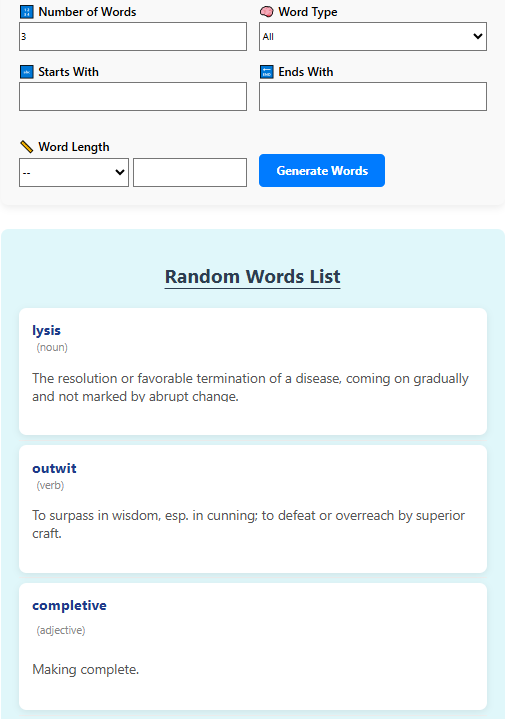
(Source)
#static/words.json
[
  {
    "word": "lysis",
    "type": "noun",
    "meaning": "The resolution or favorable termination of a disease, coming on gradually and not marked by abrupt change."
  },
  {
    "word": "outwit",
    "type": "verb",
    "meaning": "To surpass in wisdom, esp. in cunning; to defeat or overreach by superior craft."
  },
  {
    "word": "completive",
    "type": "adjective",
    "meaning": "Making complete."
  }
]
The words.json file above contains a few words, each with its type and meaning.
Next, we need an Express server that listens for API calls from the front Nuxt/Vue page.
#server.js
const path = require('path');
const express = require('express');
const cors = require('cors');
const fs = require('fs');
const app = express();
const PORT = 3001;

app.use(cors());

let words = JSON.parse(fs.readFileSync('static/words.json', 'utf-8'));

words = words.map(w => ({
  ...w,
  type: w.type ? w.type.trim().toLowerCase() : ''
}));


app.get('/api/types', (req, res) => {
  const uniqueTypes = [...new Set(words.map(w => w.type))].sort();
  res.json(uniqueTypes);
});

//Random word generator with filters
app.get('/api/random', (req, res) => {
  let filtered = [...words];
  const { type, start, end, op, len, count } = req.query;

  const requestedType = type ? type.trim().toLowerCase() : '';
  const startLetter = start ? start.trim().toLowerCase() : '';
  const endLetter = end ? end.trim().toLowerCase() : '';
  const wordLength = len ? parseInt(len) : null;
  const limit = parseInt(count) || 5;

  if (startLetter) {
    filtered = filtered.filter(w => w.word?.toLowerCase().startsWith(startLetter));
  }

  if (endLetter) {
    filtered = filtered.filter(w => w.word?.toLowerCase().endsWith(endLetter));
  }

  if (requestedType && requestedType !== 'all') {
    filtered = filtered.filter(w => w.type === requestedType);
  }

  if (op && wordLength) {
    if (op === '=') filtered = filtered.filter(w => w.word.length === wordLength);
    else if (op === '<') filtered = filtered.filter(w => w.word.length < wordLength);
    else if (op === '>') filtered = filtered.filter(w => w.word.length > wordLength);
  }

  const result = [];
  const available = [...filtered];
  while (result.length < limit && available.length > 0) {
    const index = Math.floor(Math.random() * available.length);
    result.push(available.splice(index, 1)[0]);
  }

  res.json(result);
});

app.listen(PORT, () => {
  console.log(`Server running at http://localhost:${PORT}`);
});
As the Nuxt.js server runs on port 3000 by default, we have specified port number 3001.
Next up is the Vue/nuxt.js code. With an input selection form and a “generate words” button.
#pages/index.vue
        <section class="card">
  <div class="filters">
    <div class="field">
      <label>Number of Words</label>
      <input type="number" min="1" max="100" v-model.number="wordCount" />
    </div>

    <div class="field">
      <label>Word Type</label>
      <select v-model="wordType">
        <option value="All">All</option>
        <option value="Noun">Noun</option>
        <option value="Verb">Verb</option>
        <option value="Adjective">Adjective</option>
        <option value="past participle">Past Participle</option>
        <option value="plural">Plural</option>
        <option value="preposition">Preposition</option>
      </select>
    </div>

    <div class="field">
      <label>Starts With</label>
      <input type="text" maxlength="1" v-model="startLetter" />
    </div>

    <div class="field">
      <label>Ends With</label>
      <input type="text" maxlength="1" v-model="endLetter" />
    </div>

    <div class="field">
      <label>Word Length</label>
      <div class="length-filter">
        <select v-model="lengthOperator">
          <option value="">--</option>
          <option value="=">=</option>
          <option value="<"><</option>
          <option value=">">></option>
        </select>
        <input type="number" min="1" v-model.number="wordLength" />
      </div>
    </div>

    <div class="action">
      <button @click="getFilteredWords">Generate Words</button>
    </div>
  </div>
</section>


      <section class="results">
  <h2>Random Words List</h2>

<div class="results-list">

  <div v-show="!results.length" class="placeholder">
    <p>Your generated words will appear here.</p>
  </div>

  <ul v-show="results.length">
    <li v-for="(word, index) in results" :key="index" class="result-item">
      <div class="word-card">
        <strong class="word-title">{{ word.word }}</strong>
        <small v-if="word.type" class="word-type">({{ word.type }})</small>
        <p class="word-meaning">{{ word.meaning }}</p>
      </div>
    </li>
  </ul>

</div>
</section>

This is the normal HTML form that will be placed inside <template></temple>.

This is the Vue.js variables section:

data() {
    return {
      menuOpen: false,
      results: [],
        wordCount: 3,
        wordType: 'All',
        startLetter: '',
        endLetter: '',
        lengthOperator: '',
        wordLength: null
    };
  },

Below is the code to send request to express server:

async getFilteredWords() {
        const params = new URLSearchParams({
          count: this.wordCount,
          type: this.wordType,
          start: this.startLetter,
          end: this.endLetter,
          op: this.lengthOperator,
          len: this.wordLength
        });

const res = await fetch(`http://localhost:3001/api/random?${params.toString()}`);

        this.results = await res.json();
        this.$nextTick(() => {
    const resultsSection = document.querySelector('.results');
    if (resultsSection) {
      resultsSection.classList.add('show');
      resultsSection.classList.add('highlight');


setTimeout(() => {
        resultsSection.classList.remove('highlight');
      }, 1500);
    }
  });
      }
And done. We have successfully set up the words.json file inside the static folder (static/words.json). Vue.js code inside pages/index.vue file. Express server code is inside the/server.js file.
Run the project:
To run the Nuxt server: “npm run dev.”
To run the Express server: “node server.js.”
Once these two commands are running in cmd, open a web browser and go to: http://localhost:3000/.
Project Explanation Step by Step
In this code, we have developed a random word finder from the words.json file, and we have shown randomly generated words to the users. In this code, we have used Vue.js/Nuxt.js for the front end and node/express server for the backend. Vue/Nuxt server is running on localhost:3000, and the Express server is running on localhost:3001.
Step 1: Front-End With Vue.js
Vue.js gathers the selected word options and sends an API request to the backend Express server running on port 3000. First, Vue.js binds all the user input options to params:
async getFilteredWords() {
        const params = new URLSearchParams({
          count: this.wordCount,
          type: this.wordType,
          start: this.startLetter,
          end: this.endLetter,
          op: this.lengthOperator,
          len: this.wordLength
        });
Once bound, the information is sent to the backend with the following code.
Step 2: The Backend Server With Express.js Server
The backend API in the Express server is triggered with app.get(). First, the Express server fetches word information from the static words.json file and stores words in a filtered constant. Then processes the incoming information from the front-end and, as per the user's requirements, filters out words fetched from the words.json file. Once filtered, it sends words to the front end with res.json().
Step 3: Show Words to the Users
In the Vue.js front end, we have used the async/await syntax. So, the following code line makes Vue.js wait until it gets a response from the Express.js server.
Conclusion
So, this is a simple full-stack code to pick information from the static JSON file randomly. In this article, Node.js is used for the back end to retrieve data randomly, and Vue.js is used for the front-end user interface. This looks like a few simple lines of code, but this code can be used in several educational and fun applications that process information randomly.
Opinions expressed by DZone contributors are their own.
Comments