

Efficiently Reading Large Excel Files (Over 1 Million Rows) Using the Open-Source Sjxlsx Java API
The primary objective of this article is to prevent the "out of memory-Java heap issue" when reading large Excel files using the open-source "sjxlsx" library.
Join the DZone community and get the full member experience.
Join For FreeIf you are a developer, regardless of the technologies you use, at some point, you will face the challenge of handling large Excel files.
Most commonly, you will see the "out of memory" error when handling these files.
Here is the requirement:
You get a workbook with 100 spreadsheets, and each of them has 1 million records with a minimum of 100 columns.
For your reference, here's how many rows each Excel version can support:
- 1,048,576 rows – Excel 365, 2013, 2010, 2007
- 65,536 rows – Excel 2003 and earlier versions
Cost and Hosting Server Limitations
- Third-party license purchase is not feasible. Open source is allowed.
- Deployment should be on average-tier cloud environments (4 GB disk/4 GB RAM or less) or on-premises Windows Server (16/32 GB RAM) already loaded with 10+ running applications.
How would you handle this situation?
Let's explore the current digital market. Are there any open-source solutions available to meet this requirement?
I can’t use “interop” when your cloud runs on "Linux OS," and it also causes intermittent hang issues in multi-threaded applications.
Most of them will say that the popular library is the "Apache POI" streaming library.
Let’s proceed with a practical implementation using Apache POI.
To get the large dataset (Excel) file, we have N number of websites, such as awesome-public-datasets, Google Dataset Search, and World Bank Data.
Personally, I frequently visit Kaggle. Let's download the container Dataset as a 1.9GB CSV file, and then save it as an Excel file (.XSLX), which became around a 600 MB XLSX file.
The sheet includes 87 columns and 1048576 rows.
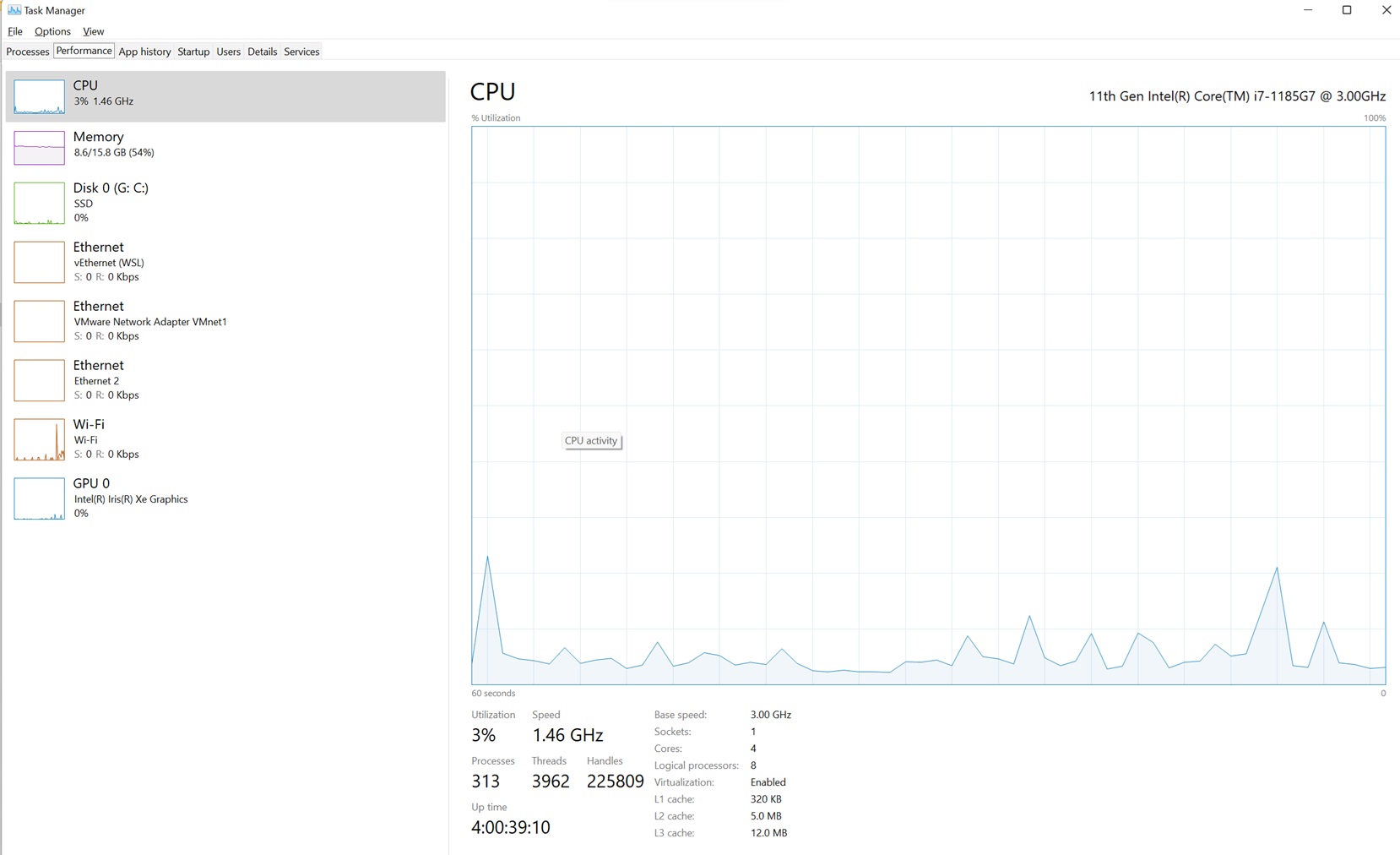
Before we run the solution, let me capture my laptop's resource usage so that we can compare later.
Resource Usage
- CPU: 3%
- Memory: 54%
IDE
I am using Eclipse IDE (v: 4.36.0).
Apache POI
I am using the latest Apache POI 5.2.5 and other dependency JARS available from Apache POI.
Source Code
Here, I am just attempting to read the sheet name from the workbook, not the rows.
public static void main(String[] args) throws Exception {
		String filePath = "C:\\POC\\Containers_Dataset.xlsx";
		ReadExcelbyApachePOI(filePath);
	}

/*List out sheet name*/
	static void ReadExcelbyApachePOI(String filePath) throws Exception {
		try (OPCPackage opcPackage = OPCPackage.open(new File(filePath), PackageAccess.READ)) {
			XSSFWorkbook workbook = new XSSFWorkbook(opcPackage);
			XSSFReader xssfReader = new XSSFReader(opcPackage);
			StylesTable styles = xssfReader.getStylesTable();
			XSSFReader.SheetIterator iter = (XSSFReader.SheetIterator) xssfReader
	                .getSheetsData();
			while (iter.hasNext()) {
				InputStream stream = iter.next();
	            String sheetName = iter.getSheetName();
	            System.out.println("Sheetname: " + sheetName);
			}

		} catch (IOException e) {
			e.printStackTrace();
		}
	}
Result
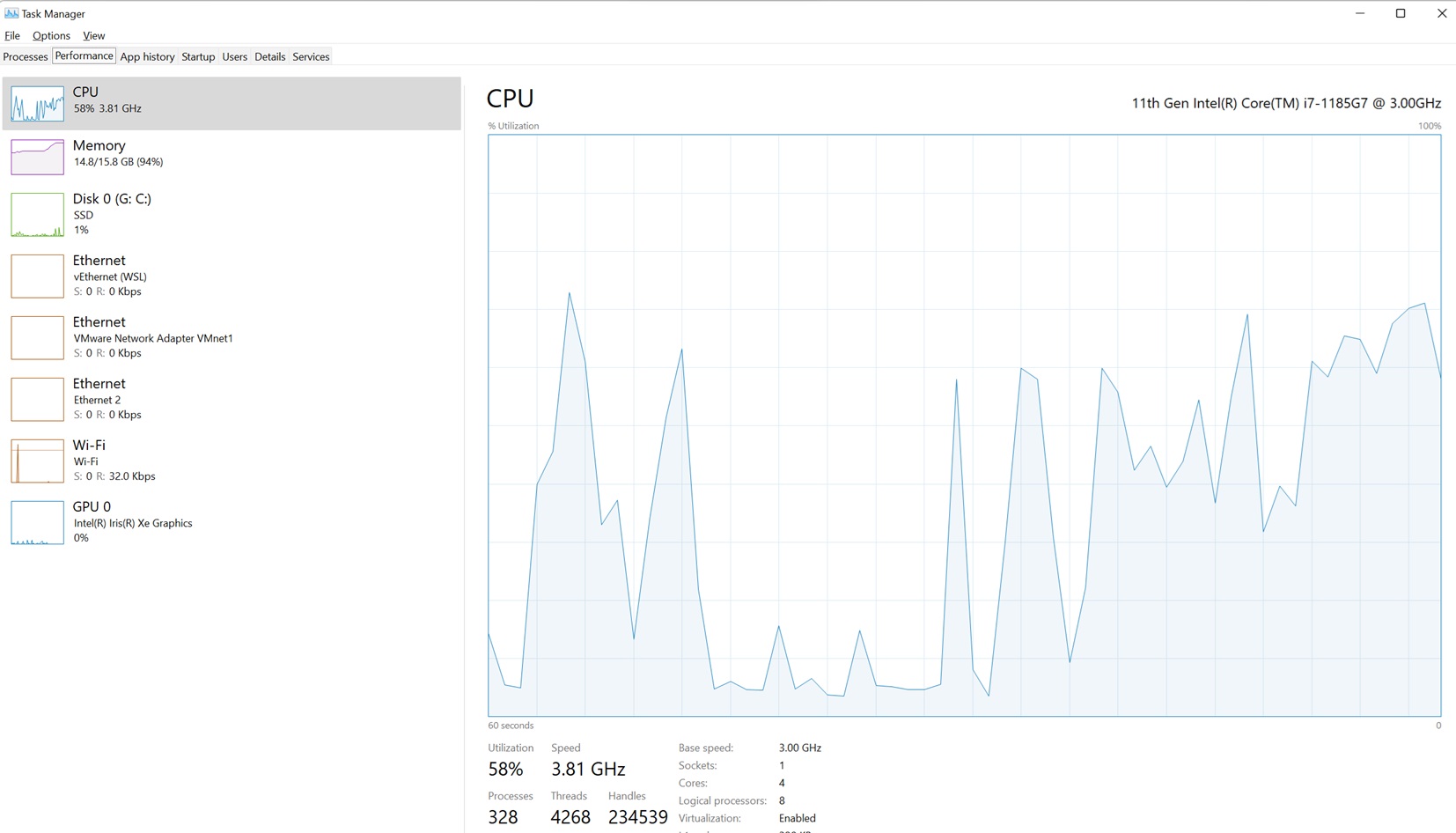
Encountering "Java heap space - Out of memory error."
Exception in thread "main" java.lang.OutOfMemoryError: Java heap spaceResource Usage
- CPU: 58%
- Memory: 94%
Let us try with the sjxlsx open-source API.
It’s an open-source Java API Source Code; this project was first published on Google Code, and it seems unmaintained. In GitHub, it is available for anyone who can download and update the changes for their needs.
"Memory" and "speed" are primary goals of this API.
It provides two modes, which are "classic" and "stream."
- Classic – All records of the sheet will be loaded.
- Stream – Read one record at a time.
Microsoft XLSX uses XML+zip (OOXML) to store the data. So, to be fast, "sjxlsx" uses STAX for XML input and output.
Source Code
public static void main(String[] args) throws Exception {
		String filePath = "C:\\POC\\Containers_Dataset.xlsx";
		SimpleXLSXWorkbook workbook = newWorkbook(filePath);
		testLoadALL(workbook);
	}
private static SimpleXLSXWorkbook newWorkbook(String filePath) {
		return new SimpleXLSXWorkbook(new File(filePath));
	}
	/*Read Each Row*/
	private static void printRow(int rowPos, com.incesoft.tools.excel.xlsx.Cell[] row) {
		int cellPos = 0;
		for (com.incesoft.tools.excel.xlsx.Cell cell : row) {
			System.out.println(com.incesoft.tools.excel.xlsx.Sheet.getCellId(rowPos, cellPos) + "=" + cell.getValue());
			cellPos++;
		}
	}

	/*Load & Read workbook
	 * false => Read each row
	 * true  => Load all rows
	 */
	public static void testLoadALL(SimpleXLSXWorkbook workbook) {
		com.incesoft.tools.excel.xlsx.Sheet sheetToRead = workbook.getSheet(0,false);
		SheetRowReader rowreader = sheetToRead.newReader();
		int rowPos = 0;
		while (rowreader != null) {
			com.incesoft.tools.excel.xlsx.Cell[] row = rowreader.readRow();
			printRow(rowPos, row);
			rowPos++;

		}

	}
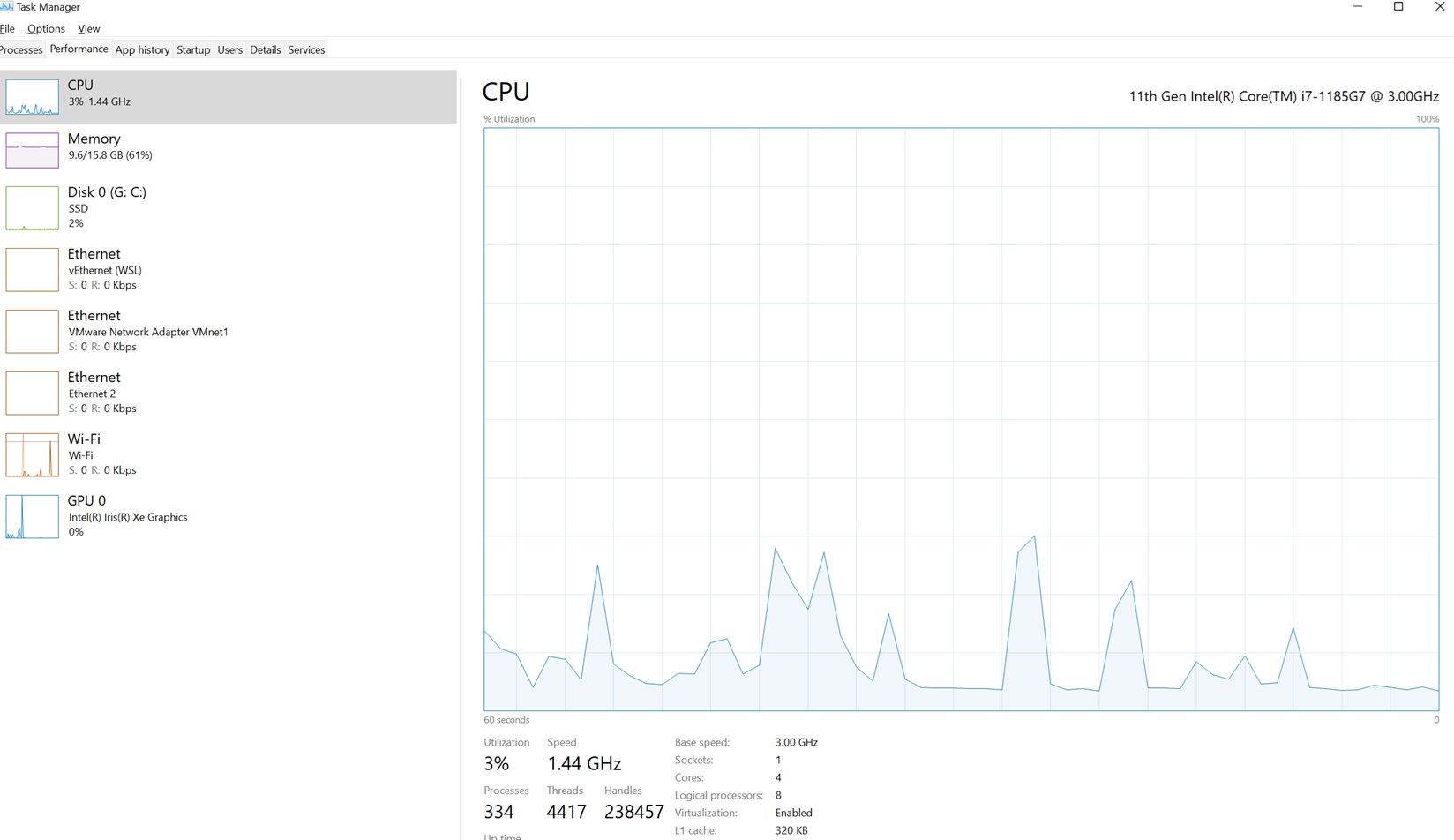
Resource Usage
- CPU: 3% (No changes)
- RAM: 61% (7% usage: 1 GB usage)
Output
BN1048519=40298
BO1048519=0
BP1048519=0
BQ1048519=0
BR1048519=0
BS1048519=610
BT1048519=0
BU1048519=1
BV1048519=64240
BW1048519=923
BX1048519=158
BY1048519=32
BZ1048519=0
CA1048519=0
CB1048519=0
CC1048519=0
CD1048519=0
CE1048519=0
CF1048519=0
CG1048519=0
CH1048519=10000206
CI1048519=0
A1048520=100.64.0.2-10.16.0.9-35919-8080-6
B1048520=100.64.0.2
C1048520=35919
D1048520=10.16.0.9
E1048520=8080
F1048520=6
G1048520=45266.83932053241
H1048520=41626
I1048520=6
J1048520=5
K1048520=515
L1048520=357
M1048520=515
N1048520=0
O1048520=85.8333333333333
P1048520=210.24786958888899
Q1048520=357
R1048520=0
S1048520=71.400000000000006
T1048520=159.65525359348399
U1048520=20948.445682986501
V1048520=264.25791572574798
W1048520=4162.5999999999904
X1048520=12728.124713056101
Y1048520=40374
Z1048520=9
AA1048520=41626
AB1048520=8325.2000000000007
AC1048520=17922.528077813098
AD1048520=40374
AE1048520=29
AF1048520=41594
AG1048520=10398.5
AH1048520=20011.5685292282
AI1048520=40406
AJ1048520=26
AK1048520=1
AL1048520=1
AM1048520=0
AN1048520=0
AO1048520=0
AP1048520=0
AQ1048520=200
AR1048520=168
AS1048520=144.14068130495301
AT1048520=120.11723442079401
AU1048520=0
AV1048520=515
AW1048520=79.272727272727295
AX1048520=179.87445116474399
AY1048520=32354.8181818181
AZ1048520=2
BA1048520=2
BB1048520=0
BC1048520=2
BD1048520=10
BE1048520=0
BF1048520=0
BG1048520=0
BH1048520=0.83333333333333304
BI1048520=79.272727272727195
BJ1048520=85.8333333333333
BK1048520=71.400000000000006
BL1048520=0
BM1048520=0
BN1048520=0
BO1048520=0
BP1048520=0
BQ1048520=0
BR1048520=0
BS1048520=46
BT1048520=0
BU1048520=32
BV1048520=64240
BW1048520=502
BX1048520=1
BY1048520=32
BZ1048520=0
CA1048520=0
CB1048520=0
CC1048520=0
CD1048520=0
CE1048520=0
CF1048520=0
CG1048520=0
CH1048520=41626
CI1048520=0
A1048521=100.64.0.2-10.16.0.9-9479-8080-6
B1048521=100.64.0.2
C1048521=9479
D1048521=10.16.0.9
E1048521=8080
F1048521=6
G1048521=45266.835683206016
H1048521=111205
I1048521=6
J1048521=5
K1048521=537
L1048521=357
Performance Results
Woo-hoo! I can read the records.
The winner is "sjxlsx." It has been proven that this library consumes less than 1 GB of memory, compared to the higher usage by Apache POI.
It is an excellent open-source Java API for reading large Excel datasets.
Additional Features
In addition to that, it supports writing Excel and offers rich data formatting in sheets.
public static void main(String[] args) throws Exception {
		// WRITE - we take WRITE as a special kind of MODIFY
		 SimpleXLSXWorkbook workbook = newWorkbook();
        OutputStream output = ExcelOutput("write");
        WriteExcel(workbook, output);
        output.close();
	}
 private static SimpleXLSXWorkbook newWorkbook() {
         return new SimpleXLSXWorkbook(new File("/sample.xlsx"));
 }
	 private static OutputStream ExcelOutput(String suffix) throws Exception {
         return new BufferedOutputStream(new FileOutputStream("/sample_"
                         + suffix + ".xlsx"));
 }

	public static void WriteExcel(SimpleXLSXWorkbook workbook,
            OutputStream outputStream) throws Exception {
		com.incesoft.tools.excel.xlsx.Sheet sheet = workbook.getSheet(0);
		WriteRecords(workbook, sheet, 0);
    workbook.commit(outputStream);
}
	 static public void WriteRecords(SimpleXLSXWorkbook wb, com.incesoft.tools.excel.xlsx.Sheet sheet,
             int rowOffset) {
     int columnCount = 10;
     int rowCount = 10;
     int offset = rowOffset;
     for (int r = offset; r < offset + rowCount; r++) {
             int modfiedRowLength = sheet.getModfiedRowLength();
             for (int c = 0; c < columnCount; c++) {
                     sheet.modify(modfiedRowLength, c, r + "," + c, null);
             }
     }
}
Writing a Richly Styled Row
public static void WriteRichStyleRow(SimpleXLSXWorkbook wb, com.incesoft.tools.excel.xlsx.Sheet sheet)
              throws Exception {
      Font font = wb.createFont();
      font.setColor("FFFF0000");
      Fill fill = wb.createFill();
      fill.setFgColor("FF00FF00");
      CellStyle style = wb.createStyle(font, fill);

      RichText richText = wb.createRichText();
      richText.setText("test_text");
      Font font2 = wb.createFont();
      font2.setColor("FFFF0000");
      richText.applyFont(font2, 1, 2);
      sheet.modify(0, 0, (String) null, style);
      sheet.modify(1, 0, richText, null);
}
Summary
Ultimately, "sjxlsx" provides an efficient, lightweight way to read large Excel files without infrastructure headaches.
Thank you!
Opinions expressed by DZone contributors are their own.
Comments