

Regex in Action: Practical Examples for Python Programmers
Explore how to use Python Regex for tasks like text extraction, validation, and log parsing with simple examples for string processing and automation.
Regex (Regular Expressions) is a powerful tool that is embedded inside Python which is a sequence of characters that define search patterns. Regex allows one to do string searching, string matching and manipulating strings based on the search pattern to do the operations like text extraction, data validation and search and replace functions. Regex is used whether we are processing large datasets, web scraping or parsing the logs. Let us explore some real-world examples and use cases to better understand Regex.
Below are a few examples where Regex is greatly utilized:
1. Online Form Validation
- Email ID validation: validating if an email address follows the correct format (e.g., [email protected])
- Phone number validation: validating phone numbers are formatted correctly (e.g., (987) 654-3210).
- Password strength: validating if the set password meets the criteria – uppercase & lowercase letters, alphanumeric, numbers, and any special characters.
2. Search and Replace Text
- Find and replace text: Search for specific word or phrases in a document and replace them with alternative text.
- Identifying and replacing any profanity texts or abusive or offensive words or inappropriate content.
- Reformatting text: Modifying a date format for example from YYYY-MM-DD to MM/DD/YYYY.
3. Data Cleansing
- Cleaning unwanted information: Removing unwanted information like additional spaces, special characters or any other formatting mistakes in the document.
4. Text Extraction
- Extracting information like first name, last name, address, age or other such relevant information from unstructured text whose source could be anywhere like Facebook or Instagram, LinkedIn or any social media.
5. Data Scraping
- Extracting specific patterns of data from the internet or specific documents.
- Scraping of stock prices or product names from any website / url.
6. Text Tokenization
- Expanding or abbreviations or splitting a specific text into words, sentences, or paragraphs based on specific delimiters.
7. Analysis of Log Files
- Checking and extracting server logs information, error messages, timestamps, or IP addresses.
- Identifying specific log patterns for debugging or monitoring.
Now let us deep dive into a few of them with specific code reviews.
- Email Extraction / Email Validation
- Phone number Extraction / Phone Number Validation
- Web scraping
- Log Parsing
- Dates Extraction
Email Extraction / Email Validation
In B2B and B2C business, email extraction is an important process in various applications which involves identifying and extracting the email addresses from large text documents, webpages or from customer survey results. The email addresses collected will be used for customer outreach programs, marketing campaigns or to send the newsletters. Email extraction by regex module simplifies the process of organizing contact information, making it more efficient and scalable and also ensures accuracy and speed in reaching out to various customers.
- Extracting the emails from large text documents.
- Email extraction from the Contact us page.
- Extracting the email from invoices, sales documents.
In the below example we plan to extract email ID’s from a URL which is the contact us page of the organization.
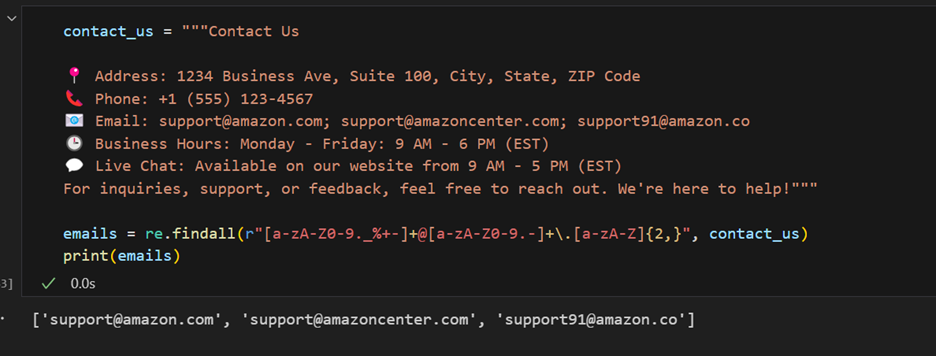
From the contact us contents, you can extract all the emails that were provided.
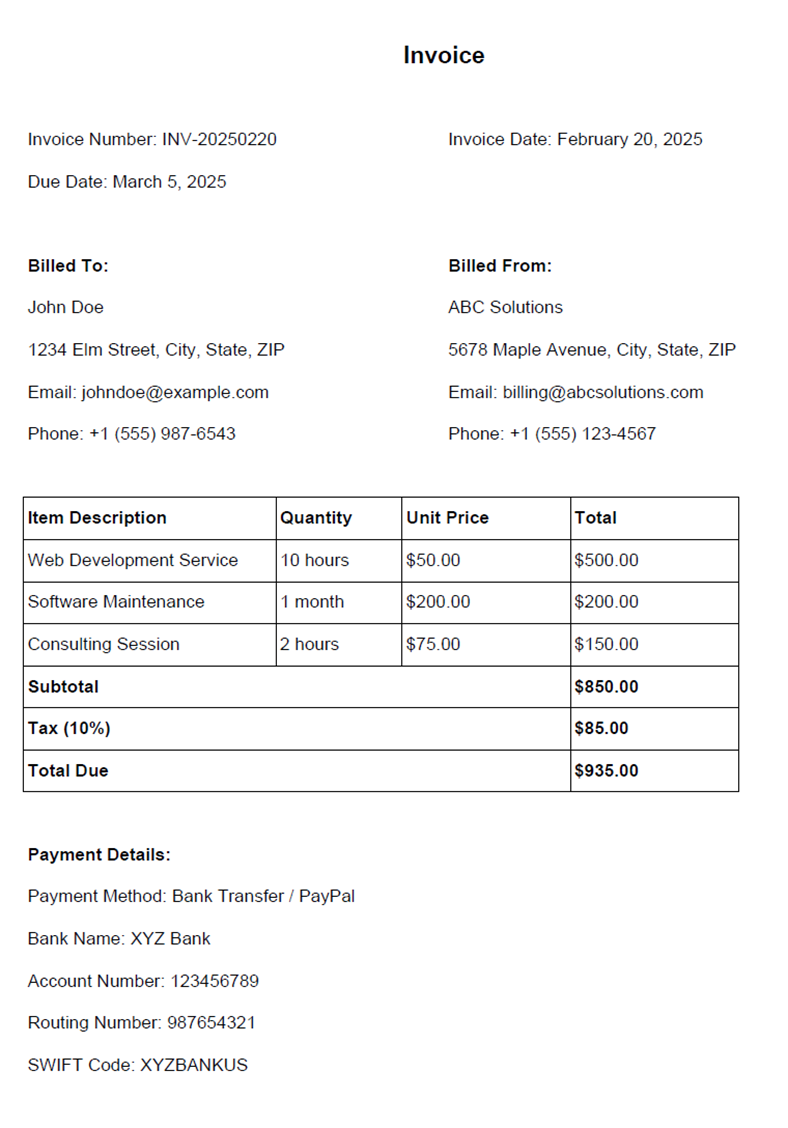
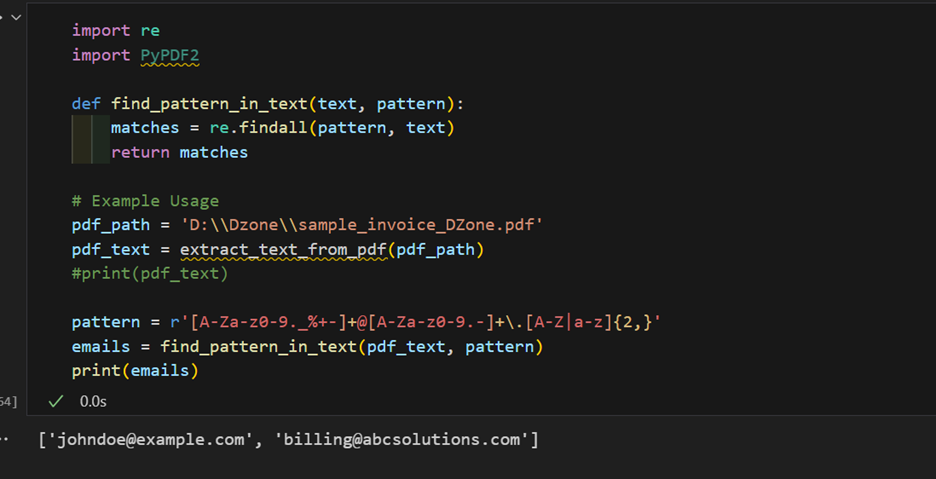
From the invoice documents, the emails can be extracted. Below is a sample Invoice Document from where we plan to extract email ID.
Phone Number Extraction / Phone Number Validation
Phone number extraction and validation are the important steps in many applications like data processing, customer databases and candidate databases.
Phone number extraction involves extracting the phone numbers from large text documents, resumes and from websites. Regex will help in extracting the phone numbers of various formats by giving patterns that include parenthesis, hyphens, dots and international prefixes.
Phone number validation helps in validating the numbers to be of valid length, ensuring the correct country code is used and the right patterns used for landline and mobile numbers. Both extraction and validation of phone numbers help in maintaining the data integrity.
Web Scraping
Web scraping is the automated process of collecting data from websites, often using scripts to extract specific content like text, links, or images for analysis or reuse. Python is a popular language for web scraping due to its powerful libraries like BeautifulSoup, requests, and Selenium.
There are various applications for web scraping and it includes scraping the product information from the E-commerce websites, scraping the job listings from the career websites, scraping the weather data, scraping the movies and its rating information and collecting the sports statistic and player’s score details etc.
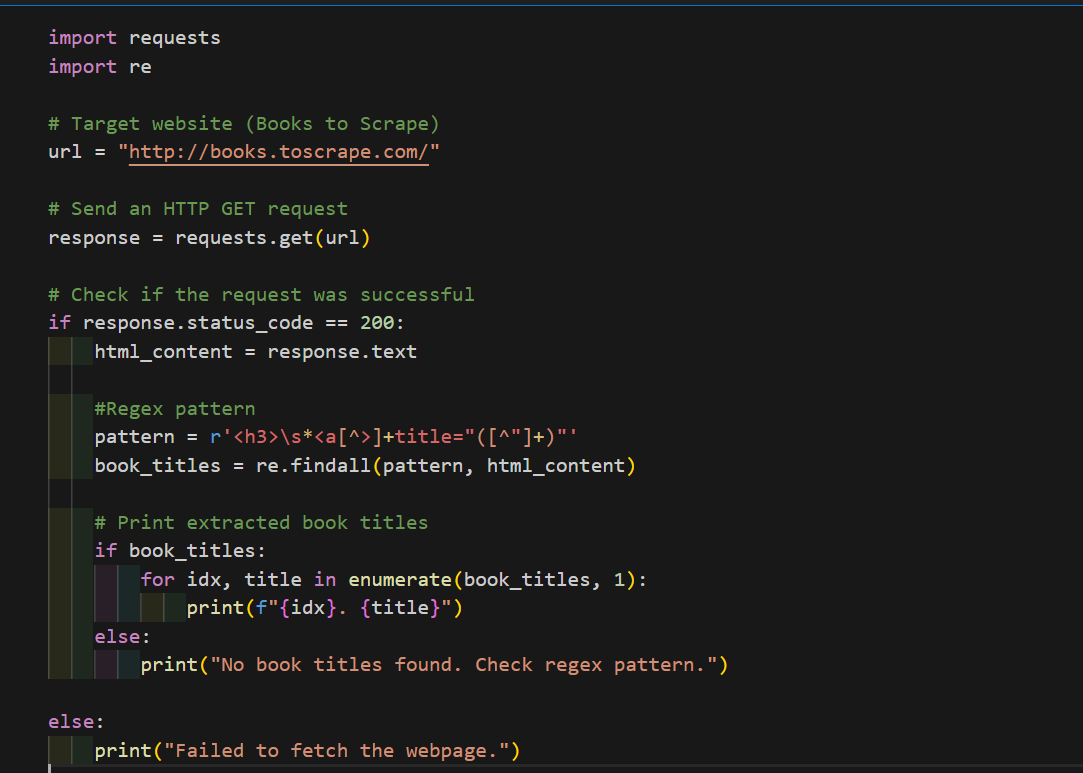
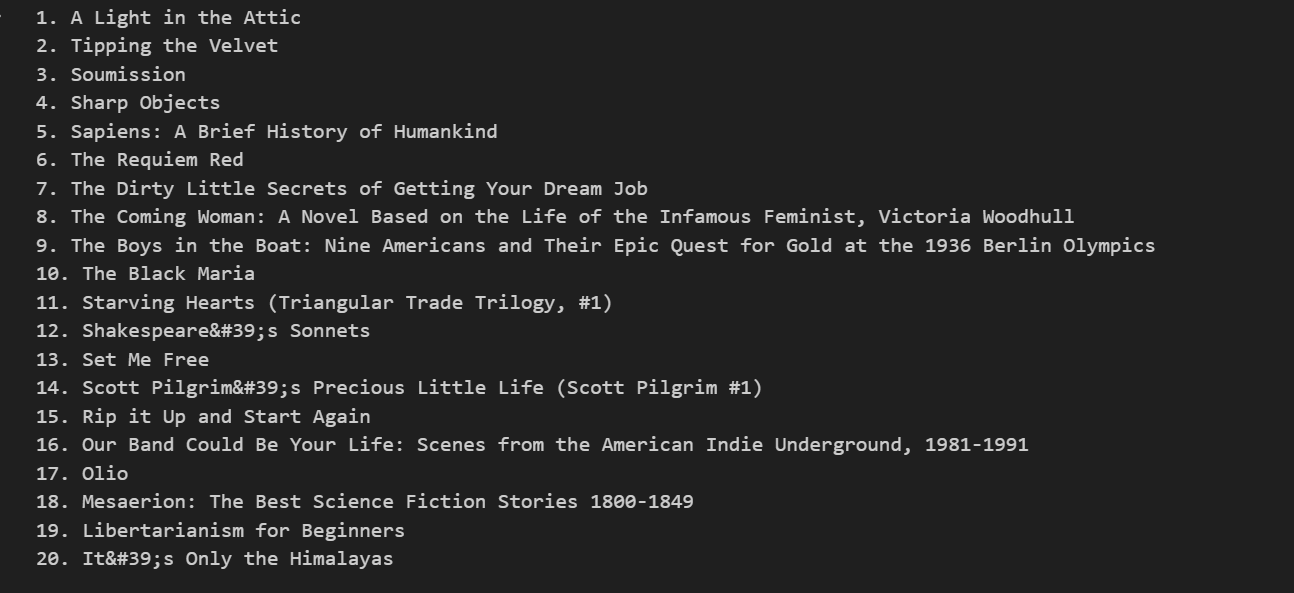
The following is the example to extract the book names from the website “All products | Books to Scrape - Sandbox".
Log Parsing
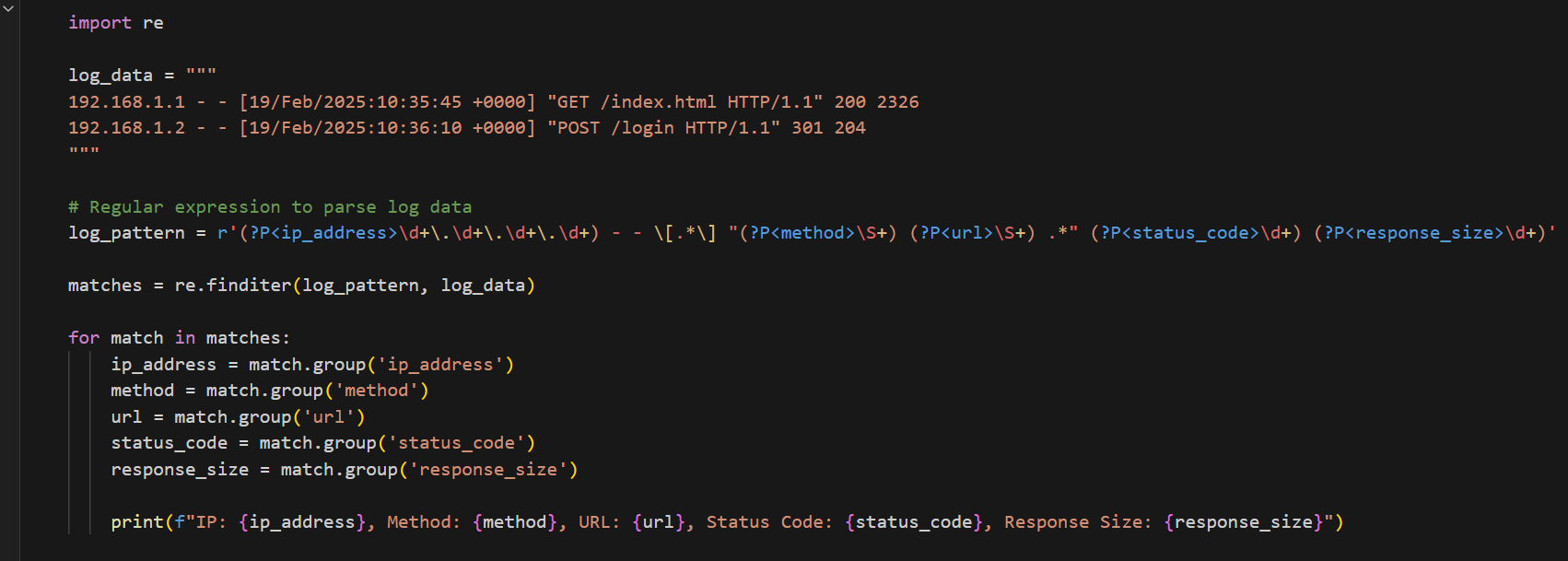
Log parsing refers to the process of analyzing and extracting meaningful data from log files. These log files can come from servers, applications, web traffic, or system events. Log parsing is an essential part of monitoring, troubleshooting, and analyzing system behavior.

Extracting Dates
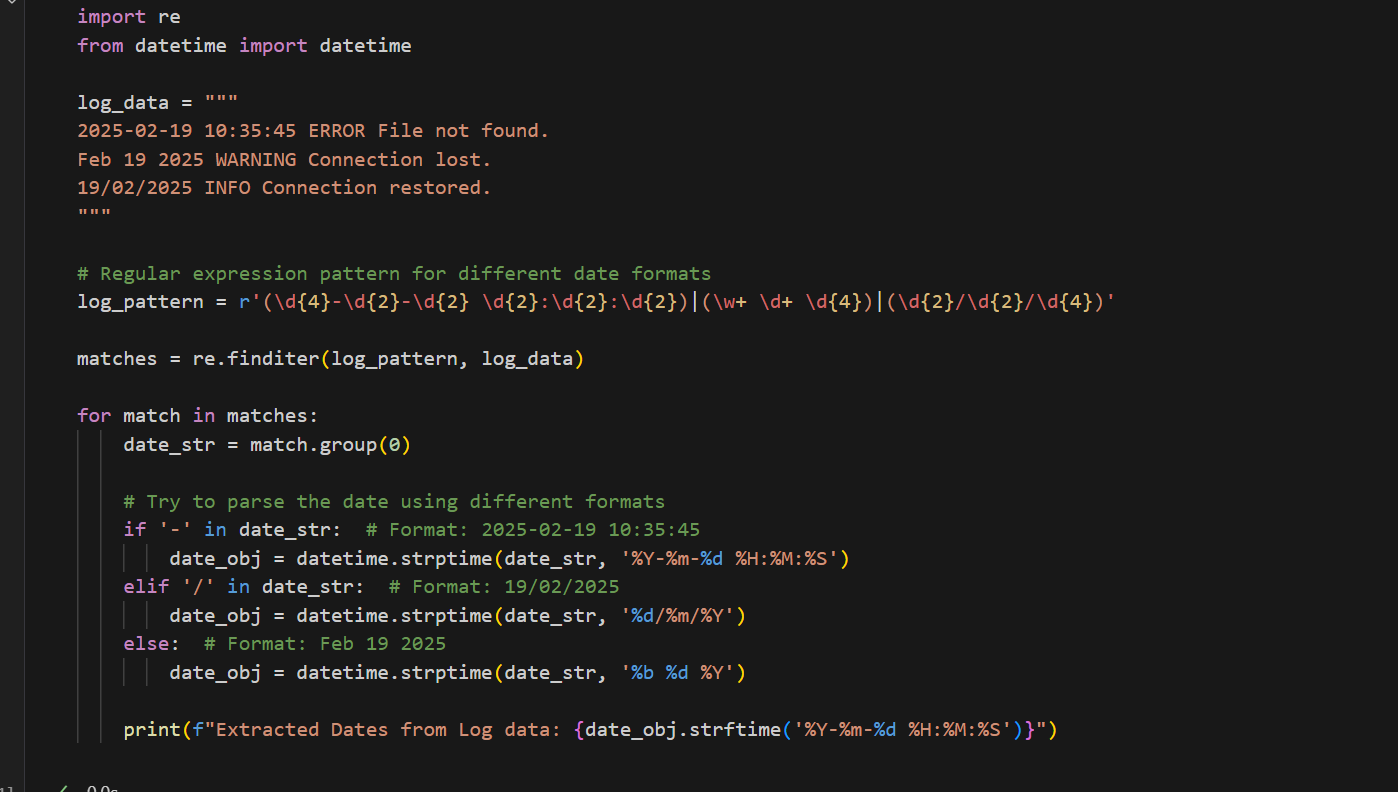
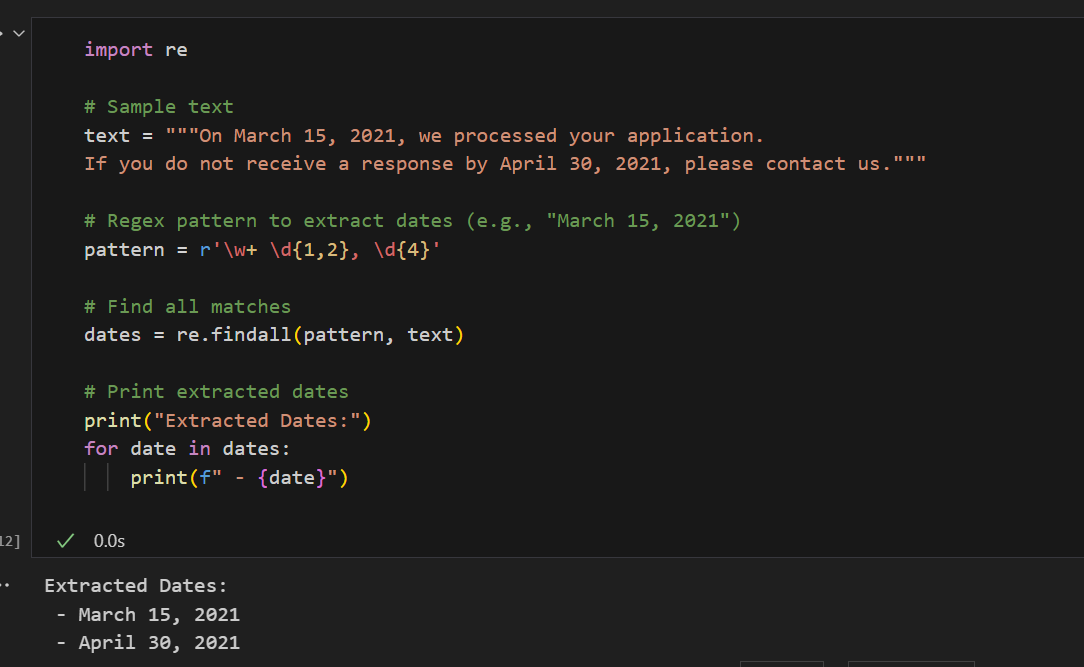
Extracting dates from text is a common task in many real-world scenarios. Dates might appear in logs, documents, user input, or web scraping results.
Some code examples to parse the dates using Regex.

Finding and Replacing Text
Finding and replacing text is a common task in Python, especially when dealing with large amounts of text, data processing, or cleaning content from documents, logs, or files.
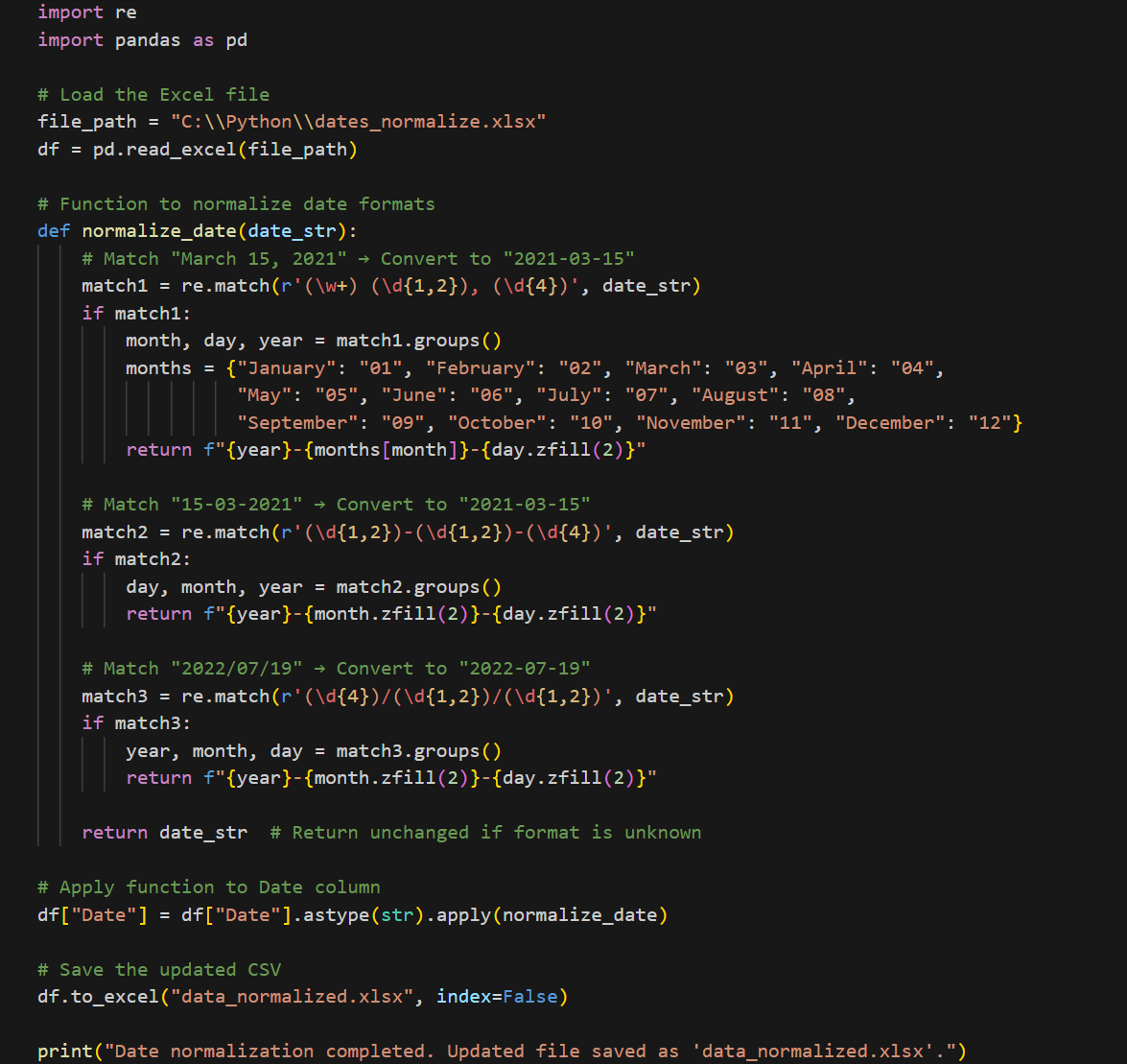
Python provides flexible ways to find and replace text in a variety of formats, including text files, multiple files, web scraping data, and structured files like CSV. The built-in replace() method, combined with regular expressions (re.sub()), allows for more complex and powerful text processing tasks, such as replacing specific patterns, handling multiple replacements at once, and interacting with users.
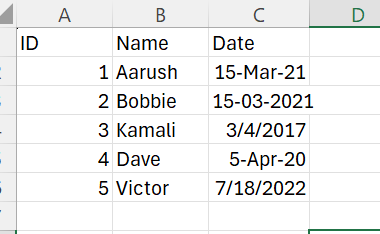
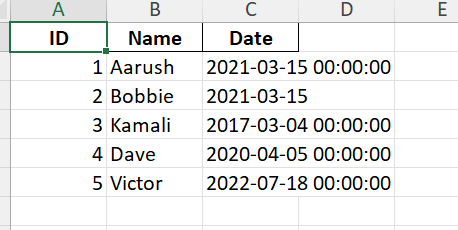
Code example demonstrating how to replace dates in Excel.
Input excel file contents:
Output File contents:
Conclusion
Regex is an incredibly efficient and versatile tool, and it is best used for:
- Extracting structured data from logs, reports, or web pages
- Cleaning and formatting text (e.g., converting date formats)
- Validating user input (e.g., email, phone number validation)
- Replacing text efficiently in large files.
But it is not ideal for Complex HTML parsing and handling nested structures.
Opinions expressed by DZone contributors are their own.